What are HR Hub culture surveys?
Most businesses have no structured way to ask staff how they actually feel about work. HR Hub culture surveys change that — giving you a built-in tool to run anonymous workplace surveys, measure results across custom dimensions, and track trends over time, all within RosterElf.
This article explains HR Hub culture surveys in RosterElf. You will learn how culture surveys work, what survey dimensions are and why they matter, when to use this feature for your business, and how to get set up. We also cover how staff complete surveys and how to read the results.
Culture surveys are available as part of the HR Hub module in RosterElf. Admins create the survey structure, run surveys for selected employees, and review results through reports and a dashboard widget. Staff complete surveys anonymously via the web app or smartphone app — no separate platform needed.
Custom dimensions
Build your own survey categories with tailored questions, or pick from a pre-built template library.
Anonymous surveys
Staff respond honestly knowing responses are anonymous. Surveys work on web and smartphone app.
Results and reporting
View completion rates, dimension scores, and staff responses through dashboard widgets and HR Hub reports.
How culture surveys work
Culture surveys in RosterElf follow a simple three-stage flow: build your survey structure, send it to staff, and analyse the results. Each stage happens inside HR Hub — there is no separate tool or external platform to manage.
Real scenario
A hospitality business notices higher-than-usual turnover and wants to understand whether the issue is leadership, communication, or workload. The HR manager creates three dimensions in RosterElf — Leadership, Team Communication, and Work-Life Balance — each with five questions. They send a survey to all front-of-house staff. Within a week they have anonymous responses from 80% of the team, filtered by dimension, showing that Work-Life Balance scores are significantly lower than the others. They act on it before the next departure.
Stage 1 — build your survey structure
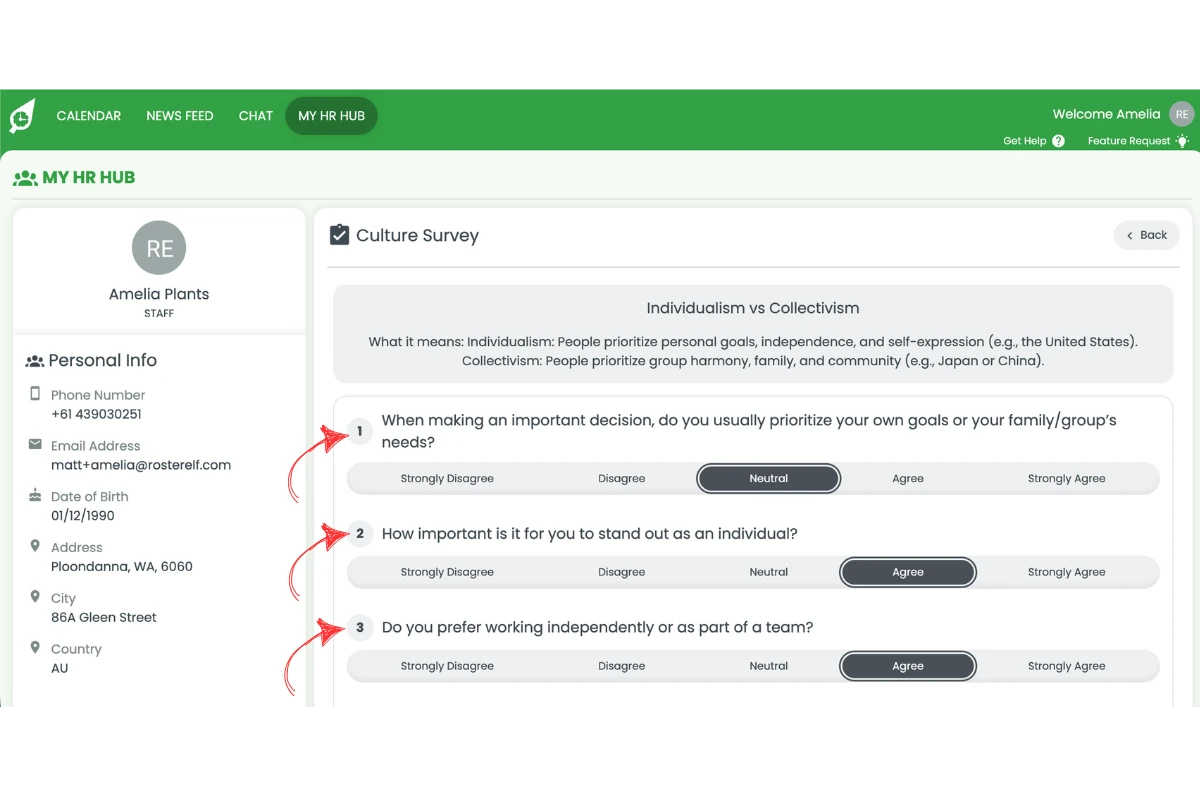
Before running a survey, you set up the dimensions and questions that will measure your workplace. Each dimension is a named category with its own set of questions. You can build dimensions from scratch or enable pre-built ones from the template library. Questions use a Likert scale (Strongly Disagree to Strongly Agree) and you mark whether a high score or low score represents a positive result.
Stage 2 — run a survey
When you are ready to collect feedback, press Run Culture Survey in HR Hub. You give the survey a title and due date, write an introduction for staff, select which employees to include, and choose which dimensions to measure. Staff receive a notification and can complete the survey anonymously via the web app or the RosterElf smartphone app.
Stage 3 — review the results
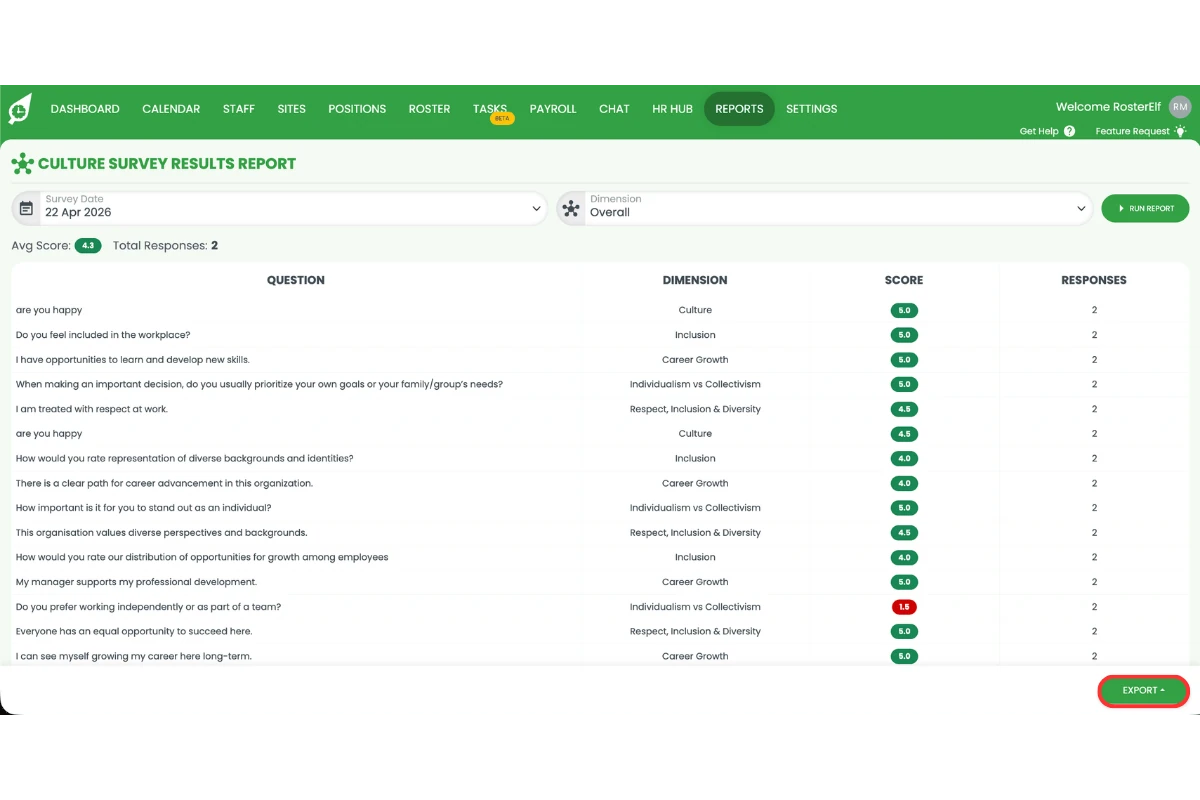
Once responses are in, you can track completion from the dashboard widget and analyse dimension-level scores through HR Hub reports. The completion report shows who has responded, and the results report breaks down scores by dimension so you can pinpoint exactly which areas of culture need attention.
Survey dimensions explained
Dimensions are the backbone of the culture survey system. Rather than sending a single list of unrelated questions, dimensions let you organise your survey into meaningful categories — each measuring a specific aspect of your workplace culture. This makes results far easier to interpret and act on.
For example, a business might create dimensions for Leadership, Team Communication, Inclusion and Belonging, and Career Growth. After the survey, they can compare scores across all four categories and see immediately where the business is strong and where it needs improvement — rather than wading through individual question responses.
Custom dimensions
Build dimensions from scratch with your own name, description, and questions. Set each question's polarity — whether a high score is a positive or negative result — so RosterElf can score the dimension correctly.
How to create a custom dimensionTemplate library
Browse RosterElf's pre-built dimension library for proven culture measurement frameworks. Enable a template in one click and edit the questions to suit your business if needed.
How to use the template libraryBest use cases
Culture surveys deliver the most value when used consistently and with a clear goal. Here are three situations where they make a measurable difference:
Understanding high turnover
If your business is experiencing staff exits above the industry average, a culture survey helps you identify whether the cause is leadership, workload, recognition, or team dynamics. Quantified dimension scores give you something concrete to act on rather than guessing. For industries with notoriously high churn — hospitality, retail, and aged care — regular culture surveys create an early warning system.
Tracking culture changes over time
Running surveys quarterly or after major changes — a new manager, a restructure, a policy shift — lets you measure whether the change had a positive or negative impact on how staff feel. Because surveys are run inside the same platform your team already uses, participation rates are higher and results arrive faster.
Giving staff a structured voice
Anonymous surveys create a safe space for honest feedback, particularly in workplaces where staff are reluctant to raise concerns directly. Staff can leave optional comments alongside their Likert scale responses, giving you qualitative context behind the scores. This is especially valuable for shift-based teams who rarely see management face-to-face.
How to set up culture surveys
Culture surveys are available inside HR Hub. You need HR Hub enabled on your account before you can access the feature. See how to manage and enable HR Hub access if you have not set this up yet.
1. Enable the culture module
Go to Settings → HR Hub and turn on the Culture Survey toggle. This makes the Culture section available inside HR Hub.
2. Create your dimensions
Open HR Hub → Culture and press the plus symbol to add a custom dimension, or press Library to browse and enable a pre-built template. Add questions, set the polarity for each question, and save. You
can create as many dimensions as your survey needs.
3. Run a survey
Press Run Culture Survey, give it a title and due date, write an introduction for your staff, select the employees to include, choose which dimensions to measure, and press Send Culture Survey. Staff
will be notified and can complete the survey from the web app or smartphone app.
4. Review the results
Add the Culture Results widget to your dashboard for a live overview, or go to Reports → HR Hub and run the Culture Survey Completion report to track submissions and the Culture Survey Results report
to analyse scores by dimension.