An honest Deputy review 2026:
Pricing, features, pros & cons

We spent 1 week hands-on testing Deputy across rostering, time tracking, and workforce management to evaluate how it performs for Australian businesses.

Written by
Steve Harris
Steve Harris
Workforce management specialist with 10+ years experience in Australian HR tech. Former operations manager in hospitality.

Edited by
Georgia Morgan
Georgia Morgan
Senior editor and compliance researcher. Background in employment law and Fair Work regulations.
Deputy review - quick summary
Last reviewed: September 2026. We keep this review current. In this update we refreshed Deputy's plan pricing (Lite, Core and Pro all dropped since our original review) and re-checked its ratings across Trustpilot, Capterra and the Xero App Store.

Overall Score
8.3/10
Key takeaways
- Strong rostering & scheduling – Deputy excels at shift management for medium-to-large teams
- Great mobile apps – One of the best mobile experiences in the category
- Pricing adds up quickly – Core plan is $8.75/user, but add-ons can push costs to about $22.00/user/month
- Not a full HR system – Good for scheduling, but limited HR and compliance tools
Score breakdown
Deputy pricing at a glance
| Plan | Price per user/month | What it covers |
|---|---|---|
| Lite | $6.75 | Rostering, timesheets, time clock, award interpretation, leave |
| Core | $8.75 | Adds auto-scheduling, demand forecasting, wage budgets |
| Pro | $13 | Adds SSO, location hierarchies, pay centres |
AUD, excluding tax, as published by Deputy and last checked 1 September 2026. A $30/month minimum applies per invoice, so very small teams pay more per head than the headline rate. Payroll ($5) and HR ($3.50) are paid add-ons, so a Core team needing both is about $17.25 per user/month. Full breakdown in Deputy pricing and plans below.
Who is Deputy?
We tested Deputy as a workforce management platform for scheduling staff, tracking time and attendance, managing timesheets, and feeding data into payroll systems. From our testing, its strongest areas are rostering, mobile usability, and time tracking — particularly for medium-to-large teams with structured shift patterns.
Where Deputy divides opinion is pricing and scope. We found costs can rise quickly as headcount grows, and while there's some HR functionality, it's not a full HR system. If you're expecting deep HR workflows, policy management, or end-to-end compliance tooling, you may need additional software.
Deputy review methodology
We spent 1 week hands-on testing Deputy — creating real accounts, building rosters, testing payroll exports, and evaluating Australian award compliance. This review is based on actual product use, not marketing claims.
- Built and tested real rosters using a live Deputy account
- Tested Xero and MYOB payroll integration workflows
- Analysed 1,300+ verified reviews from Trustpilot, Capterra & Xero App Store
This means you can trust our assessment is based on real-world experience with Deputy — not vendor-provided demos or marketing materials.
How we tested Deputy
We tested Deputy by creating a live account, building rosters, configuring award interpretation, and evaluating Xero integration. We also analysed verified reviews from the Xero App Store, Google, and Capterra.
25%
Compliance
Award interpretation, Fair Work
25%
Ease of use
Setup time, daily usability
20%
Value
Pricing, hidden costs
15%
Support
Response times, onboarding
15%
Integrations
Xero, MYOB, other tools
Our testing process
- • Created a live Deputy account and built rosters with sample staff data
- • Tested award interpretation accuracy for Hospitality, Retail, and SCHADS awards
- • Evaluated Xero integration by syncing timesheets and comparing payroll exports
- • Contacted Deputy support as a prospective customer to assess response times
- • Analysed 1,300+ verified user reviews from Xero App Store, Google, Trustpilot, and Capterra
Deputy user reviews
User ratings score: 8.2/10
Xero App Store ratings
Deputy is a certified Xero-connected app listed on the Xero App Store. We prioritise Xero App Store reviews in our analysis because they come from verified Xero users who have actually integrated Deputy with their accounting software — with no incentives offered for leaving reviews.
This matters because Xero is the leading accounting platform for Australian small businesses, so feedback from this community directly reflects the experience of the businesses most likely to use Deputy for rostering and payroll integration.

146 verified reviews on Xero App Store
What Xero users highlight
- Simplified rostering — drag-and-drop scheduling and award interpretation praised by managers
- Multi-site management — works well for businesses with multiple locations and large teams
- Staff self-service — employees can clock in, swap shifts, and view timesheets easily
Common concerns from Xero users
- Support responsiveness — some users report slow email-only support and unactioned feature requests
- Sync errors — occasional unmapped pay items or connection timeouts with Xero integration
- Pricing complexity — costs can add up with add-ons, and some features require higher tiers
Other Deputy reviews
Across review platforms, Deputy shows mixed ratings. While incentivised platforms (Capterra, G2) rate Deputy at 4.6/5, independent review sources tell a different story. Trustpilot Australia rates Deputy significantly lower at 3.9/5 based on verified customer reviews. Common complaints include pricing complexity, technical glitches, slow support response, and Australian award interpretation issues.
This review prioritizes independent, non-incentivised reviews while including incentivised platforms for transparency. Review sources are clearly labeled so you can assess credibility.
Deputy ratings on key platforms
| Review source | Deputy rating | Review type |
|---|---|---|
| Trustpilot AU | 3.9 / 5 (104 reviews) | ✓ Verified reviews |
| Xero App Store | 3.9 / 5 (147 reviews) | Verified purchases |
| Capterra | 4.6 / 5 (773 reviews) | Incentivised |
| G2 | 4.6 / 5 (495+ reviews) | Incentivised |
| Google Reviews | No public review page | N/A |
Common themes in user feedback
Xero App Store reviews show mixed feedback. Positive comments highlight feature depth, while concerns include:
- Xero integration issues
- Support delays
- Complex setup for payroll and awards
Real user experiences from trustpilot and capterra
To provide transparent insights, we've extracted verified user reviews from independent platforms. Below are direct quotes from Australian business owners and managers who have used Deputy:
What users like about Deputy
"The mobile app is fantastic. My staff can clock in and out from their phones, and I can approve timesheets on the go. Makes life so much easier."
— Sarah M., Retail Manager | Trustpilot AU, 4/5 stars, January 2026
"Deputy is very easy to use and navigate. The interface is intuitive, and training new managers on it doesn't take long."
— James T., Operations Coordinator | Capterra AU, 4/5 stars, December 2025
Pricing complaints
"Deputy is way too expensive for what it offers. We used it for 6 months and couldn't justify the cost anymore. The add-ons really stack up, and you need most of them to make it work properly."
— Restaurant Manager, QLD | Capterra AU, 2/5 stars, November 2025
"Price increases disguised as 'new features' that we didn't ask for. We're now paying 40% more than when we started, and the value hasn't increased to match."
— David L., Hospitality Business Owner | Trustpilot AU, 2/5 stars, October 2025
Technical issues
"We've had ongoing issues with glitches, especially around notifications and shift reminders. Sometimes staff don't get notified about their shifts until it's too late."
— Michael P., Café Owner | Capterra AU, 3/5 stars, December 2025
"The notification system is unreliable. We've had several instances where employees claimed they never received shift notifications, and checking the logs showed Deputy never sent them."
— Emma K., Retail Manager | Trustpilot AU, 2/5 stars, September 2025
Customer support concerns
"Support response times are terrible. We've waited days for responses on critical issues affecting payroll. When you're paying this much, you expect better."
— Alex R., Operations Manager | Capterra AU, 2/5 stars, November 2025
"We had multiple support tickets for the same issue, and they kept getting merged and closed without resolution. Felt like we were going in circles for weeks before someone actually fixed it."
— Restaurant Owner, VIC | Trustpilot AU, 3/5 stars, August 2025
Australian award compliance issues
"The biggest issue for us was Australian award interpretation. We're in healthcare (SCHADS Award), and Deputy's calculations kept coming out wrong. We had to manually check everything, which defeated the purpose of automation."
— Healthcare Manager, NSW | Capterra AU, 2/5 stars, October 2025
Our analysis: These real user reviews highlight a pattern we also observed. While Deputy's core functionality and mobile apps receive praise, Australian businesses consistently report issues with pricing transparency, technical reliability, support quality, and award interpretation accuracy. The gap between Trustpilot's 3.9/5 rating (verified reviews) and Capterra's 4.6/5 (incentivised reviews) suggests these concerns are more widespread than incentivised platforms indicate.
Pros & cons
| Pros | Cons |
|---|---|
| Strong ease-of-use feedback | Pricing frustration reported |
| Mobile app praised | Support experiences vary |
| Reliable core features | Integration issues mentioned |
★ Verdict
User sentiment is positive overall, with pricing and integration complexity being the most consistent sources of friction — matching our own testing experience. We also note that Deputy doesn't maintain a public Google Reviews presence, limiting transparency compared to some competitors.
Deputy scheduling software: rostering and shift planning
Rostering score: 9.0/10
Deputy functions as a comprehensive scheduling platform for small to large businesses, with tools designed to reduce administrative effort and improve shift coverage. We found its approach built around configurability and scale, offering flexibility for businesses with varying operational complexity.
For Australian businesses, Fair Work–compliant rostering is an important consideration. Deputy supports this through configurable templates, fatigue management rules, and alerting mechanisms rather than built-in award interpretation. This places more responsibility on managers to ensure settings are correctly configured for their specific award and agreement requirements, unlike platforms with built-in award interpretation engines.
In this section, we analyse the core elements that influence daily roster creation—views, shift detail, filtering, automation, budgeting, and overall scheduling performance.
Deputy: scheduling overview
Here we examine how Deputy handles day-to-day rostering, including layout, usability, roster views, shift detail, filtering options, automation tools, and labour cost visibility.
We found Deputy provides robust core scheduling functionality, with an emphasis on flexibility, forecasting, and support for larger or multi-location workforces.
Roster layout & first impressions
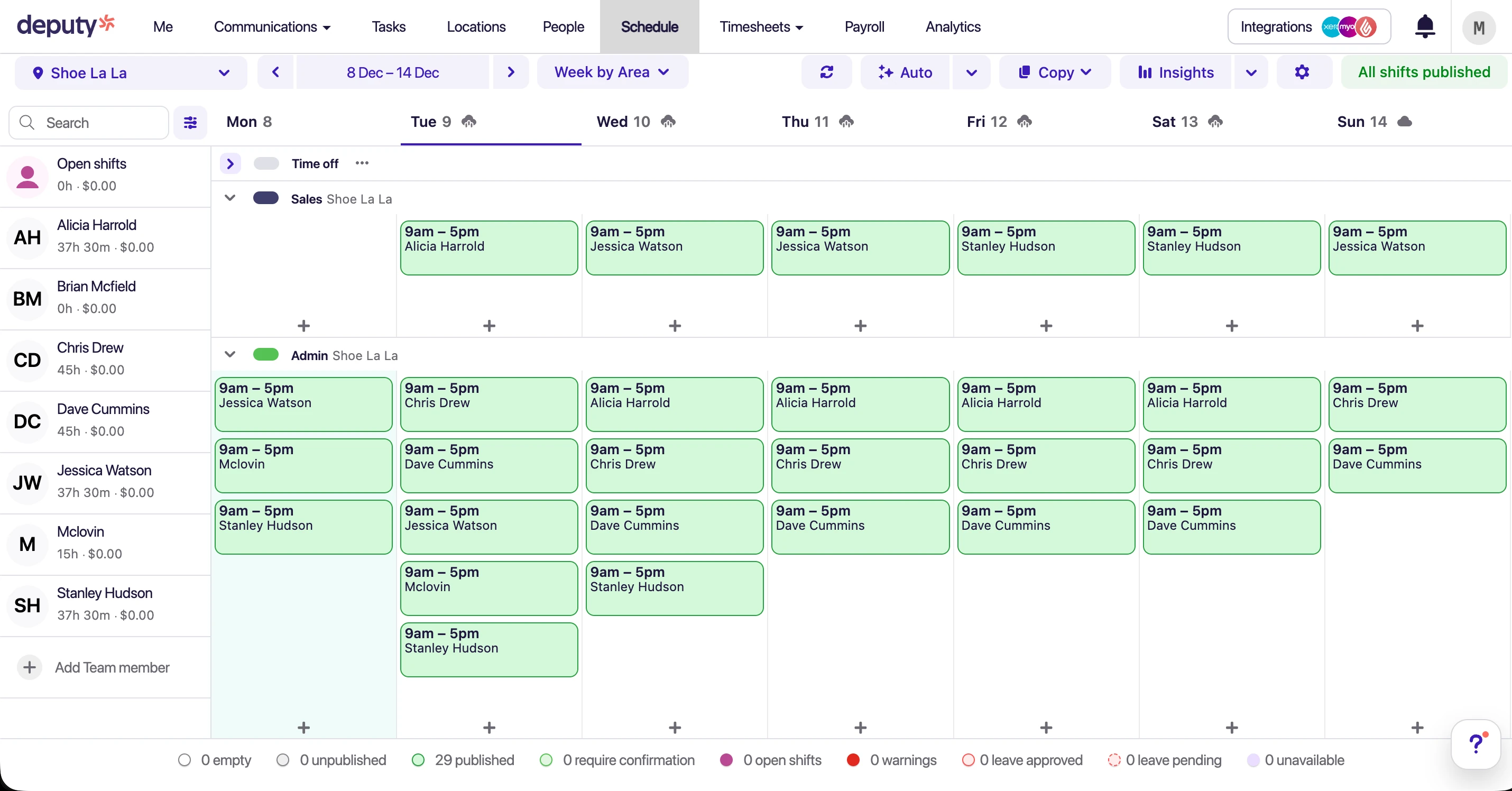
Deputy calls its roster a "Schedule" — a nod to its global positioning. The default view presents staff in a left-hand column with shifts in a central grid, while primary actions sit across the top.
We found the layout structured and consistent, though there is a clear separation between the staff list and the shift grid. By default, the staff panel shows weekly hours and cost summaries, with additional information accessible via secondary clicks. This keeps the interface clean but can require extra interaction to view deeper context.
Shift detail & information density
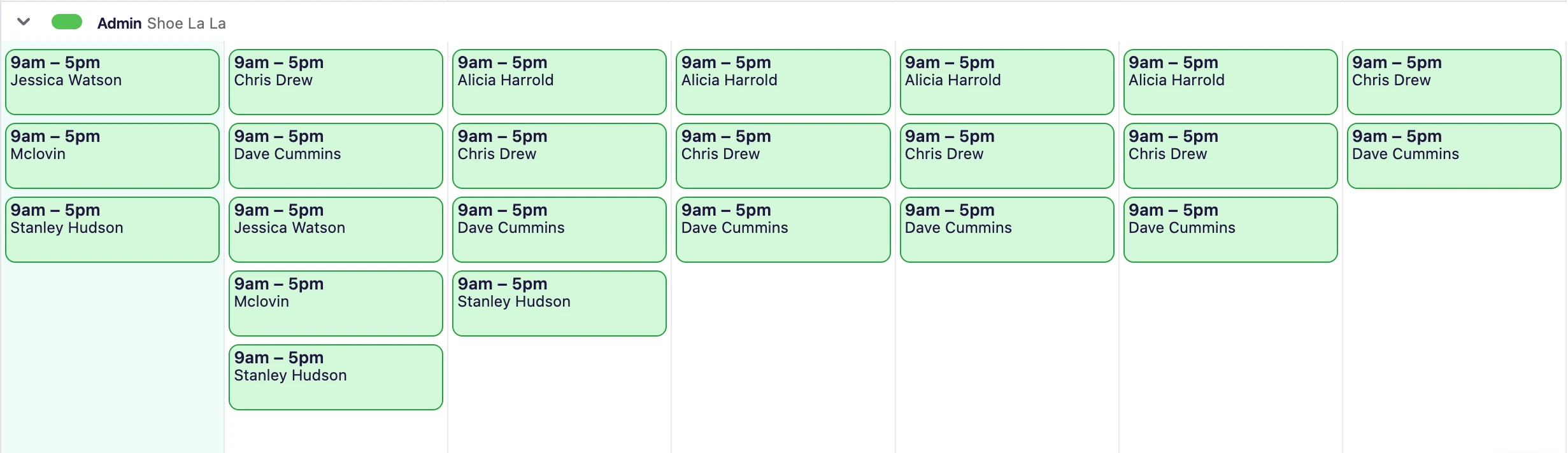
Deputy displays a relatively light level of information directly within the schedule grid, typically showing area or location details. We noticed break information, pay context, and compliance indicators are not visible on the main roster and instead require opening the shift modal.
While this reduces visual clutter, we found managers often need to click into shifts to confirm full details, particularly when checking breaks, compliance, or role-specific information.
Roster views & navigation
Deputy provides several scheduling views and navigation options, including:
- Daily, weekly, and two-week schedule views
- Staff, site, and area-based roster views
- Monthly view with days displayed horizontally
- Filters accessed via a dedicated sidebar
- Leave displayed in a separate "On Leave" section rather than inline
The filtering system is functional but more segmented, requiring navigation away from the main roster grid to refine views. We found this can slow scenario-based adjustments when managers need to quickly isolate specific roles, areas, or conditions.
Adding, editing & repeating shifts
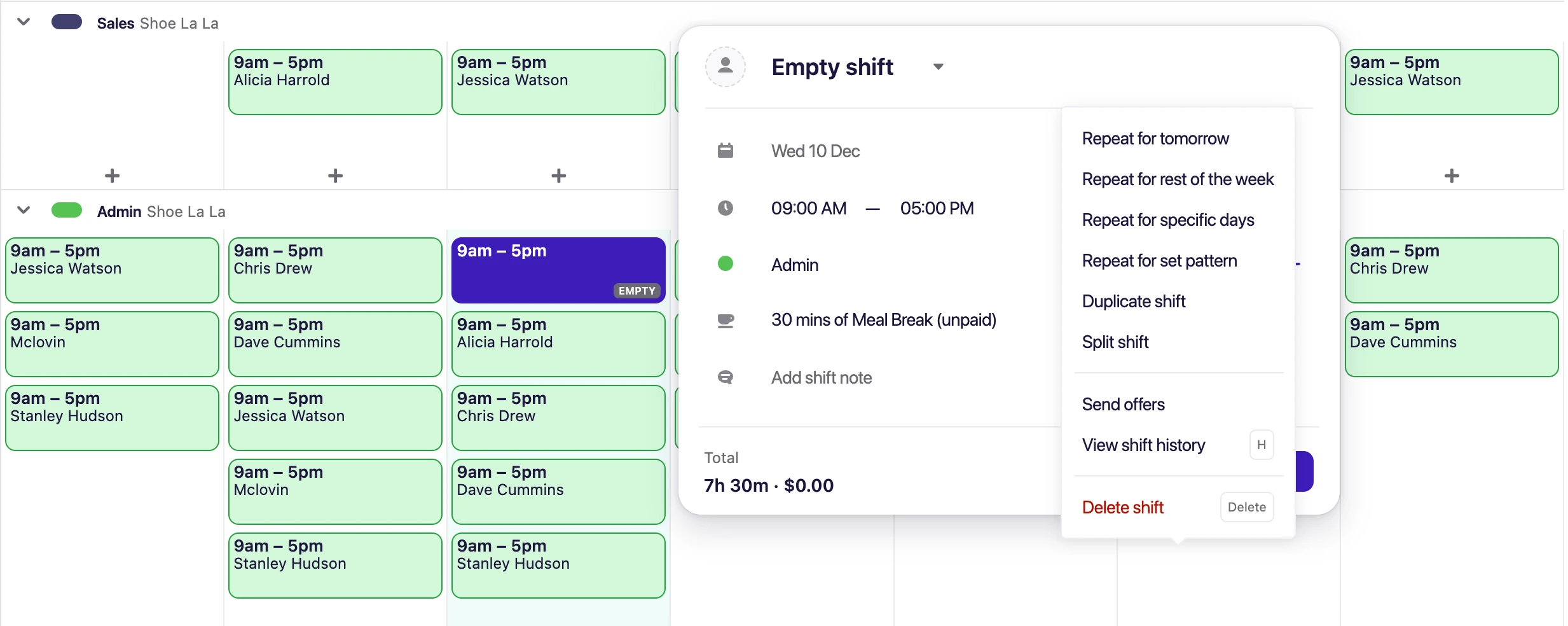
Shift creation in Deputy is handled through a modal interface. The workflow includes multiple steps, such as confirming whether a shift is open, open with approval, or assigned. We found employee selection within the modal is not fully searchable or dynamically filtered, which can slow down scheduling for larger teams.
Positions are tied to locations, meaning multi-site businesses may need to duplicate roles across locations. On the positive side, we found Deputy offers flexible repeat patterns, allowing shifts to be scheduled weeks in advance with detailed recurrence rules.
Deputy: scheduling automation
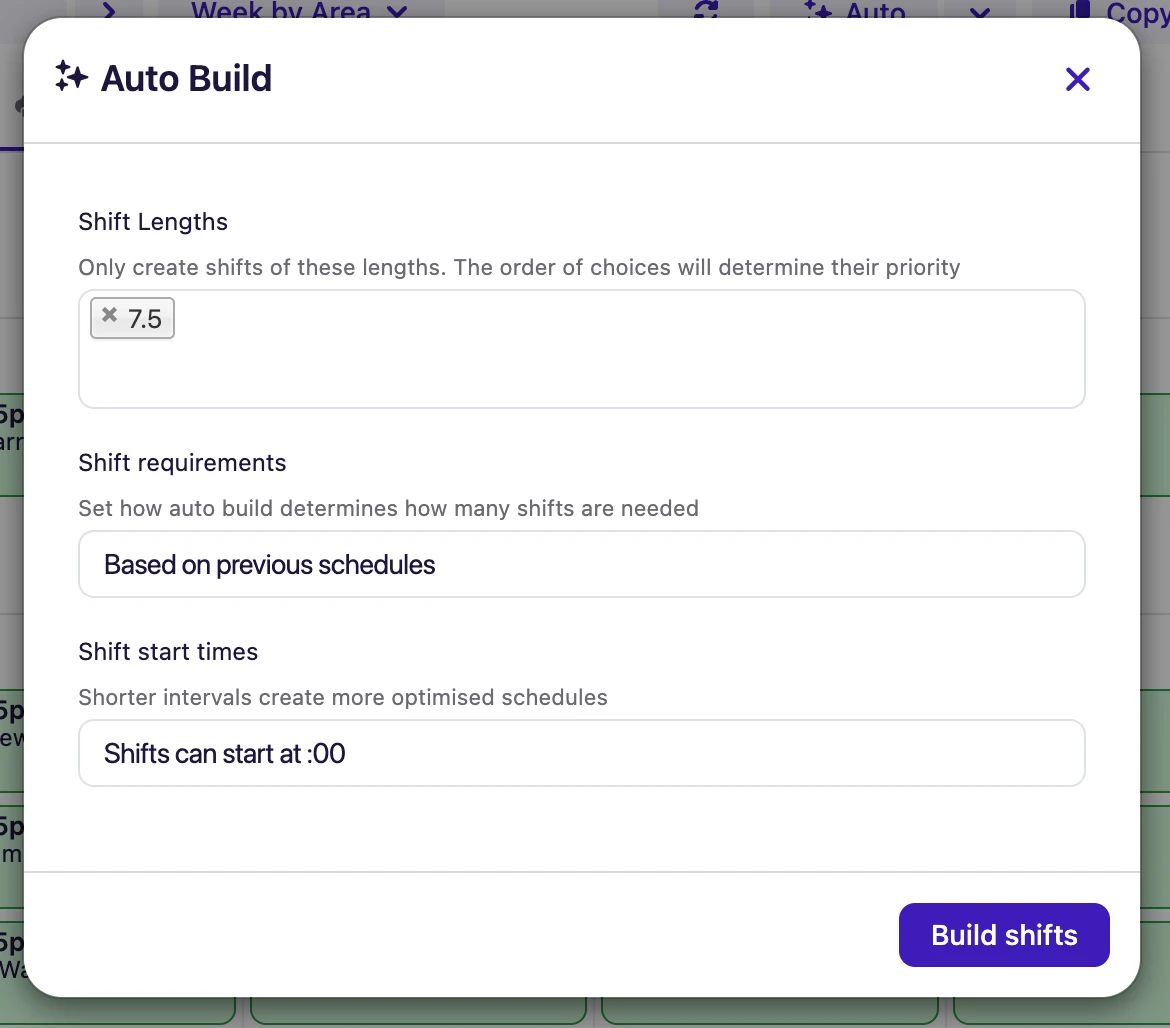
Deputy includes AI-assisted Auto-Scheduling, which can generate schedules based on historical patterns, predefined structures, or by filling unassigned shifts. It also supports demand-based scheduling using sales or foot-traffic forecasts. Learn more about Deputy's Auto-Scheduling feature.
While powerful, we found the automation tools provide limited in-flow guidance, and adoption may require prior training—particularly for users on lower-tier plans with restricted support access. In our view, the feature set is best suited to businesses with stable data inputs and well-defined scheduling rules. For comparison, see our guide on designing roster templates.
Deputy: labour cost comparison & forecasting
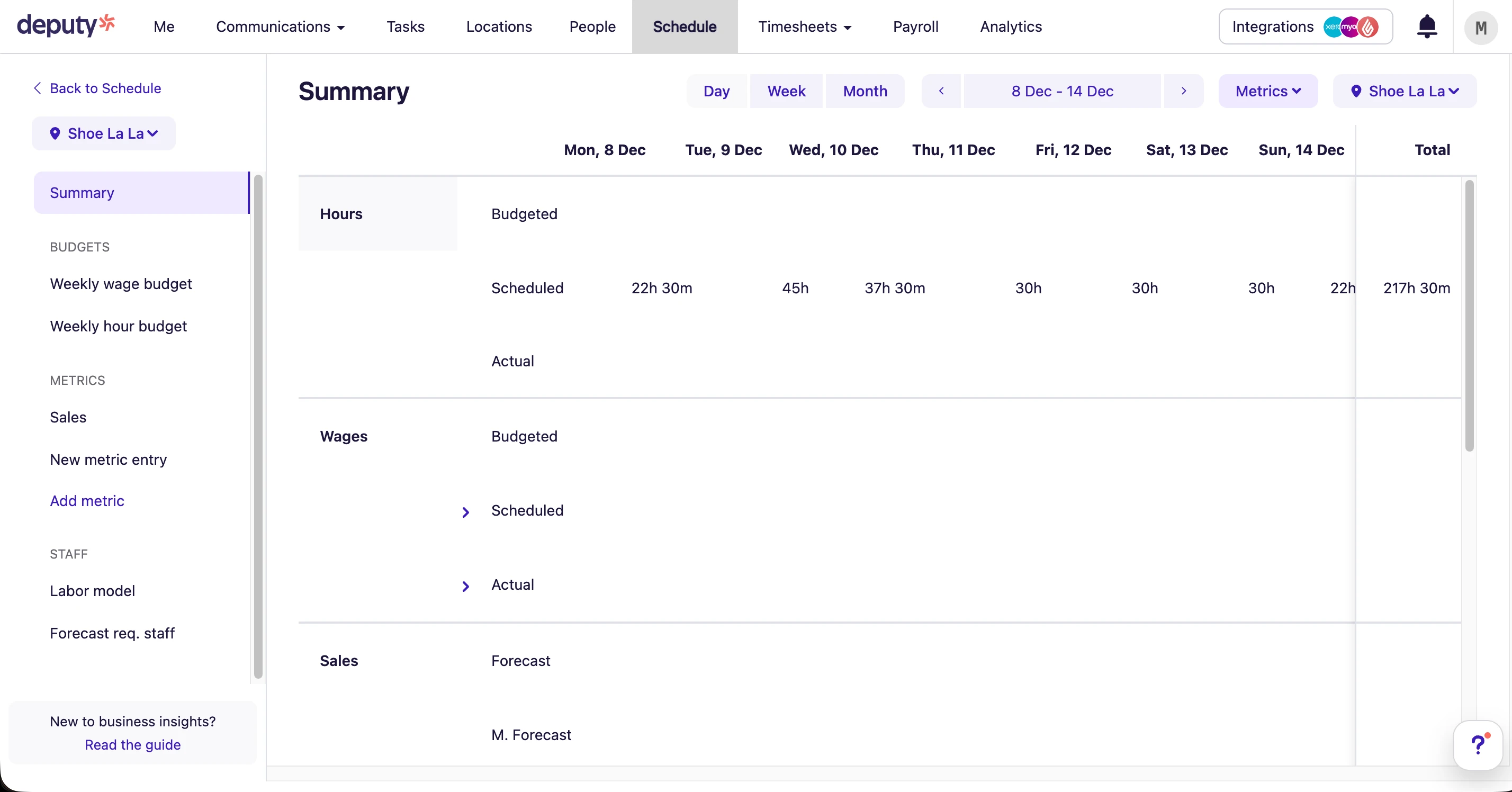
Labour budgeting and forecasting in Deputy is handled through the Insights module rather than directly within the schedule. We found this separation means managers cannot see real-time cost impacts as shifts are built. For more on labour cost management, visit our guide on workforce analytics.
Insights offers advanced tools such as labour forecasting, sales-linked staffing models, and required coverage projections. However, we noticed the interface provides limited contextual guidance, and users may need time to interpret and configure the data effectively.
Publishing, loading & performance
Publishing schedules in Deputy involves multiple steps across different screens. During our testing, we noticed loading times when applying templates or confirming publication, particularly on larger schedules or multi-location rosters.
While the workflow is structured and controlled, we found it can feel slower compared to more direct, in-roster publishing experiences.
Pros & cons
| Pros | Cons |
|---|---|
| Powerful scheduling engine – Handles complex rosters, rotating shifts, split shifts, and variable demand patterns with ease. | Setup takes time – Initial configuration can be time-consuming, especially for multi-site or rules-heavy environments. |
| Multi-location support – Strong visibility across teams, departments, and locations from a central schedule view. | Learning curve – Managers often require training to confidently use advanced scheduling and forecasting features. |
| Flexible shift rules – Supports configurable templates, fatigue rules, and scheduling logic tailored to operational needs. | Overkill for small teams – Smaller businesses with simple rosters may find the feature set more complex than necessary. |
| Good rostering visibility – Clear layouts and reporting improve oversight of coverage, hours, and labour distribution. | Needs ongoing management – Rules, templates, and forecasts require regular maintenance to remain accurate and effective. |
★ Verdict
We found Deputy offers powerful core rostering functionality, particularly for forecast-driven scheduling, shift swapping, and multi-location operations. However, this depth can feel overly complex for many businesses, with a user interface that may be confusing without training or ongoing configuration. In our view, larger or more operationally complex teams will benefit most, but businesses with simpler rostering needs may find it more than they require.
Deputy time and attendance
Time tracking score: 8.5/10
We tested Deputy's Time & Attendance system across multiple scenarios. It's designed for businesses operating across multiple locations and shift patterns, with tools that focus on capturing accurate clock-ins, enforcing location rules, and managing approvals at scale.
Below, we cover the core elements that impact daily attendance accuracy — clock-in methods, GPS enforcement, kiosk controls, tolerances, and the overall manager experience.
Strengths
- Multiple clock-in methods
- Reliable time capture
- Suitable for on-site and remote teams
Limitations
- Edits can increase admin workload
- Requires consistent staff training
- Setup needed to avoid errors
Pros & cons
| Pros | Cons |
|---|---|
| Accurate time tracking | Admin oversight required |
| Flexible clock-in options | Edits can add workload |
| GPS and kiosk support | Not fully automated |
| Scales well | Policy setup essential |
★ Verdict
We found Deputy provides reliable time tracking, but accuracy still depends on clear rules and consistent management.
Deputy timesheets and payroll
Payroll score: 8.1/10
We tested Deputy as a payroll feeder rather than a full payroll solution. Its real value is in getting timesheets reviewed, approved, and exported accurately to systems like Xero and MYOB.
For businesses with straightforward pay rules, this works well. For more complex Australian award structures, we found manual review is often still required. Learn more about calculating payroll from timesheets.
Strengths
- Clean payroll exports
- Structured approval workflows
- Strong integrations
Limitations
- Limited award interpretation depth
- Not a payroll replacement
- Manual checks often required
Pros & cons
| Pros | Cons |
|---|---|
| Reliable timesheet exports | No full payroll engine |
| Good payroll integrations | Manual review needed |
| Approval workflows | Compliance checks external |
| Reduces payroll errors | Not fully automated |
★ Verdict
In our assessment, Deputy works best as a payroll data feeder rather than a complete payroll or compliance solution.
Deputy communication tools
Communication score: 7.4/10
We found Deputy's communication tools — shift notifications, announcements, and in-app messaging — practical for keeping staff informed about roster changes and upcoming shifts.
That said, it's not designed to replace dedicated team communication platforms. For businesses prioritizing team engagement, explore our guide on managing shift swaps and staff communication.
Pros & cons
| Pros | Cons |
|---|---|
| Centralised shift notifications | Limited engagement tools |
| Reduces missed shifts | Not a chat-first platform |
| Easy staff access | Basic messaging only |
★ Verdict
We found Deputy's communication tools practical for operations but not designed for deeper team engagement.
Deputy mobile apps
Mobile apps score: 9.1/10
Deputy's mobile apps are widely regarded as one of its strongest features. Employees can view rosters, clock in and out, apply for leave, and receive notifications with minimal friction.
Managers can approve timesheets, manage shifts, and handle changes on the go, although some admin tasks remain easier on desktop. Learn more about tracking employee hours effectively.
Pros & cons
| Pros | Cons |
|---|---|
| Excellent mobile UX | Desktop still needed for admin |
| Easy staff adoption | Some menus not intuitive |
| Reliable performance | Limited offline use |
| Strong notifications |
★ Verdict
In our view, Deputy's mobile experience is a standout feature and a major reason for its popularity among frontline teams.
Deputy HR software: what the HR add-on includes
HR tools score: 7.0/10
We found Deputy's HR module covers the basics — employee profiles, document storage, and onboarding workflows — but it's clearly secondary to the platform's scheduling focus.
Deputy HR is a paid add-on rather than part of a base plan, listed at $3.50/user/month on top of Lite, Core or Pro. That matters when you compare it against an all-in HR platform: the headline plan price is not what an HR buyer ends up paying. Deputy also applies a minimum monthly spend per invoice, so very small teams pay more per head than the per-user rate suggests — the pricing section below works through the totals.
In our view, Deputy is primarily a workforce management tool rather than a full HR system. If you need the deepest HR feature set, consider reviewing Employment Hero. If your staff work shifts and you want core HR alongside rostering rather than instead of it, that is the gap RosterElf's HR Hub is built for — the comparison below sets out which modules each platform actually ships.
Pros & cons
| Pros | Cons |
|---|---|
| Covers HR basics | Not a full HRIS |
| Integrated with scheduling | Limited policy management |
| Centralised employee records | Minimal compliance tooling |
★ Verdict
We found Deputy's HR tools functional but secondary — suitable as a supplement, not a replacement for full HR software.
Deputy vs RosterElf: HR modules compared
Two rostering-first platforms, so the question is how much HR each one ships alongside the roster.
| HR capability | Deputy | RosterElf |
|---|---|---|
| Employee records & documents | Yes | Yes — digital HR records |
| Onboarding | Onboarding to the platform | Yes — employee onboarding |
| Offboarding | Not a distinct module | Yes — offboarding |
| Employment contracts | Not a distinct module | Yes — digital contracts |
| Policies & acknowledgements | Document storage | Yes — policy management |
| Licences & certifications | Not a distinct module | Yes — with expiry alerts |
| Leave management | Yes | Yes — on every plan, including Core |
| Employee training | Not a distinct module | Yes — employee training |
| Culture & engagement surveys | Not a distinct module | Yes — culture surveys |
| Modern award interpretation | Supported, manual configuration | Automatic — built-in award interpretation |
| Rostering & scheduling | Yes — core strength | Yes — on every plan |
| Payroll | Integration, not native | Integration, not native — Xero, MYOB and others |
| Hiring / applicant tracking | Not a distinct module | Early access |
| Performance reviews | Not a distinct module | Early access |
Deputy analytics and reporting
Reporting score: 7.8/10
Deputy provides operational reporting focused on labour costs, hours worked, and roster performance. We found these reports help managers track staffing efficiency and costs but are not deeply customisable.
Pros & cons
| Pros | Cons |
|---|---|
| Useful labour insights | Limited custom reports |
| Good for managers | Not finance-grade analytics |
| Export options |
★ Verdict
We found Deputy's reporting supports day-to-day operations well but may fall short for advanced analytics needs.
Deputy pricing and plans
Pricing score: 7.0/10
Deputy uses a modular, per-user pricing model, meaning businesses pay per employee per month, with different feature bundles depending on the plan selected. We found this structure gives organisations flexibility to pick and choose functionality, but it also introduces complexity — particularly for small and mid-sized teams trying to forecast their true monthly costs.
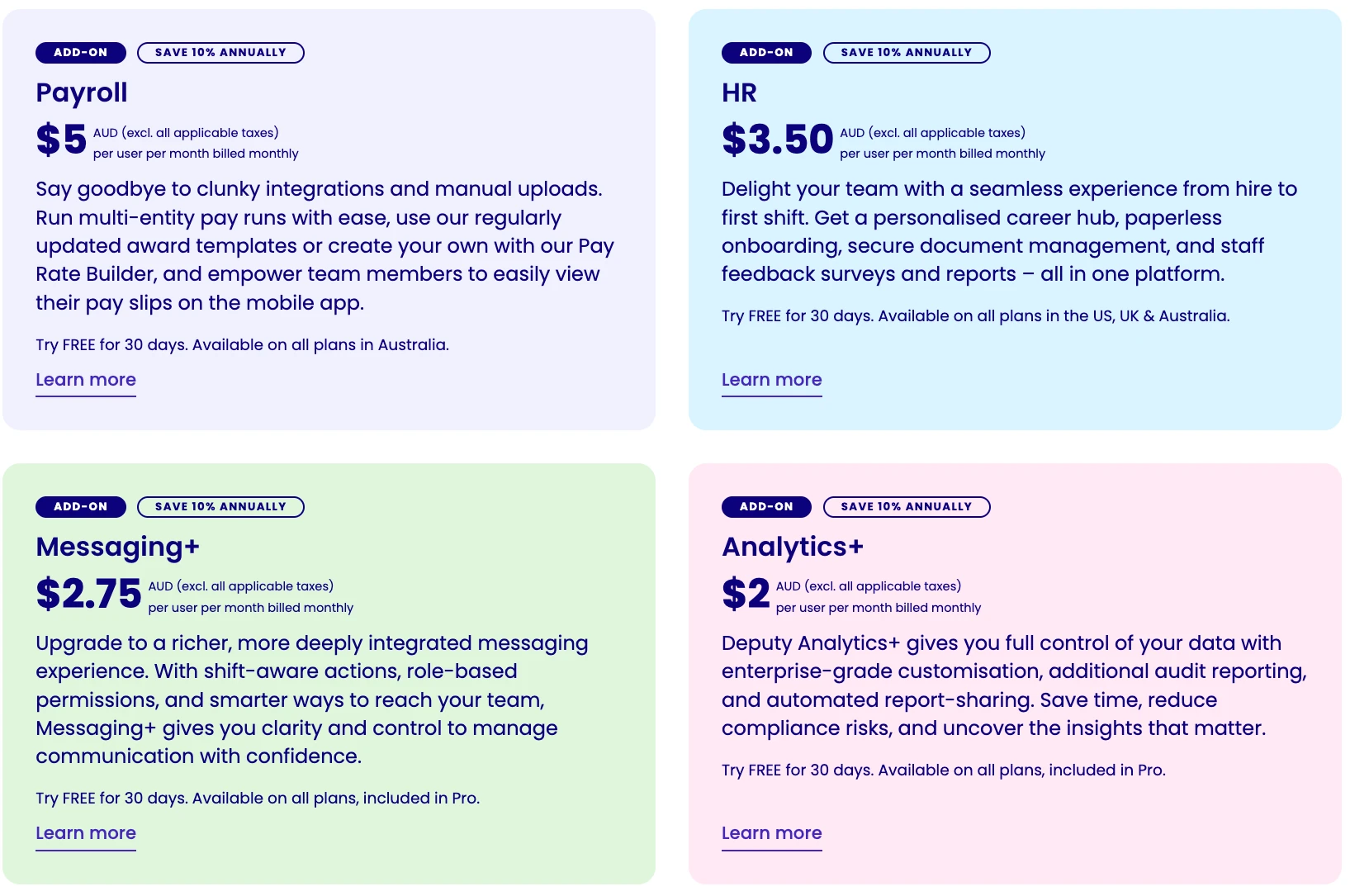
Deputy now offers three tiers — Lite ($6.75), Core ($8.75) and Pro ($13) AUD per user per month — having lowered prices across all three since our original review. The popular Core plan sits at $8.75 per user per month. However, many features that businesses commonly expect to be included in an all-in-one workforce platform are sold as separate add-ons. These include:
- HR module – approximately $3.50 per user/month
- Messaging+ – approximately $2.75 per user/month
- Analytics+ – approximately $2.00 per user/month
- In-built payroll – approximately $5.00 per user/month
When these commonly required add-ons are combined with the Core plan, the total monthly cost rises to around $22.00 AUD per user per month (and a $30/month minimum spend applies). This means the headline price can significantly understate the real cost for businesses that need a more complete workforce management solution.
On annual billing, the pricing pattern remains largely the same. While per-user rates are discounted slightly, the combined Core plan plus key add-ons still totals approximately $20.68 AUD per user per month, once equivalent functionality is included.
Overall, Deputy separates more functionality into individual modules than many competitors. This modular structure can work well for larger or more complex organisations that want to selectively enable advanced features such as detailed labour forecasting, compliance tools, or enterprise-level analytics. However, for smaller teams or growing businesses, this approach can make budgeting more difficult and lead to higher-than-expected costs as additional modules and users are added over time. Compare this with Connecteam for an alternative pricing model.
How Deputy prices its plans
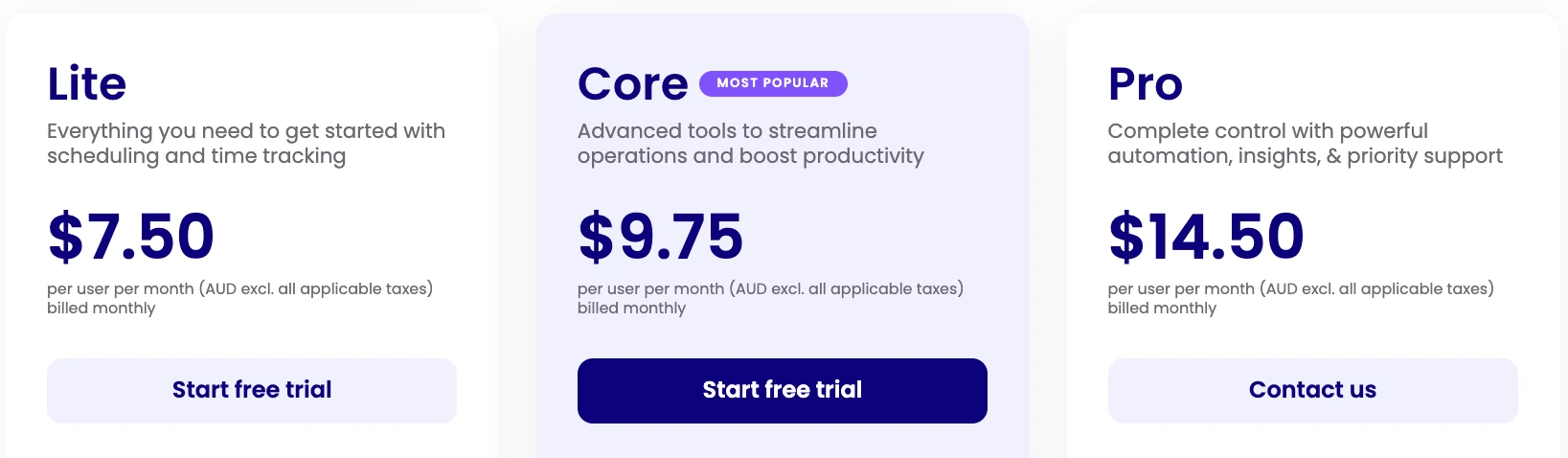
Deputy pricing comparison (monthly vs annual)
| Feature | Deputy – Monthly (AUD) | Deputy – Annual (AUD) |
|---|---|---|
| Core plan | $8.75 | $8.75 |
| HR | $3.50 (add-on) | $3.15 (add-on) |
| Messaging | $2.75 (add-on) | $2.48 (add-on) |
| Analytics+ | $2.00 (add-on) | $1.80 (add-on) |
| In-built payroll | $5.00 (add-on) | $4.50 (add-on) |
| TOTAL (per user / month) | $22.00 | $20.68 |
Deputy pricing by team size
To understand the real cost of Deputy, here are common scenarios showing Core plan plus frequently needed add-ons across different team sizes. These examples assume monthly billing.
| Team Size | Core Plan | + Payroll | + HR | + Messaging+ | Monthly Total |
|---|---|---|---|---|---|
| 10 staff | $87.50 | $50 | $35 | $27.50 | $200 |
| 25 staff | $218.75 | $125 | $87.50 | $68.75 | $500 |
| 50 staff | $437.50 | $250 | $175 | $137.50 | $1,000 |
| 100 staff | $875 | $500 | $350 | $275 | $2,000 |
Calculate your Deputy cost
Use this calculator to estimate your monthly Deputy cost based on your team size and the features you need. Pricing shown is for monthly billing.
Most businesses choose Core for full scheduling features
Note: RosterElf Full Suite includes rostering, time tracking, award interpretation, payroll integration, HR, leave management, and team communication for $6.75-$10/user/month with no add-ons. Compare features side-by-side or view RosterElf pricing.
What works well
Deputy's modular pricing structure can scale logically for larger organisations, particularly those with 50+ employees or multiple locations. These businesses often value the ability to pay only for the specific features they actually use, rather than being locked into an all-inclusive plan that includes unnecessary tools.
For organisations where scheduling, time & attendance, and labour forecasting are mission-critical, Deputy's approach allows teams to invest more heavily in advanced functionality while keeping less essential modules turned off. This can be especially appealing to businesses with dedicated operations, payroll, or HR teams who already use specialist systems and simply want Deputy to slot into an existing tech stack.
In short, Deputy's pricing model tends to suit complex workforce environments where customisation, forecasting, and enterprise-grade controls matter more than simplicity.
Where it falls short
For smaller teams and growing businesses, Deputy's pricing can feel fragmented and harder to predict. While the headline Core price appears competitive, many businesses quickly discover they need to add multiple paid modules to achieve a complete day-to-day workflow — such as HR records, messaging, analytics, or payroll functionality.
Because these features are priced separately, true costs are not always obvious upfront, particularly for owners comparing platforms quickly or budgeting month to month. As staff numbers increase or operational needs evolve, costs can climb incrementally, sometimes without a clear line of sight into how much the platform will cost at scale.
For time-poor small business owners who want a simple, all-in-one system with predictable pricing, this modular approach can create friction — requiring more decision-making, more configuration, and closer cost management just to achieve what feels like a "standard" setup. Compare this to all-inclusive rostering solutions.
Pros & cons
| Pros | Cons |
|---|---|
| Flexible modular pricing | Hard to predict total cost |
| Scales well for large teams | Not always SME-friendly |
| Pay only for what you use | Add-ons increase spend |
| Suitable for enterprises | Minimum charges reported |
★ Verdict
We found Deputy's pricing works well at scale but can be frustrating for smaller businesses seeking simple, predictable costs. For most businesses, combining multiple add-ons can quickly increase the monthly spend, and alternative platforms often deliver similar functionality at lower price points.
Deputy use cases: who is it best for?
Use cases score: 8.4/10
Based on our testing, Deputy performs best in environments with structured shifts, rotating staff, and multiple locations.
Best suited for:
- Hospitality venues
- Retail chains
- Healthcare & services
- 20+ employee teams
Less suited for:
- Very small businesses
- Fixed-schedule teams
- Budget-conscious startups
Pros & cons
| Pros | Cons |
|---|---|
| Excellent for complex teams | Overkill for micro-businesses |
| Scales well | Costly for small teams |
| Strong operational control | Requires setup effort |
★ Verdict
In our assessment, Deputy shines in structured, multi-role environments but may be unnecessary for simpler operations.
Deputy security and privacy
Security score: 8.6/10
Deputy includes role-based permissions, access controls, and security features appropriate for medium-to-large organisations. We found its security posture meets standard business expectations, though it's not heavily marketed.
Security features
| Feature | Deputy |
|---|---|
| Data encryption (at rest + in transit) | Yes |
| Role-based access controls | Yes |
| Two-factor authentication (2FA) | Yes |
| SSO (Single Sign-On) | Yes (Enterprise) |
| GDPR compliant | Yes |
| Australian data hosting | Yes |
| SOC 2 Type II certified | Yes |
| Audit logs | Yes |
Deputy holds SOC 2 Type II certification — a third-party attestation of security controls that is particularly valuable for enterprises and organisations with compliance mandates. Learn more about Deputy's security certifications. SSO is available on Enterprise plans for centralised identity management.
Pros & cons
| Pros | Cons |
|---|---|
| SOC 2 Type II certified | SSO only on Enterprise |
| Strong access controls | PII encryption not explicitly documented |
| Australian data hosting |
★ Verdict
We found Deputy offers enterprise-grade security with SOC 2 certification, making it suitable for organisations with strict compliance requirements. For most SMEs, the security posture is more than adequate.
Deputy customer support
Support score: 7.4/10
Deputy's support experience varies widely depending on the plan you're on. We found Premium plan users get access to phone support and faster response times, while Starter and lower-tier plans are limited to email and in-app chat — often with slower turnarounds.
User feedback on support is mixed. Some customers praise the knowledgeable team and helpful documentation, while others report frustration with delays and difficulty reaching a human, especially during peak periods. For businesses that need quick, hands-on assistance during payroll or rostering crises, we'd note this inconsistency can be a real pain point.
Support channels by plan
| Plan | Support channels |
|---|---|
| Starter | Email, in-app chat, help centre |
| Premium | Email, in-app chat, phone support, priority response |
| Enterprise | Dedicated account manager, phone, email, priority SLA |
Pros & cons
| Pros | Cons |
|---|---|
| Comprehensive help centre | Phone support only on Premium+ |
| Knowledgeable team when reached | Inconsistent response times |
| Enterprise gets dedicated support | Lower-tier plans can feel neglected |
★ Verdict
We found Deputy's support solid if you're on a higher-tier plan, but businesses on Starter may find themselves waiting longer or relying heavily on self-service resources. For Australian SMBs who value fast, personal support, this is worth factoring into your decision.
Deputy review: final verdict
Deputy is a capable, feature-rich workforce management platform that excels in rostering, time tracking, and mobile access. Based on our testing, it's particularly well-suited to larger teams and multi-location businesses that need scalable scheduling tools and are comfortable navigating a more complex pricing model.
That said, we found Deputy isn't without trade-offs. The per-user pricing can escalate quickly, especially once you add Premium features or need integrations. Australian award interpretation — while available — requires manual setup and ongoing maintenance. And customer support experiences vary depending on your plan level.
Deputy is best suited to:
- Hospitality, retail, and service businesses
- Teams with 20+ employees
- Multi-location operations
- Businesses that value mobile access and scheduling flexibility
Deputy may be less suitable for:
- Very small teams
- Cost-sensitive SMEs
- Businesses wanting an all-in-one HR platform
Deputy pros and cons
| Pros | Cons |
|---|---|
| Excellent rostering & scheduling | Pricing can be complex |
| Strong mobile apps | Costs increase quickly with scale |
| Reliable time & attendance | HR tools are relatively light |
| Scales well for larger teams | Admin setup required |
★ Overall verdict
Deputy is a mature, well-built workforce management platform that excels at scheduling and time tracking, but it's best approached with a clear understanding of pricing and feature scope.
 4.8+ stars
 See what RosterElf customers say
Verified reviews from 30,000+ Australian workplaces on Google, Xero App Store and G2.
Read customer reviewsLooking for a Deputy alternative?
Step-by-step guide to switching from Deputy, plus what to look for in a replacement.
Read switching guideDeputy vs RosterElf, capability by capability
Assessed on 43 capabilities across 7 areas. RosterElf is a rostering-first Australian product; Deputy is included here because the two are frequently shortlisted together.
| Capability area | RosterElf | Deputy |
|---|---|---|
| Rostering & scheduling | 8/8 | 8/8 |
| Time & attendance | 7/7 | 7/7 |
| Payroll & award interpretation | 7/7 | 7/7 |
| Team communication | 5/5 | 4/5 |
| Mobile apps | 4/5 | 5/5 |
| HR & compliance | 6/6 | 1/6 |
| Reporting & analytics | 5/5 | 5/5 |
In RosterElf, not Deputy
- Read receipts— Team communication
- Digital contracts— HR & compliance
- Policy acknowledgements— HR & compliance
- Certificate tracking— HR & compliance
- Compliance reminders— HR & compliance
- Document storage— HR & compliance
In Deputy, not RosterElf
- Offline clock-in— Mobile apps
Assessments are maintained in a shared data layer and applied identically across every review and comparison on this site. Feature sets change — check each vendor's own documentation before deciding.
Our review methodology
Learn how we evaluate workforce management platforms through hands-on testing and verified user feedback.
Feature comparisons are checked against each vendor's public documentation at the time of writing. Assessments of usability, fit and value are our reviewers' opinions, not statements of fact, and products change often. We'd encourage you to trial both platforms and judge for yourself. Spotted something out of date? Tell us and we'll correct it .
Real support from people who understand your business
At RosterElf, support isn't a ticket system — it's part of the product. Our Australian-based team helps you set up correctly, understand award rules, and stay compliant as your business changes. No scripts. No offshore handoffs. Just real help when you need it.
-
Guided setup and onboarding
-
Award and payroll questions answered
-
Ongoing help as your team grows

Deputy FAQ
- Deputy's Core plan is $8.75 AUD per user per month (Lite is $6.75 and Pro is $13). However, most Australian businesses need additional features like Payroll ($5.00), HR ($3.50), Messaging+ ($2.75), and Analytics+ ($2.00). With Core + Payroll + HR, the typical total is about $17.25/user/month. For full-featured access, Pro + Payroll + HR runs about $21.50/user/month (Pro already includes Messaging+ and Analytics+), and a $30/month minimum spend applies. Visit our full Deputy vs RosterElf comparison for detailed pricing breakdowns.
- Deputy uses a modular pricing model where many commonly needed features are sold as separate add-ons. While not technically "hidden", features like HR tools, advanced messaging, analytics, and built-in payroll all cost extra on top of the base Core plan. This means the headline price can significantly understate the true monthly cost. Check the RosterElf pricing page for transparent all-in-one pricing.
- No. Deputy has a free trial but no permanently free plan — every tier is paid per user per month, and a $30 AUD minimum monthly spend applies to monthly Lite, Core and Pro plans. If a genuinely free tier is what you need, Connecteam offers one for up to 10 users, though without Australian award interpretation. Checked against Deputy's Australian pricing page on 25 August 2026.
- The app is included — there is no separate charge for it. Deputy is priced per user per month for the platform, and staff use the mobile app at no extra cost on any plan. What does add cost is the module set: Payroll, HR, Messaging+ and Analytics+ are each priced on top of your base plan.
- Yes, Deputy offers a free trial so businesses can test the platform before committing. However, some advanced features may require upgrading to paid plans during or after the trial period. Be sure to test all the features you need, including add-ons, to understand your total monthly cost.
- It depends on which features you need. Deputy's Core plan looks competitive at $8.75 per user per month, but once you add commonly required modules (Payroll, HR, messaging, analytics), typical costs run about $17.25-$22.00 per user per month. RosterElf offers all-in-one pricing with award interpretation, rostering, time tracking, payroll integration, HR, and team communication built-in. See our detailed comparison for side-by-side pricing.
- Most Australian businesses need more than the base Core plan. To get full workforce management functionality, you typically need the Core plan plus add-ons for HR, messaging, analytics, and payroll integration. This modular approach works well for large enterprises but can be complex and costly for small to medium businesses. Consider whether you need a simpler all-in-one solution like RosterElf.