
Aged care rostering & staff scheduling software for Australian providers

Schedule carers across shifts and sites, get the allowances right the first time and control wage costs — without enterprise complexity.
-
Aged care staff scheduling with award rules
-
Sleepover and broken-shift allowances costed
-
Integrates with Xero and MYOB




Designed for the realities of aged care work
Aged care rostering is where the award is hardest. Sleepovers, broken shifts and 24-hour care each have their own rule, and each is a separate underpayment risk.
24/7 resident and client coverage
Sleepover and broken-shift allowances
Staff-to-resident ratios
Police checks and qualifications
NDIS, CHSP and Support at Home funding lines
High casual and part-time mix
Aged care staff scheduling that gets the allowances right
Aged care scheduling software has to price a shift as well as fill it — the allowances are where the cost and the risk both live.

The shift, and what the shift actually costs
Sleepovers, broken shifts and 24-hour care handled as the roster is built
RosterElf applies SCHADS and Aged Care Award rules while the roster is a draft, so a broken shift is a decision rather than a discovery at reconciliation.
- Schedule against ratios and client need, not last week
- Sleepover and broken-shift allowances costed as you roster
- Only staff with current checks and qualifications offered a shift
- Track labour cost per site, per funding line
The three allowances aged care gets wrong most often
Underpayment in aged care is rarely the hourly rate. It is the allowances that sit beside it, each with its own trigger.
Where aged care rosters go wrong
Sleepover
- When it applies
- An overnight period where the employee must remain on site
- Why it is missed
- Paid as an allowance plus any hours actually worked during it — the hours are the part that gets lost
Broken shift
- When it applies
- A shift split into two or three parts across a day
- Why it is missed
- Common in home care; carries its own allowance on top of the hours
24-hour care
- When it applies
- A continuous period of client care
- Why it is missed
- Has its own rate structure rather than being 24 ordinary hours
Triggers and amounts are set by the applicable award — SCHADS (MA000100) for home care and disability, the Aged Care Award (MA000018) for residential. See the SCHADS pay guide and the aged care award pay guide, and verify against Fair Work.
A sleepover is not a shift with a rate
It is an allowance plus the hours actually worked during the night. A roster that records only the allowance will underpay the carer who was woken three times.
Time and attendance across sites and in the community
In home care the shift happens at a client’s address, so attendance has to prove location as well as time.

Attendance you can acquit funding against
GPS clock-in at the client or the facility
Carers clock in on their phone at the client’s address or at a facility terminal, with GPS confirming location.
- GPS clock-in at each site
- Photo verification to reduce time theft
- Overnight and rotating shifts tracked accurately
- Worked hours convert straight into payroll-ready timesheets
Aged care award compliance, made simpler
Penalty rates, overtime and break rules vary by day, time, employment type and shift length — and one week’s roster touches most of them.
Aged Care Award (MA000018) — pay rates by period
| Period | Full-time & part-time | Casual |
|---|---|---|
| Ordinary hours (Mon–Fri) | 100% | 125% |
| Saturday | 150% | 175% |
| Sunday | 175% | 200% |
| Public holiday | 250% | 275% |
Casual rates are set by the award directly, not by adding a loading to the permanent rate. Rates change each 1 July; the full breakdown by classification, junior age and allowance is in the aged care award pay guide. Always verify against Fair Work.
Payroll-ready workforce data
Approved hours should reach the pay run without being re-keyed, penalties and all.
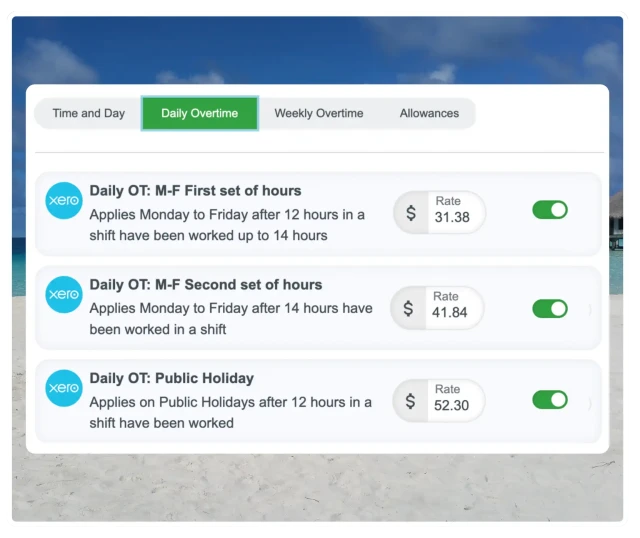
From the roster to the pay run without a spreadsheet in between
Award interpretation already applied
RosterElf connects aged care scheduling and time tracking to payroll, so approved hours flow cleanly to Xero or MYOB with penalties already applied.
- Fewer payroll errors from manual data entry
- Less time reconciling timesheets each fortnight
- Clear records for audits and compliance checks
- Faster pay runs, even through a busy period
Australian aged care providers using RosterElf report significant time savings on schedule creation. Based on customer feedback and ROI calculator data.
More than aged care scheduling software
Scheduling is one job of several. RosterElf puts communication, HR and time tracking in the same place, so a aged care team has one app rather than four.
Why aged care providers choose RosterElf
RosterElf is built for Australian workplaces, with Fair Work compliance, modern awards and local payroll integrations as the starting point rather than an add-on.
Save hours on scheduling
Less time building and re-fixing the roster every week.
Control labour costs
See live wage cost as you schedule — no guesswork until payday.
Australian compliance
Aged Care Award rates and penalties built in.
All employment types
Works for casual, part-time and full-time staff.
Easy to adopt
Intuitive for managers and staff, with minimal training.
Single or multi-site
Scales from one site to a group.
Relevant awards for aged care
Stay compliant with Australian Modern Award pay rates

“Having worked with other platforms before, we didn't hesitate to use RosterElf. The simplicity of the app makes it a dream for managers and staff.”
Darcy Wood · Inspire Care SA
Adelaide NDIS provider found simplicity and reliability
Read the Inspire Care SA storyCalculate your aged care scheduling savings
See how much time and money your business could save with RosterElf rostering software.
Your current rostering
Based on 70% time reduction with automated rostering
Your potential savings
No credit card required
Trusted by aged care providers across Australia
Hear from Australian businesses that simplified their scheduling with RosterElf
Andrew Nathan
November 13, 2025

"We are extremely happy with Roster Elf, it's a great improvement on the previous system we were using. Sean and all the staff have been fantastic, really know their stuff and make using RosterElf a pleasure."
Monica Van De Laak
October 16, 2025
"Sean was an amazing help, very patient and thorough."
Mary C.
October 13, 2025

"I can see my roster, enter availability, put leave in advance and clock on and off easily."
Common roles in aged care
Download free job description templates for your aged care team
Explore similar industries
See how RosterElf helps other businesses like yours
Aged care scheduling and rostering resources
Free scheduling tools, templates and guides for Australian aged care providers
Try aged care staff scheduling free
Build your first aged care roster in minutes. No credit card required.
Real support from people who understand your business
At RosterElf, support isn't a ticket system — it's part of the product. Our Australian-based team helps you set up correctly, understand award rules, and stay compliant as your business changes. No scripts. No offshore handoffs. Just real help when you need it.
-
Guided setup and onboarding
-
Award and payroll questions answered
-
Ongoing help as your team grows

Aged care staff scheduling FAQ
-
The best aged care rostering software prices a shift as well as filling it — sleepover, broken-shift and 24-hour-care allowances applied as the roster is built, checks and qualifications enforced before someone is offered a shift, attendance confirmed at the client’s address, and payroll export without re-keying. RosterElf applies both SCHADS and the Aged Care Award.
-
Keep them in one roster with different drivers: residential works from ratios and shift coverage, home care from client visits and travel. The allowances differ too — broken shifts are a home-care pattern, sleepovers a residential one — so a single system that knows which award applies is what stops the two being reconciled by hand.
-
Build the roster against the ratio rather than checking it afterwards. RosterElf shows coverage as you schedule, so a shift that would drop below the required ratio is visible while it can still be changed.