Best rostering software
& apps Australia 2026
Hands-on review

We tested the top rostering platforms on features, pricing, Australian compliance, and support quality. This guide covers everything you need to choose the right software for your business.
· 15 min read

Written by
Steve Harris
Steve Harris
Workforce management specialist with 10+ years experience in Australian HR tech. Former operations manager in hospitality.

Edited by
Georgia Morgan
Georgia Morgan
Senior editor and compliance researcher. Background in employment law and Fair Work regulations.
Top 5 rostering software at a glance
Short on time? Here are our top picks based on extensive testing:

9.2/10
Australian-built with local support, simple setup, and seamless Xero integration.
Learn more
8.3/10
Comprehensive features for large teams and multi-country operations.
Read review
7.7/10
Strong time and attendance with geofencing. Good reporting and security.
Read review
7.2/10
Flat-rate pricing with a generous free plan. Best for budget-conscious teams.
Read review
6.2/10
Full-suite HR and payroll platform with rostering as an add-on module.
Read reviewOther notable rostering platforms we reviewed
We reviewed 10 widely used rostering platforms in Australia. The top five above represent our strongest overall recommendations. These additional platforms may suit specific business needs:
Zenshifts
Australian SMEs
Humanforce
Large workforces
When I Work
Simple scheduling
Sling
Lightweight teams
Microkeeper
Time & attendance
Rostering software review methodology
We spent 40+ hours hands-on testing Australian rostering platforms — creating real accounts, building rosters, and validating award compliance. This guide is based on actual product use, not marketing claims.
- Built and tested real rosters using live product accounts
- Verified award interpretation for Hospitality, Retail & SCHADS
- Analysed 500+ verified reviews from Xero App Store & Google
20+
Platforms
researched
10
Fully reviewed
end-to-end
4
Top picks
identified
Australia-focused
Local awards & SME
This means you can confidently choose a platform that works for Australian award conditions — without trial-and-error.
How we tested rostering software
We tested each platform by creating accounts, building rosters, setting up award interpretation, and evaluating integrations. We also analysed verified reviews from the Xero App Store and Google.
25%
Compliance
Award interpretation, Fair Work
25%
Ease of use
Setup time, daily usability
20%
Value
Pricing, hidden costs
15%
Support
Response times, onboarding
15%
Integrations
Xero, MYOB, other tools
Our testing process
- • Created real accounts and built rosters with sample staff data
- • Tested award interpretation accuracy for Hospitality, Retail, and SCHADS awards
- • Evaluated Xero integration by syncing timesheets and comparing payroll exports
- • Contacted support as a prospective customer to assess response times
- • Analysed 500+ verified user reviews from Xero App Store, Google, and Capterra
Xero App Store ratings
We analysed every Xero App Store review for each platform, examining common positive and negative feedback patterns. We chose to weight Xero ratings heavily for two reasons:
- Verified reviews — Xero requires users to log in with their Xero account, ensuring reviews come from actual customers, not fake accounts
- Critical integration — Xero is the accounting backbone for most Australian SMEs, making the quality of this integration a key success factor
93 reviews
93 reviews
View on Xero →
147 reviews
147 reviews
View on Xero →
51 reviews
51 reviews
View on Xero →
50 reviews
50 reviews
View on Xero →
17 reviews
17 reviews
View on Xero →
Ratings as of August 2026. Click to view current ratings on Xero App Store.
What Xero reviewers say
RosterElf
Reviewers consistently praise the seamless Xero integration, with timesheets flowing directly into payroll without manual data entry. Customer support receives frequent mentions, with users highlighting responsive, Australia-based help. Some users note occasional GPS clock-in issues and a learning curve during initial setup, though most describe the transition from spreadsheets as worthwhile. The 94% five-star rating reflects strong satisfaction among hospitality and retail businesses.
Deputy
Deputy's Xero integration receives mixed feedback. Positive reviews highlight time savings on payroll processing and appreciate the feature set for larger teams. However, a notable number of reviewers report integration difficulties, with some stating it "never worked" and criticising offshore support responsiveness. Users with complex award requirements note setup can be involved. The polarised ratings (many 5-star and 1-star reviews) suggest experiences vary significantly based on business complexity and support needs.
Tanda
Tanda's Xero integration is generally well-regarded, with reviewers praising the automatic timesheet sync and award interpretation accuracy. The platform's Australian focus resonates with local businesses, though some users note the modular pricing structure can be confusing when estimating total costs. Support receives mixed feedback — responsive when available, but limited to AEST business hours which can frustrate businesses operating outside standard hours. Time tracking features receive consistent praise, particularly the geofencing and kiosk mode.
Connecteam
Connecteam earns praise for its generous free tier (up to 10 users) and user-friendly mobile app. Reviewers appreciate the all-in-one approach combining rostering, communication, and time tracking. The main limitation flagged is the lack of native Australian award interpretation — users must manually configure pay rules, and some report hours not always syncing correctly to Xero. As a US-based platform, support hours and default settings (like geo-fence units) are US-centric.
Employment Hero
Reviews are notably polarised, with the lowest Xero rating among the five platforms. Positive reviewers praise the comprehensive HR and payroll suite when it works, with one noting the Xero integration is "seamless once set up." However, critical reviews cite complex setup processes, difficulty reaching support, and leave calculation errors. Several reviewers with extensive payroll experience describe it as unnecessarily complicated. The rostering module receives less focus than the core HR/payroll features.
Need a deeper Xero comparison? Two guides go further than this section: Xero rostering apps covers building and publishing rosters alongside Xero, and timesheet apps for Xero covers how accurately each platform sends hours into Xero Payroll, award calculations included.
Feature comparison
How the top platforms compare on key features Australian businesses need:
Drag-and-drop roster builder
Availability & unavailability rules
Shift conflicts & overlap warnings
Unfilled shift alerts
Multi-location rostering
Shift templates
Publish & notify staff instantly
Manager override & approvals
GPS clock-in / clock-out
Photo proof on clock-in
Tablet time clock mode
Device restrictions (lockdown)
Unscheduled shift detection
Manager timesheet approval
Break enforcement rules
Auto-generated timesheets
Xero payroll integration
MYOB payroll integration
Award interpretation (AU)
Overtime & penalty rules
Export-ready payroll files
Pay run preview & validation
In-app staff messaging
Shift change notifications
Read receipts
Announcements / broadcast messages
Manager-only communication
iOS app
Android app
Employee self-service
Manager mobile approvals
Offline clock-ins
Digital contracts & onboarding
Policy acknowledgements
Certificate & licence tracking
Compliance reminders
Employee document storage
HR tools without payroll lock-in
Labour cost reporting
Attendance & punctuality reports
Overtime & penalty analysis
Export to CSV / Excel
Custom report filters
Features supported
| FEATURE | | | | | |
|---|---|---|---|---|---|
| Rostering & scheduling | |||||
| Drag-and-drop roster builder | |||||
| Availability & unavailability rules | |||||
| Shift conflicts & overlap warnings | |||||
| Unfilled shift alerts | |||||
| Multi-location rostering | |||||
| Shift templates | |||||
| Publish & notify staff instantly | |||||
| Manager override & approvals | |||||
| Time & attendance | |||||
| GPS clock-in / clock-out | |||||
| Photo proof on clock-in | |||||
| Tablet time clock mode | |||||
| Device restrictions (lockdown) | |||||
| Unscheduled shift detection | |||||
| Manager timesheet approval | |||||
| Break enforcement rules | |||||
| Timesheets & payroll | |||||
| Auto-generated timesheets | |||||
| Xero payroll integration | |||||
| MYOB payroll integration | |||||
| Award interpretation (AU) | |||||
| Overtime & penalty rules | |||||
| Export-ready payroll files | |||||
| Pay run preview & validation | |||||
| Communication | |||||
| In-app staff messaging | |||||
| Shift change notifications | |||||
| Read receipts | |||||
| Announcements / broadcast messages | |||||
| Manager-only communication | |||||
| Smartphone apps | |||||
| iOS app | |||||
| Android app | |||||
| Employee self-service | |||||
| Manager mobile approvals | |||||
| Offline clock-ins | |||||
| HR tools | |||||
| Digital contracts & onboarding | |||||
| Policy acknowledgements | |||||
| Certificate & licence tracking | |||||
| Compliance reminders | |||||
| Employee document storage | |||||
| HR tools without payroll lock-in | |||||
| Analytics & reporting | |||||
| Labour cost reporting | |||||
| Attendance & punctuality reports | |||||
| Overtime & penalty analysis | |||||
| Export to CSV / Excel | |||||
| Custom report filters | |||||
| Features supported | 42/43 | 37/43 | 39/43 | 26/43 | 37/43 |
Feature data based on hands-on testing. Last verified January 2026.
Mobile app comparison
A good mobile rostering app is essential for modern teams. Staff need to check rosters, clock in, and swap shifts from their phones. Managers need to build schedules and approve requests on the go. Here's how the top platforms compare.
Here is what each rostering app lets staff do from their phone.
| Platform | GPS clock-in | Shift swaps | Push notifications |
|---|---|---|---|
| RosterElf | |||
| Deputy | |||
| Tanda | |||
| Connecteam | |||
| Employment Hero |
Staff app vs manager app
Most rostering platforms offer separate experiences for staff and managers. Staff apps focus on viewing rosters, clocking in, and requesting leave. Manager apps add roster building, approval workflows, and reporting.
What staff can do
- View upcoming shifts and rosters
- Clock in/out with GPS verification
- Request shift swaps with colleagues
- Submit leave requests
- Update availability preferences
What managers can do
- Build and publish rosters
- Approve shift swaps and leave
- View real-time attendance
- Send team announcements
- Access labour cost reports
Our mobile app recommendation
For Australian businesses, RosterElf offers the best balance of app quality and Australian compliance. The employee work app is intuitive for staff, while managers get full roster control on mobile. Connecteam's app is polished but lacks Australian award interpretation. Deputy's app is feature-rich but can overwhelm smaller teams.
RosterElf deep dive
Purpose-built for Australian businesses with native award interpretation, Xero/MYOB integration, and local support. Ideal for hospitality, healthcare, and retail with 5-200 staff.
 Best for Australian SMEs
 Our assessment
RosterElf stands out for Australian SMEs because it's genuinely built for Australian businesses, not adapted from a US product. The award interpretation is straightforward to set up (we had a Hospitality Award roster running in under an hour), and the Xero integration is the highest-rated in the category.
The pricing model is refreshingly simple — one price includes all features. No modules, no add-ons, no surprises. The time and attendance module supports both tablet kiosk and smartphone GPS clock-in with optional photo proof, giving businesses accurate, fraud-resistant attendance tracking without extra hardware. Combined with free onboarding support from an Australian team, it's the easiest path from spreadsheets to proper online rostering software.

Clean, intuitive roster view with live cost tracking

Perfect Match® finds the best staff for each shift
Strengths
- Australian-based support team
- Simple award interpretation setup
- Strong Xero App Store ratings (4.9/5)
- Free onboarding and training
- All features included in base price
- Tablet kiosk + GPS smartphone clock-in with photo proof
Limitations
- Less suited for 500+ employee enterprises
- Fewer third-party integrations than Deputy
Deputy deep dive
Global workforce management platform with comprehensive features. Strong for multi-country operations and large enterprises, but pricing complexity and support responsiveness are common concerns.
 Best for Enterprise
 Our take on Deputy
Deputy is a capable platform with a strong feature set, particularly for businesses operating across multiple countries. However, for most Australian SMEs, it's more than you need. The pricing structure — with separate modules for scheduling, time tracking, and tasking — can quickly add up. Support responsiveness varies, with some users reporting long wait times during peak periods.
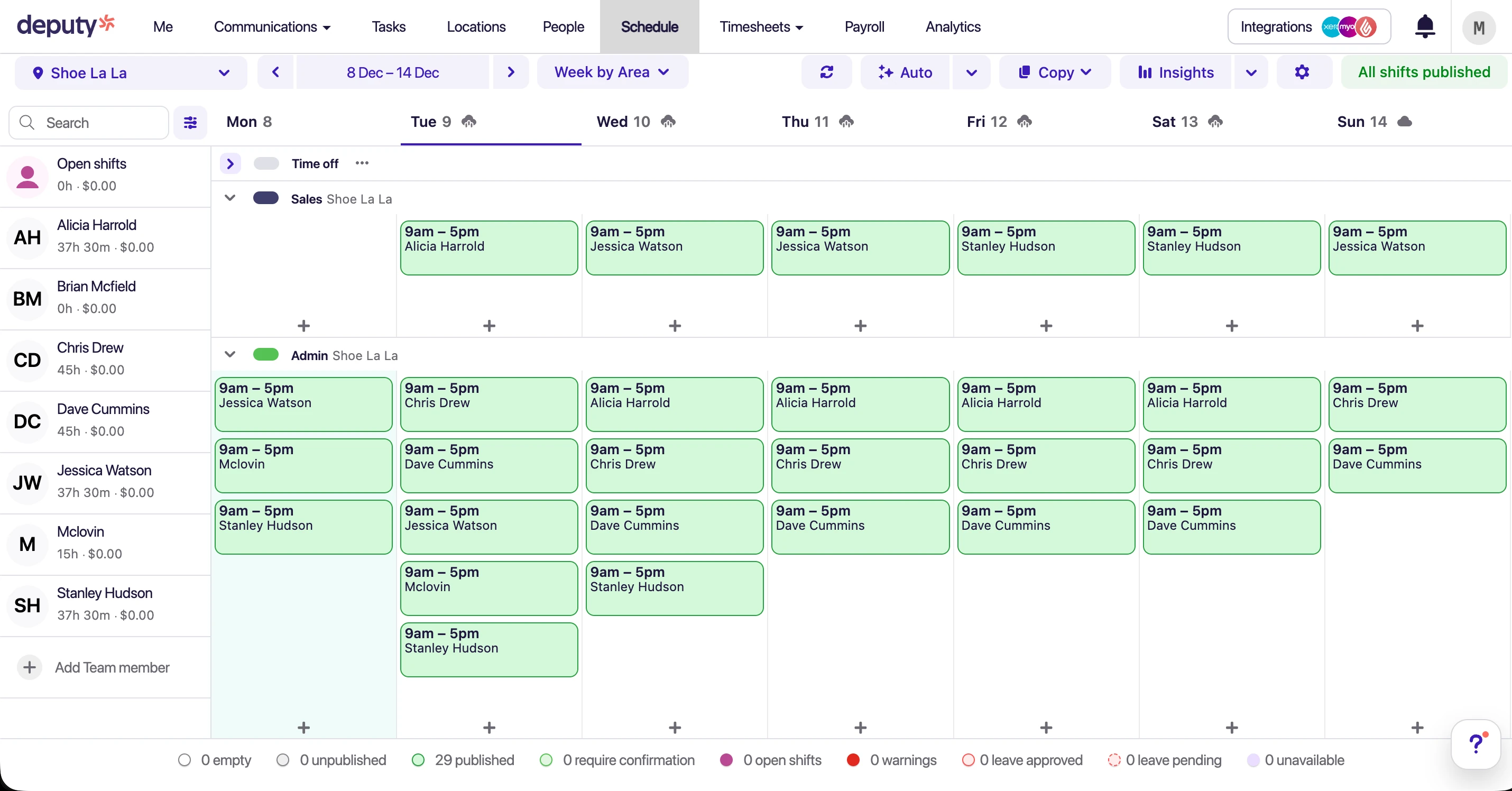
Deputy's roster view with colour-coded shifts
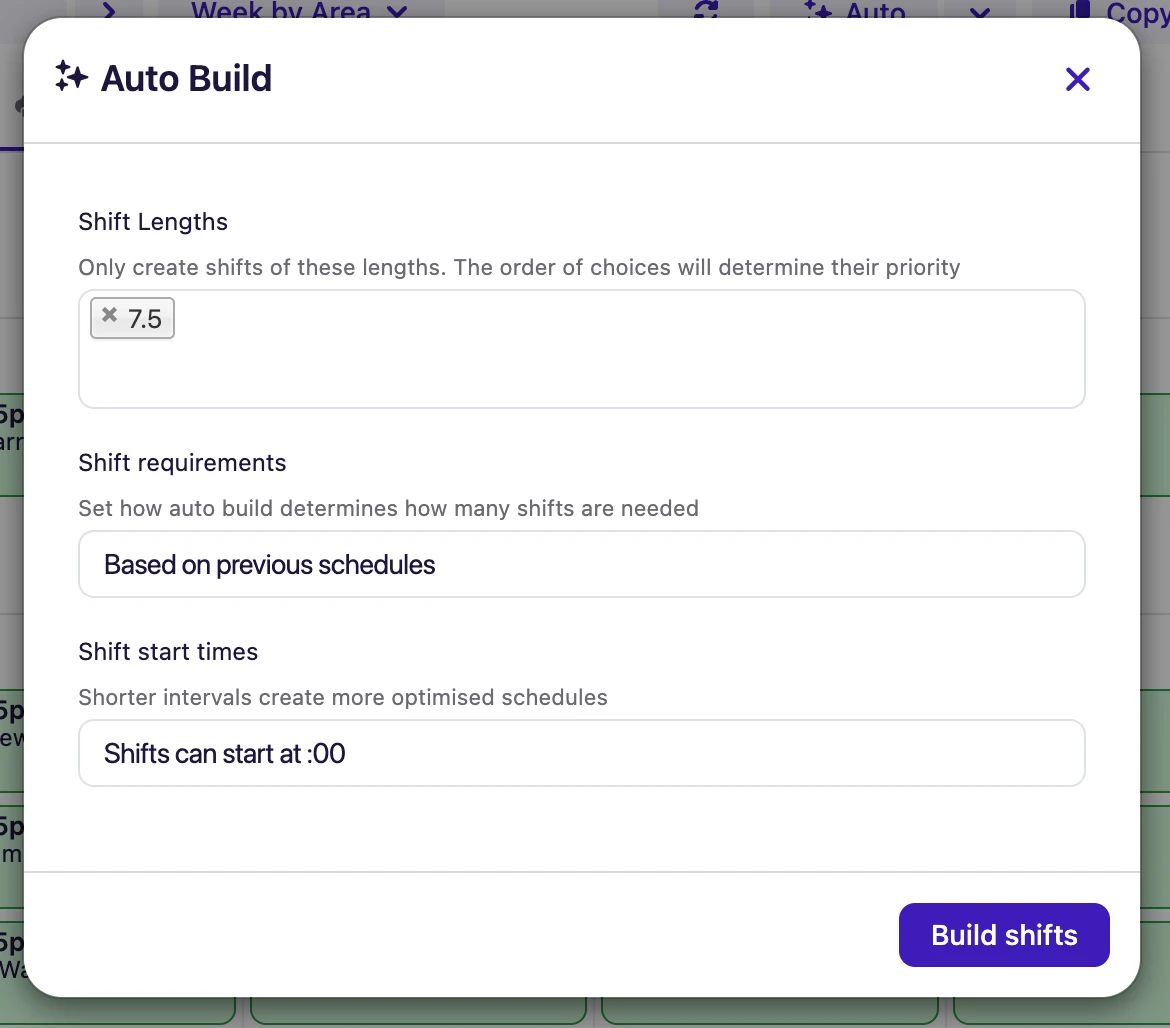
Auto-scheduling with demand forecasting
Strengths
- Comprehensive feature set
- Strong multi-country support
- Large integration marketplace
- Demand forecasting tools
Limitations
- Complex pricing with required add-ons
- Support response times vary
- Overkill for small businesses
- Award setup can be complex
Tanda deep dive
Australian-built workforce management platform with strong time and attendance features. Excels at clock-in controls and reporting, but modular pricing and support accessibility are common concerns.
 Best for Time Tracking
 Our take on Tanda
Tanda delivers solid time tracking functionality with geofencing, photo verification, and kiosk mode for shared devices. Reporting is comprehensive and the security features are above average. However, the modular pricing structure makes it hard to predict total costs, and support is limited to AEST business hours. The rostering module works but isn't the standout feature — this is a time tracking platform first.
Strengths
- Strong time tracking with geofencing (8.5/10)
- Comprehensive reporting tools (8.3/10)
- Good security features (8.2/10)
- Australian-based company
Limitations
- Modular pricing hard to predict
- Sales-led onboarding (no instant trial)
- Support limited to AEST hours
- Rostering functional but not exceptional (7.5/10)
Connecteam deep dive
All-in-one employee app with rostering, team communication, and training. Strong value for budget-conscious businesses, but Australian compliance features are limited.
 Best Budget Option
 Our take on Connecteam
Connecteam is a solid choice if budget is your primary concern and you don't need Australian award interpretation. The per-hub pricing (from US$35/month for the first 30 users) is attractive for small teams. However, the lack of award support means you'll still need to calculate penalty rates manually — which defeats much of the purpose of rostering software for Australian businesses.
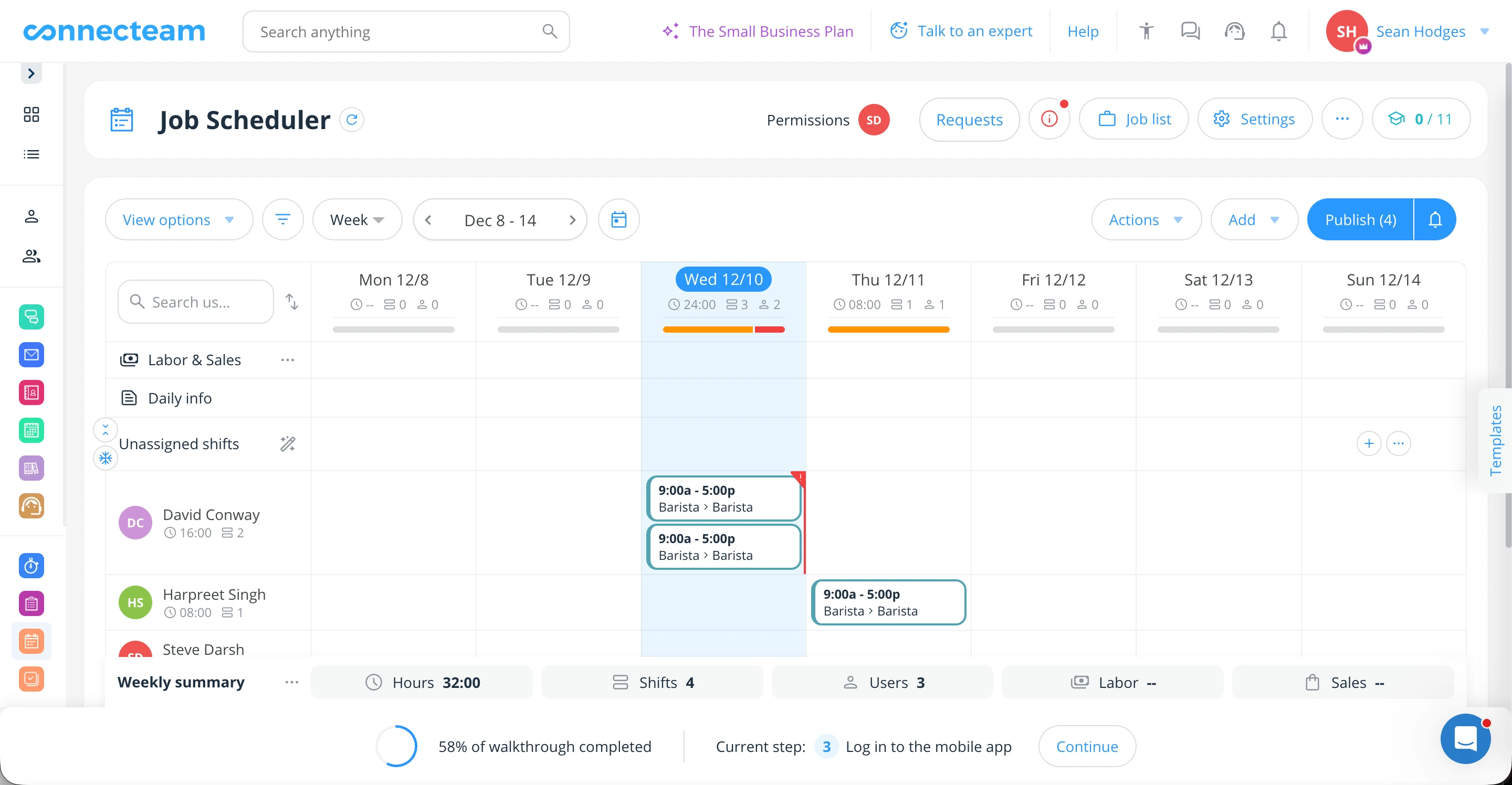
Connecteam's main scheduler interface
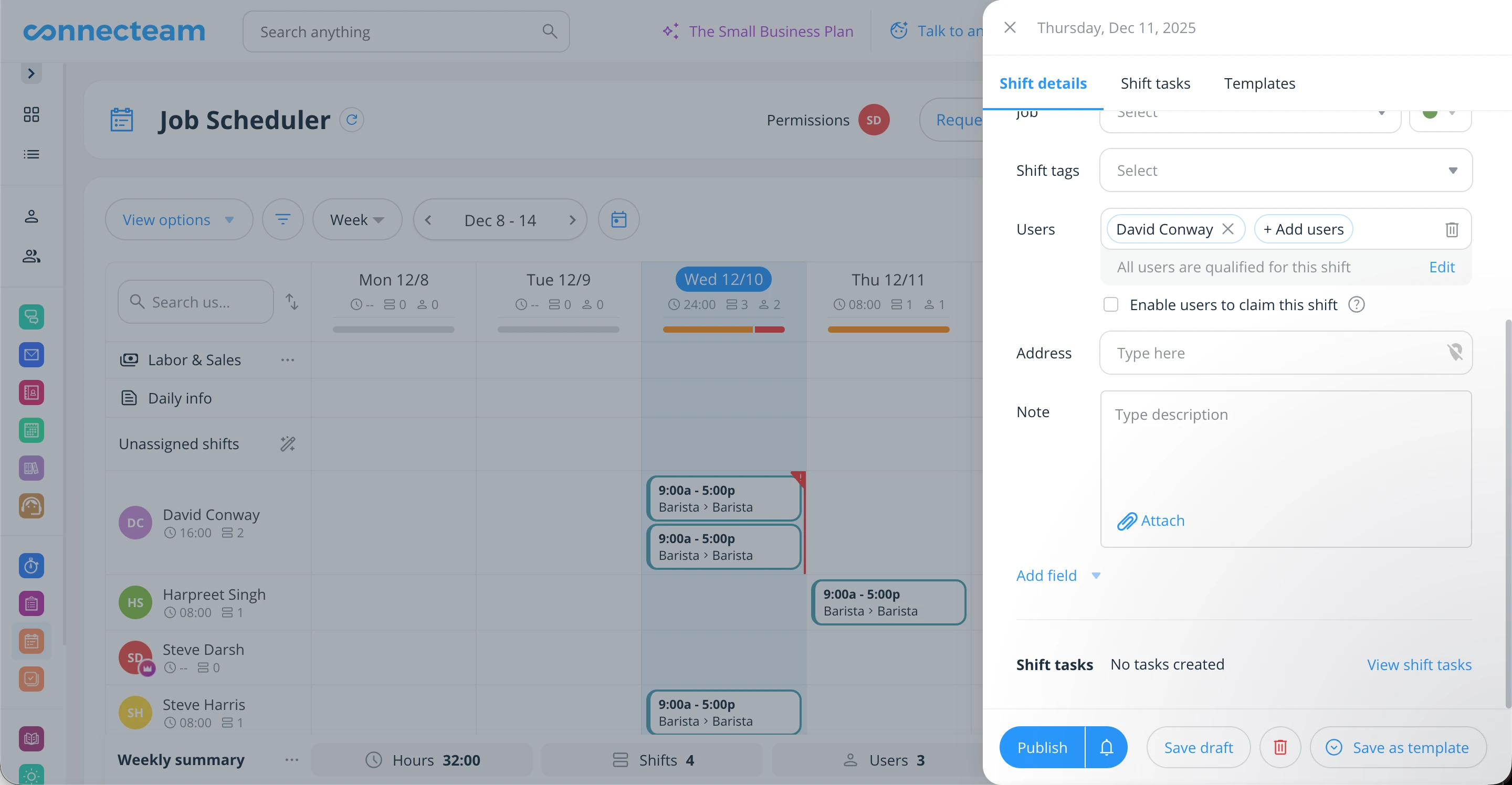
Shift details with notes and attachments
Strengths
- Affordable for small teams
- Strong communication features
- Employee training tools
- Free plan available
Limitations
- Limited Australian award support
- Xero sync issues reported
- Less suited for complex rostering
Employment Hero deep dive
Full-suite HR and payroll platform with rostering add-on. Strong for businesses prioritising HR compliance and payroll, though rostering UX is less polished than dedicated platforms.
 Best for HR-First
 Our take on Employment Hero
Employment Hero is primarily an HR and payroll platform — rostering is an add-on, not the core product. If you're looking for comprehensive HR (onboarding, performance reviews, policies, learning) with some rostering capability, it's worth considering. But if rostering is your primary need, a dedicated platform will serve you better. The rostering UX feels like an afterthought compared to purpose-built alternatives.
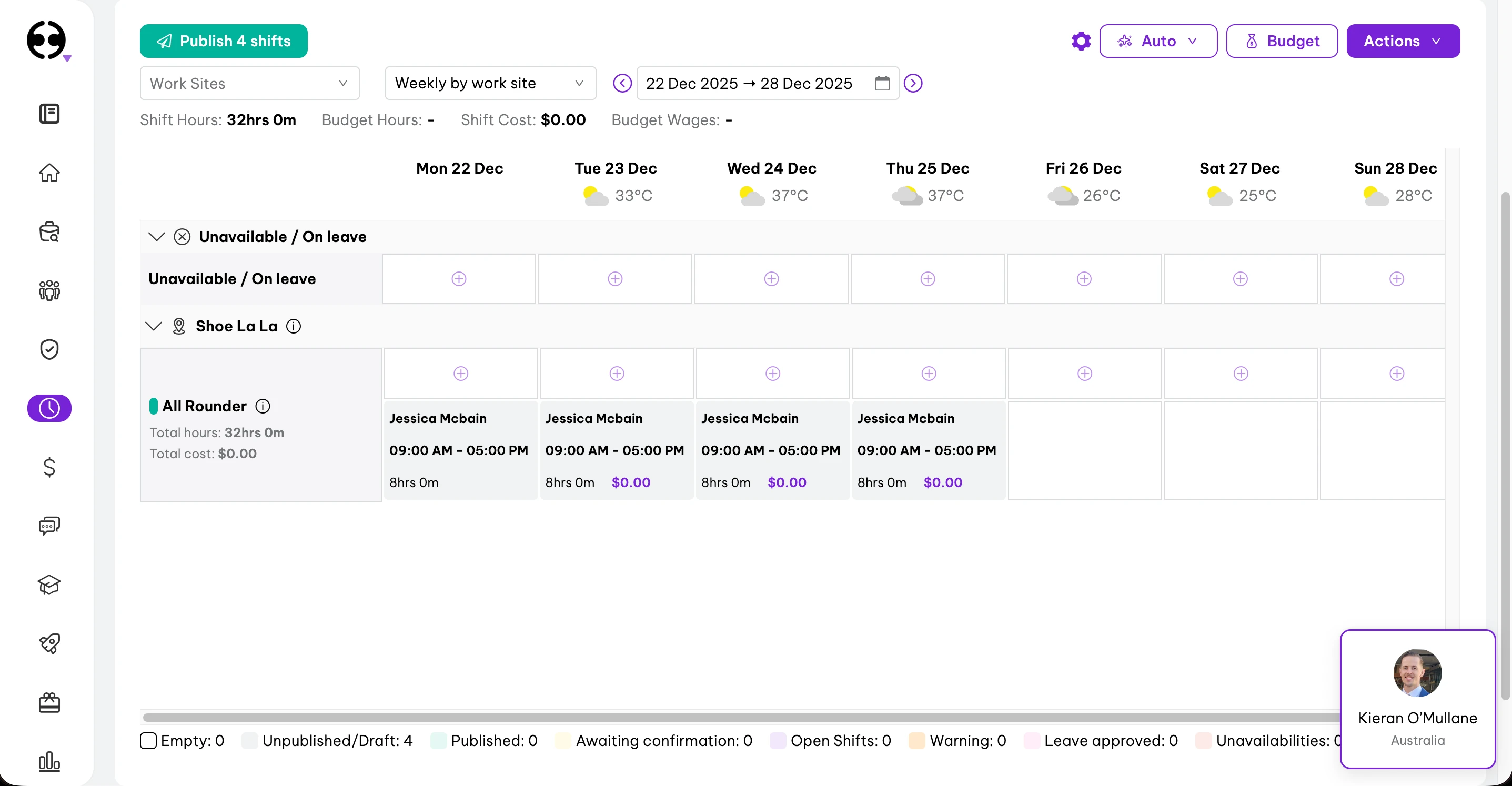
Rostering module — functional but less intuitive

HR features are comprehensive and polished
Strengths
- Comprehensive HR and payroll
- Strong Australian compliance
- All-in-one platform potential
- Hero AI assistant
Limitations
- Rostering not the primary focus
- Complex module pricing
- Support responsiveness varies
- Rostering UX needs work
Best rostering software by use case
Different industries have different needs. Here's our recommendation based on your business type:
Hospitality
Cafes, restaurants, bars, hotels
Hospitality needs complex award interpretation (penalty rates vary by day and time), RSA/food safety certificate tracking, and easy shift swaps for casual-heavy rosters.
Recommended: RosterElf
Pre-built Hospitality Award support, certificate tracking, and simple shift swap workflows.
Healthcare & aged care
Nursing homes, clinics, home care
Healthcare requires SCHADS and Nurses Award interpretation, qualification tracking (certifications, police checks), and careful break compliance for 24/7 operations.
Recommended: RosterElf
SCHADS and Nurses Award support, qualification tracking, and compliance-focused design.
Retail
Shops, supermarkets, franchises
Retail benefits from General Retail Award support, labour cost visibility (staff-to-sales ratios), and easy handling of seasonal workforce fluctuations.
Recommended: RosterElf
Retail Award support, labour budgeting, and scalable pricing for seasonal staff changes.
Multi-site & enterprise
Franchise groups, large chains
Large operations need multi-location management, role-based permissions, enterprise integrations, and potentially multi-country support.
Recommended: Deputy or RosterElf
Deputy for 500+ staff or multi-country. RosterElf for Australian-focused multi-site (up to 200 staff per location).
Budget-first businesses
Startups, small teams
If budget is your primary constraint and you have simple rostering needs (no complex awards), per-hub pricing can work. Be aware of compliance limitations.
Consider: Connecteam
From US$35/month per hub for the first 30 users. But no award interpretation — only suitable if compliance isn't a concern.
Time tracking focused
Field service, construction, mobile teams
If accurate time tracking with geofencing and photo verification is your priority — such as field workers or multiple job sites — strong clock-in controls matter most.
Consider: Tanda
Strong geofencing, photo verification, and detailed time clock controls. Rostering is functional but secondary.
HR-first businesses
HR compliance priority
If you need comprehensive HR (onboarding, policies, performance reviews) with basic rostering, an HR platform with rostering add-on may work.
Consider: Employment Hero
Full HR suite with rostering module. Better for HR-first than rostering-first needs.
Pricing comparison
Here's what you'll actually pay for each platform. Watch out for hidden costs with module-based pricing.
| Platform | Base price | Pricing model | Hidden costs? |
|---|---|---|---|
| RosterElf | $6/employee/month | Per employee, all rostering & time features | None — add payroll & HR on Full Suite |
| Deputy | $8.75 /user/month | Per user, per module | Yes — modules priced separately |
| Tanda | $12.80 /user/month | Per user, bundled | Bundle covers HR, payroll and workforce management |
| Connecteam | $35 USD /month (Per hub, first 30 users. US$29 if billed yearly) | Flat rate, tiered by users | Hubs priced separately |
| Employment Hero | $10 /employee/month | Per employee, per tier | Yes — payroll only in the top custom-priced tier |
Cost example: 20-person hospitality team
- • RosterElf: $120/month (20 × $6) — rostering & time
- • Deputy: $175–$279/month, from Core alone up to the all-in-one bundle
- • Connecteam: US$35–US$59/month per hub — but no award interpretation
- • Employment Hero: $280/month for HR Essentials plus the rostering add-on
How to choose the right rostering software
Use this decision framework to find the best fit for your business:
Do you need Australian award interpretation?
If you employ staff under a Modern Award (most Australian businesses), this is non-negotiable. Without it, you're still calculating penalty rates manually — and at risk of underpayment.
What's your team size?
Some platforms are overkill for small teams, others don't scale well for enterprise.
Which accounting software do you use?
Strong payroll integration saves hours every pay run. Check App Store ratings as a quality indicator.
What's your budget priority?
Cheaper isn't always better if it creates compliance risk or requires more manual work.
What is online rostering software?
Online rostering software — also called shift rostering software, employee scheduling software, or workforce management software — is a cloud-based tool that helps businesses create staff schedules, track time and attendance, and manage labour costs. It replaces manual processes like spreadsheets, paper rosters, and whiteboard schedules.
Modern rostering platforms do much more than just scheduling. They typically include:
Shift scheduling
Drag-and-drop roster creation, recurring schedules, shift templates, and open shift management.
Time and attendance
GPS clock-in/out, timesheet tracking, overtime monitoring, and break management.
Award interpretation
Automatic calculation of penalty rates, overtime, allowances, and loadings based on Modern Awards.
Mobile apps
Staff can view rosters, clock in/out, request leave, and swap shifts from their phones.
Payroll integration
Direct sync with Xero, MYOB, and other accounting platforms for seamless payroll processing.
Labour cost tracking
Real-time visibility into wage costs as you build rosters, with budget warnings and reports.
What makes shift rostering software different?
Shift rostering software is built for businesses that run on rotating shifts rather than fixed 9-to-5 hours — hospitality, healthcare, retail, security, and logistics. Beyond basic scheduling, it handles the realities of shift work: staff swapping shifts, filling open shifts at short notice, managing split shifts and rotating patterns, and keeping every shift covered without blowing the wage budget.
This is where dedicated shift rostering software pulls ahead of generic calendar tools like Microsoft Shifts or spreadsheets. Because shifts at different times attract different penalty rates under Australian Modern Awards, the software applies the correct rate to each shift automatically — and lets staff request shift swaps that a manager approves in one tap, so coverage never depends on a last-minute group chat.
How does online rostering software work?
Cloud-based rostering software works through a browser or mobile app — no software to install. Here's the typical workflow:
- Build rosters online — Drag-and-drop shifts in a browser. Publish rosters to staff instantly via the mobile app.
- Staff clock in/out — Employees use GPS-enabled smartphones or a shared tablet kiosk. Attendance is logged in real time.
- Timesheets sync automatically — Approved hours feed directly into your payroll platform (Xero, MYOB) — no manual data entry.
- Compliance runs in the background — Award rates, overtime, and penalty calculations apply automatically based on actual hours worked.
Not all rostering software is created equal
Many international platforms lack Australian-specific features like award interpretation. Without proper award support, you're still at risk of underpayments and Fair Work compliance issues.
Why Australian businesses need rostering software
Australia has one of the most complex employment law environments in the world. With 121+ Modern Awards, each containing dozens of pay rates, penalties, and allowances, manual rostering is a compliance minefield.
The Fair Work compliance challenge
The Fair Work Act 2009 and Modern Awards create obligations that are difficult to track manually:
- Penalty rates — Saturday, Sunday, and public holiday rates vary by award and can reach 250% of base pay
- Overtime calculations — Different thresholds for daily, weekly, and fortnightly overtime depending on the award
- Break requirements — Mandatory rest and meal breaks with specific timing requirements
- Minimum engagement — Casual and part-time employees often have minimum shift lengths
- Allowances — Split shifts, uniforms, meals, travel, and other award-specific allowances
The cost of getting it wrong
Wage theft is now a criminal offence in most Australian states. Beyond legal penalties, underpayment scandals have cost Australian businesses hundreds of millions in back-pay, legal fees, and reputational damage.
High-profile cases include 7-Eleven ($173M), Woolworths ($400M+), Commonwealth Bank ($16.5M), and countless hospitality businesses.
Benefits of using rostering software
Compliance confidence
Award interpretation removes guesswork. Correct rates are calculated automatically, reducing underpayment risk.
Time savings
What takes hours in spreadsheets takes minutes with rostering software. Managers reclaim time for customer service.
Labour cost control
See costs in real-time as you build rosters. Avoid expensive overtime and optimise staff coverage.
Staff satisfaction
Mobile apps, shift swaps, and clear communication improve engagement and reduce no-shows.
Ready to simplify your rostering?
Join 30,000+ Australian workplaces using RosterElf to simplify staff scheduling, time tracking, and payroll.
Our review methodology
Learn how we evaluate workforce management platforms through hands-on testing and verified user feedback.
Feature comparisons are checked against each vendor's public documentation at the time of writing. Assessments of usability, fit and value are our reviewers' opinions, not statements of fact, and products change often. We'd encourage you to trial both platforms and judge for yourself. Spotted something out of date? Tell us and we'll correct it .
Rostering software FAQs
Common questions about choosing rostering software in Australia
- Online rostering software is a cloud-based tool for building staff schedules, tracking attendance, and managing labour costs. Unlike spreadsheets or paper rosters, it works from any browser or mobile device — managers publish shift rosters online and staff receive instant notifications. Leading Australian platforms include RosterElf, Deputy, and Tanda.
- Shift rostering software helps businesses that operate in shifts — hospitality, healthcare, retail, logistics — to schedule staff, track hours, and enforce compliance automatically. It's particularly valuable in Australia where Modern Award rules (penalty rates, overtime, break requirements) vary by shift time and day. The best platforms build these rules in so managers don't have to calculate them manually.
- For most Australian SMEs (5-200 staff), RosterElf offers the best balance of features, pricing, and local support. For large enterprises with 500+ staff or multi-country operations, Deputy may be more suitable despite higher costs. The best choice depends on your team size, industry, and specific compliance needs.
- Most Australian rostering software costs between $6 and $13.95 per user per month. RosterElf starts at $6/employee/month on annual plans, Deputy from $8.75/user/month plus add-ons, and Tanda's all-in bundle is $12.80/user/month + GST. Connecteam charges per hub from US$35/month covering the first 30 users. Always check what features are included — some platforms charge extra for essential features like HR tools or advanced reporting.
- Key features for Australian businesses include: award interpretation (critical for compliance), Xero/MYOB integration, GPS clock-in, shift swap management, mobile apps for staff, and leave management. For hospitality and healthcare, look for certificate tracking (RSA, food safety, etc.). Prioritise platforms with Australian-based support who understand local compliance requirements.
- Yes, most rostering platforms integrate with popular Australian accounting software. Xero and MYOB are the most commonly supported. Look for native integrations rather than third-party connectors — they tend to be more reliable and better maintained. Check the integration's Xero App Store rating as an indicator of quality.
- Some platforms are highly effective within specific industries or use cases but are not designed for broad Australian workforce needs. To avoid misleading comparisons, we only score tools that compete directly across general business use cases. Platforms listed as "notable alternatives" may excel in specific niches but lack the versatility of our top five picks.