An honest Employment Hero review 2026:
Pricing, features, pros & cons

We spent 1 week hands-on testing Employment Hero across rostering, time tracking, HR tools, and payroll to evaluate how it performs for Australian businesses.

Written by
Steve Harris
Steve Harris
Workforce management specialist with 10+ years experience in Australian HR tech. Former operations manager in hospitality.

Edited by
Georgia Morgan
Georgia Morgan
Senior editor and compliance researcher. Background in employment law and Fair Work regulations.
Employment Hero review - quick summary

Overall Score
6.2/10
Key takeaways
- HR-first platform – Comprehensive HR tools are Employment Hero's core strength
- Strong compliance tools – Extensive template library and Australian compliance features
- Rostering is basic – Lacks advanced filtering, views, and budgeting tools
- Payroll setup challenges – Documentation is outdated and videos don't work
Score breakdown
Note on scoring: Payroll features could not be fully evaluated due to non-functional documentation and unavailable support during our trial period. See the payroll section for details.
Employment Hero pricing and plans
Pricing score: 6.0/10
Employment Hero prices HR in four tiers: HR Essentials at $10 per employee/month and HR Engage at $14, with HR Elite and Employment Unlimited on quote-only pricing. A 10-user minimum applies to every plan. Rostering and time and attendance are not included — they are a $4 per employee/month add-on — and payroll is bundled only in Employment Unlimited.
The pricing positions Employment Hero for medium to large businesses with complex HR needs. For small businesses focused primarily on rostering, we'd note the pricing is less competitive compared to dedicated workforce management platforms that include all features in one price.
Employment Hero pricing evidence (September 2026)
Captured from Employment Hero's Australian pricing page on 1 September 2026:


Employment Hero pricing comparison
| Feature | HR Essentials | HR Engage | HR Elite / Unlimited |
|---|---|---|---|
| Per employee / month | $10 | $14 | Quote only |
| Minimum users | 10 | 10 | 10 |
| Core HR features | ✓ | ✓ | ✓ |
| Rostering & time tracking | +$4/employee | +$4/employee | +$4/employee |
| Payroll | +$20/employee | +$20/employee | Bundled in Unlimited |
| Performance management | — | ✓ | ✓ |
| Recruitment | — | Limited | ✓ |
| Telephone support | — | — | ✓ |
Employment Hero pricing by team size
Employment Hero's minimum charges mean small businesses pay more per employee. Below are real costs accounting for minimums. Businesses with fewer than 10 employees will hit minimum charges on all plans. Rostering and time and attendance sit on top of every tier at $4 per employee/month, so HR Engage with rostering is $18 per employee/month, not $14.
| Team Size | HR Essentials ($10/employee) | HR Engage ($14/employee) | Essentials + rostering ($14/employee) |
|---|---|---|---|
| 5 staff | $100/mo (10-user min) | $140/mo (10-user min) | $140/mo (10-user min) |
| 10 staff | $100/mo | $140/mo | $140/mo |
| 15 staff | $150/mo | $210/mo | $210/mo |
| 25 staff | $250/mo | $350/mo | $350/mo |
| 50 staff | $500/mo | $700/mo | $700/mo |
| 100 staff | $2,000/mo | $4,000/mo | $6,000/mo |
Pros & cons
| Pros | Cons |
|---|---|
| All-in-one platform | Minimum charges for small teams |
| Transparent per-user pricing | Premium features need higher plans |
| HR + payroll included | Can be expensive for SMBs |
★ Our verdict
Employment Hero's pricing is straightforward but can be expensive for small businesses due to minimum charges. The comprehensive HR suite justifies the cost for businesses with complex compliance needs. For rostering-focused businesses, dedicated platforms may offer better value.
Who is Employment Hero?
Employment Hero is an Australian HR and payroll platform founded in 2014 and headquartered in Sydney. With over 300,000 businesses across Australia, New Zealand, the UK, Singapore, and Malaysia, it's one of the larger players in the Australian HR software market.
We found Employment Hero positions itself as an all-in-one solution covering HR management, payroll, rostering, time and attendance, recruitment, and employee benefits. There's also a staff-facing app called "Swag" (formerly Employment Hero Work) that gives employees access to payslips, leave requests, and various lifestyle perks and discounts.
Employment Hero review methodology
Our team evaluated Employment Hero by setting up a live account, configuring HR workflows, testing the rostering and time tracking modules, and attempting payroll integration with Xero. Every observation in this review comes from direct experience with the platform.
- Built and tested real rosters using a live Employment Hero account
- Tested Xero payroll integration workflows
- Analysed 600+ verified reviews from Xero App Store, Capterra & G2
This means you can trust our assessment is based on real-world experience with Employment Hero — not vendor-provided demos or marketing materials.
How we tested Employment Hero
We tested Employment Hero by creating a live account, building rosters, configuring HR workflows, and evaluating Xero integration. We also analysed verified reviews from the Xero App Store, Capterra, and G2.
25%
Compliance
HR compliance, Fair Work
25%
Ease of use
Setup time, daily usability
20%
Value
Pricing, hidden costs
15%
Support
Response times, onboarding
15%
Integrations
Xero, MYOB, other tools
Our testing process
- • Created a live Employment Hero account and built rosters with sample staff data
- • Tested HR compliance features including document templates and onboarding workflows
- • Evaluated Xero integration by syncing timesheets and comparing payroll exports
- • Contacted Employment Hero support as a prospective customer to assess response times
- • Analysed 600+ verified user reviews from Xero App Store, Capterra, and G2
Employment Hero user reviews
User ratings score: 6.0/10
Xero App Store ratings
Employment Hero is a certified Xero-connected app listed on the Xero App Store. We prioritise Xero App Store reviews in our analysis because they come from verified Xero users who have actually integrated Employment Hero with their accounting software — with no incentives offered for leaving reviews.
This matters because Xero is the leading accounting platform for Australian small businesses, so feedback from this community directly reflects the experience of the businesses most likely to use Employment Hero for HR and payroll integration.

15 verified reviews on Xero App Store
What Xero users highlight
- Comprehensive HR suite — businesses praise the depth of HR features and compliance tools
- Document management — centralised storage and template library valued by HR teams
- Employee self-service — staff can easily access payslips and manage leave
Common concerns from Xero users
- Support is difficult to reach — multiple reviewers report being unable to reach anyone, with calls only answered for new sales
- Integration problems — Xero integration described as having "major bugs" preventing setup
- Long setup times — one reviewer reported still not properly set up after 12+ months
Other Employment Hero reviews
Employment Hero's ratings tell different stories depending on who's reviewing. The platform scores well on Google Reviews (4.1/5) but poorly on Xero App Store (3.1/5). Understanding this gap matters for businesses evaluating the platform.
We prioritise independent, non-incentivised reviews while including incentivised platforms for transparency. Review sources are clearly labelled so you can assess credibility.
Employment Hero ratings on key platforms
| Review source | Employment Hero rating | Review type |
|---|---|---|
| Google Reviews | 4.1 / 5 (618 reviews) | ✓ Verified reviews |
| Xero App Store | 3.1 / 5 (17 reviews) | Verified purchases |
| Capterra AU | 4.5 / 5 | Incentivised |
| G2 | 4.5 / 5 | Incentivised |
Understanding the ratings gap
The ratings show a stark divide. Google Reviews (4.1/5) skew positive — but many are from employees praising the app's usability for viewing payslips and managing leave. These reviews reflect the employee experience, not the employer/admin experience.
Xero App Store reviews (3.1/5) tell a different story. Recent reviews from business owners highlight serious concerns about support availability, billing issues, and integration problems.
This disconnect — positive employee reviews vs. negative admin reviews — aligns with our own findings about Employment Hero's support and documentation challenges.
Employment Hero rostering and scheduling
Rostering score: 7.0/10
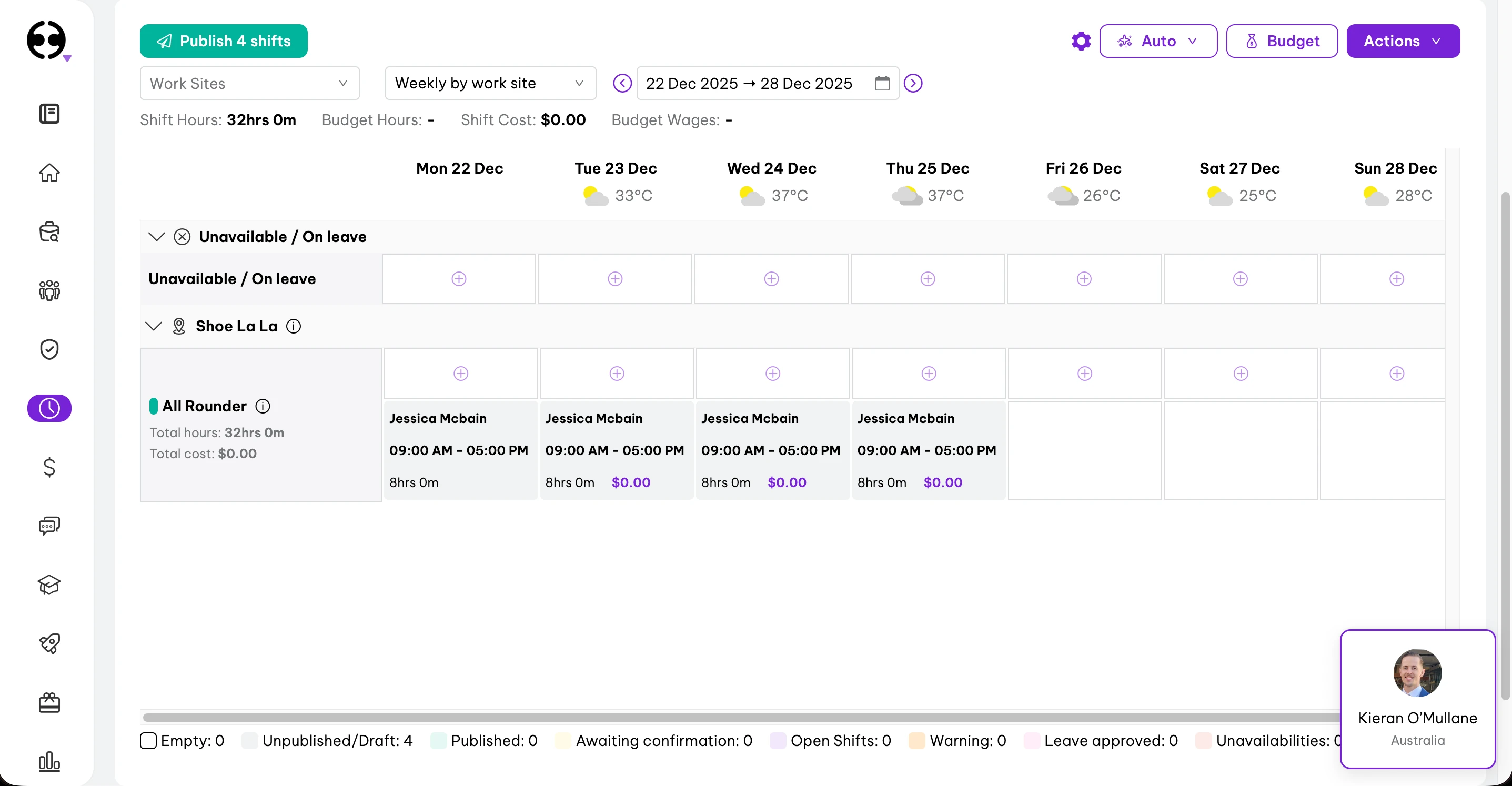
Employment Hero's rostering sits under the "Time" section as "Roster Management". The roster displays by work site with positions listed below, viewable in weekly, 2-weekly, or 4-weekly formats.
We appreciated that the roster interface shows unavailable staff and leave, with options to add leave directly from the roster view. Each shift cell provides a nice breakdown of total time, break duration, and cost — a helpful touch for managers tracking labour costs.
What works well
Adding shifts is straightforward — hit the plus symbol to open a side panel with shift details. The "bulk shift" option lets you repeat shifts across multiple days, which saves time. The roster templates include helpful metadata showing cost, hours, staff count, and original save date, and there's a search function for businesses managing multiple templates.
For basic rostering needs, the core functionality is present and the interface works well enough.
Where it falls short
The rostering module lacks the advanced features we'd expect from dedicated rostering platforms. There's no option to customise views — if you prefer a staff list view rather than position-based view, you're out of luck. We also noticed limited filtering options for specific staff or positions, and no live labour budgeting tool to forecast costs as you build the roster.
For businesses where rostering is a core operational need, these limitations will likely prove frustrating compared to purpose-built rostering software.
Pros & cons
| Pros | Cons |
|---|---|
| Clean roster interface | No staff list view option |
| Template support with metadata | Limited filtering options |
| Bulk shift creation | No live labour budgeting |
| Cost breakdown per shift | No copy roster function |
★ Our verdict
Employment Hero's rostering covers the basics but lacks the advanced features that dedicated rostering platforms offer. The absence of view customisation, advanced filtering, and live budgeting tools limits its usefulness for roster-intensive businesses. As Employment Hero was built HR-first, rostering feels like an add-on rather than a core strength.
Employment Hero time and attendance
Time tracking score: 6.5/10
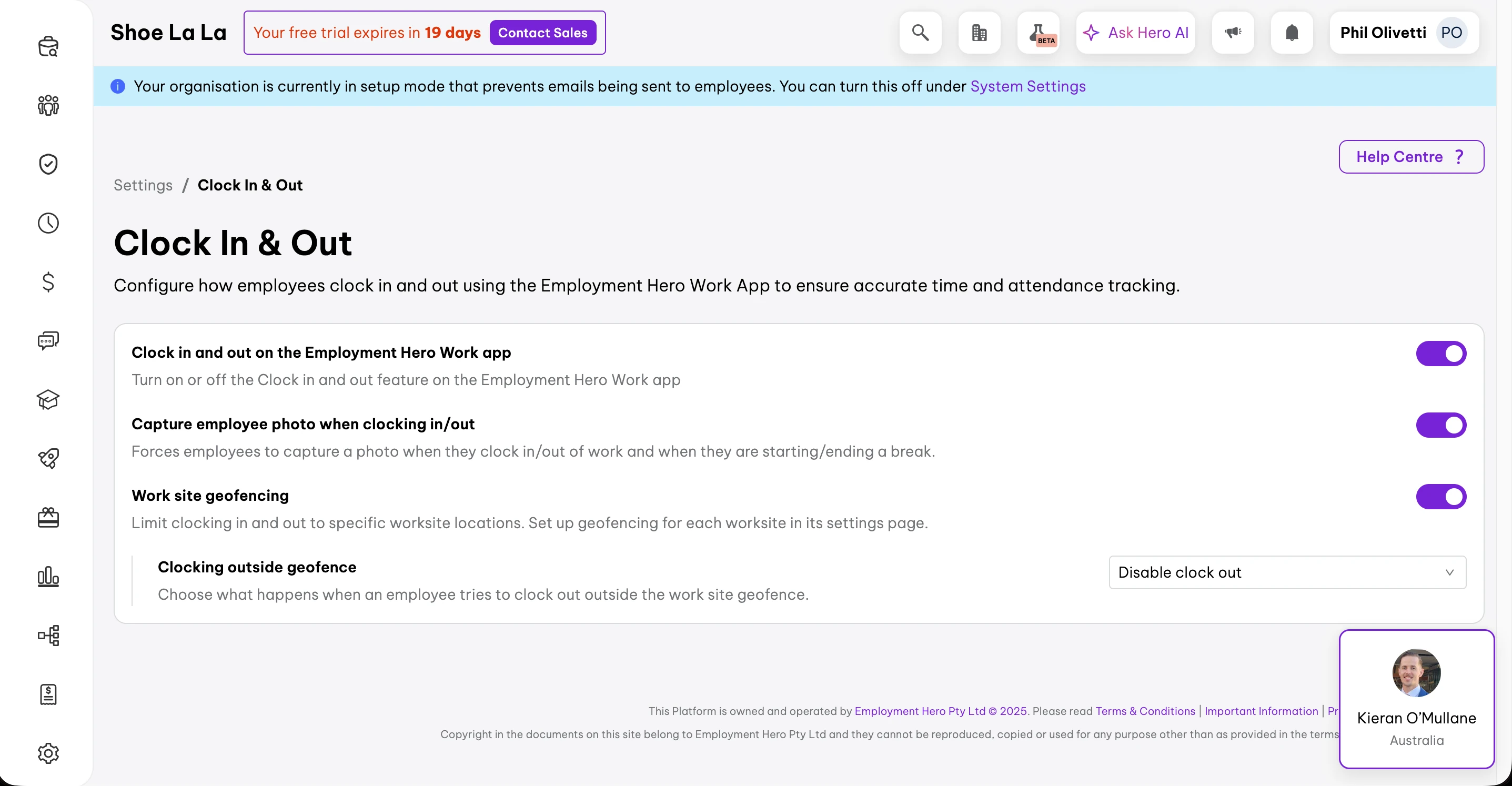
Time and attendance features are enabled through the settings tab. Staff can clock in and out via the Employment Hero Work app, with geo-fence support and optional selfie capture for verification.
What works well
The basic time tracking covers essential needs. The geo-fence feature allows you to set boundaries, and we liked that you can allow clock-ins outside the geo-fence (triggering a timesheet warning for review). Selfie capture on clock in/out adds an extra layer of verification.
Where it falls short
Customisation is limited compared to dedicated time and attendance platforms. There's no option to set a specific pin drop location — a notable gap for businesses at large sites with designated clock-in points. We couldn't find a kiosk-style app option, and you can't set different rules for different sites.
This becomes problematic for businesses with field-based team members or multiple venues needing different attendance rules per location. The feature covers the basics but lacks the advanced settings that complex operations require.
Pros & cons
| Pros | Cons |
|---|---|
| Mobile clock in/out | No pin drop location setting |
| Geo-fence support | No kiosk app option |
| Selfie verification | Same rules for all sites |
| Flexible outside-fence option | Limited customisation |
★ Our verdict
Employment Hero's time tracking handles the basics but lacks the flexibility that operations-focused businesses need. The inability to set pin-drop locations and different site rules limits its usefulness for multi-site or field-based teams. For businesses with straightforward attendance needs, it will work — but don't expect the depth of dedicated time tracking platforms.
Employment Hero payroll
Payroll score: 4.0/10
Employment Hero offers built-in payroll as part of its one-platform approach covering HR, rostering, time tracking, and payroll. For an HR-first platform, having integrated payroll makes sense.
Setup challenges
Unfortunately, the payroll setup experience was the most disappointing part of our review. The "Payroll Start Guide" in the main menu includes tutorial videos for getting started — however, clicking on these videos marks them as complete without actually playing the content.
The help centre provides directions for accessing the pre-built award library, but these options weren't available in the account. Searching for "payroll" was unsuccessful despite having a dedicated payroll section in the platform. Two linked articles were found — one with an unrelated video from 2023, and another with a video that simply doesn't work.
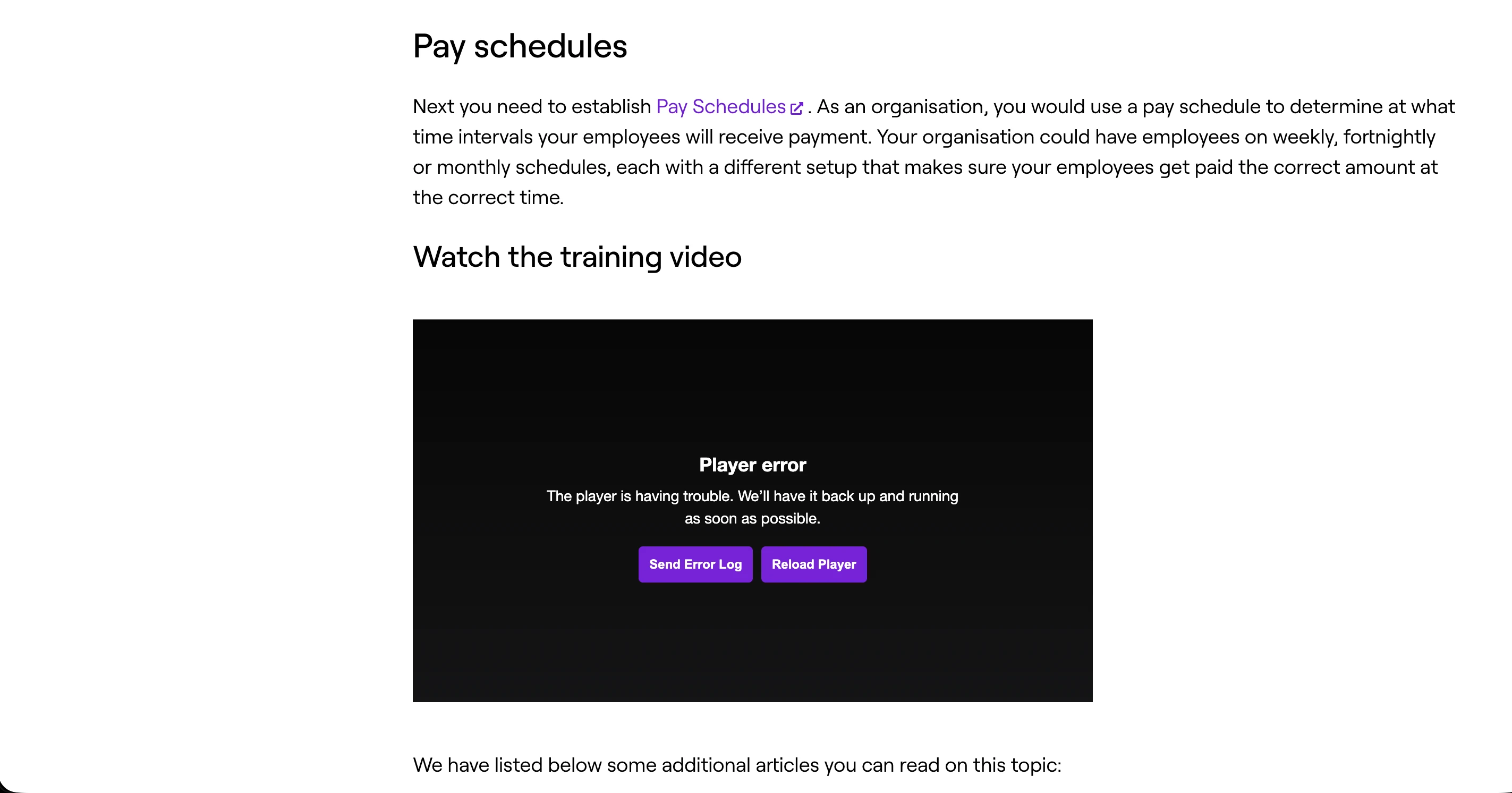
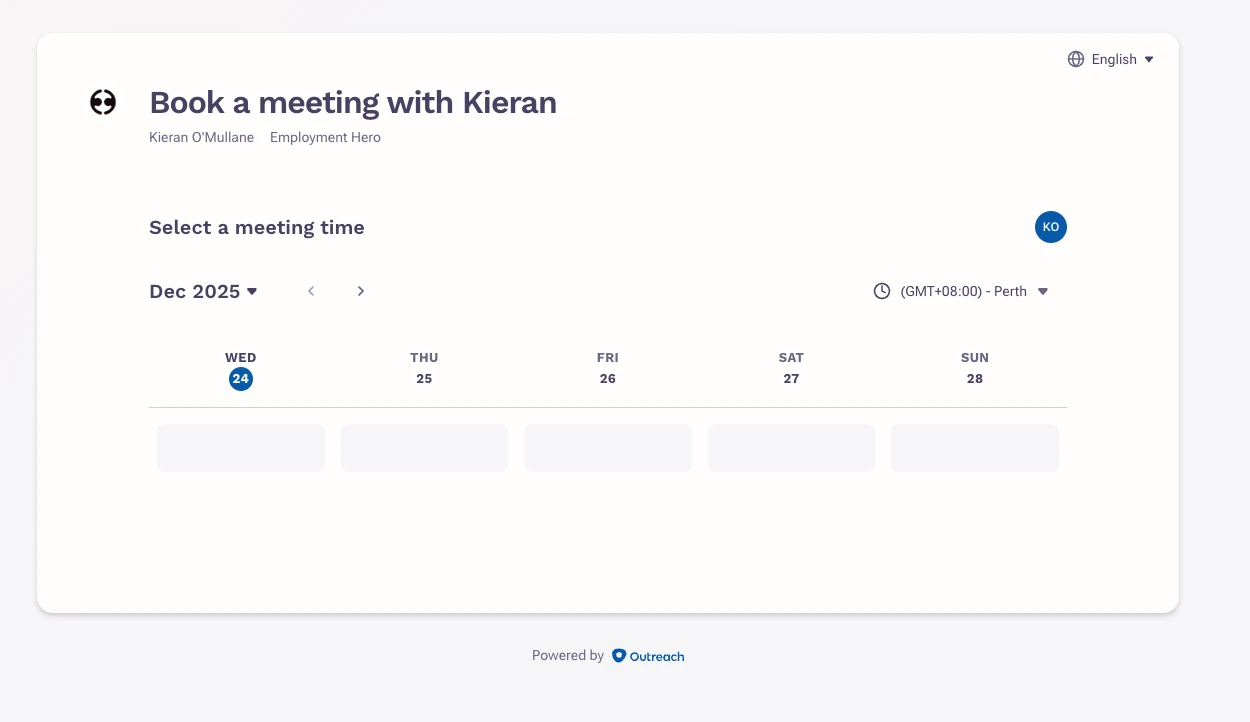
This setup experience was notably challenging. We were unable to find working resources to complete payroll configuration. Attempts to reach support were unsuccessful as phone support required a "Support Pin" with unclear setup instructions, and online booking showed no available slots until January 2026.
What this means for users
We couldn't fully evaluate Employment Hero's payroll functionality because we couldn't complete setup. Businesses considering Employment Hero for payroll should request a live demonstration and ensure adequate support is available during implementation.
Pros & cons
| Pros | Cons |
|---|---|
| Built-in payroll (one platform) | Tutorial videos don't play |
| Australian award support | Outdated documentation |
| Couldn't complete setup | |
| Support unavailable |
★ Our verdict
We were unable to fully test Employment Hero's payroll due to setup challenges. Outdated documentation, non-functional videos, and limited support availability made configuration difficult during our review period. Businesses considering Employment Hero for payroll should request a live demonstration and confirm support availability during implementation.
Employment Hero communication tools
Communication score: 5.0/10
We looked closely at Employment Hero's communication tools and found they don't include a dedicated messaging feature for company-wide updates or direct staff messages in the traditional sense.
What's available
Employment Hero provides bulk email messaging for recruitment updates, bulk document issuing, onboarding invites, and customised pay run messages. Features include Bulk Email Candidates, Bulk Issue Documents, and Company Feed posts — though availability depends on your plan and access level.
Limitations
For quick team announcements or one-to-one communication, you'll likely still need external tools like Slack or email. Employment Hero's communication is more administrative than conversational — useful for HR processes but not a replacement for day-to-day team messaging.
Pros & cons
| Pros | Cons |
|---|---|
| Company Feed for announcements | No direct messaging |
| Bulk document distribution | Limited real-time chat |
| Onboarding invites | External tools still needed |
★ Our verdict
Employment Hero's communication tools are administrative rather than operational. If you need quick team messaging or direct one-to-one chat, you'll need additional software. The Company Feed and bulk messaging work for announcements and HR communications, but won't replace dedicated team messaging platforms.
Employment Hero mobile app
Mobile apps score: 6.5/10
We tested the mobile app, called "Employment Hero Work", which covers Work, Money, and Perks sections. The Work section includes timesheets, shift swaps, leave requests, and document access.
What works well
Employees can access key HR functions from their phone including viewing payslips, requesting leave, and accessing company documents. We liked that the app stores certifications and qualifications, making compliance verification straightforward.
Where it falls short
The interface feels cluttered with many features crammed into limited menus. We found the lifestyle features like phone plan offers (Money & Perks sections) distracting from core workforce management. Navigation between HR, timesheets, and rostering requires more taps than we'd like.
Pros & cons
| Pros | Cons |
|---|---|
| Payslip access | Cluttered interface |
| Leave requests | Lifestyle features distract |
| Document storage | Multi-tap navigation |
★ Our verdict
The Employment Hero Work app covers essential employee self-service functions but tries to do too much. The Money and Perks sections feel out of place for workforce management. For core functions like viewing payslips and requesting leave, it works well enough.
Employment Hero HR tools
HR tools score: 9.0/10
HR is where Employment Hero truly excels, and it's clear this is the platform's core strength. From employee profiles to compliance tracking, document management to performance reviews — the HR suite is genuinely comprehensive.

What works well
Employee profiles are detailed, with tabs for Employment records, Pay & compensation, Documents, and Performance. We were particularly impressed by the template library, which is extensive and covers contracts, policies, and compliance documents relevant to Australian businesses. Onboarding workflows can be automated with document signing and checklist tracking — a real time-saver for HR teams.
Key HR features
- Comprehensive employee profiles with document storage
- Extensive template library for Australian compliance
- Automated onboarding workflows with e-signatures
- Leave management with accrual tracking
- Performance review tools (higher plans)
Pros & cons
| Pros | Cons |
|---|---|
| Comprehensive HR suite | Some features need higher plans |
| Australian compliance templates | Learning curve for full use |
| Detailed employee records | Can be overwhelming |
★ Our verdict
Employment Hero's HR tools are its standout feature. For businesses prioritising HR compliance, document management, and employee lifecycle management, this is where the platform delivers real value. The depth of features justifies the positioning as an HR-first platform.
Employment Hero vs RosterElf: HR modules compared
Both cover core HR. They differ on what surrounds it — Employment Hero adds native payroll and hiring, RosterElf adds rostering and automatic award interpretation on every plan.
| HR capability | Employment Hero | RosterElf |
|---|---|---|
| Employee records & documents | Yes | Yes — digital HR records |
| Onboarding | Yes | Yes — employee onboarding |
| Offboarding | Yes | Yes — offboarding |
| Employment contracts | Yes | Yes — digital contracts |
| Policies & acknowledgements | Yes | Yes — policy management |
| Licences & certifications | Yes | Yes — with expiry alerts |
| Leave management | Yes | Yes — on every plan, including Core |
| Employee training | Yes | Yes — employee training |
| Culture & engagement surveys | Yes | Yes — culture surveys |
| Modern award interpretation | Supported, manual configuration | Automatic — built-in award interpretation |
| Rostering & scheduling | Available in the platform | Included on every plan — rostering software |
| Time & attendance | Yes | Yes — on every plan |
| Payroll | Native payroll | Integration, not native — Xero, MYOB and others |
| Performance reviews | Yes | Yes |
| Hiring / applicant tracking | Yes | Early access |
Employment Hero analytics and reporting
Reporting score: 7.5/10
The reporting section is well organised into categories: People, Compliance, Time, and Development. We found the interface clean, with report cards showing brief descriptions of what each report covers.
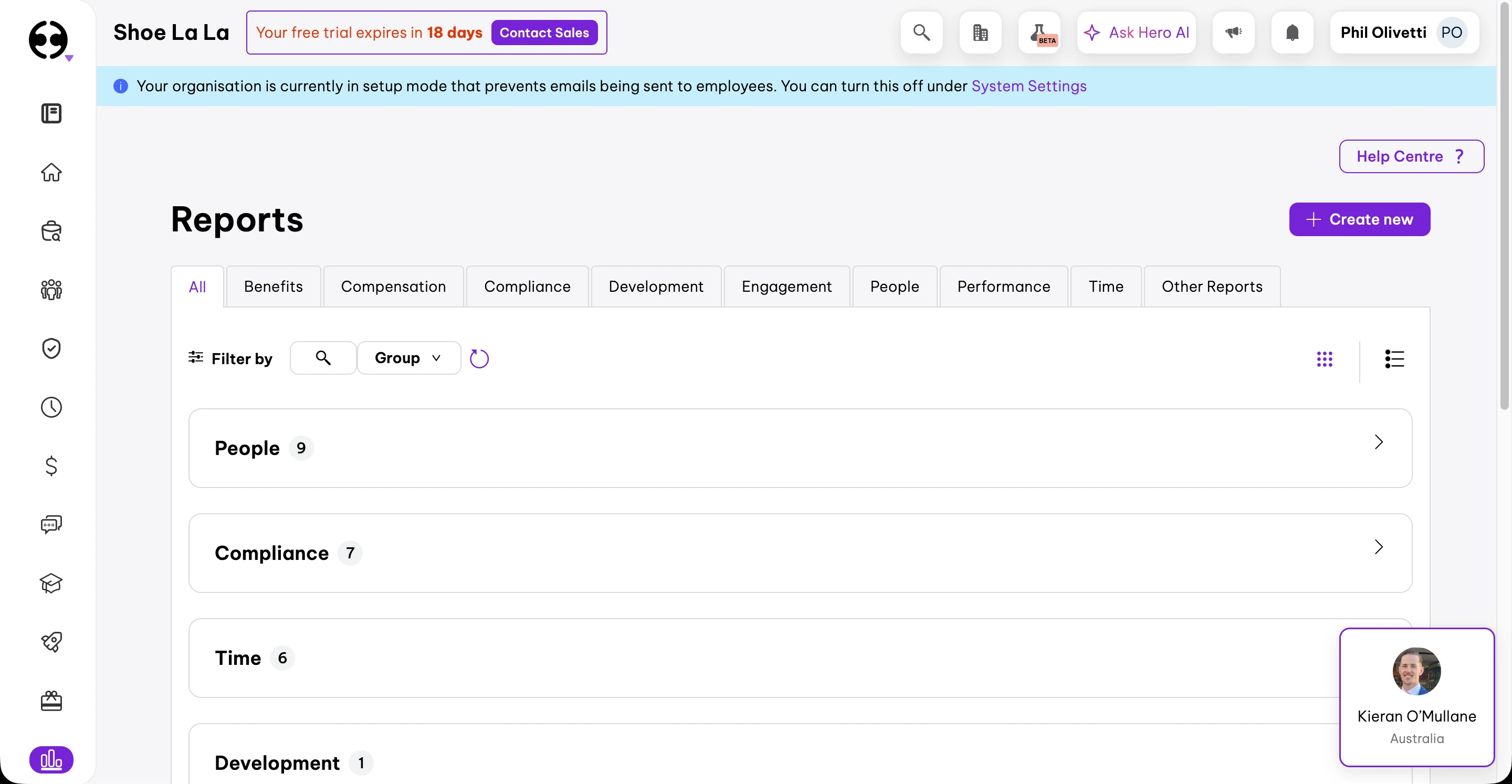
Available reports
- People: Headcount, turnover, demographics, tenure
- Compliance: Policy acknowledgments, document tracking
- Time: Attendance, leave balances, timesheets
- Development: Training completion, performance metrics
Pros & cons
| Pros | Cons |
|---|---|
| Well-organised categories | Limited customisation |
| HR-focused metrics | No labour cost forecasting |
| Compliance tracking | Export options limited |
★ Our verdict
Employment Hero's reporting covers HR essentials well but lacks the operational depth that rostering-focused businesses need. You won't find real-time labour cost analysis or roster efficiency metrics. For HR compliance and people analytics, it delivers value.
Employment Hero use cases
Employment Hero works best for certain business profiles. Based on our testing and user feedback, here's where the platform fits:
Best suited for
- Medium to large businesses with complex HR requirements
- Companies prioritising HR compliance over rostering
- Businesses with dedicated HR staff to manage the platform
- AEST-based operations (matching support hours)
Less suitable for
- Small businesses focused on rostering and scheduling
- Businesses needing advanced roster filtering and budgeting
- Western Australian businesses (AEST support only)
- Teams wanting quick, intuitive payroll setup
Employment Hero security and privacy
Security score: 8.5/10
Security is an area where Employment Hero performs well. As an Australian company handling sensitive HR and payroll data, they've invested in enterprise-grade credentials, achieving SOC 2 Type II compliance in October 2025.
| Feature | Employment Hero |
|---|---|
| Data encryption (at rest + in transit) | Yes |
| Role-based access controls | Yes |
| Two-factor authentication (2FA) | Yes |
| SSO (Single Sign-On) | Yes |
| Australian data hosting | Yes |
| SOC 2 Type II certified | Yes (October 2025) |
| Trust Centre | Yes (trust.employmenthero.com) |
| Audit logs | Yes |
The SOC 2 audit evaluates controls across five Trust Service Principles: security (safeguarding systems from unauthorized access), availability (ensuring uptime), processing integrity (accurate data processing), confidentiality (protecting sensitive information), and privacy (regulatory compliance).
Pros & cons
| Pros | Cons |
|---|---|
| SOC 2 Type II certified | Security details require Trust Centre access |
| Australian data hosting | |
| SSO available | |
| Public Trust Centre |
★ Verdict
Security is one of Employment Hero's strengths. The SOC 2 Type II certification demonstrates enterprise-grade security controls, and Australian data hosting is important for local compliance. The public Trust Centre shows transparency about their security posture.
Employment Hero customer support
Support score: 4.0/10
Customer support was the most disappointing aspect of our Employment Hero review.
Support experience
Two days into the trial, we received no automated onboarding emails or welcome communication. Attempting to call the advertised number (1300 084 847) prompted for a "Support Pin" with unclear instructions to set it up in "hr" — not helpful guidance.
Booking support through the onboarding option showed no available slots until January 2026. Support is only offered during AEST hours — a significant limitation for Western Australian businesses.
Documentation quality
Help articles aren't formatted well. We found outdated instructions, broken in-app videos, and videos that simply don't play or open externally. Some features link to a help button that opens the entire help centre rather than the relevant article — requiring users to search again for their specific question.
Pros & cons
| Pros | Cons |
|---|---|
| Australian-based team | No trial onboarding emails |
| Phone support available | AEST hours only |
| Broken documentation | |
| Videos don't work |
★ Our verdict
If you need support, Employment Hero may leave you frustrated. Broken documentation, non-functional videos, AEST-only hours, and unclear support access create barriers for users. Businesses should ensure they have adequate support arrangements before committing, particularly during implementation.
Final verdict
Overall score: 6.2/10
Employment Hero is a platform of contrasts. The HR tools genuinely impressed us — comprehensive, well-organised, and suitable for businesses with complex compliance needs. The template library alone justifies consideration for HR-focused organisations.
However, the operational workforce management features tell a different story. We found rostering lacking advanced features, time tracking customisation limited, and payroll setup frustrating due to broken documentation. Support availability is a genuine concern.
Choose Employment Hero if: HR compliance is your primary concern, you have dedicated HR staff, and you're based in AEST timezone with resources for potentially challenging implementation.
Look elsewhere if: Rostering and scheduling are your core needs, you want quick payroll setup, you need WA-friendly support hours, or you're a smaller team without dedicated HR resources.
★ Bottom line
Employment Hero excels at HR but struggles with operational workforce management. For businesses where rostering, time tracking, and payroll are primary concerns, dedicated workforce management platforms will likely serve you better. For HR-focused organisations with the resources to navigate implementation challenges, the comprehensive HR suite may be worth the trade-offs.
Who is Employment Hero best for?
Best suited for
- Medium-large businesses (50+ employees)
- HR-focused organisations
- Companies with dedicated HR staff
- Businesses prioritising compliance
- AEST-based operations
Less suited for
- Small teams under 20 staff
- Rostering-focused operations
- Multi-site with complex attendance rules
- WA-based businesses (support hours)
- Teams wanting quick payroll setup
 4.8+ stars
 See what RosterElf customers say
Verified reviews from 30,000+ Australian workplaces on Google, Xero App Store and G2.
Read customer reviewsLooking for an Employment Hero alternative?
Compare Employment Hero with other rostering and HR platforms for Australian businesses.
View all software reviewsReview methodology
Our review methodology
Learn how we evaluate workforce management platforms through hands-on testing and verified user feedback.
Feature comparisons are checked against each vendor's public documentation at the time of writing. Assessments of usability, fit and value are our reviewers' opinions, not statements of fact, and products change often. We'd encourage you to trial both platforms and judge for yourself. Spotted something out of date? Tell us and we'll correct it .
Employment Hero vs RosterElf, capability by capability
Assessed on 43 capabilities across 7 areas. RosterElf is a rostering-first Australian product; Employment Hero is included here because the two are frequently shortlisted together.
| Capability area | RosterElf | Employment Hero |
|---|---|---|
| Rostering & scheduling | 8/8 | 7/8 |
| Time & attendance | 7/7 | 4/7 |
| Payroll & award interpretation | 7/7 | 7/7 |
| Team communication | 5/5 | 4/5 |
| Mobile apps | 4/5 | 5/5 |
| HR & compliance | 6/6 | 5/6 |
| Reporting & analytics | 5/5 | 5/5 |
In RosterElf, not Employment Hero
- Unfilled shift alerts— Rostering & scheduling
- Tablet kiosk mode— Time & attendance
- Device restrictions— Time & attendance
- Unscheduled shift detection— Time & attendance
- Read receipts— Team communication
- No payroll lock-in— HR & compliance
In Employment Hero, not RosterElf
- Offline clock-in— Mobile apps
Assessments are maintained in a shared data layer and applied identically across every review and comparison on this site. Feature sets change — check each vendor's own documentation before deciding.
Real support from people who understand your business
At RosterElf, support isn't a ticket system — it's part of the product. Our Australian-based team helps you set up correctly, understand award rules, and stay compliant as your business changes. No scripts. No offshore handoffs. Just real help when you need it.
-
Guided setup and onboarding
-
Award and payroll questions answered
-
Ongoing help as your team grows

Employment Hero FAQ
- Employment Hero prices HR in four tiers: HR Essentials at $10 per employee per month and HR Engage at $14, with HR Elite and Employment Unlimited quote-only. A 10-user minimum applies to every plan. Rostering and time and attendance are not included in any HR tier — they are a $4 per employee/month add-on — and payroll is bundled only in Employment Unlimited. Figures checked 1 September 2026.
- Yes, Employment Hero offers a free trial to test the platform. However, some features like recruitment may not be available during the trial period, limiting your ability to fully evaluate the platform before committing.
- Employment Hero can be expensive for small businesses, particularly when you need the full suite of features. The platform is positioned more for medium to large businesses with complex HR requirements. Smaller businesses focused primarily on rostering and time tracking may find dedicated rostering platforms more cost-effective.
- The core is HR: employee records, onboarding, contracts, document storage, leave and an employee self-service app. Rostering, time and attendance, performance and learning sit alongside it, and payroll is included only in the top Employment Unlimited tier. It is the broadest feature set of the platforms we review — the trade-off is that rostering is one module among many rather than the product itself.
- Employment Hero plans typically include core HR features like employee records, leave management, and document storage. Rostering, time tracking, payroll, and advanced features are often additional modules. The exact inclusions vary by plan tier, so check current offerings directly with Employment Hero.