
100% free roster tool (no signup required)
Free rostering software you can use right now. Build and manage staff rosters online with our free roster app — no login, no limits, no cost.
Last verified:
How to use the free roster tool
Build a staff roster, calculate hours and costs, and share it with your team — no login required. Follow these steps to create your first roster in minutes.
Set up positions
Before adding staff or shifts, set up your positions first. This makes building your roster much faster.
- 1 Click the Positions tab on the left side
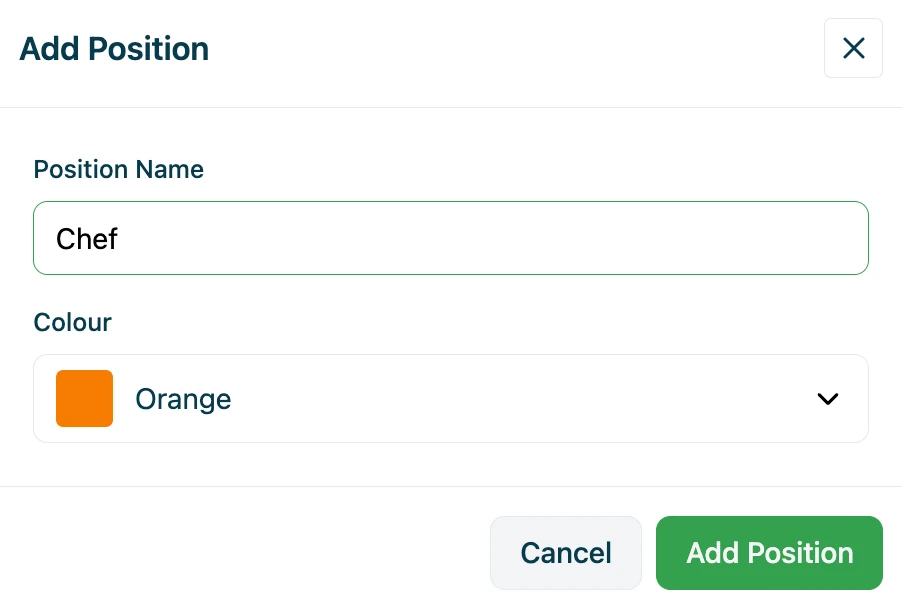
- 2 Click Add Position
- 3 Enter a position name (e.g. Manager, Chef, Barista)
- 4 Choose a colour — this helps identify shifts on the roster
Tip: Delete any dummy positions that aren't relevant to your business.
Add your staff
Add your team members with just their names — that's all that's required.
- 1 Click the Staff tab at the top
- 2 Delete any dummy employees if not needed
- 3 Click Add Staff and enter first and last name
Optional: Add hourly rates
Enter rates for weekdays, Saturday, Sunday, and public holidays. The tool will automatically calculate shift costs, daily totals, and weekly labour costs.
Select the week to roster
Navigate to the week you want to schedule before adding shifts.
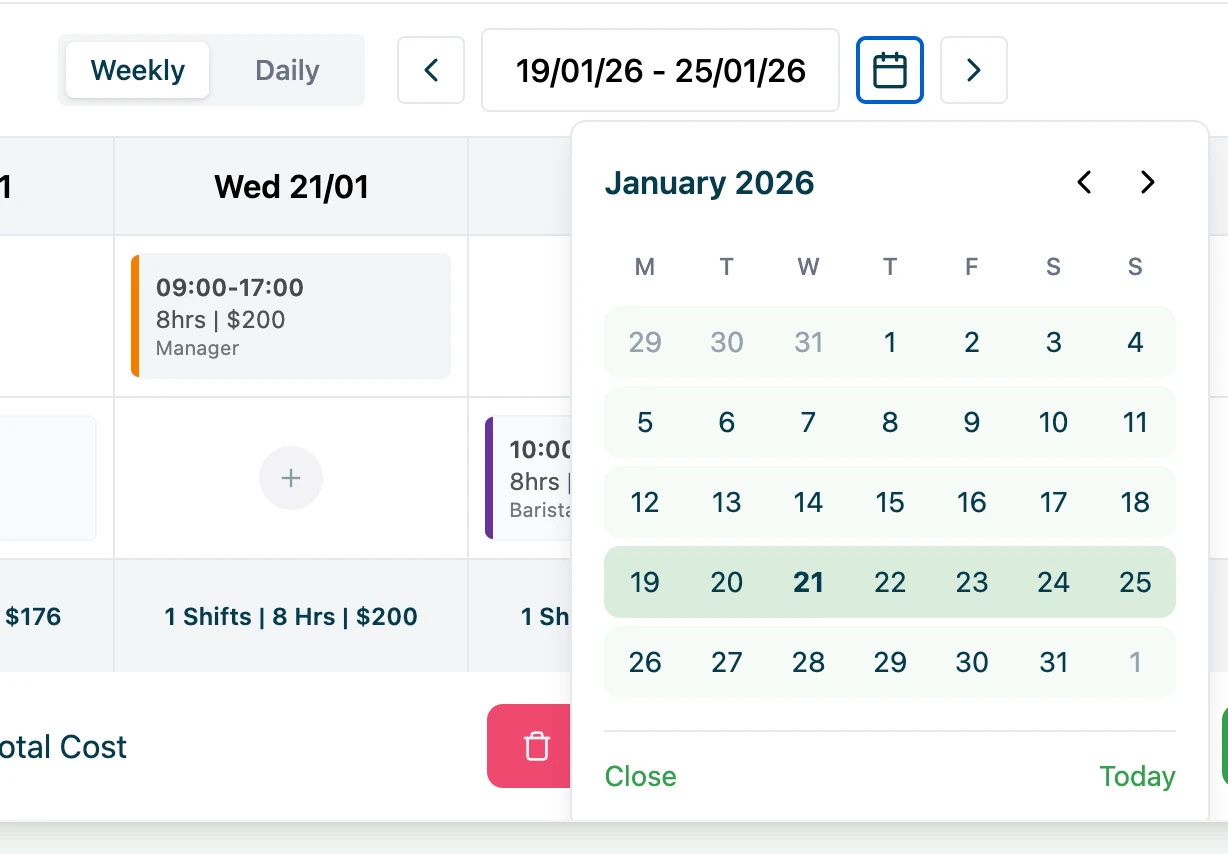
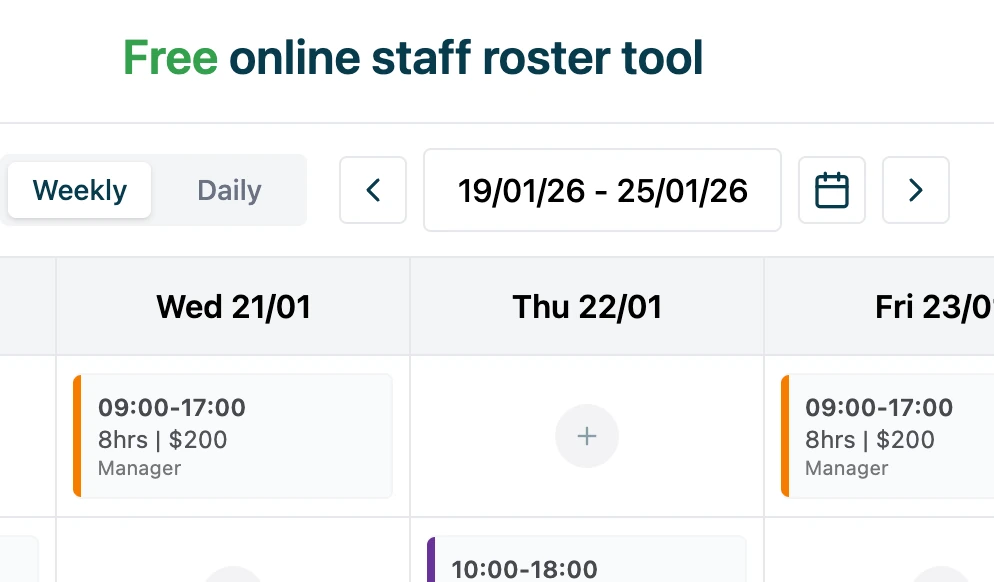
- Use the left/right arrows to move between weeks
- Or click the calendar icon to jump to a specific date
Build your roster
Create shifts using two different views. Switch between them anytime.
Weekly view — best for planning the whole week
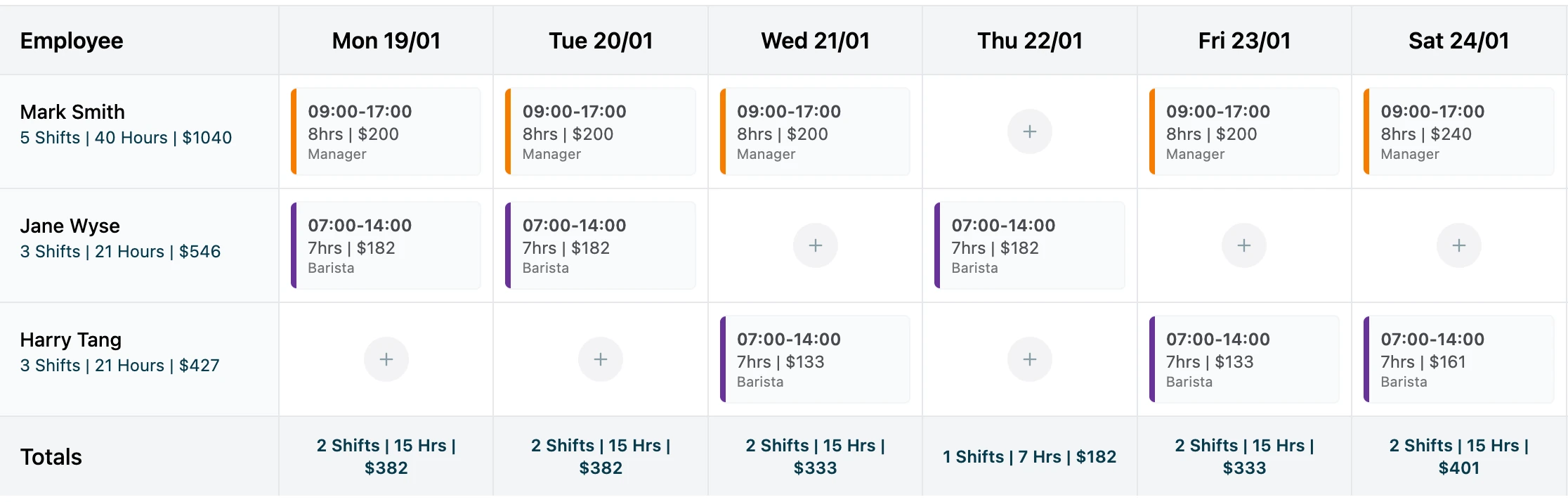
The weekly view gives you a traditional roster layout.
To add a shift:
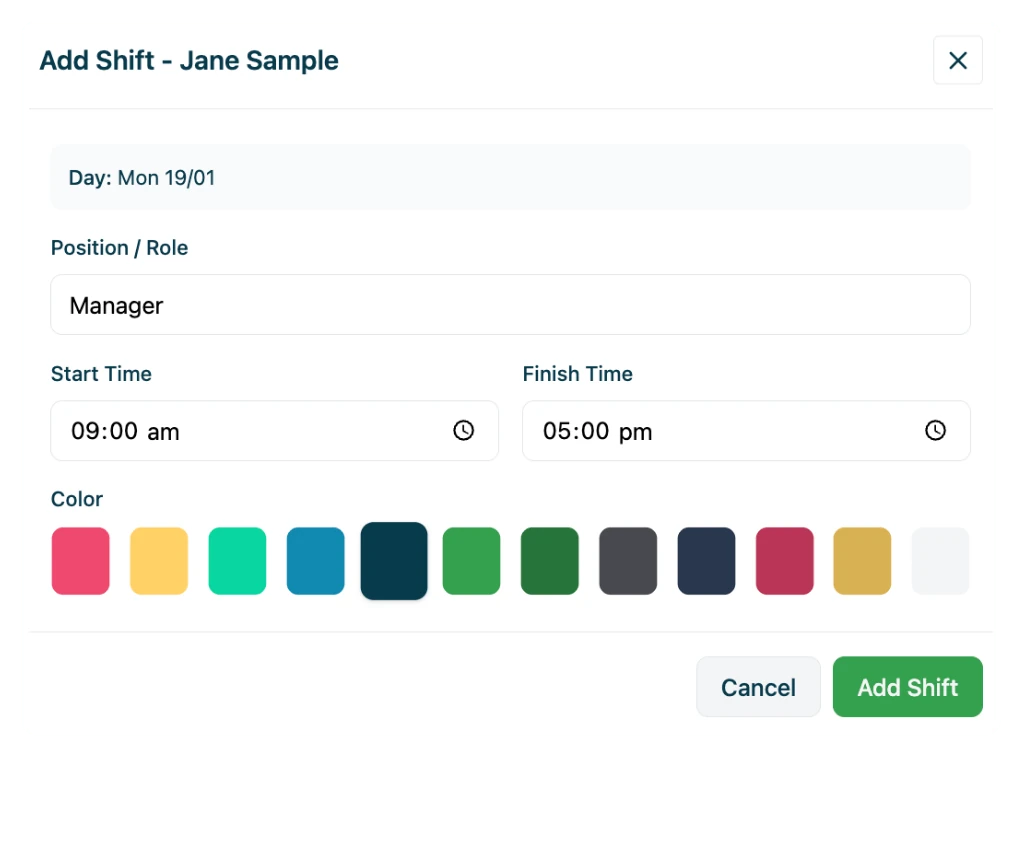
- 1.Click the + (plus) icon next to an employee
- 2.Enter date, position, start/end times, and unpaid break
- 3.Click Add Shift — hours and cost calculate automatically
- Drag and drop shifts between days
- Move shifts between employees
- Totals update instantly as you go
Daily view — best for visual coverage
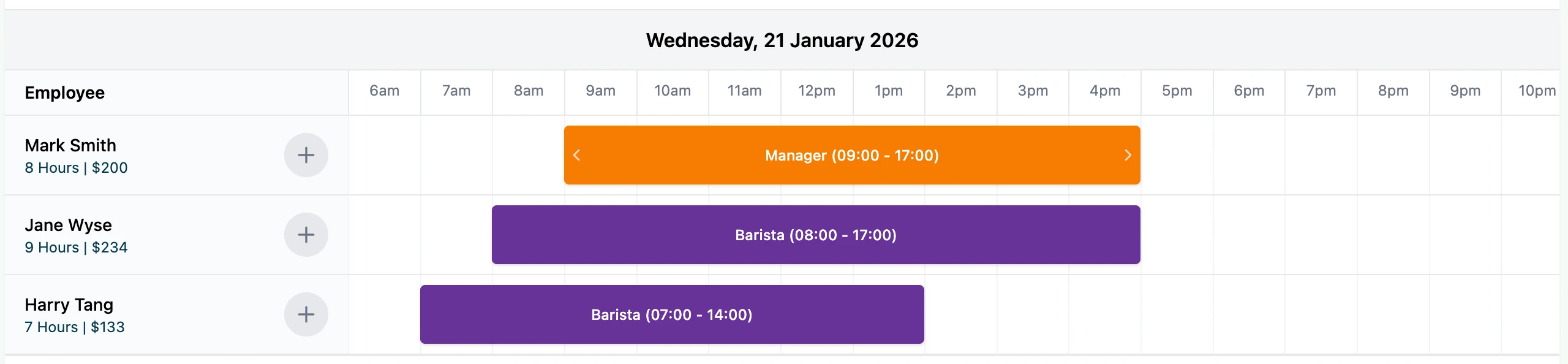
The daily view is a Gantt-style timeline showing who is working and when.
- Add shifts directly on the timeline
- Drag start and finish times visually
- Quickly spot coverage gaps or overlaps
Pro tip: Many users plan the week in weekly view, then fine-tune timings in daily view.
Review hours, costs & coverage
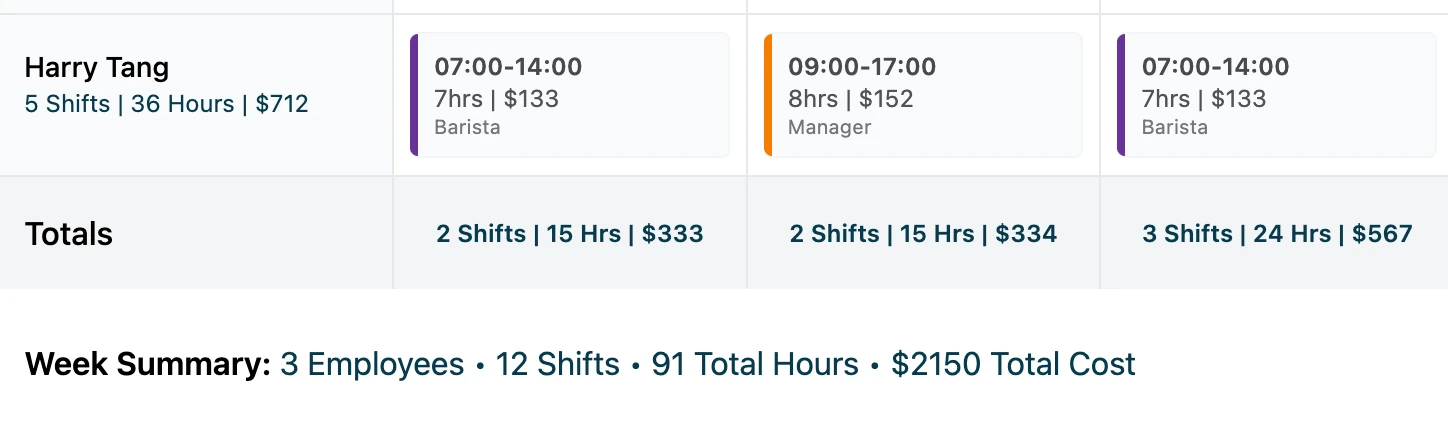
As you build your roster, the tool automatically calculates and displays:
- Hours per shift and total hours per employee
- Total hours per day
- Estimated labour cost per shift, day, and week
Move shifts between employees to balance workloads, avoid over-rostering, and share shifts fairly.
Download and share your roster
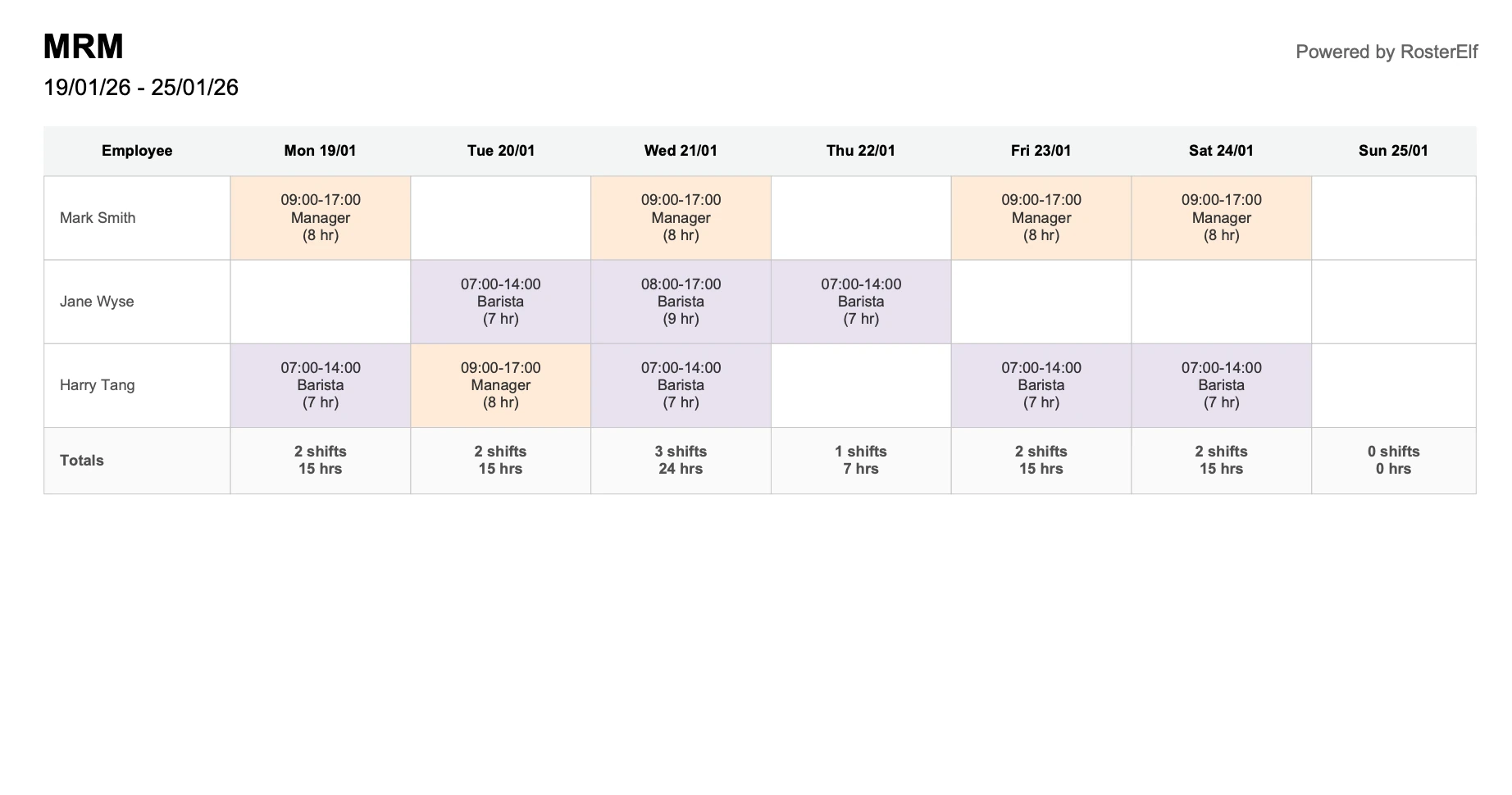
Once you're happy with your roster, share it with your team:
Download CSV
Great for spreadsheets or payroll prep
Download PDF
Perfect for printing or emailing
Share link
Generate a URL to send directly to staff
Extra tips
Full screen mode
Click Go Full Screen to expand the roster — especially helpful on smaller screens.
Auto-save in browser
Your roster saves automatically. Bookmark this page to return anytime — just don't clear your browser cache.
Start fresh
Use the Delete All Shifts button if you want to clear everything and start a new roster from scratch.
Everything included — 100% free
Need more than a free roster tool?
Upgrade to RosterElf for automated rostering, award compliance, time tracking, and seamless payroll integration.
Free Roster Tool
Perfect for simple weekly scheduling
- Drag-and-drop roster builder
- Unlimited staff & shifts
- Print & share rosters
- No signup required
- Award interpretation & compliance
- Staff availability tracking
- Time & attendance (GPS clock-in)
- Payroll export (Xero & MYOB)
Full Suite
Rostering, payroll & HR in one
per user per month
every active employee, logged in or not
+ GST, billed annually
Payroll & HR tools in one system
- Smart rostering & availability
- Time & attendance (GPS & photo)
- Award interpretation & penalties
- Payroll export (Xero & MYOB)
- HR Hub with employee profiles
- Digital onboarding & contracts
- Policies, certificates & compliance tracking
- Payroll sync with employee records
- Workwise AI compliance assistant
- Central document storage & management
- Leave management with approvals
No credit card required · 15-day free trial
How your roster is saved (no login required)
This free roster tool uses your browser to save your roster automatically.
- No account or email required
- Close the page and come back later
- Bookmark this page to return to your saved roster
Important: Clearing your browser cache or using a different device will start a new roster.
Downloadable roster templates
Prefer working in Excel or Google Sheets? Download our free roster templates.
How this compares to other free rostering apps
See how our free roster app stacks up against popular rostering software alternatives.
| Feature | This free toolRecommended | ScheduleBee | Findmyshift | Google Sheets |
|---|---|---|---|---|
| No signup required | ||||
| Unlimited staff | Limited (5) | Limited (5) | ||
| Mobile-friendly | Limited | |||
| Export to PDF/CSV | ||||
| Australia-focused | ||||
| Award compliance ready* | Upgrade |
*Award compliance with automatic penalty rates and Fair Work integration available with RosterElf rostering software.
Create staff rosters online for free
This free rostering software lets Australian businesses build a complete weekly staff schedule without downloading anything or creating an account. It works as a free roster app right in your browser on any device.
Simply add your employees, drag shifts into place, and share your roster with your team. This free roster software is designed for small Australian teams who need a quick, no-fuss way to organise their weekly schedule.
Whether you're managing a cafe, retail shop, or small office in Australia, this free rostering app gets the job done. Follow the step-by-step guide above to create your first roster in minutes.
What is a free roster tool?
An online scheduling tool to plan employee shifts without cost — no login, no complexity.
Add employees
Enter names and roles
Assign shifts
Drag and drop to schedule
Share roster
Print or send to team
Learn more about free roster tools
A free roster tool is an online scheduling tool used to plan employee shifts without cost. It helps you create and manage staff work schedules easily. Unlike complex workforce management systems, a free scheduling tool focuses on the essentials: adding employees, assigning shifts, and sharing the finished roster with your team.
You might hear "roster" and "schedule" used interchangeably, but there's a subtle difference. A roster typically refers to a list of staff and their assigned shifts, while a schedule can include broader planning elements like tasks and deadlines. For most small businesses, what you need is a simple roster that shows who's working and when.
A free employee roster tool is ideal when you have a small team with straightforward scheduling needs. If you don't require payroll integration, award interpretation, or compliance tracking, a free tool can handle your rostering without unnecessary complexity.
Who is this free rostering software for?
This free rostering software works best for Australian teams who need simple, fast scheduling without the overhead of complex software. Learn more about fair and cost-effective rostering for Australian businesses.
Small businesses
Teams of 2–15 staff who need a quick way to organise weekly shifts.
Cafes & hospitality
Restaurants, cafes, and bars managing rotating front-of-house and kitchen staff.
Retail teams
Shops and boutiques scheduling floor staff across opening hours.
Startups
New businesses that need to roster staff before investing in full HR systems.
Community groups
Volunteer organisations and NFPs coordinating shifts without a budget.
Side projects
Market stalls, pop-ups, and casual ventures needing occasional rosters.
Industries that use free rostering software
This free rostering software works for Australian businesses across industries. Here's how different teams use it.
Hospitality
Hotels, pubs, and event venues managing rotating shifts across front desk, housekeeping, and bar staff. Balance irregular hours and weekend peaks.
See hospitality solutionsRetail
Schedule floor staff around trading hours and peak shopping periods. Ensure coverage during busy times while keeping hours fair across the team.
See retail solutionsCafes & restaurants
Coordinate kitchen and front-of-house teams around service rushes. Handle split shifts and match staffing to reservations and walk-ins.
See cafe solutionsTrades & services
Assign technicians and contractors to job sites across the week. Account for travel time and job duration with a clear weekly view.
See trades solutionsNFPs & community
Coordinate volunteer shifts without software costs. Professional rostering at zero cost for op-shops, events, and community programs.
See NFP solutionsOther industries
Healthcare, fitness, childcare, and more.
View all industriesWorks like a free roster app — in your browser
This free rostering app runs entirely in your web browser on any device. No app download required — just open and start scheduling.
Mobile-friendly
Use this free roster app on your phone, tablet, or desktop. The responsive design adapts to any screen size.
Instant access
No app store download, no signup, no waiting. This free scheduling app is ready to use immediately.
Share anywhere
Export to PDF, download as CSV, or share a link. Your team can view rosters on any device.
Looking for a dedicated mobile app? This free roster app works great in your browser. For push notifications, shift swaps, and team messaging, try RosterElf's mobile app for iOS and Android.
What types of rosters can you create?
This free roster tool handles all common roster types for Australian businesses. Build any schedule you need.
Weekly staff rosters
The most common roster type. Plan Monday to Sunday with daily shift assignments for your team.
Shift-based rosters
Create morning, afternoon, evening, or overnight shifts. Perfect for hospitality and retail.
Employee rosters for small teams
Ideal for teams of 2–20 staff. Add unlimited employees and positions at no cost.
Hospitality & retail rosters
Handle weekend peaks, public holidays, and variable trading hours with flexible shift times.
Casual, part-time, and full-time staff rosters
Mix different employment types on the same roster. Set individual hourly rates for accurate cost calculations across weekdays, Saturdays, Sundays, and public holidays.
Free roster tool vs roster templates
Not sure which option suits your needs? Here's when to use each.
Use this free roster tool if you want to:
- Build rosters online without downloading anything
- Edit shifts quickly with drag-and-drop
- See automatic hour and cost calculations
- Share a link or export to PDF/CSV
Use roster templates if you want to:
- Download an Excel or Google Sheets file
- Start with a fixed, printable layout
- Work offline without internet
- Customise formulas in a spreadsheet
Common roster examples you can build
Here are real-world roster examples Australian businesses create with this free tool.
Weekly café roster
A small café with 6 staff members creating a weekly roster with morning and afternoon shifts. Baristas, kitchen staff, and a manager across 7 days.
- Split shifts for busy periods
- Weekend penalty rate tracking
Retail shift roster
A boutique retail store scheduling 8 casual and part-time staff across trading hours. Coverage for weekends and late-night shopping.
- Multiple positions (floor, register)
- Fair hour distribution
Casual staff roster
A small business with 12 casual employees creating weekly rosters based on varying availability. Flexible shifts across different roles.
- Casual loading cost estimates
- Easy shift swaps
When free rostering software may not be enough
This free roster app is ideal for simple scheduling. But as your team grows, you may need more than a free rostering system.
Larger teams (15+ staff)
Managing availability, leave, and multiple locations
Ongoing scheduling
Recurring rosters, templates, and historical records
Time tracking
GPS clock-in, timesheets, and attendance records
Award compliance
Automatic penalty rates, overtime, and Fair Work rules
If you need more advanced rostering with award compliance, time tracking, and payroll integration, explore RosterElf rostering software.
Free rostering software built for Australian businesses
This free rostering app is designed specifically for Australian workplaces and scheduling needs. Use it as your free roster software — no overseas platforms, no hidden costs.
Monday start week
Australian standard Mon–Sun weekly view
Local timezone
AEST/AWST automatic detection
AUD cost estimates
Enter rates in Australian dollars
Weekend rates
Separate Sat/Sun/PH rate fields
For automatic Australian award interpretation with Fair Work penalty rates, explore RosterElf rostering software.
Ready for smarter rostering?
Join 30,000+ Australian workplaces using RosterElf to save hours on scheduling, automate award interpretation, and keep their team connected.
See labour costs before the roster goes out
RosterElf applies award rates, loadings and penalties as you build the roster, so cost is visible before you publish rather than after payroll.
How many staff do you roster?
Related resources
Explore guides, insights, and templates to help you get more from this tool.
Explore more free tools
Discover other calculators and AI tools to help manage your workforce.
AI employment contract generator
Generate draft employment contracts for casual, part-time, or full-time employees using AI.
AI roster generator
Generate draft staff rosters using AI based on your team size and shift requirements.
Modern award pay rate estimates
Get indicative pay rate estimates for common Australian awards. Verify with Fair Work.
Casual vs part-time calculator
Compare the estimated cost of casual vs part-time employment including loadings.
Payroll cost calculator
Estimate employee costs including super, leave, and casual loading.
Free invoice generator
Create and download professional tax invoices with GST and ABN details — no signup required.
Overtime & penalty rate calculator
Estimate shift costs including weekend, public holiday, and overtime rates.
Roster cost forecast calculator
Forecast the estimated cost of your staff roster before publishing shifts.
Free rostering FAQs
-
Yes. This free scheduling app allows you to create and manage staff rosters online with no signup, limits, or expiry. If you are comparing paid options, see our ranking of the best employee scheduling software in Australia.
-
Rostering and staff scheduling are often used interchangeably. Scheduling software focuses on assigning shifts, while roster tools help visualise weekly or fortnightly coverage.
-
Yes. The tool works in any modern mobile browser, so you can use it on your phone, tablet, or desktop.