An honest Tanda review 2026: Pricing, features, pros & cons

We reviewed Tanda across rostering, time tracking, and workforce management to assess how it performs for Australian businesses.

Written by
Steve Harris
Steve Harris
Workforce management specialist with 10+ years experience in Australian HR tech. Former operations manager in hospitality.

Edited by
Georgia Morgan
Georgia Morgan
Senior editor and compliance researcher. Background in employment law and Fair Work regulations.
Tanda review - quick summary

Key takeaways
- Strong time tracking (8.5/10) – Geofencing, photo verification, and detailed clock-in controls reduce time theft
- Comprehensive reporting (8.3/10) – Pre-built reports with strong filtering across HR, rostering, and payroll
- Pricing lacks transparency (7.1/10) – Modular add-ons make total costs hard to predict; not SME-friendly
- Support friction (6.9/10) – No instant trial, sales-led onboarding, AEST-only support hours
Score breakdown
Who is Tanda?
Tanda is a Brisbane-based workforce management platform founded in 2012. We tested their cloud-based software for rostering, time and attendance, timesheets, payroll integration, and workforce reporting.
The platform is used by businesses across industries that employ hourly and shift-based staff. In our evaluation, we focused on their scheduling, timekeeping, award interpretation, internal communication, and integrations with payroll and accounting systems.
Tanda review methodology
We evaluated Tanda across its core feature set — rostering, time and attendance, payroll integrations, and award interpretation for Australian businesses. This review is grounded in hands-on product use and verified user feedback, not vendor claims.
- Created and managed test rosters using a live Tanda account
- Evaluated payroll export workflows to Xero and MYOB
- Reviewed verified user feedback from Capterra, G2, and the Xero App Store
This means you can trust our assessment is based on real-world experience with Tanda — not vendor-provided demos or marketing materials.
How we tested Tanda
We assessed Tanda by setting up an account, creating rosters, testing award interpretation settings, and reviewing payroll integration with Xero. We also examined verified feedback from Capterra, G2, and the Xero App Store.
25%
Compliance
Award interpretation, Fair Work
25%
Ease of use
Setup time, daily usability
20%
Value
Pricing, hidden costs
15%
Support
Response times, onboarding
15%
Integrations
Xero, MYOB, other tools
Our testing process
- • Set up a live Tanda account and configured rosters with sample employee data
- • Checked award interpretation accuracy across Hospitality, Retail, and SCHADS awards
- • Tested Xero integration by syncing timesheets and verifying payroll exports
- • Reached out to Tanda support as a prospective customer to gauge response quality
- • Reviewed verified user feedback from Capterra, G2, and the Xero App Store
Tanda user reviews
User ratings score: 8.9/10
Xero App Store ratings
Tanda holds certified status as a Xero-connected app, available through the Xero App Store. We give weight to Xero App Store feedback because these reviews come from verified users running Tanda alongside their accounting software — without any incentive to leave a rating.
Since Xero dominates the Australian small business accounting market, reviews from this user base offer a reliable signal of how Tanda performs in real rostering and payroll workflows.

51 verified reviews on Xero App Store
What Xero users highlight
- Award interpretation — users value automatic pay rate calculations for Australian awards
- Xero integration — timesheet data flows smoothly into Xero payroll for most users
- Time clock options — flexible clocking via app, kiosk, or photo verification suits different workplaces
Common concerns from Xero users
- Learning curve — some users find initial setup and configuration takes time to master
- Feature complexity — smaller teams may not need all the functionality included
- Occasional sync issues — some users report needing to re-sync data after Xero updates
Other Tanda reviews
Tanda performs consistently well across review platforms, with ratings ranging from 4.4 to 4.8 out of 5. G2 rates Tanda highest at 4.8/5, while Capterra AU and the Xero App Store sit at 4.4/5 and 4.5/5 respectively. Tanda does not have a Trustpilot presence, so we rely on Capterra, G2, and the Xero App Store for user sentiment. Common praise centres on award interpretation and time tracking, while concerns include support accessibility and initial setup complexity.
This review draws on feedback from multiple platforms to present a balanced view. Review sources are clearly labeled so you can assess credibility.
Tanda ratings on key platforms
| Review source | Tanda rating | Review type |
|---|---|---|
| G2 | 4.8 / 5 | Incentivised |
| Xero App Store | 4.5 / 5 (51 reviews) | Verified purchases |
| Capterra AU | 4.4 / 5 (97 reviews) | Incentivised |
| Software Advice | 4.4 / 5 | Incentivised |
| Trustpilot AU | No reviews | N/A |
Common themes in user feedback
Across Capterra and the Xero App Store, users consistently highlight Tanda's strengths, while some concerns emerge around:
- Support accessibility — phone support not always available
- Initial setup and configuration complexity
- Mobile app experience varies by device (Android rated lower than iOS)
Real user experiences from capterra
To provide transparent insights, we've compiled verified user reviews from Capterra. Below are direct quotes from Australian business owners and managers who have used Tanda:
What users like about Tanda
"The overall experience with Tanda is amazing! One of the best features is its time clock attendance which allows you to clock in remotely. You can also easily pull out employee data and details which we use for our weekly team engagement survey."
— Verified User | Capterra AU, 5/5 stars
"Tanda provides peace of mind that employees are being paid correctly through Award Interpretation. The new onboarding functionality streamlines the paperwork around new staff, saving valuable time."
— Verified User | Capterra AU, 5/5 stars
"Software is quite easy to set up but more importantly quite easy to use for employees. Product support and help is exceptional and the whole team has been very helpful. Integration with QuickBooks and KOUNTA is a great feature."
— Verified User | Software Advice, 5/5 stars
Customer support concerns
"Tanda is extremely difficult to work with. I requested a 5-minute phone conversation to solve an issue and was told they don't call people, making it as difficult as possible."
— Verified User | Capterra AU, 1/5 stars
"No support for this software on the day of your issues. You're on your own, sink or swim. If you have a problem you have to book an appointment via email. Not good when you have timesheets to approve for payroll."
— Verified User | Capterra AU, 2/5 stars
Our analysis: User reviews paint a largely positive picture of Tanda, particularly for Australian businesses needing award interpretation and time tracking. The platform earns consistent praise for its compliance features and ease of use once configured. However, support accessibility is a recurring concern — users report difficulty getting real-time help when issues arise. The lack of a Trustpilot presence means we have less independent review data compared to some competitors.
Pros & cons
| Pros | Cons |
|---|---|
| Award interpretation praised | Phone support not always available |
| Time clock flexibility valued | Initial setup can be complex |
| Strong payroll integrations | Android app rated lower than iOS |
★ Verdict
User sentiment is strongly positive, with Tanda's award interpretation and time tracking earning consistent praise from Australian businesses. The main friction points relate to support accessibility and setup complexity rather than core functionality. The absence of Trustpilot reviews limits independent verification, but Capterra, G2, and Xero App Store feedback is consistently favourable.
Tanda rostering and scheduling
Rostering score: 7.5/10
We found Tanda positions rostering as part of a broader time and attendance and payroll-focused platform. Rather than treating rostering as a standalone planning tool, it's tightly coupled to workforce structure, teams, and payroll configuration.
This design works well for businesses with stable team structures and predictable staffing models. However, the tight coupling introduces friction when managers need to make quick roster changes or reassign staff across sites or teams.
Roster layout & first impressions
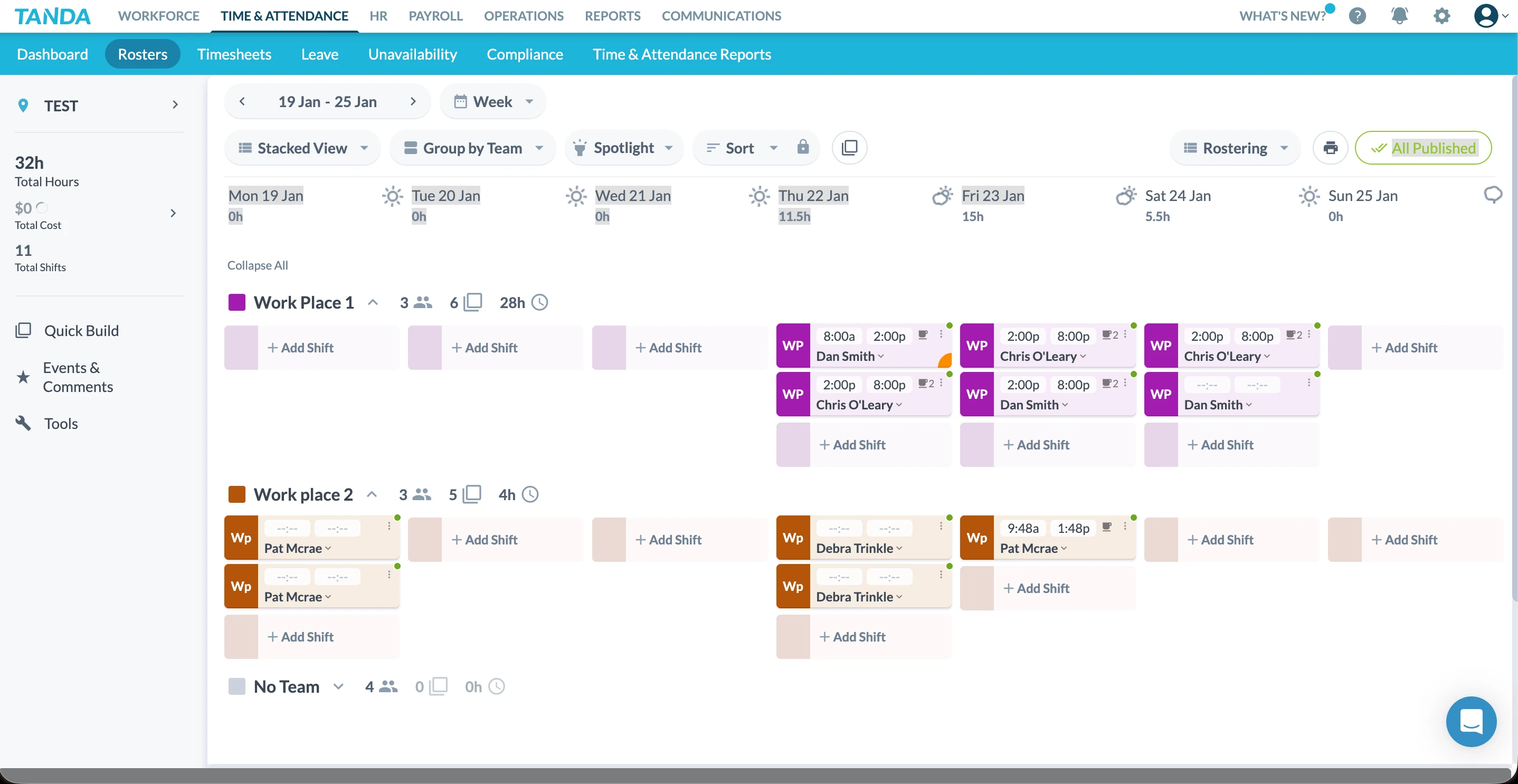
Tanda's roster sits under the Time & Attendance section, reflecting its operational focus. The blue and grey colour scheme matches the rest of the platform, but we found it feels visually dense during longer scheduling sessions.
Unlike traditional grid-based rosters, Tanda displays schedules by teams rather than sites, which immediately sets it apart from platforms like RosterElf. While this structure may suit organisations that operate strictly by departments, it can feel limiting for hospitality, retail, or multi-site businesses where staff frequently move between locations.
On smaller screens—particularly 13-inch laptops—the roster feels compressed. Interactive elements such as shift cells, action buttons, and dropdowns appear tightly packed, which makes precision editing more difficult than it needs to be.
Labour cost visibility & financial context
We appreciated that Tanda includes labour cost summaries directly within the roster view. Managers can see total hours, total shifts, and overall wage cost alongside the schedule.
That said, we found the financial breakdown relatively high-level. There's no inline visibility for:
- Cost per site
- Average hourly rate by team
- Real-time comparison against sales or demand metrics
Sales data and forecasting inputs are handled elsewhere in the platform rather than within the roster itself. This separation means managers need to jump between sections to fully understand the cost impact of roster changes, which can slow down decision-making during busy periods.
Adding and editing shifts
Adding a shift in Tanda follows a familiar pattern: select a staff member, choose the day, and enter start and finish times. A nice usability touch is the ability to enter times in either 24-hour or AM/PM format, which is not always supported in workforce platforms.
That said, we encountered several workflow limitations:
- Breaks must be added manually and are not auto-applied
- Once a break is added, it cannot be easily removed
- Bulk editing breaks across multiple shifts is not supported
When managing larger rosters, this can become time-consuming and error-prone. We also attempted to use the in-platform Help search to find guidance on removing breaks, but relevant results did not surface.
Team-based rostering limitations
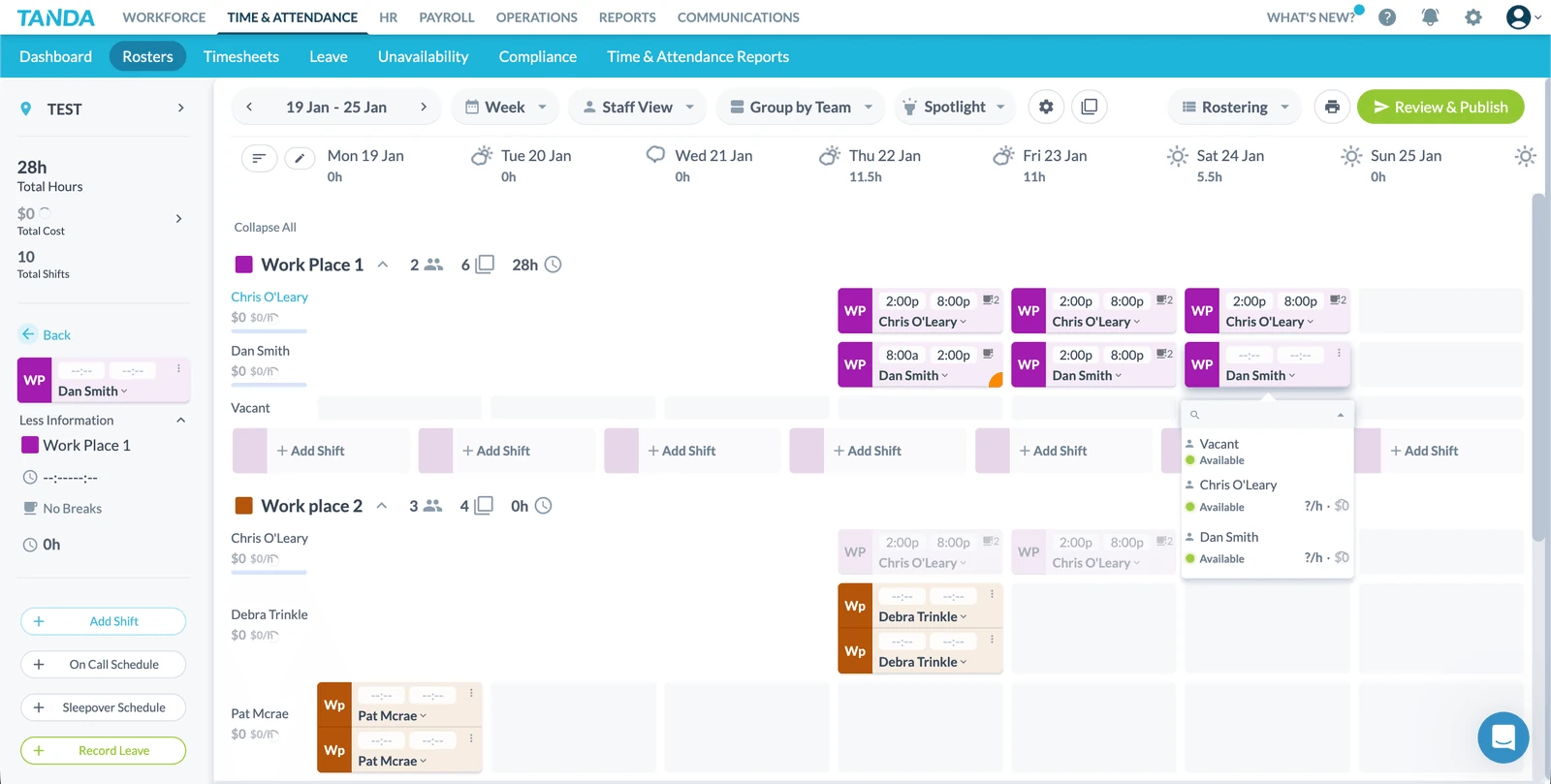
A notable constraint in Tanda's rostering model is its strict reliance on team assignment.
Once a staff member is assigned to a team, they cannot be rostered onto a different team directly from the roster. To move a staff member, managers must:
- Exit the roster
- Navigate to Workforce
- Open the staff profile
- Edit team assignments
- Return to the roster
This multi-step process makes last-minute reallocations cumbersome—particularly for businesses that rely on flexible staffing to cover absences or demand spikes.
Roster views & navigation
Tanda supports multiple roster views, including:
- Daily
- Weekly
- Fortnightly
- Four-weekly
- Monthly
There are also stacked and staff-based views, though we found these offered limited variation in how information is presented. The underlying structure remains largely the same.
One standout feature is the weather display for each site, which can be useful for businesses affected by seasonal conditions or foot traffic. While this is a thoughtful addition, it functions more as a contextual aid than a core scheduling tool.
Templates and recurring schedules
Tanda includes roster templates, allowing managers to save and reuse common scheduling patterns. This has become a baseline expectation for modern rostering software, and Tanda's implementation is solid.
Recurring shifts can be scheduled across multiple weeks, and the system supports different roster cycles. However, the setup process requires careful configuration, and changes to templates are not always intuitive once they've been applied.
Scheduling automation & AI tools
Tanda offers several AI-assisted tools designed to auto-build rosters based on historical data and predefined rules. In principle, this is a powerful feature.
In practice, these tools proved difficult to adopt without clear, in-context guidance:
- Some AI actions produced error messages without explanation
- On-screen guidance was limited or absent
- Help articles opened in small modal windows, making them hard to follow alongside the live roster
The automation capability is there, but the learning curve is steep—particularly for smaller teams without dedicated payroll or workforce specialists.
Publishing & day-to-day usability
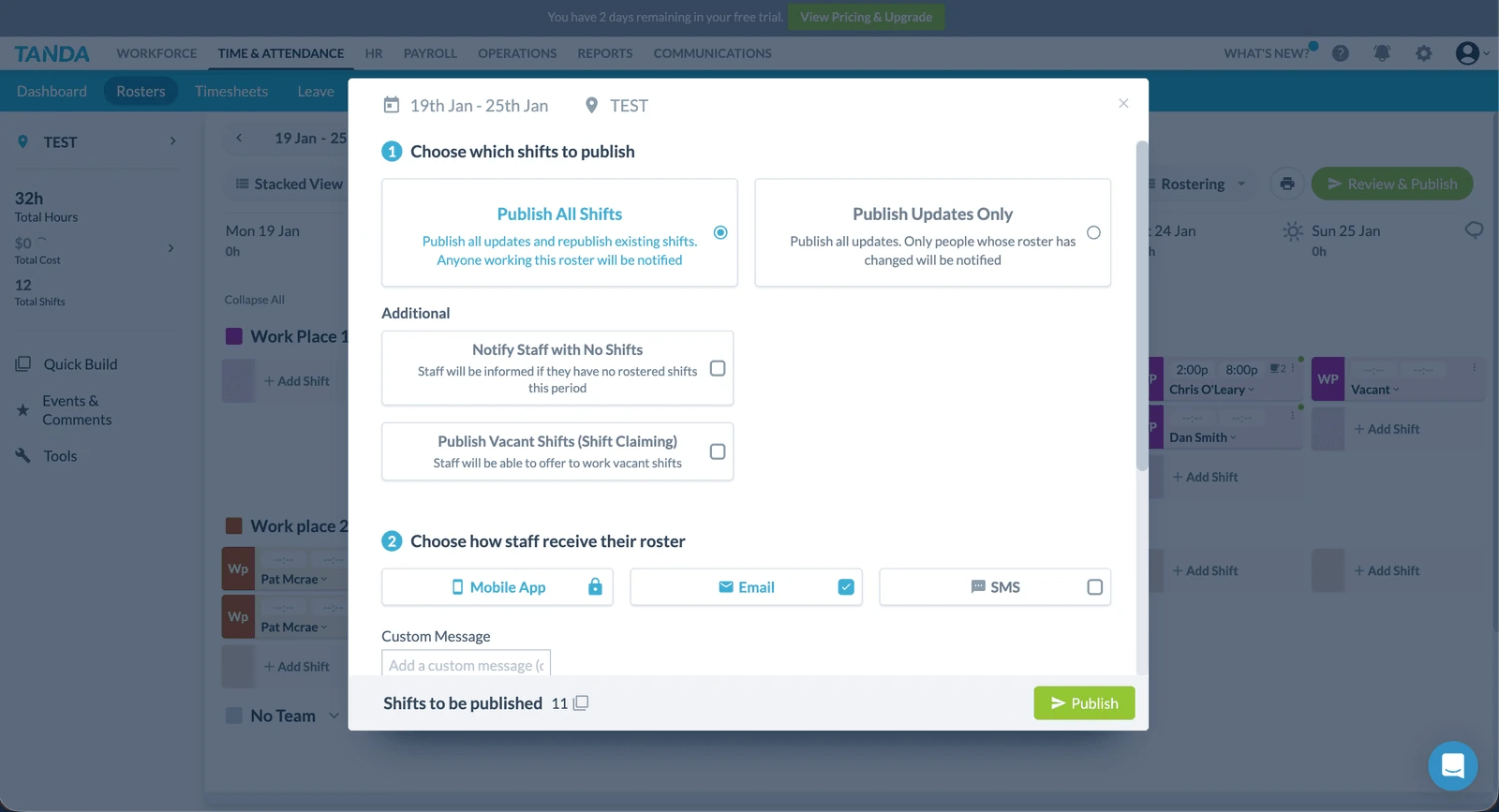
Publishing rosters in Tanda is straightforward, but the overall workflow involves multiple steps across different screens. For simple rosters, this isn't an issue. For complex, multi-team schedules, the experience can feel slower than more direct roster-first platforms.
We also encountered instances where niche features (such as on-call scheduling) triggered errors without clear explanations or linked documentation, adding unnecessary friction.
Pros & cons
| Pros | Cons |
|---|---|
| Labour cost visibility – Total hours and wage costs shown directly within the roster view. | Team-locked rostering – Staff cannot be moved between teams directly from the roster. |
| Multiple view options – Daily, weekly, fortnightly, and monthly views available. | Dense UI on smaller screens – Interface feels compressed on 13-inch laptops. |
| Weather display – Useful contextual feature for businesses affected by conditions. | Break management limitations – Breaks must be added manually and are difficult to remove. |
| Roster templates – Save and reuse common scheduling patterns. | AI tools lack guidance – Automation features have a steep learning curve. |
★ Verdict
Tanda offers a capable and feature-rich rostering system that works best for businesses with structured teams, stable staffing models, and strong payroll integration needs. However, its team-based approach, dense UI, and reliance on external configuration make it less flexible for businesses that need to move staff quickly between sites or make frequent last-minute changes. While Tanda includes advanced tools like automation and forecasting, the lack of clear in-product guidance and the complexity of certain workflows may make it challenging for smaller teams to adopt confidently. For businesses that value speed, flexibility, and intuitive roster building, the rostering experience may feel heavier than necessary—particularly when compared to platforms that prioritise roster-first design and real-time adjustment.
Tanda time and attendance
Time tracking score: 8.5/10
Time and attendance is arguably Tanda's core strength. The platform was built around accurate time capture, and this heritage shows in the depth of its clock-in options, geofencing controls, and timesheet workflows.
In this section, we look at how Tanda handles the core elements that impact daily attendance accuracy — including clock-in methods, GPS enforcement, photo verification, location setup, and the overall manager experience.
Clock-in methods
Tanda offers multiple ways for employees to record their attendance:
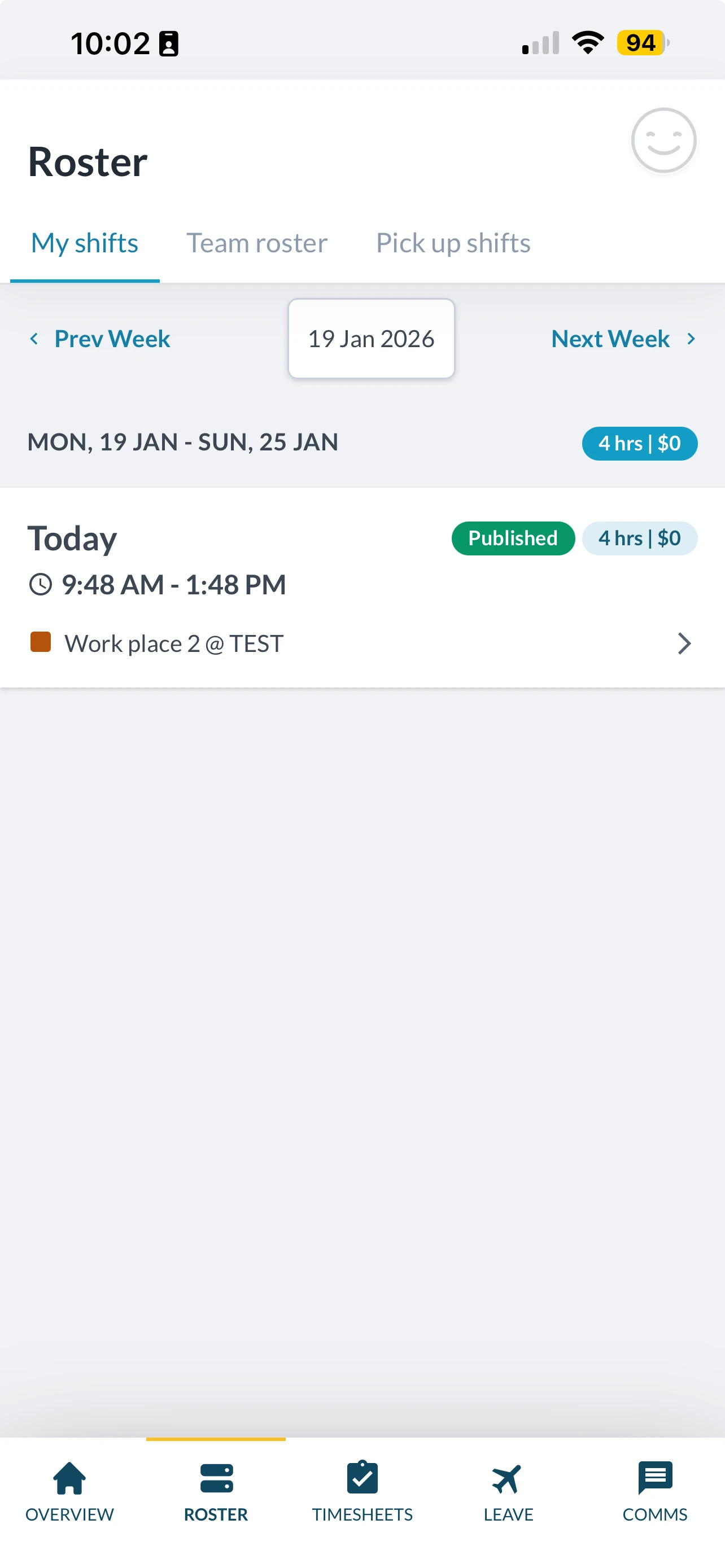
- Mobile app — Employees can clock in via the Tanda app on iOS or Android devices
- Tablet kiosk — A dedicated time clock app runs on any compatible Android or Apple tablet (iOS 13.0+ or Android 12+)
- PIN entry — Staff can use a PIN code for identification
- Photo verification — Optional photo capture at clock-in to verify identity
The flexibility here is a clear strength. Businesses can mix and match methods depending on their workplace setup — mobile for field workers, kiosk for retail or hospitality, or a combination of both.
Geofencing & GPS verification
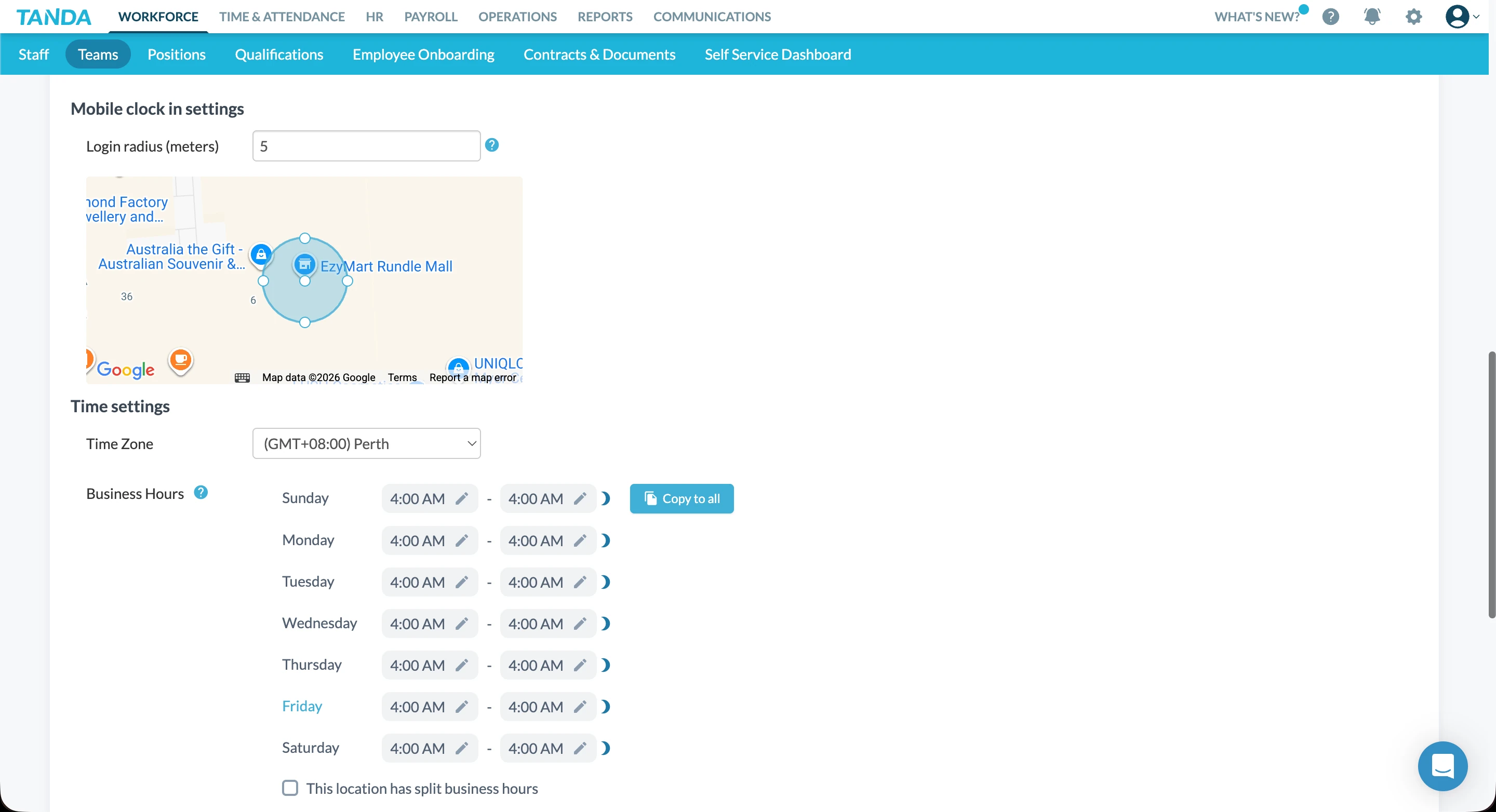
Tanda's geofencing feature creates a virtual perimeter around each work location. When employees clock in via the mobile app, Tanda compares their GPS coordinates against the defined radius to verify they're on-site.
The geofencing radius is configurable per location — you can set it in metres and adjust it by dragging the boundary on a map. This is useful for businesses with varying site sizes, from small retail stores to large warehouses.
On the timesheet, clock-ins display a colour-coded icon:
- Green — Clock-in occurred within the geofencing radius
- Red — Clock-in occurred outside the radius
- Blue — Location address not defined
You can also block clock-ins from outside the radius entirely using Shift Questions, adding an extra layer of compliance control.
Location & team setup
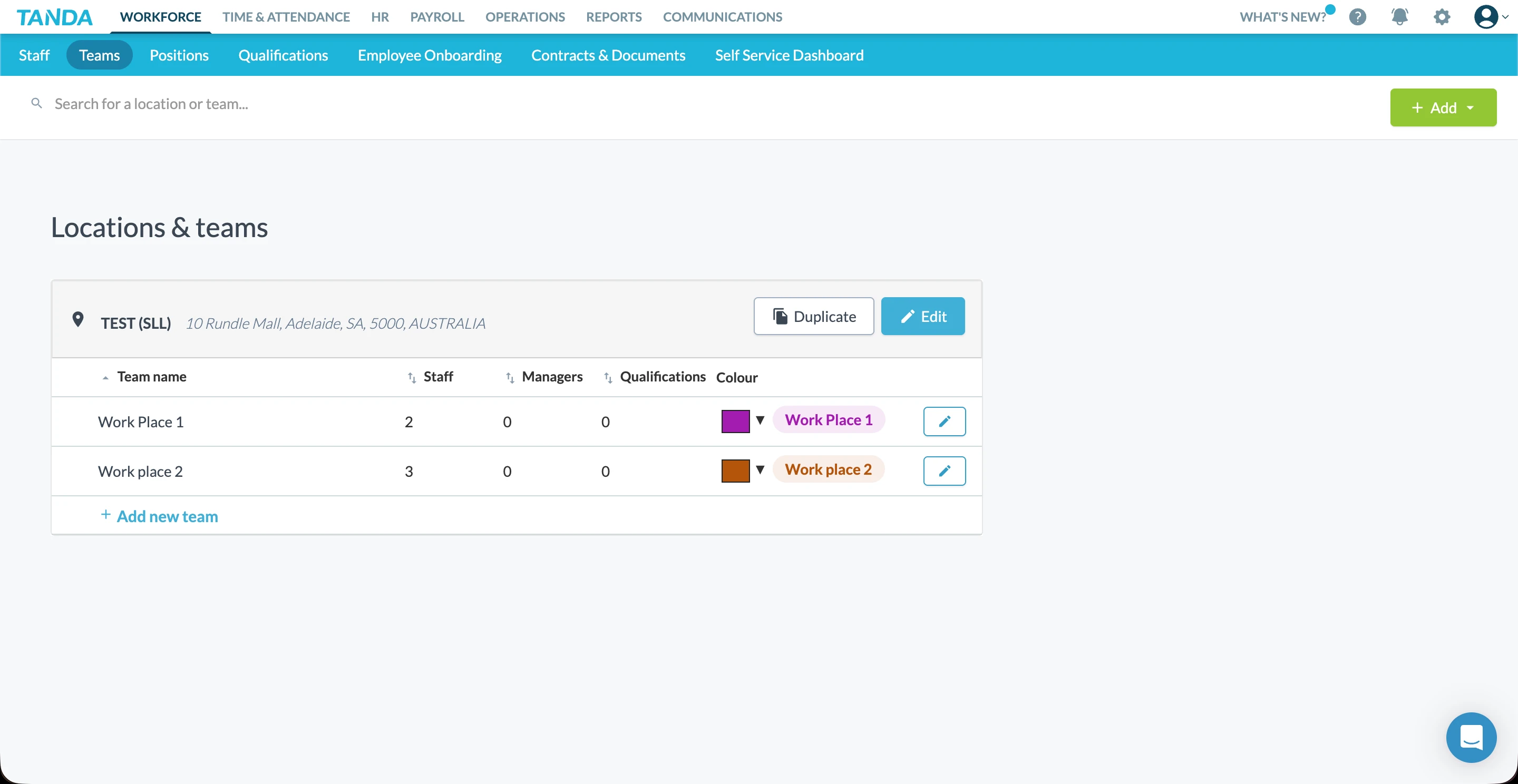
Tanda's time and attendance system is tightly integrated with its location and team structure. Each location has its own address, time zone, and business hours — all of which feed into geofencing, rostering, and reporting.
The setup process is straightforward but requires attention to detail. You'll need to configure each location's address correctly for geofencing to work, and ensure teams are properly nested within locations.
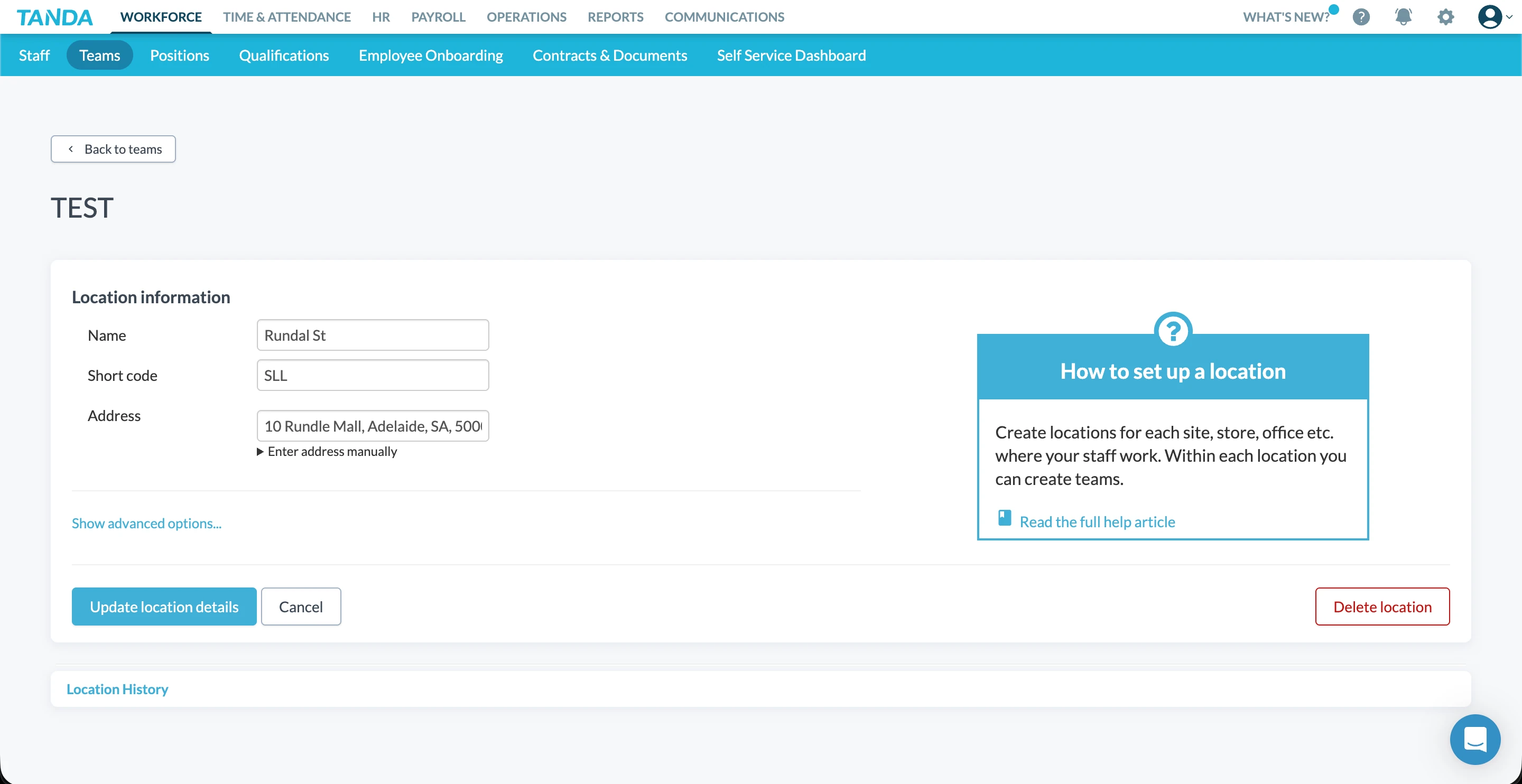
The in-platform help prompts are useful here — contextual guidance appears alongside configuration screens, linking to relevant help articles. This reduces the friction of initial setup compared to platforms that leave you searching for documentation.
Award integration & compliance
Where Tanda differentiates itself from many competitors is in connecting time and attendance directly to Australian award interpretation. Based on clock-in data, Tanda's award engine calculates shift costs using your configured award or enterprise agreement.
This means timesheet data flows through to payroll with the correct rates already applied — reducing manual calculation and the risk of underpayment. Records are retained for the required seven years, supporting Fair Work Ombudsman audit requirements.
However, the accuracy of this depends on correct award configuration during setup. Businesses with complex award structures should allow time for proper configuration and testing before going live.
Support resources
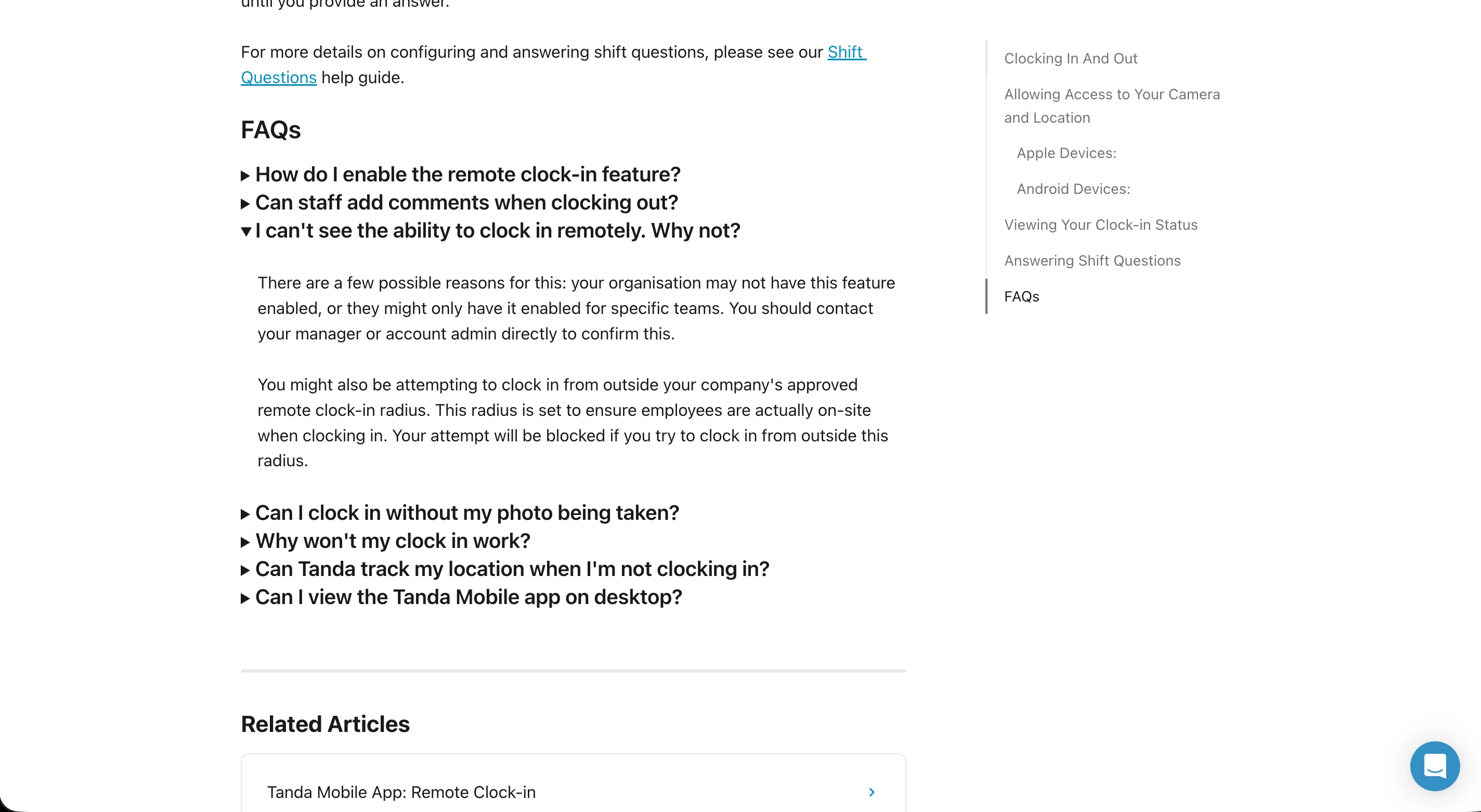
Tanda provides a comprehensive help centre with FAQs covering common clock-in scenarios. Answers to questions like "How do I enable remote clock-in?" and "Can staff add comments when clocking out?" are readily available and easy to find.
That said, some users report that real-time support can be harder to access when issues arise during payroll processing windows — a limitation noted in user reviews.
Pros & cons
| Pros | Cons |
|---|---|
| Multiple clock-in methods (app, kiosk, PIN) | Geofencing requires correct address setup |
| Configurable geofencing with visual map | Photo verification can slow clock-in |
| Award integration for accurate costing | Android app rated lower than iOS |
| Seven-year record retention for compliance | Real-time support not always available |
★ Verdict
Tanda's time and attendance functionality is one of its strongest areas. The combination of flexible clock-in methods, configurable geofencing, and direct award integration makes it well-suited for Australian businesses with hourly staff. The main considerations are ensuring correct location setup and accepting that support response times may vary during critical periods.
Tanda timesheets and payroll
Payroll score: 7.6/10
Tanda takes a fundamentally different approach to payroll compared to roster-first platforms. Rather than acting purely as a payroll data feeder, Tanda offers an in-house payroll engine supported by a maintained library of Australian awards.
In theory, this creates an all-in-one workflow—rostering, time tracking, award interpretation, and payroll processing within a single system. In practice, the depth of configuration, restricted access to payroll features, and reliance on correct award setup introduce trade-offs that businesses need to carefully consider.
Payroll structure & access
Tanda's payroll functionality sits behind a paid feature tier, requiring a full payroll-enabled account to access and configure. As a result, we were unable to fully hands-on test payroll end-to-end in the same way as rostering or time and attendance.
From a review perspective, this creates friction. Payroll is one of the highest-risk operational areas for Australian businesses, and the inability to trial or validate setup before committing makes it harder to assess suitability—particularly for small teams without in-house payroll expertise.
Award interpretation & compliance
Based on available documentation and third-party reviews, Tanda maintains a large library of pre-built Australian awards, with pay multipliers applied automatically once staff are assigned an award and base rate.
Within staff profiles, managers can set:
- Standard pay rates
- Custom rates
- Award-linked multipliers
When configured correctly, the system calculates penalties, loadings, and overtime automatically.
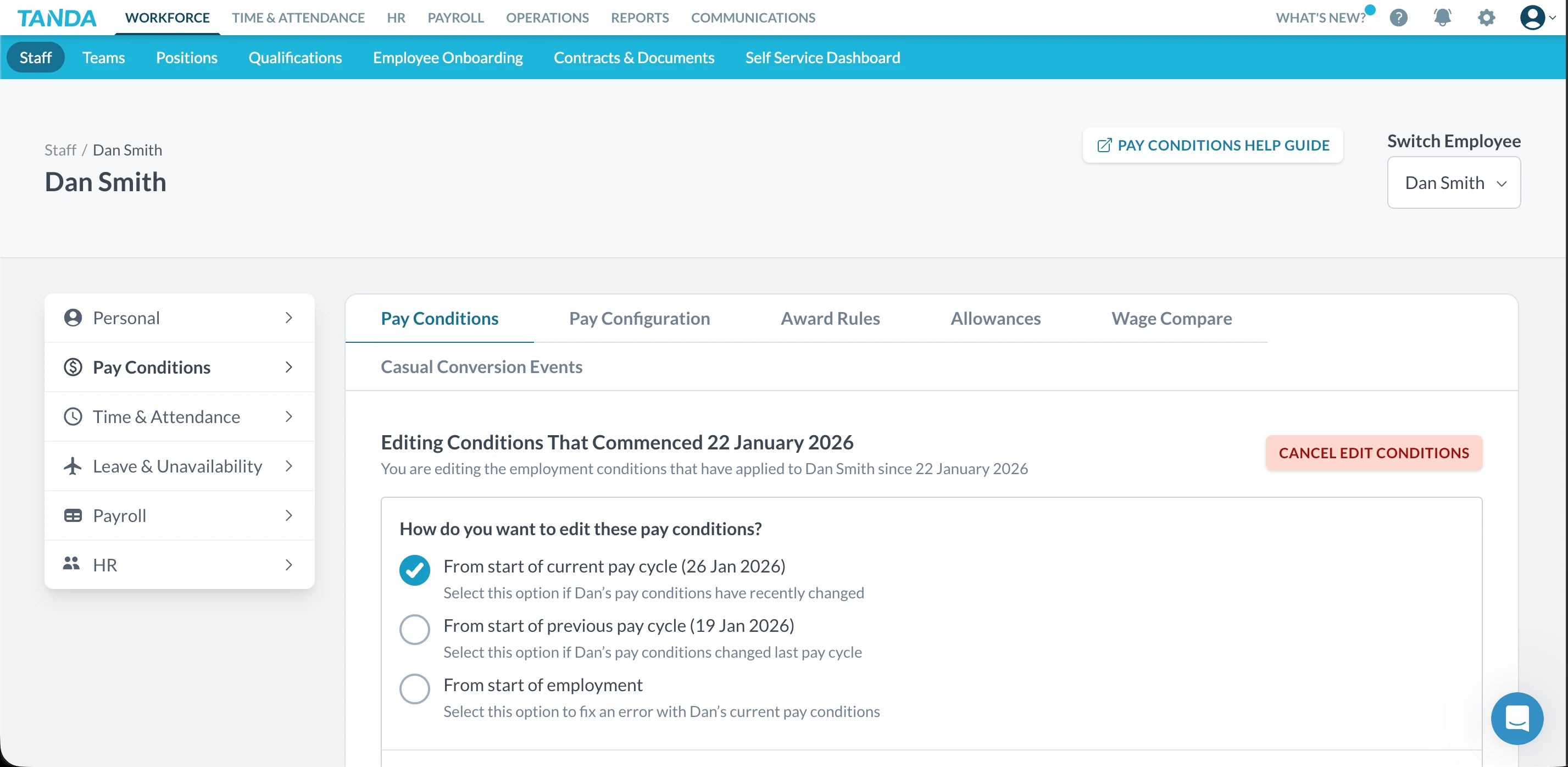
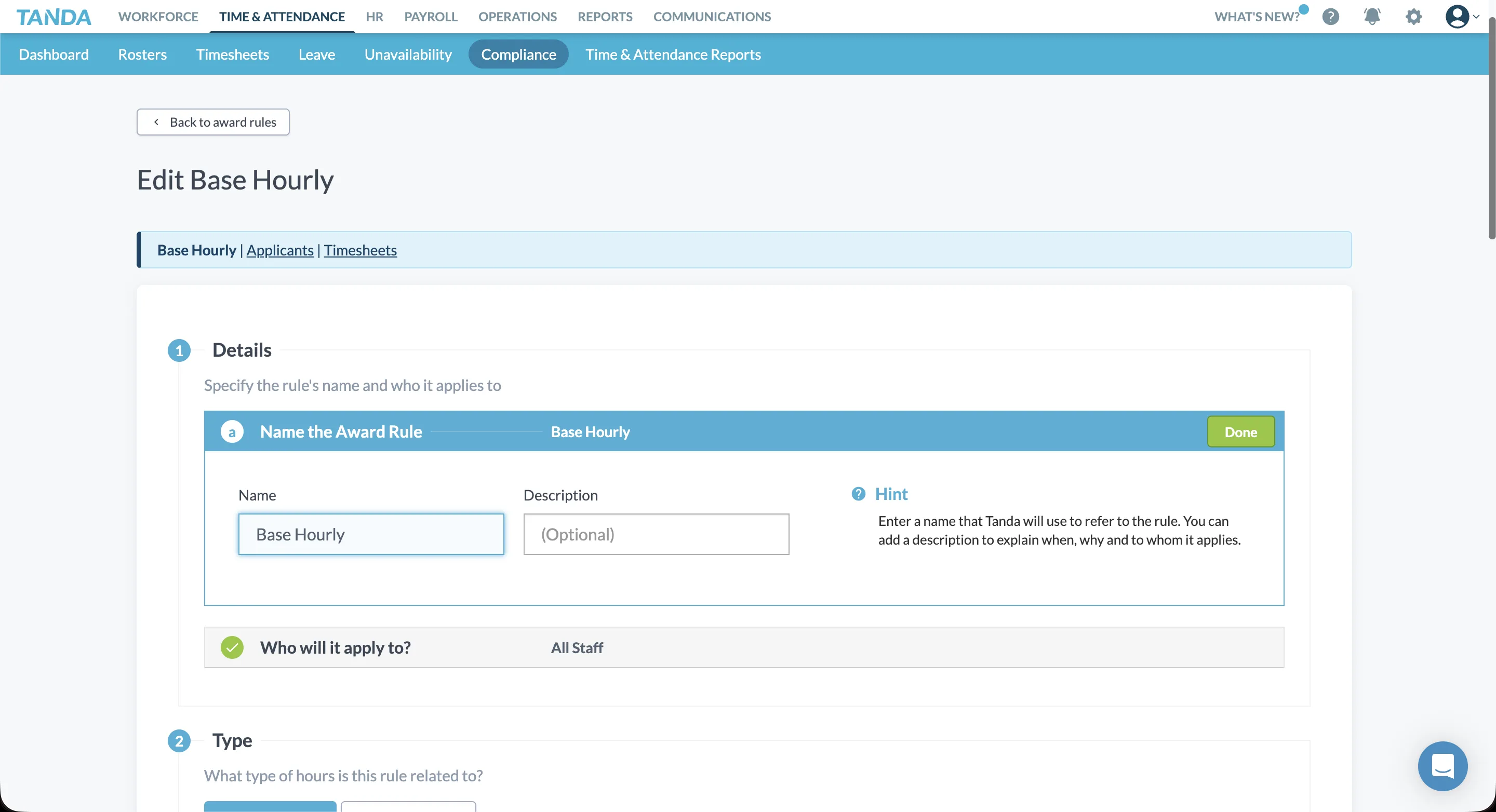
However, award compliance remains highly dependent on accurate configuration. Navigating award rules, exceptions, and location or role-specific variations requires moving across multiple menus, with limited high-level visibility into how rates are being applied across the business.
Timesheet approval & payroll processing
Timesheets in Tanda follow a structured approval workflow. Once approved, payroll can be processed internally and an ABA file generated for payment.
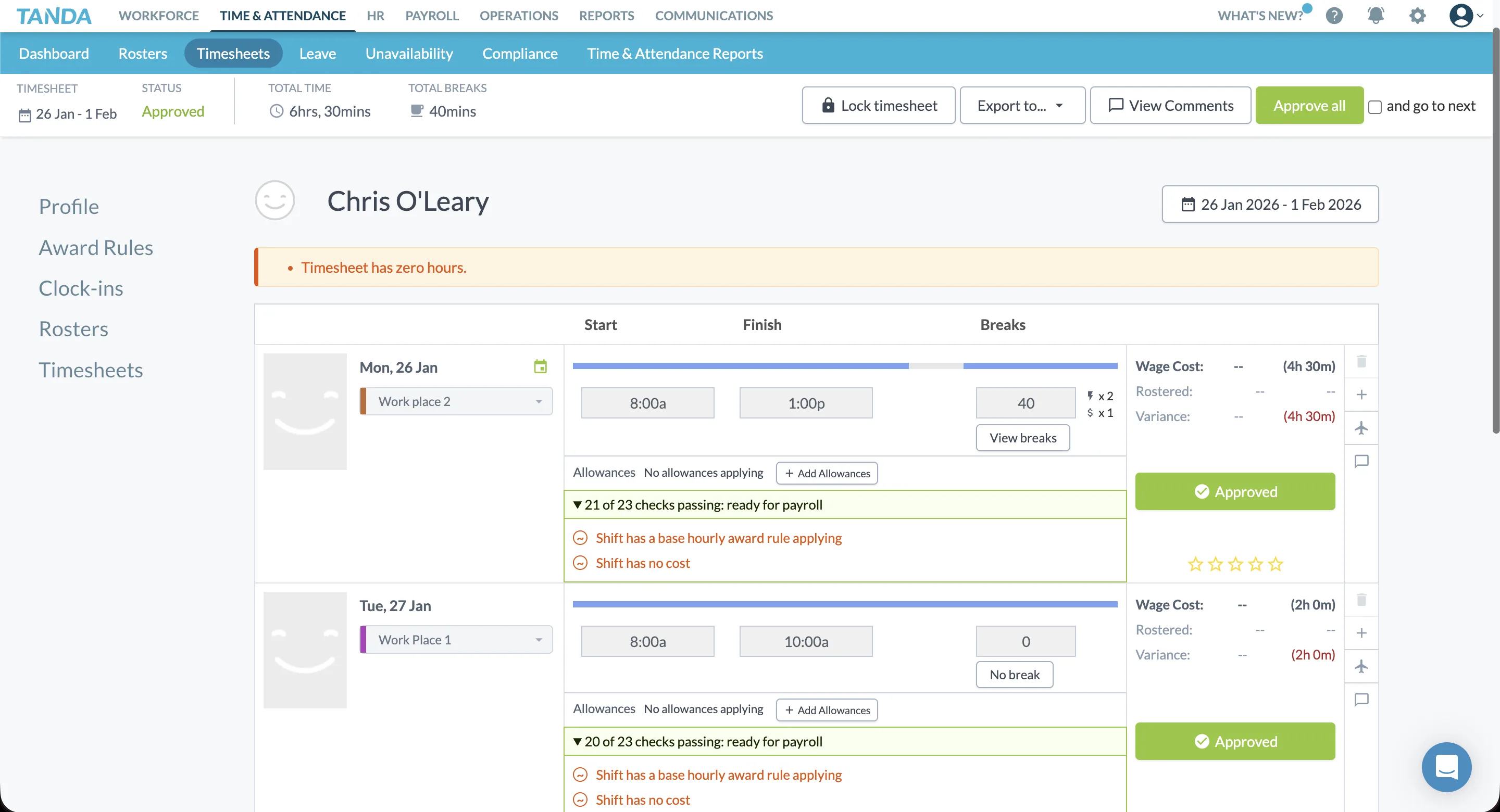
However, even when using Tanda's payroll engine, businesses still need to:
This additional step means payroll data does not flow natively into accounting without manual export, which adds friction compared to roster-led platforms that push approved timesheets directly into payroll software.
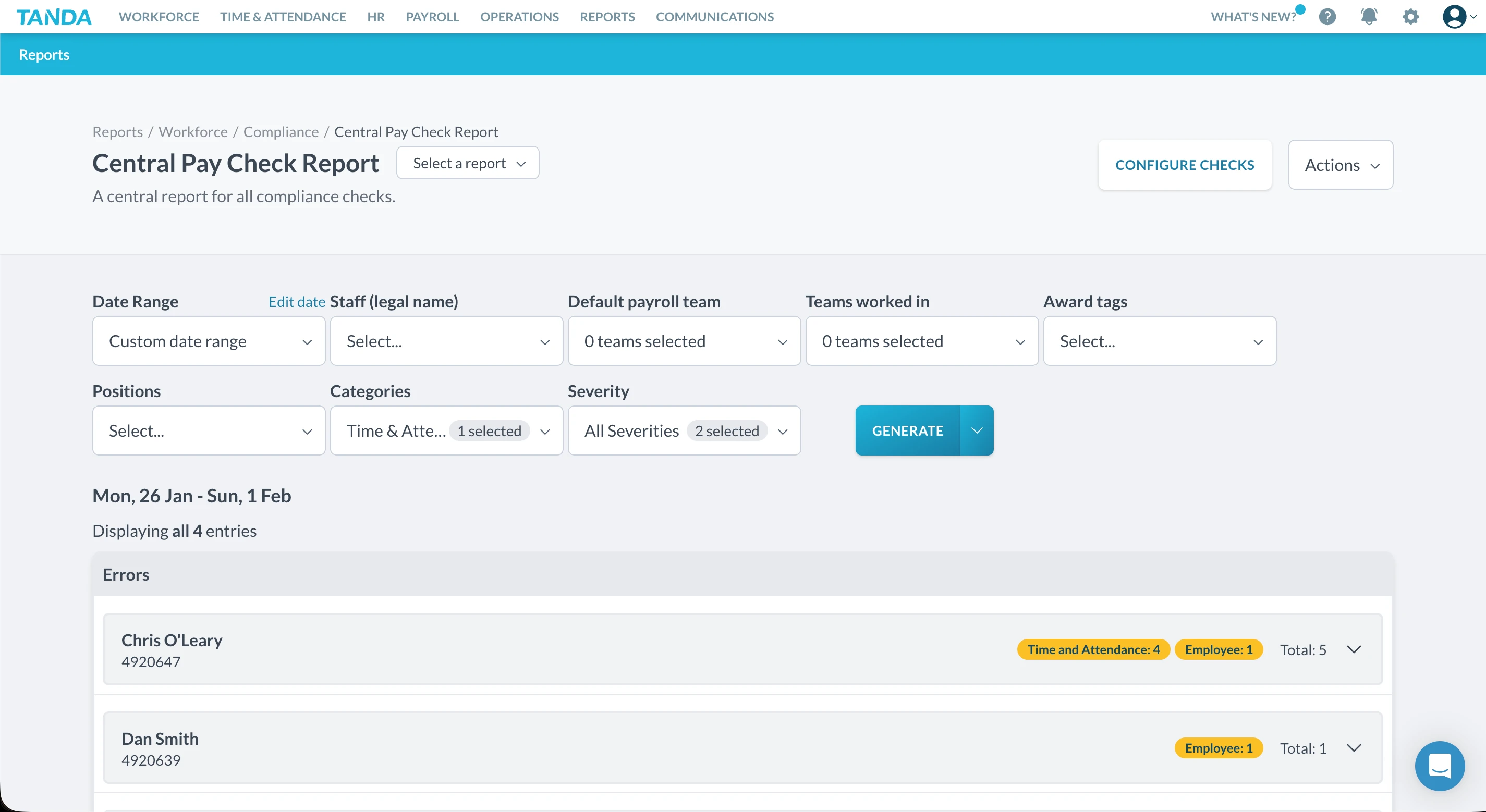
Integrations & accounting handoff
Tanda supports integration with popular accounting platforms, but the payroll workflow remains system-centric rather than accounting-centric.
For businesses already established in Xero or MYOB, this can feel duplicative—rates, journals, and payroll records must still be reconciled in the accounting platform, even when payroll is processed inside Tanda. This approach may suit organisations aiming to centralise payroll internally, but it is less aligned with workflows where external accountants or bookkeepers manage payroll within accounting software.
Strengths
- Built-in payroll engine
- Maintained Australian award library
- Automated pay calculations once configured
- Structured timesheet approval workflows
Limitations
- Payroll access restricted behind paywall
- Setup complexity across multiple menus
- Award accuracy depends heavily on configuration
- Payroll journals still require export to accounting systems
Pros & cons
| Pros | Cons |
|---|---|
| All-in-one payroll option | Payroll not easily trialled |
| Award-based calculations | Setup and testing can be complex |
| Internal payroll processing | Journal export still required |
| Reduces reliance on external software | Less transparent rate oversight |
★ Verdict
In our assessment, Tanda functions best as an internal payroll system for businesses willing to invest time in configuration and ongoing maintenance. The promise of an all-in-one solution is appealing, but the restricted access to payroll features, layered setup process, and continued reliance on accounting exports reduce transparency—particularly for small businesses or teams working closely with external accountants. For organisations seeking to manage payroll entirely within a single platform, Tanda can be a viable option with the right expertise in place. For businesses prioritising simplicity, accounting-system alignment, and clear oversight, the payroll experience may feel heavier than necessary.
Tanda communication tools
Communication score: 7.9/10
Tanda provides a dedicated communication module that goes beyond basic shift notifications, offering groups, announcements, and real-time chat functionality built into the platform. It's more featured than many competitors, though some structural decisions affect everyday usability.
Communication structure & layout
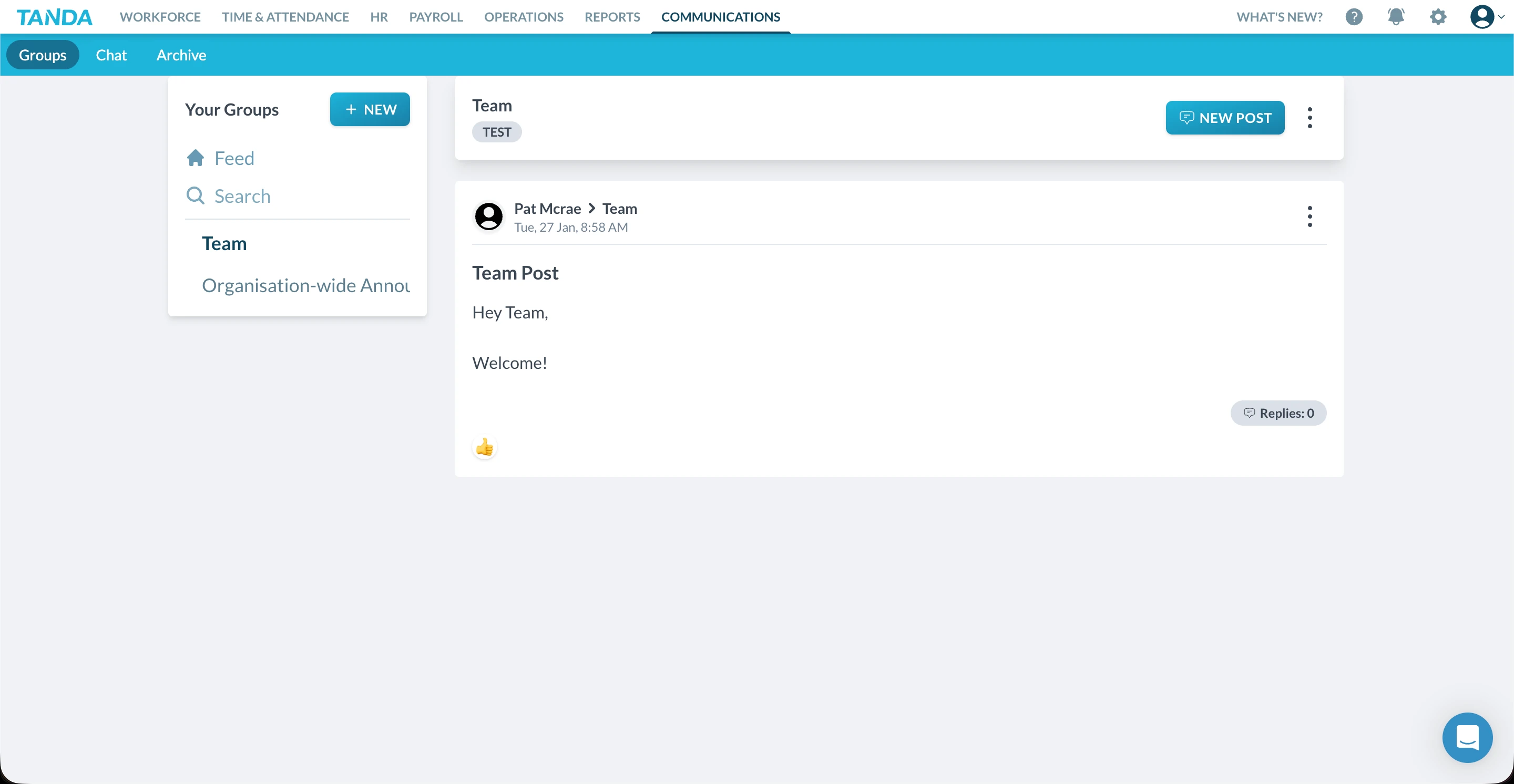
Tanda's communication tools sit in their own section of the platform, separate from rostering and time tracking. The layout follows a familiar social-media style with groups, posts, and chat threads. Navigation is clean and managers can access everything without jumping between screens.
Groups & announcements
The groups feature allows managers to create dedicated communication channels for different teams, locations, or purposes. Within groups, you can post announcements that reach relevant staff without cluttering other channels.
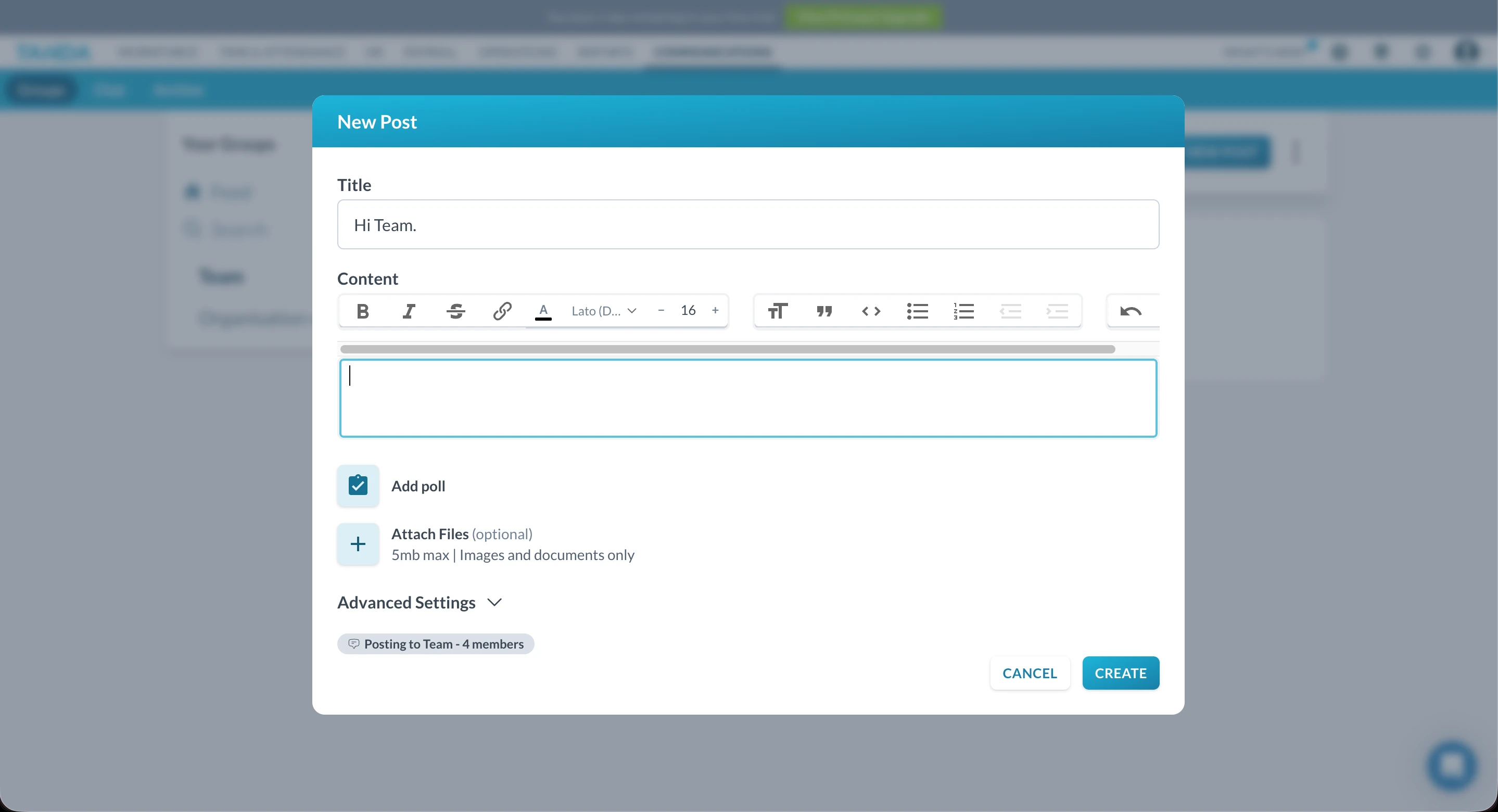
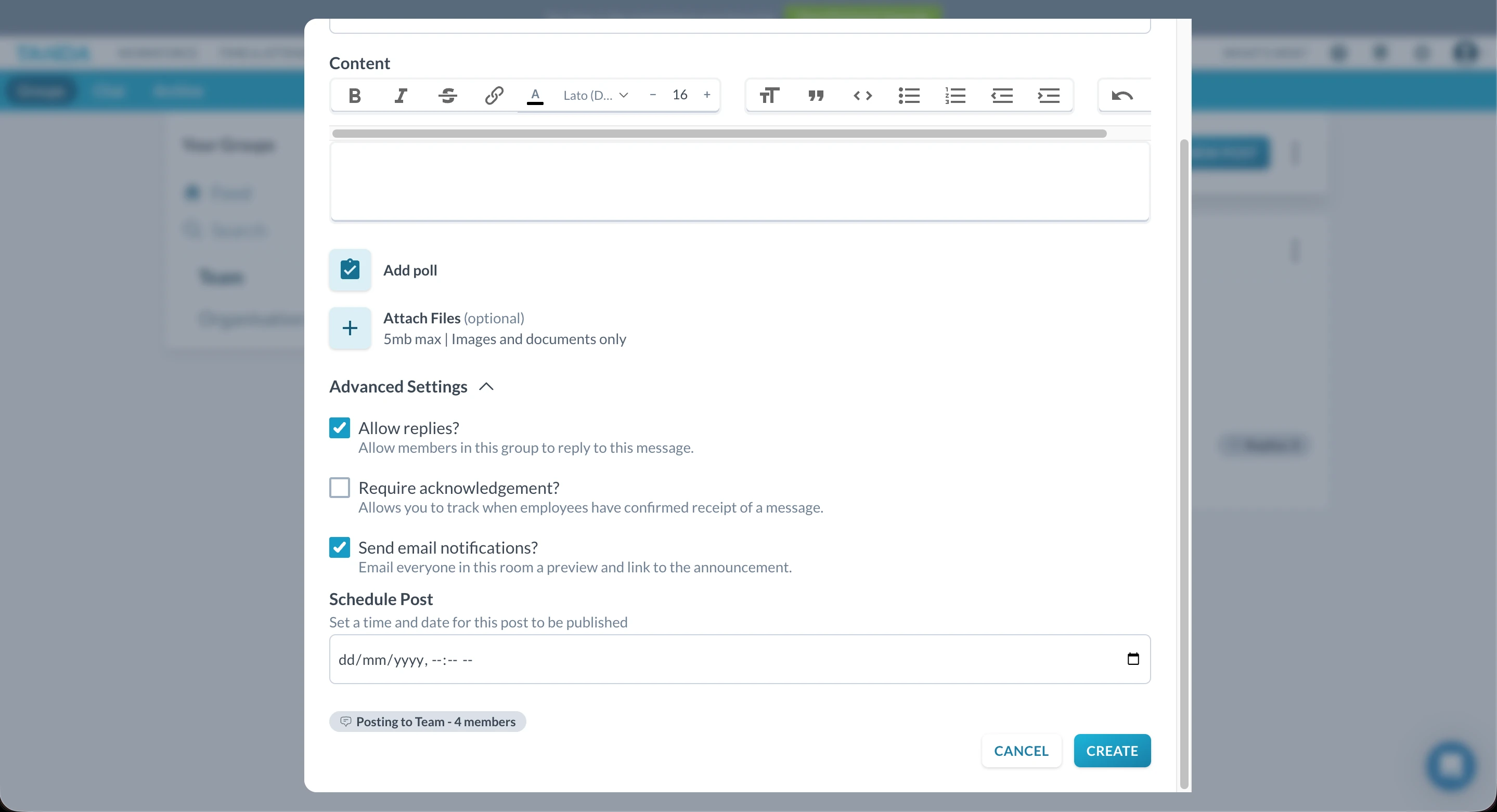
Tanda's announcement tools are feature-rich. When creating a new post, managers can add polls, request acknowledgements to confirm staff have read important updates, and control visibility settings. This goes beyond what many rostering platforms offer for internal communication.
Chat functionality
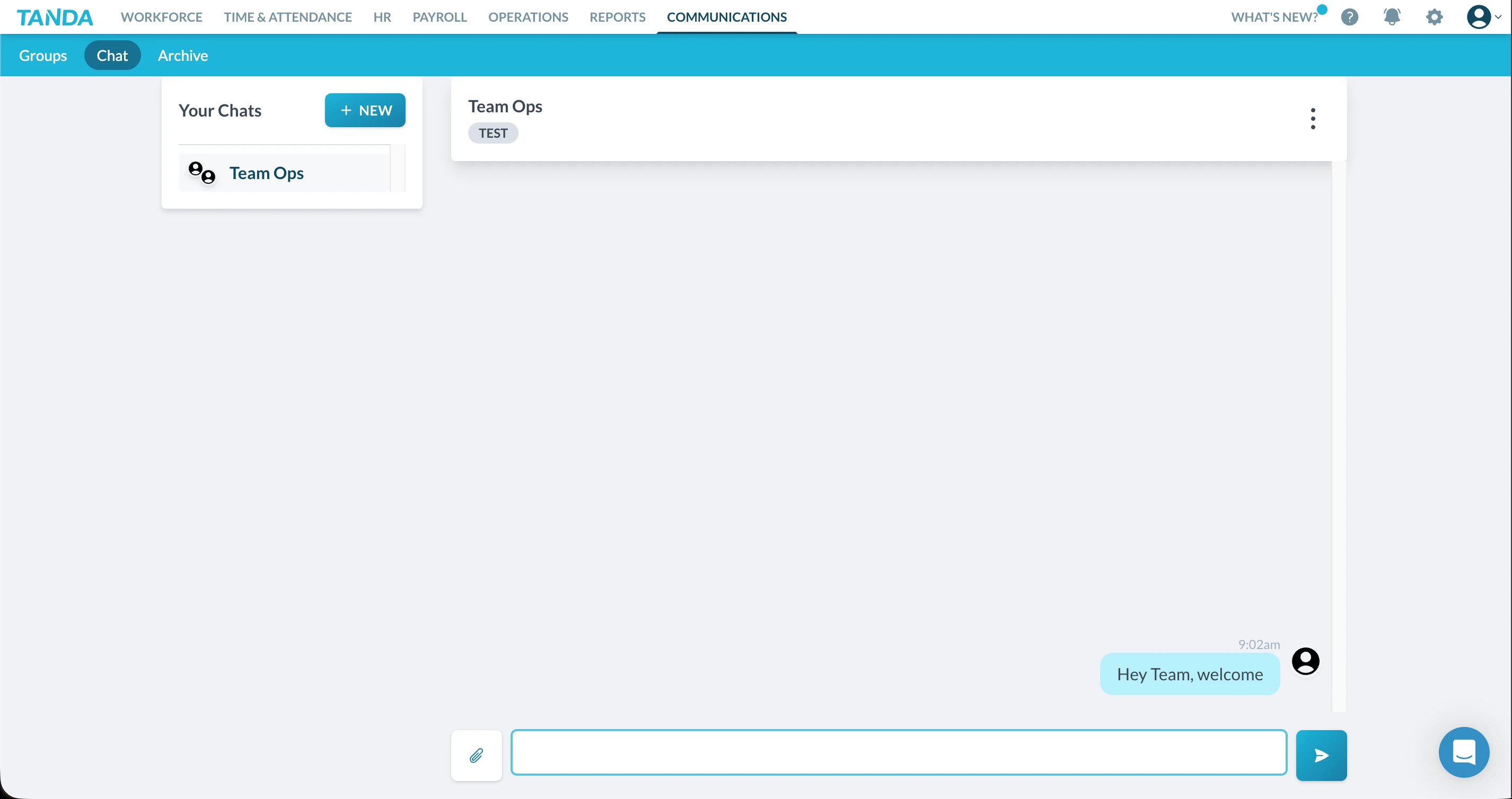
Tanda includes built-in chat for one-to-one and group conversations. Staff can message each other directly, and managers can create team-based chat channels. The interface resembles common messaging apps, which helps adoption.
Usability & flexibility concerns
While Tanda's communication tools are comprehensive, we noticed some limitations in day-to-day use. The team-based permission structure can make it difficult to add staff dynamically to conversations—you need to assign people to teams first, rather than simply adding them to a chat as needed.
The advanced settings for posts, while powerful, add complexity. Managers wanting to send a quick announcement may find themselves navigating more options than necessary.
Pros & cons
| Pros | Cons |
|---|---|
| Feature-rich announcements with polls | Team-based permissions limit flexibility |
| Acknowledgement tracking for compliance | Cannot dynamically add staff to chats |
| Built-in chat reduces app switching | Advanced settings add complexity |
★ Verdict
Tanda's communication tools offer more depth than most rostering platforms, with useful features like polls and read acknowledgements. However, the rigid team-based structure can make everyday communication feel less flexible than dedicated messaging apps. For businesses that want communication integrated with their workforce management system and don't need ad-hoc chat flexibility, it's a solid option.
Tanda smartphone app
Mobile app score: 7.6/10
Tanda offers native smartphone apps for both iOS and Android, designed to give managers and staff visibility into daily operations while on the move. The app mirrors much of the web platform's structure and visual design, aiming for consistency across devices.
The app is capable and information-rich, particularly for operational oversight. However, navigation complexity and limited configuration control from mobile reduce its effectiveness for fast, on-the-fly management.
App design & layout
The Tanda app closely reflects the web browser experience, using the same dark grey colour palette with blue and green action buttons. This consistency helps with familiarity, though the dense colour scheme can feel visually heavy during extended use.
The app is clearly positioned as a management dashboard, rather than a lightweight action-first tool. There are multiple menus and sub-sections, some of which overlap in purpose, which contributes to a steeper learning curve on mobile than expected.
Navigation & usability
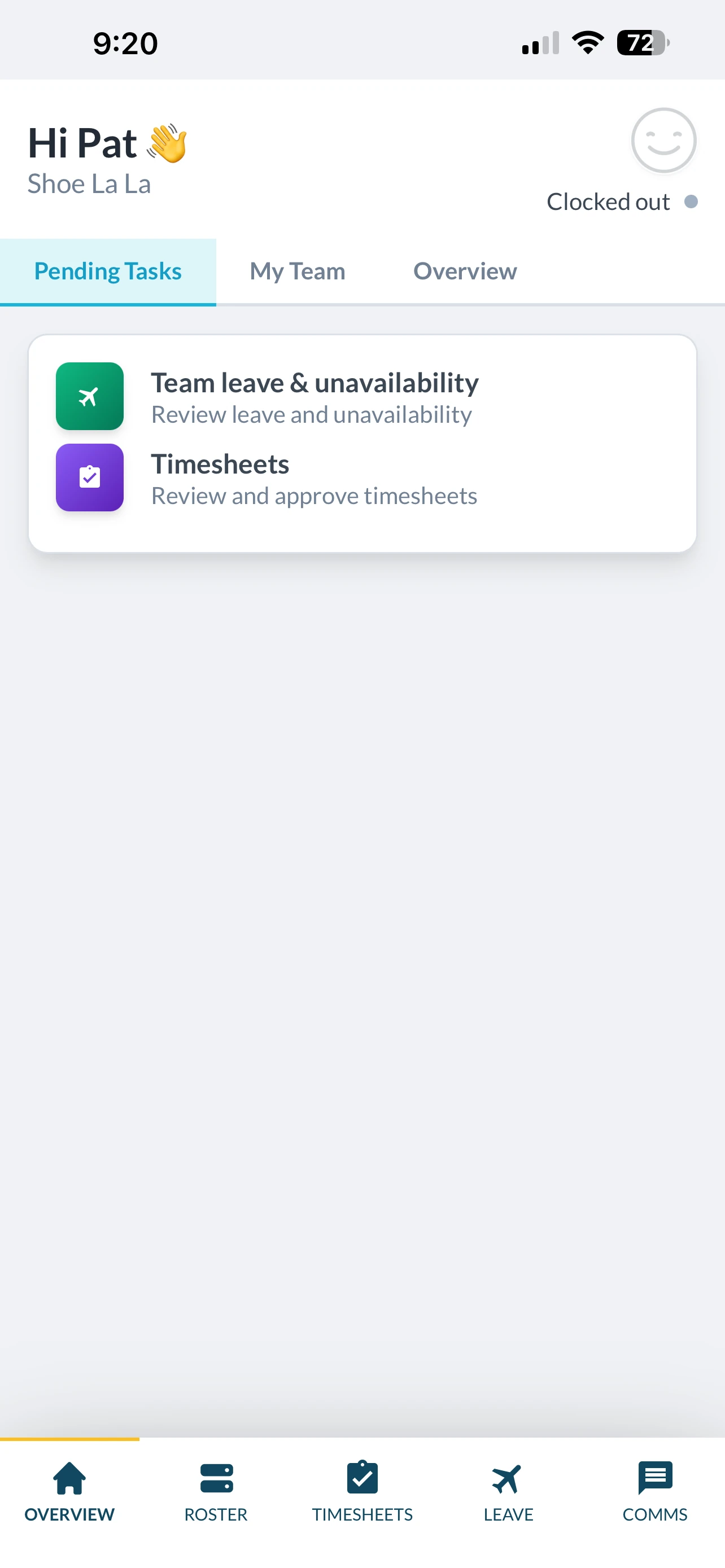
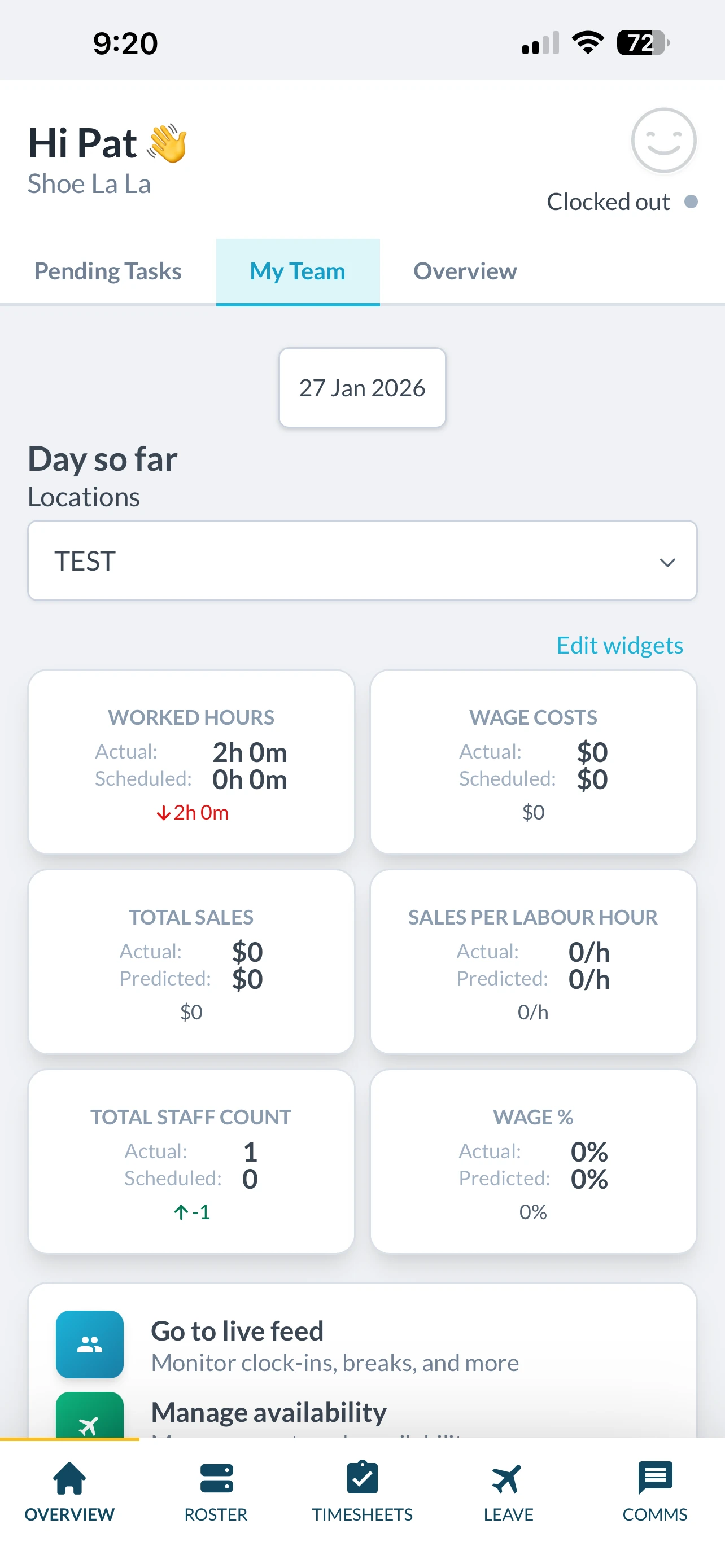
The main Overview tab provides a snapshot of current operations, including team leave and unavailability, and timesheets awaiting approval. Within the My Team section, managers can view high-level metrics such as hours worked, labour cost, total sales, sales per labour hour, staff count, and wage percentage.
There are also quick actions to access live time feeds, which is useful for real-time monitoring. That said, navigation feels less intuitive than it needs to be. Several menus perform similar actions, and important functions are spread across different sections rather than consolidated into a central control area.
Functionality & limitations
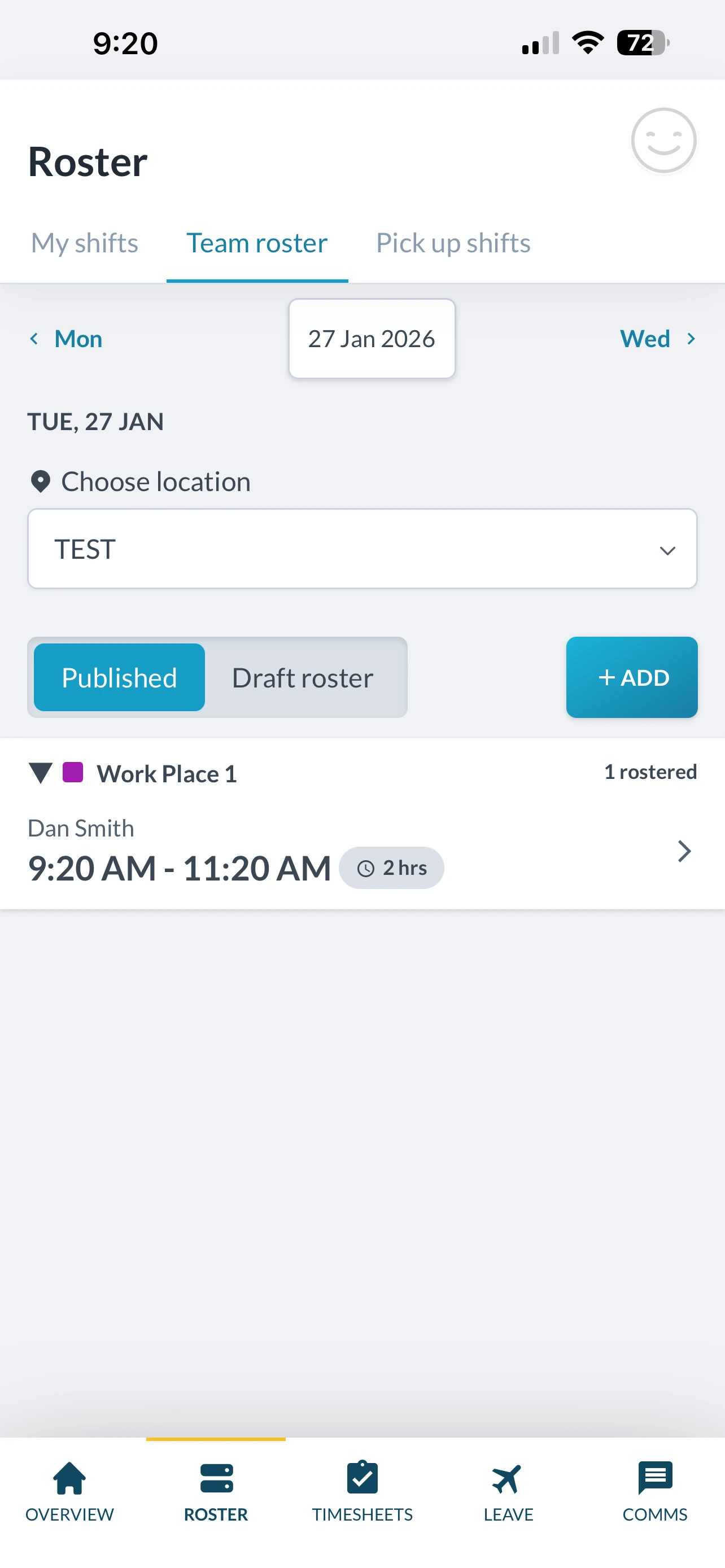
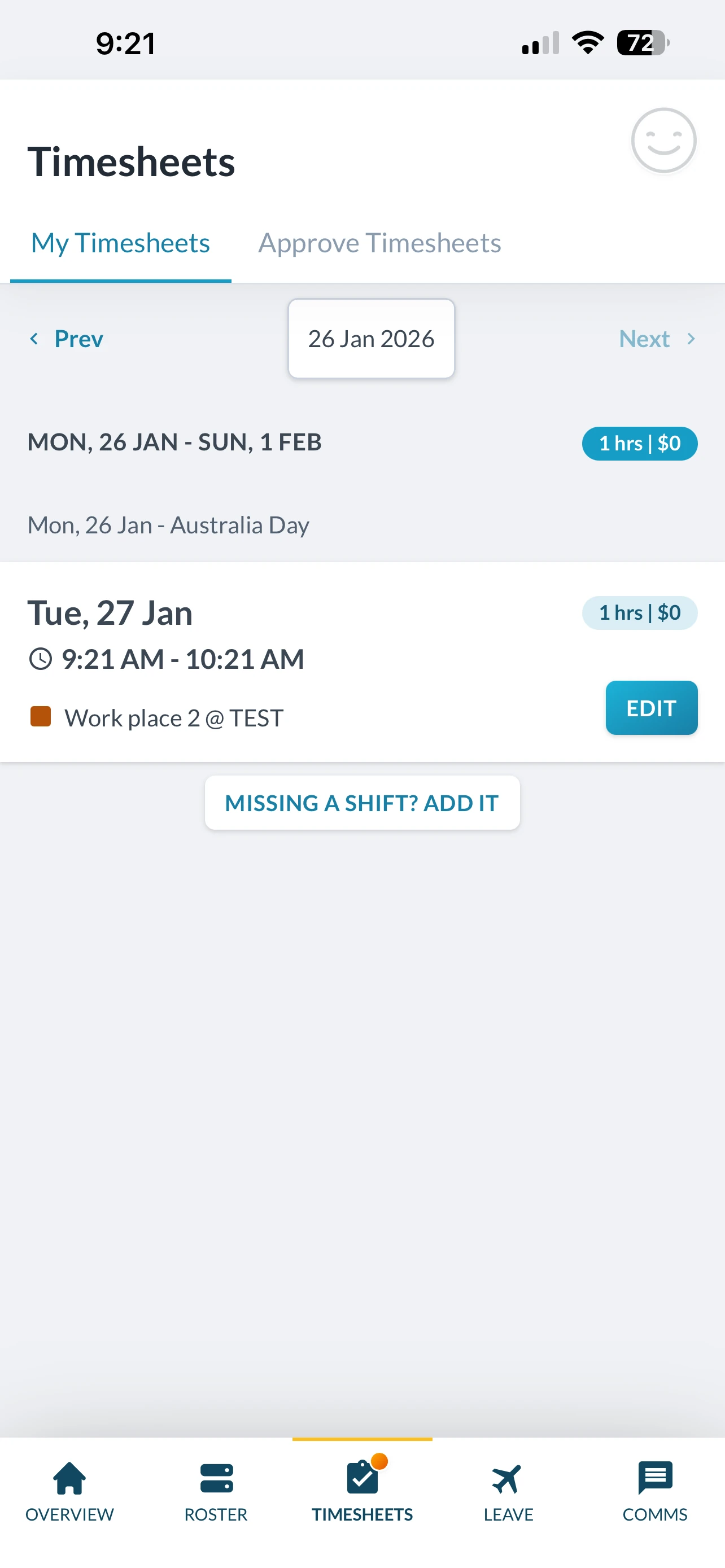
The Tanda app is strong at monitoring existing operations but more limited when it comes to changing them. Certain core configuration tasks—such as adjusting sites or positions—cannot be performed in the smartphone app and must be completed via the web browser. This reduces flexibility for managers who rely on mobile-only workflows.
From an owner or manager perspective, the interface can initially feel overwhelming. After spending time exploring the menus, the structure becomes clearer, but it requires a learning investment that may not suit all teams.
Performance & updates
Performance across both iOS and Android is stable, with no major crashes or lag reported.
Looking at update history, the app appears to receive updates approximately every six months. While this cadence is not uncommon, more frequent updates are generally beneficial in modern mobile environments—particularly for responding to OS changes, addressing bugs, and iterating on usability improvements.
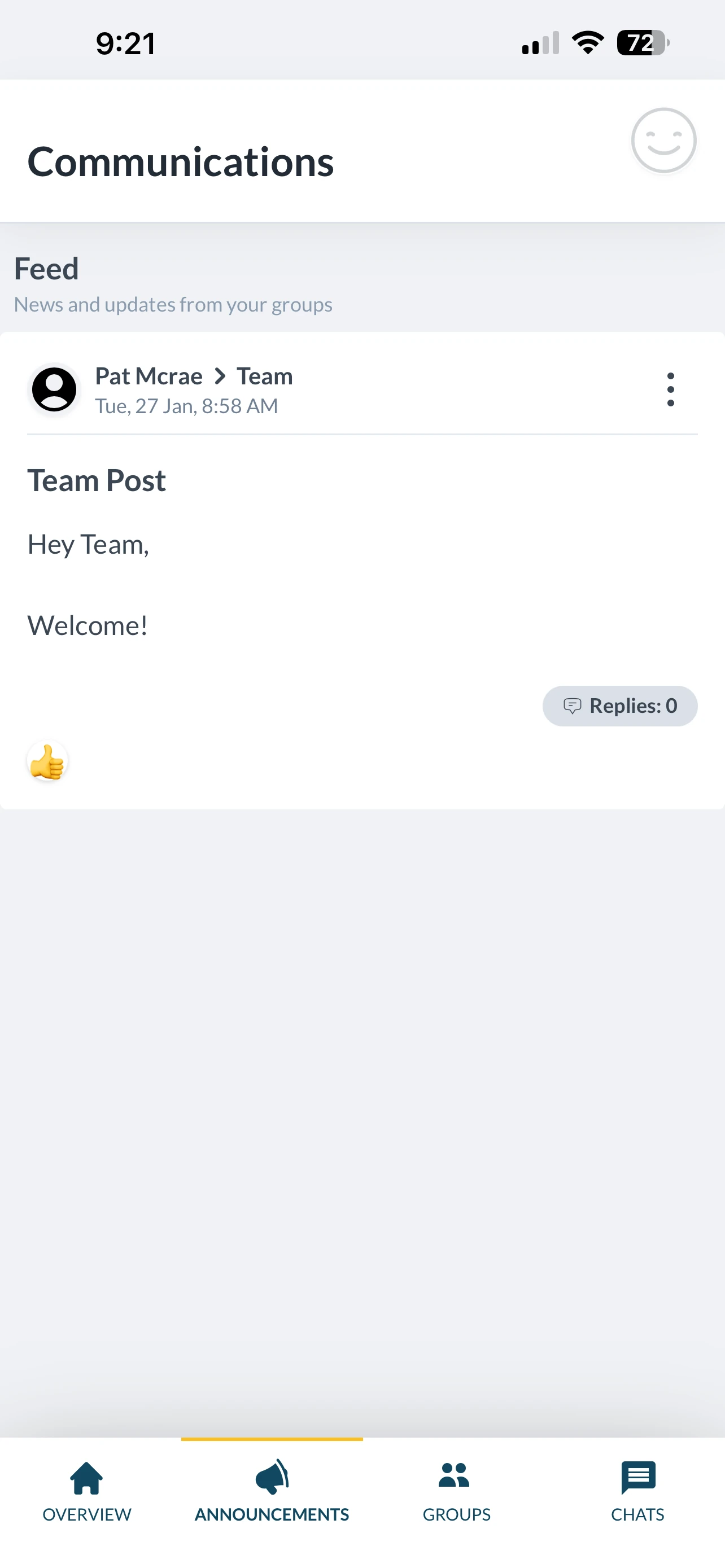
Strengths & limitations
Strengths
- Strong operational overview
- Consistent design with web platform
- Detailed business metrics on mobile
- Stable performance
Limitations
- Navigation feels menu-heavy
- Limited ability to configure settings from mobile
- Less suited to rapid, on-the-fly changes
- Infrequent update cadence
Pros & cons
| Pros | Cons |
|---|---|
| Detailed management dashboard | Steeper learning curve |
| Strong reporting visibility | Limited mobile configuration |
| Consistent UI with web | Navigation could be streamlined |
| Stable app performance | Updates less frequent |
★ Verdict
We found Tanda's smartphone app to be well suited to oversight and reporting, giving managers clear visibility into labour, costs, and attendance while away from their desk. However, its strength lies more in monitoring than action. Limited configuration controls and a complex menu structure make it less effective for managers who need to make frequent changes in real time. For businesses that value mobile reporting and high-level operational insight, Tanda's app performs well. For teams that need to adjust rosters, settings, and workflows quickly from a phone, the mobile experience may feel more constrained than expected.
Tanda HR tools and onboarding
HR tools score: 7.4/10
Tanda positions its HR tools as part of a broader workforce and payroll ecosystem, offering document management, onboarding workflows, and compliance-related features alongside rostering and time tracking.
In theory, this all-in-one approach is appealing—particularly for Australian businesses looking to reduce reliance on external HR providers. In practice, access restrictions, pricing, and limited in-product guidance are key considerations when evaluating Tanda's HR offering.
HR Hub structure & access
Tanda's HR functionality is housed within a dedicated HR Hub, which acts as a central dashboard for HR-related features. Access to this module requires opting into payroll-linked plans, which come at a higher per-employee cost.
As a result, full hands-on testing of all HR features was limited. From a buyer's perspective, this makes it harder to evaluate suitability upfront—particularly given HR and compliance are high-risk operational areas.
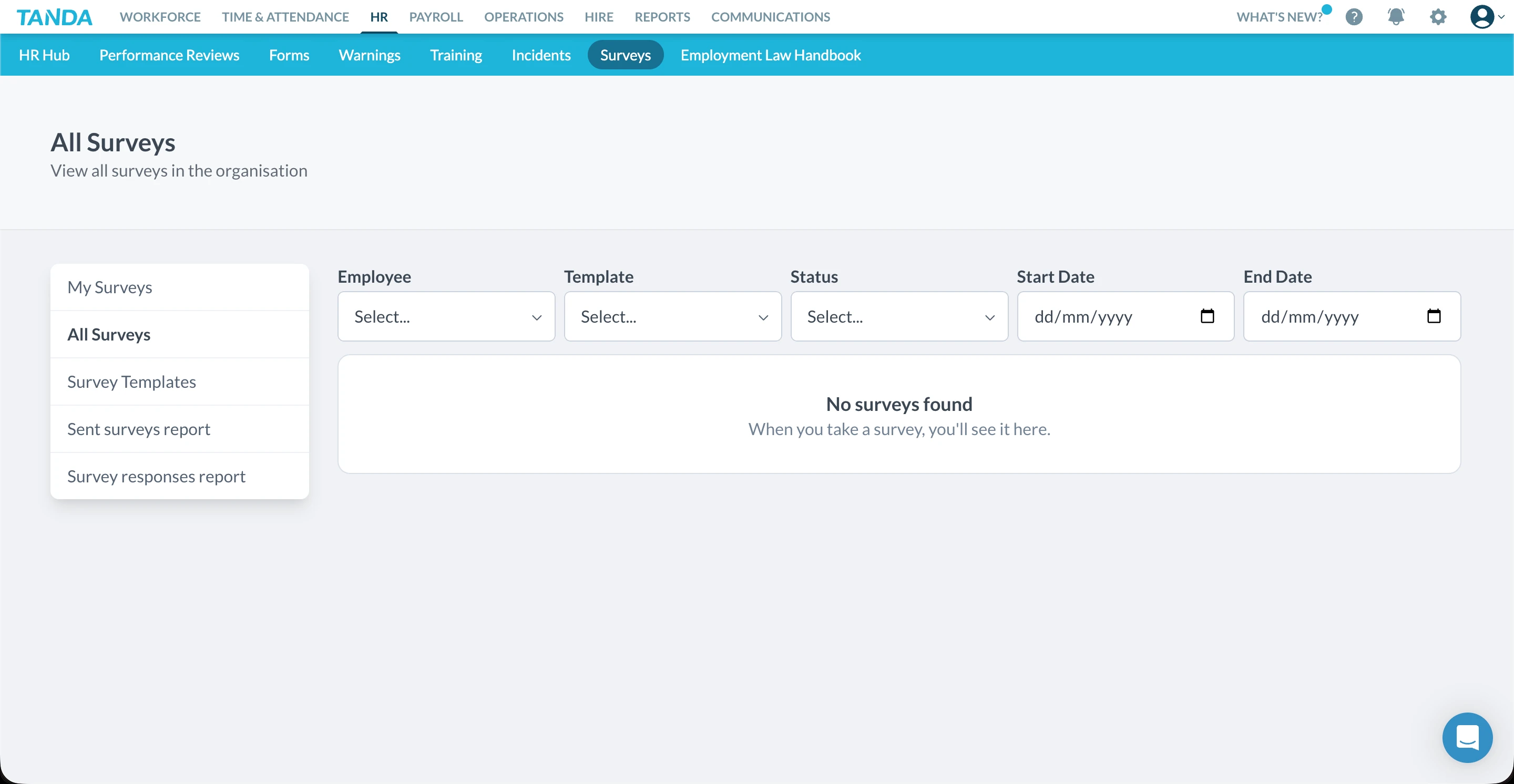
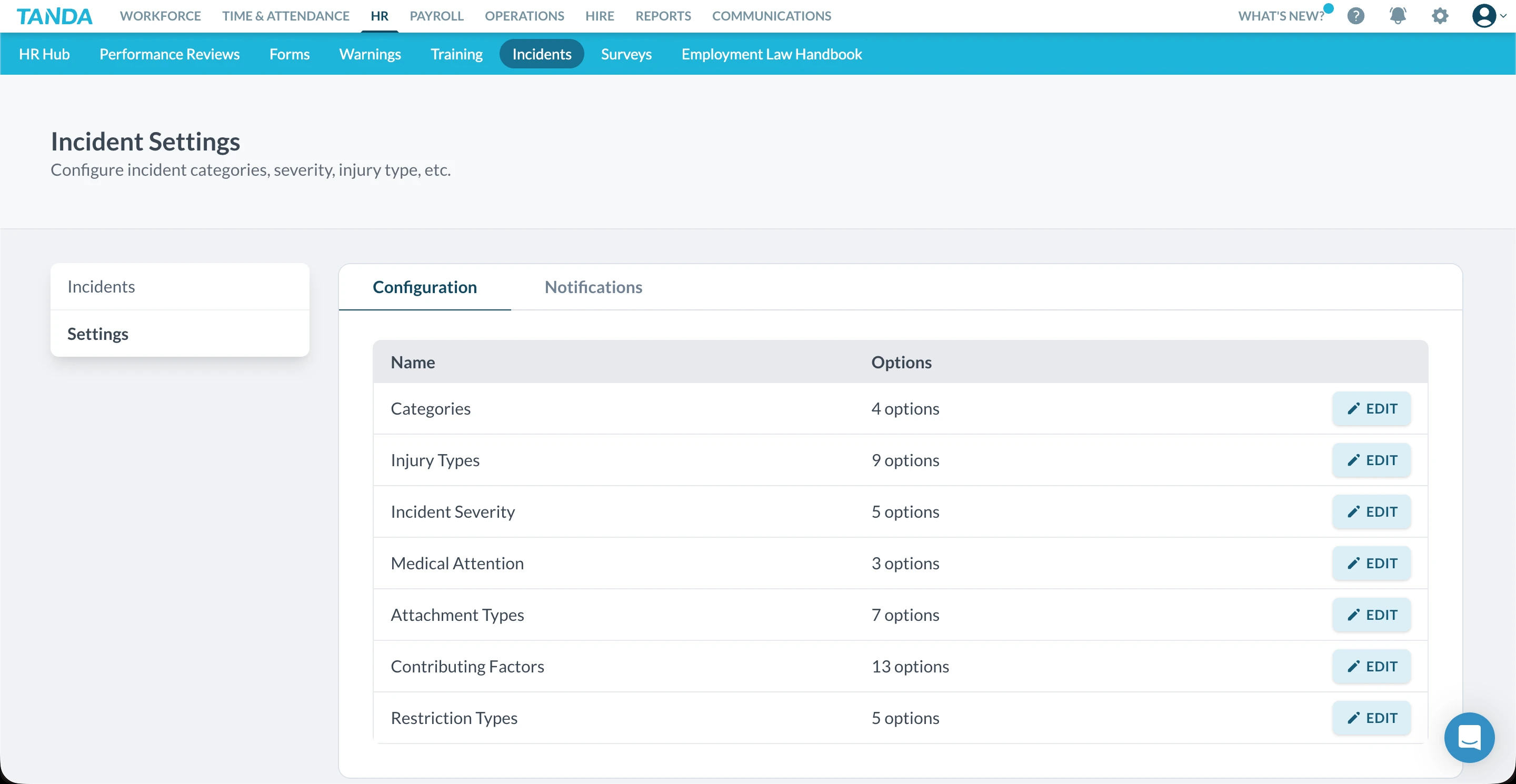
Within the HR Hub, sections include: HR Hub (dashboard view), Forms, Warnings, Training, Incidents, Surveys, and Employment Law Handbook. The breadth of features is strong, and the structure is logical at a high level.
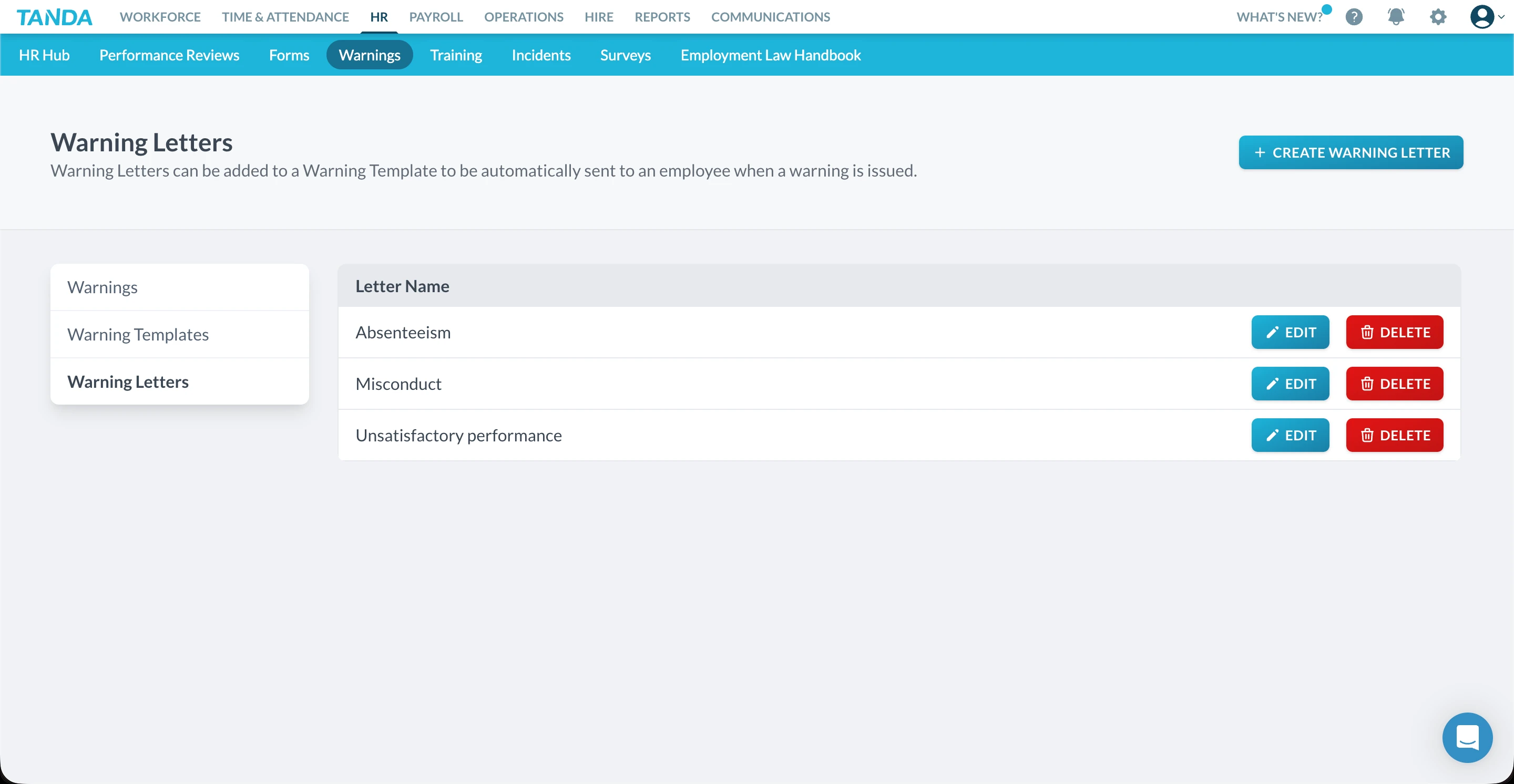
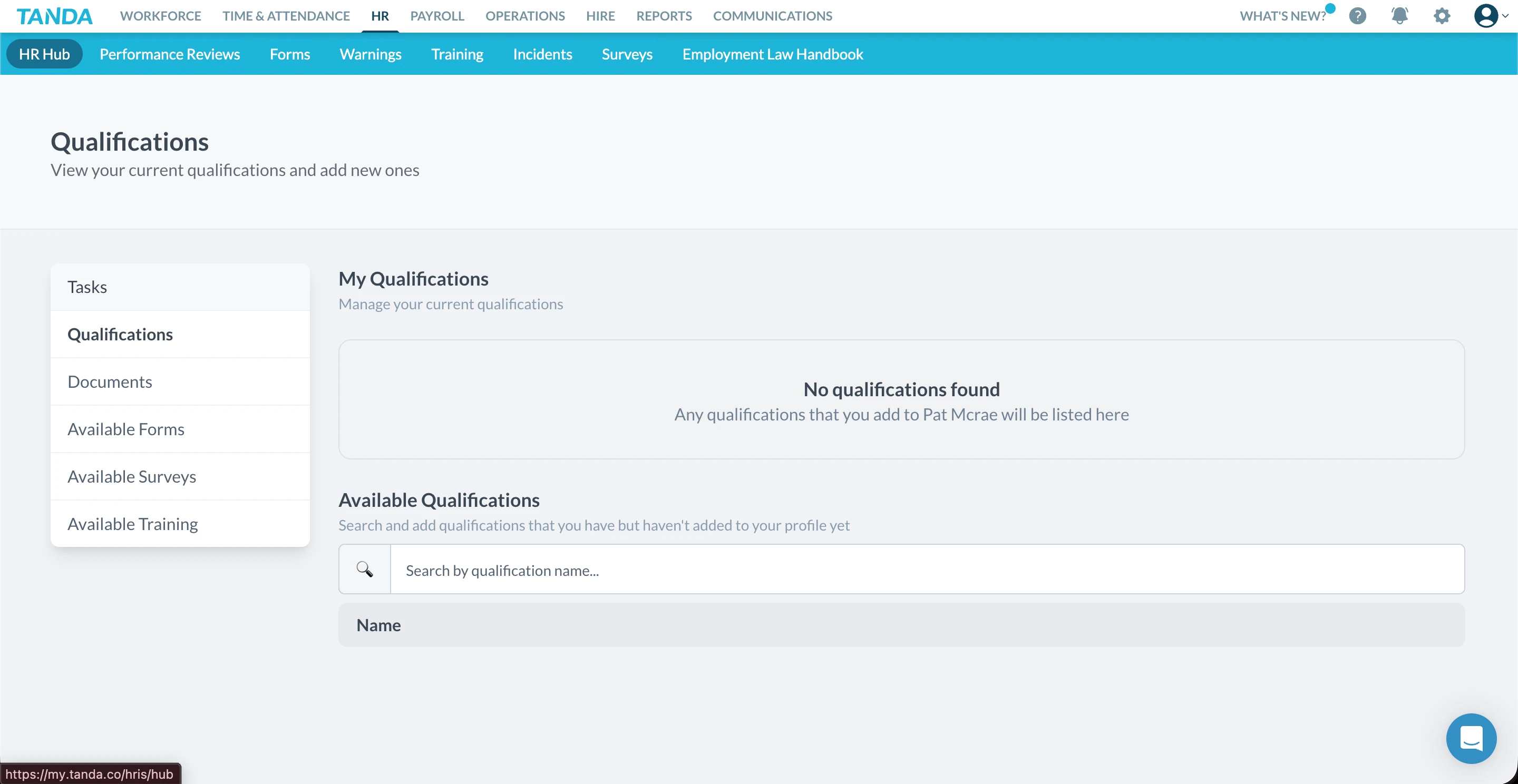
Documents, forms & records
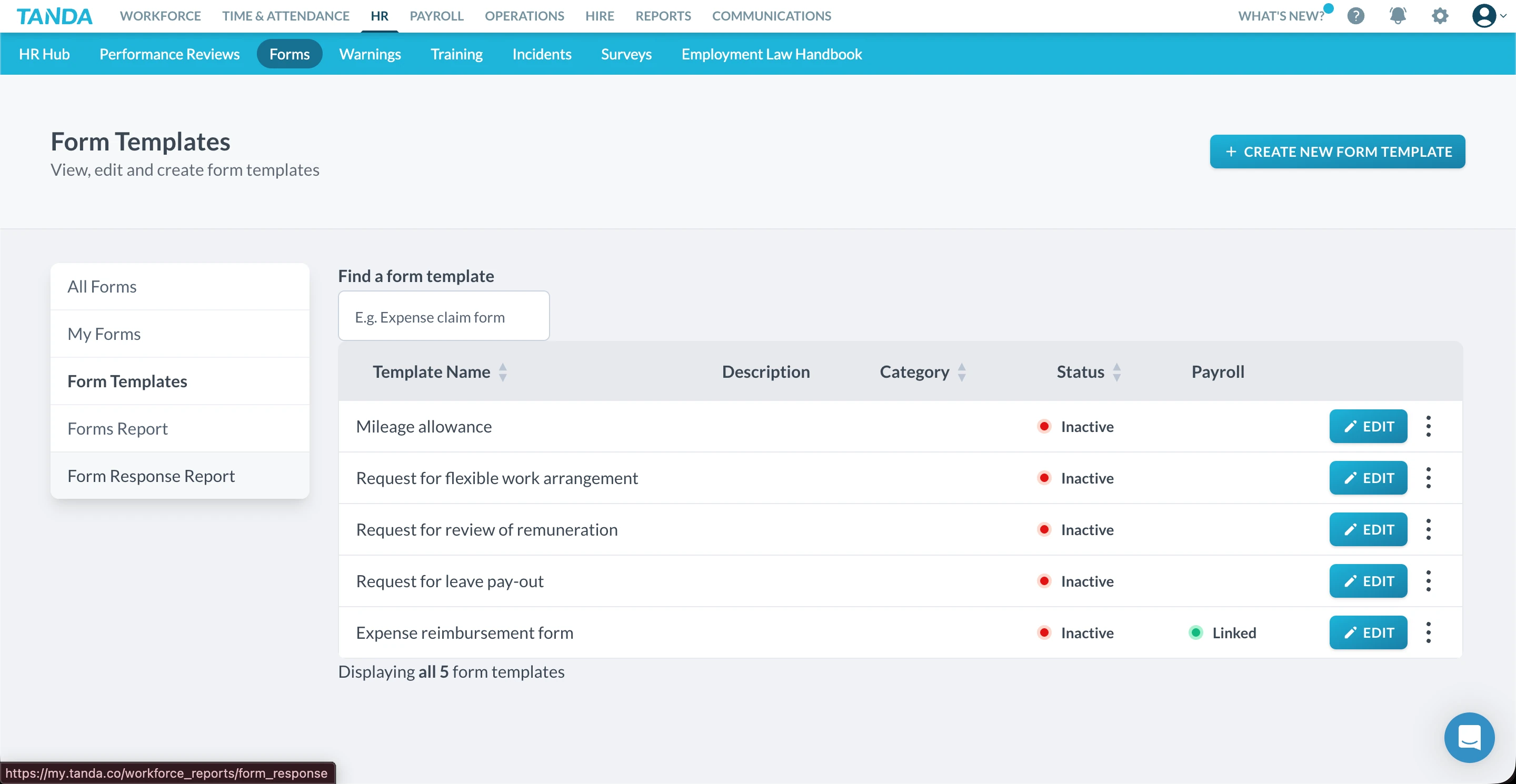
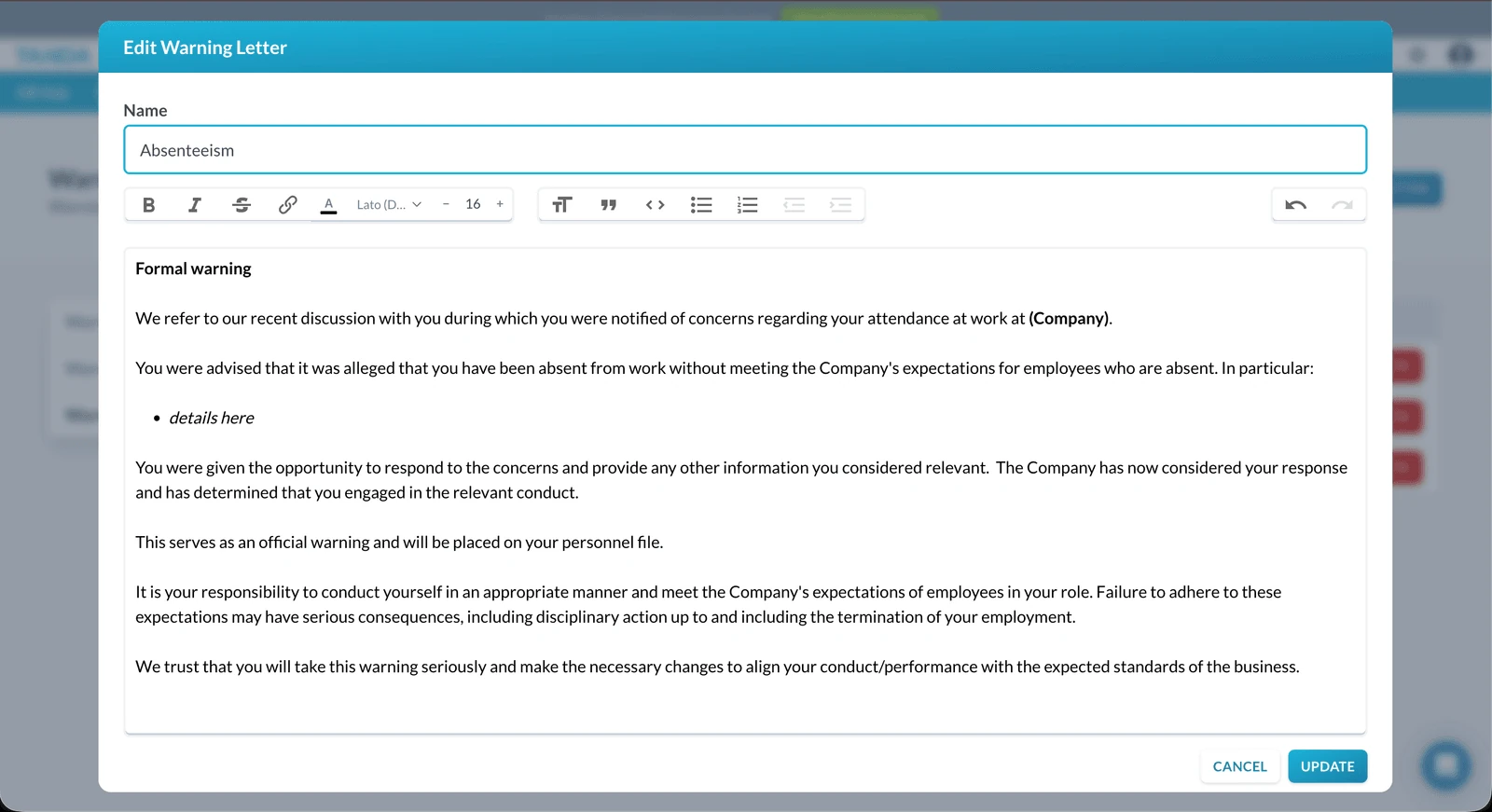
Across the various HR sections, Tanda provides filtering and categorisation tools to help locate documents and records. We also observed access to pre-built templates in some areas, allowing businesses to get started without building everything from scratch.
However, we noticed several usability gaps: limited on-screen guidance explaining how features connect, unclear workflows for creating or adding new forms, and no obvious call-to-action within the Forms section to create or upload a form. Given the cost and scope of the HR module, clearer navigation cues and contextual help would significantly improve usability—especially for smaller businesses without dedicated HR staff.
Onboarding & compliance setup
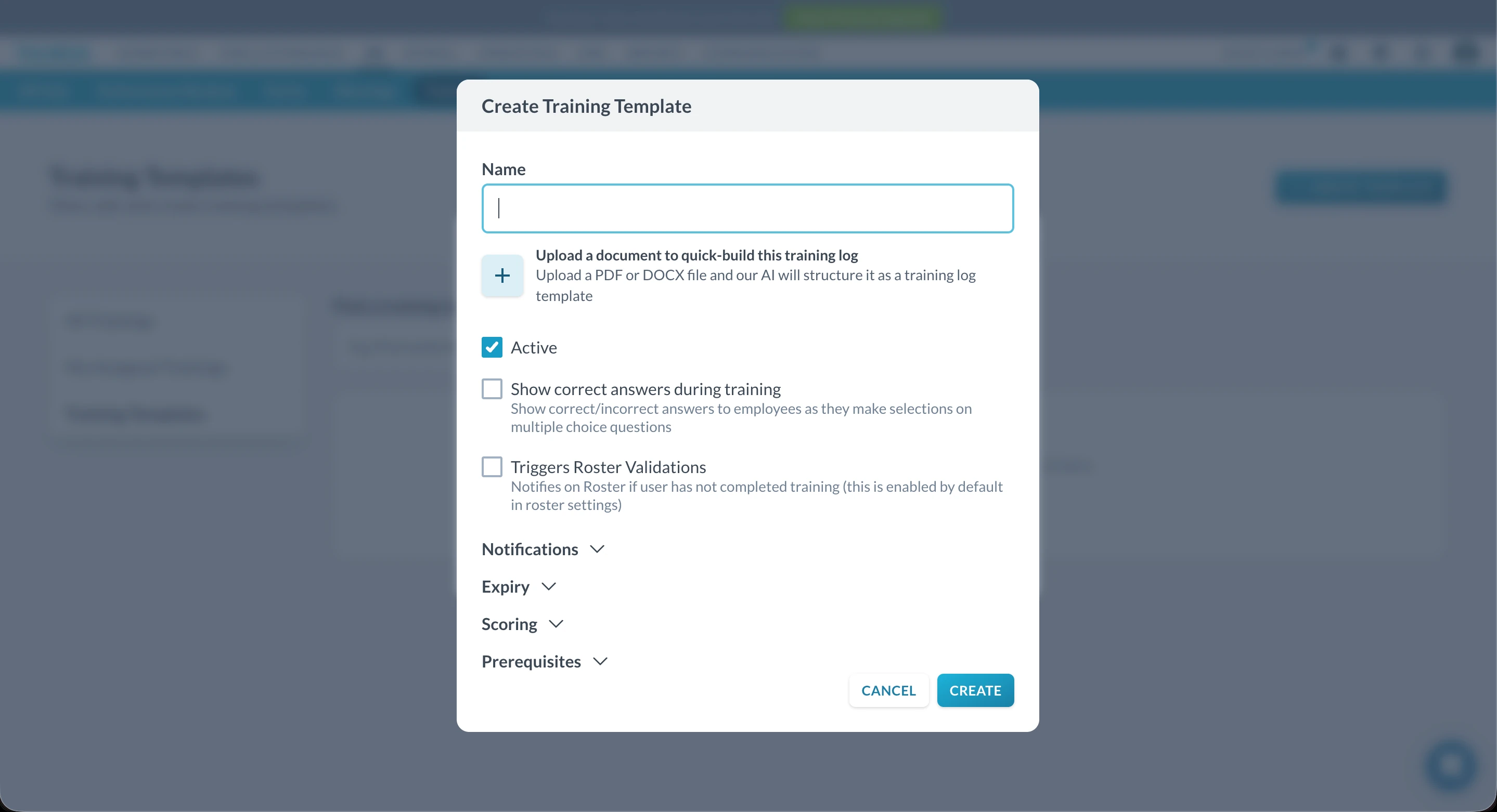
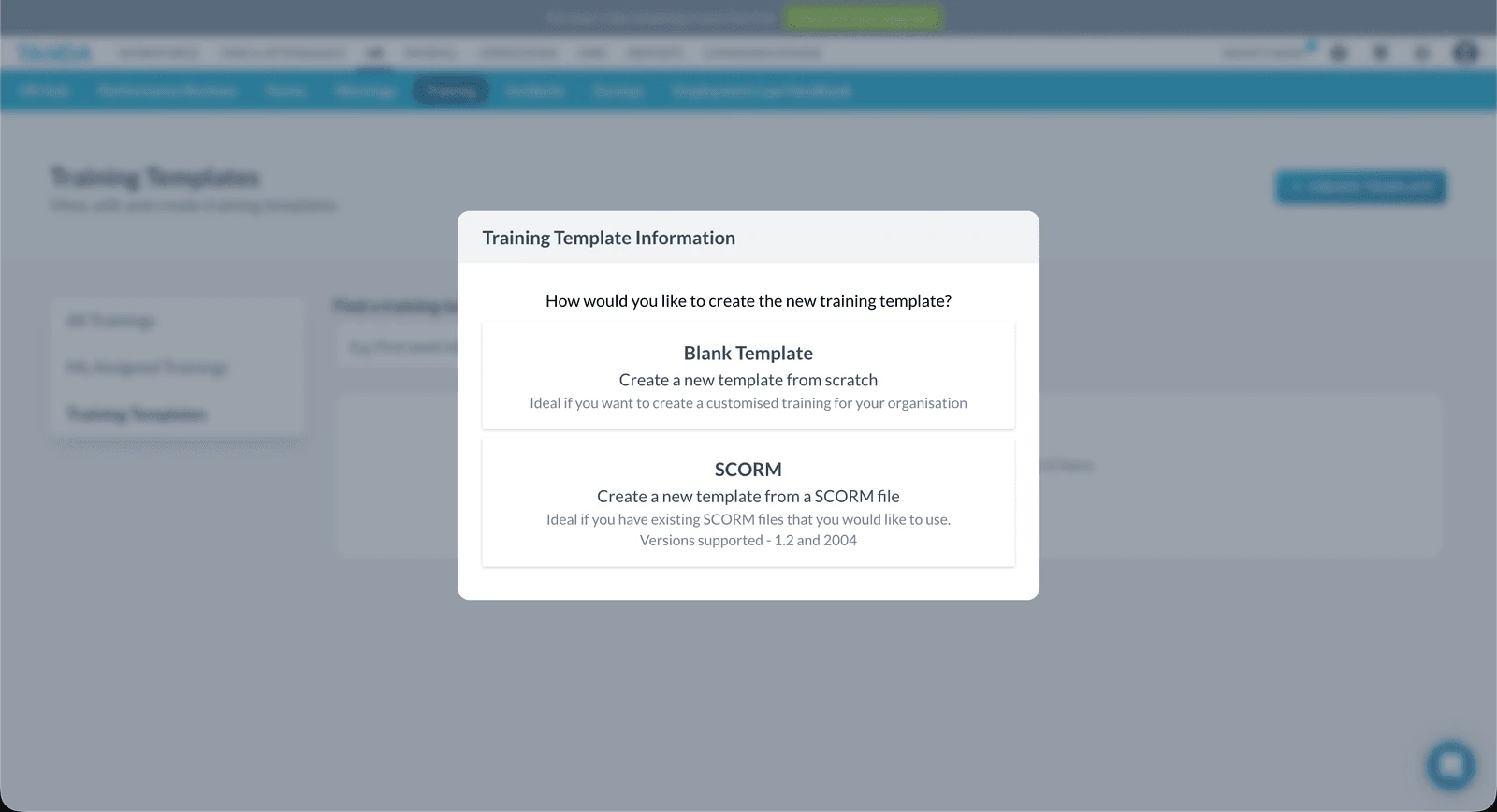
During demonstrations, it was mentioned that Tanda supports contract generation and provides access to a contract library. However, these features were not visible in the account we reviewed, suggesting they may be part of additional paid tiers or add-ons.
We did see options to manage qualifications and compliance-related records, but there was limited explanation of how these inputs are used across the platform—such as whether they trigger alerts, restrict rostering, or integrate with other modules. Most elements are logically named and broadly self-explanatory, but HR systems benefit heavily from guided setup, particularly when dealing with employment law and compliance obligations.
Guidance & learning curve
A consistent theme across the HR Hub was the absence of embedded help tools or walkthroughs. While experienced HR managers may be able to work through the setup independently, smaller teams may struggle to know whether they are using the system correctly or efficiently. Given the cost of the HR module, stronger onboarding support and clearer explanations would help justify the investment.
Strengths & limitations
Strengths
- Broad HR feature set
- Centralised HR Hub structure
- Some access to pre-built templates
- Strong potential for all-in-one workforce management
Limitations
- HR tools gated behind higher-cost plans
- Limited hands-on evaluation before committing
- Minimal in-product guidance
- Some workflows unclear (e.g. forms creation)
Pros & cons
| Pros | Cons |
|---|---|
| Wide range of HR features | Expensive per-employee pricing |
| Centralised HR hub | Limited trial visibility |
| Templates available in some areas | Sparse setup guidance |
| All-in-one positioning | Navigation could be clearer |
★ Verdict
We found Tanda's HR tools to be feature-rich but complex, with strong potential for businesses seeking a single system to manage HR, payroll, and workforce operations. However, restricted access, higher pricing, and limited in-product guidance make it harder to evaluate and adopt confidently—particularly for small Australian businesses without dedicated HR resources. For organisations willing to invest time, training, and budget into an all-in-one platform, Tanda's HR offering may be a good fit. For teams prioritising clarity, ease of setup, and cost-effective compliance, the HR experience may feel heavier than necessary.
Tanda analytics and reporting
Analytics score: 8.3/10
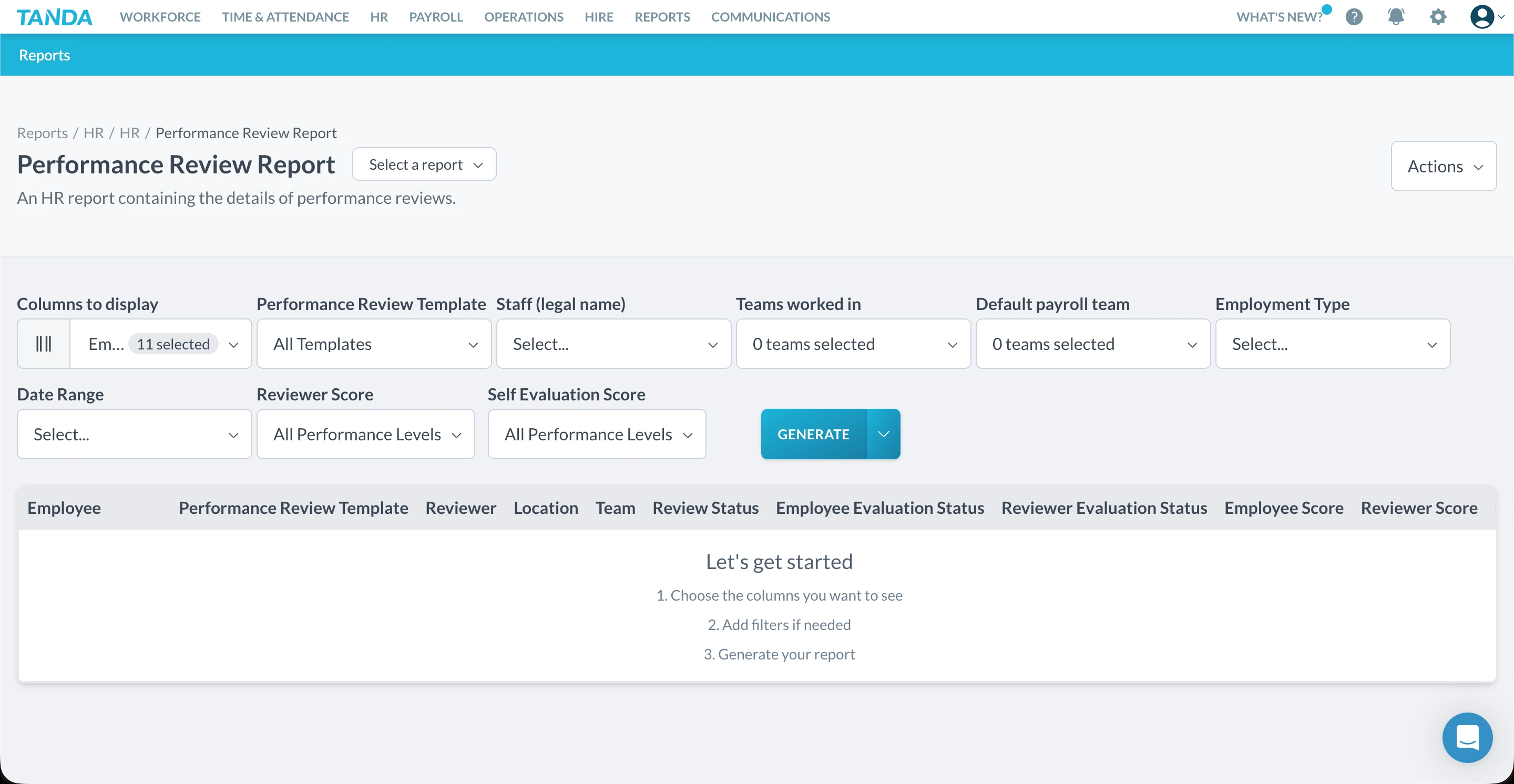
Tanda provides a comprehensive suite of pre-built analytics and reporting tools covering workforce operations, HR, rostering, and financial performance. Rather than relying on custom dashboards or report builders, Tanda focuses on structured, ready-to-use reports designed to answer common operational questions with minimal setup.
Tanda's reporting stands out for its depth and filtering capability, with a clear emphasis on operational visibility across the business.
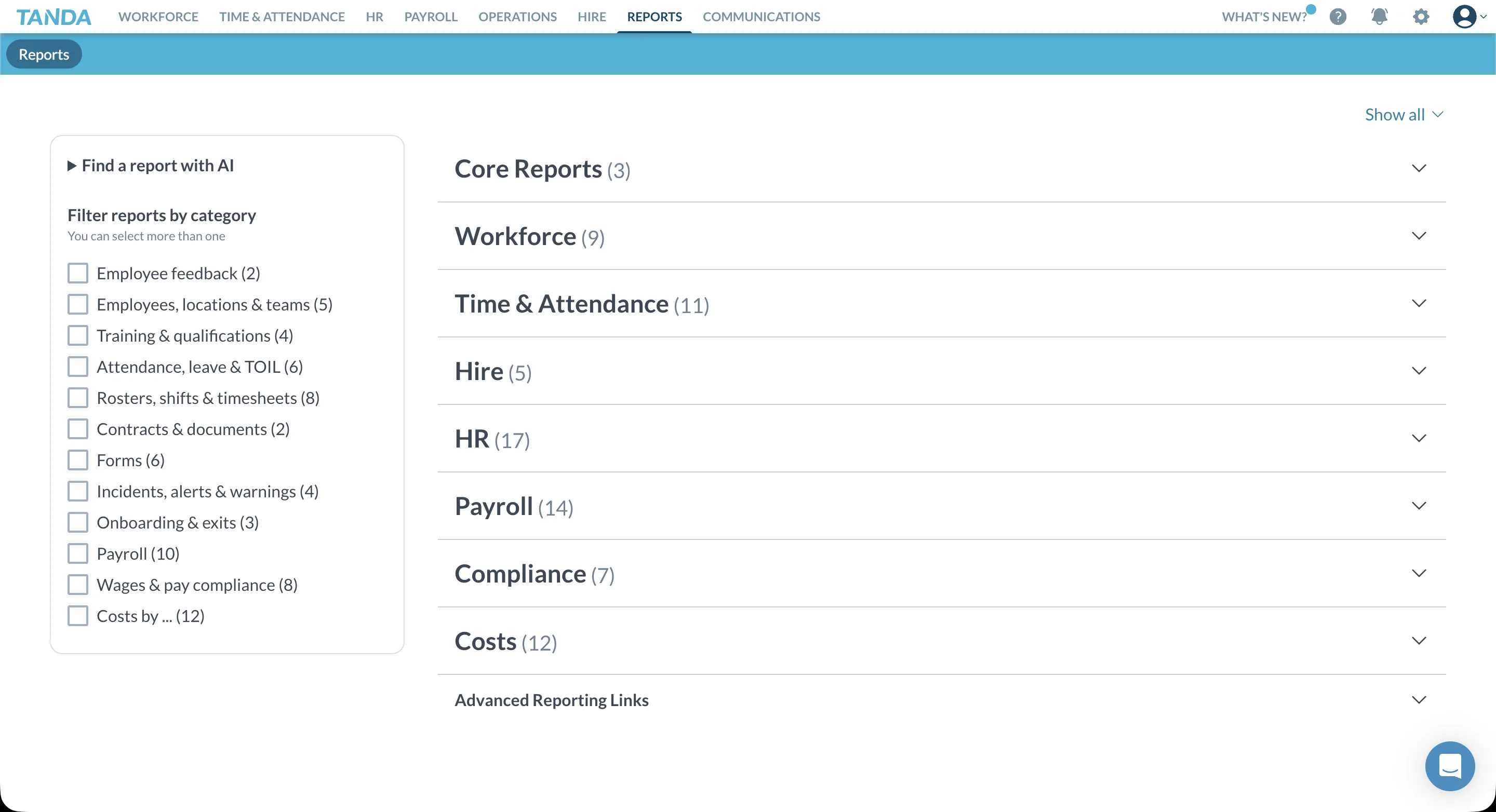
Report coverage & structure
Tanda offers a broad library of reports spanning multiple areas, including HR and onboarding, rostering and attendance, labour costs and wages, and financial and operational performance. This breadth makes it easy for managers to find relevant data without needing to build reports from scratch. For many businesses, the availability of pre-configured reports reduces the need for training or external analytics tools.
Filtering & usability
One of Tanda's strongest areas is its advanced filtering. Across reports, users can narrow results by date range, location, team, role, and other relevant attributes. This makes it easier to isolate specific operational scenarios, such as analysing labour costs for a single site or reviewing onboarding activity across a department.
Reports can be pinned for quick access, which is useful for recurring reviews. There is also an option to generate and email reports, allowing scheduled or ad-hoc sharing with stakeholders.
Viewing & output options
Within the reporting interface, data is clearly presented and easy to follow. The layout supports quick scanning, and figures are grouped logically based on the report's purpose.
However, we did note a limitation around exports. Reports are generated and emailed, but there is no clear option to choose export formats directly (such as CSV or PDF) at the point of generation. This reduces flexibility for businesses that prefer to work with data outside the platform or integrate reports into external workflows.
Learning curve & accessibility
Tanda's reliance on pre-built reports makes the analytics experience relatively accessible. Managers can jump in and start reviewing data without needing to understand a complex reporting engine. That said, we did not see on-screen descriptions explaining the intent or scope of each report. While experienced users will quickly understand the outputs, clearer contextual explanations could help newer users select the right report more confidently.
Strengths & limitations
Strengths
- Wide range of pre-built reports
- Strong filtering and segmentation
- Reports cover HR, rostering, and financial data
- Pinning and email generation supported
Limitations
- Limited control over export formats
- No in-report descriptions or guidance
- Less flexibility for custom analytics
- Reporting is structured rather than exploratory
Pros & cons
| Pros | Cons |
|---|---|
| Comprehensive report library | Export options limited |
| Advanced filtering | No report descriptions |
| Easy to get started | Less customisation |
| Suitable for most operational needs | Structured approach may not suit all users |
★ Verdict
We found Tanda's analytics and reporting to be robust, practical, and well suited to operational oversight. The strength of the system lies in its pre-built reports and filtering depth, allowing businesses to access meaningful data quickly without heavy setup. While export flexibility and contextual guidance could be improved, the overall reporting experience is reliable and effective for most day-to-day business needs. For organisations that value ready-made insights over custom analytics, Tanda's reporting tools perform well and cover a broad range of operational requirements.
Tanda pricing and plans
Pricing score: 7.1/10
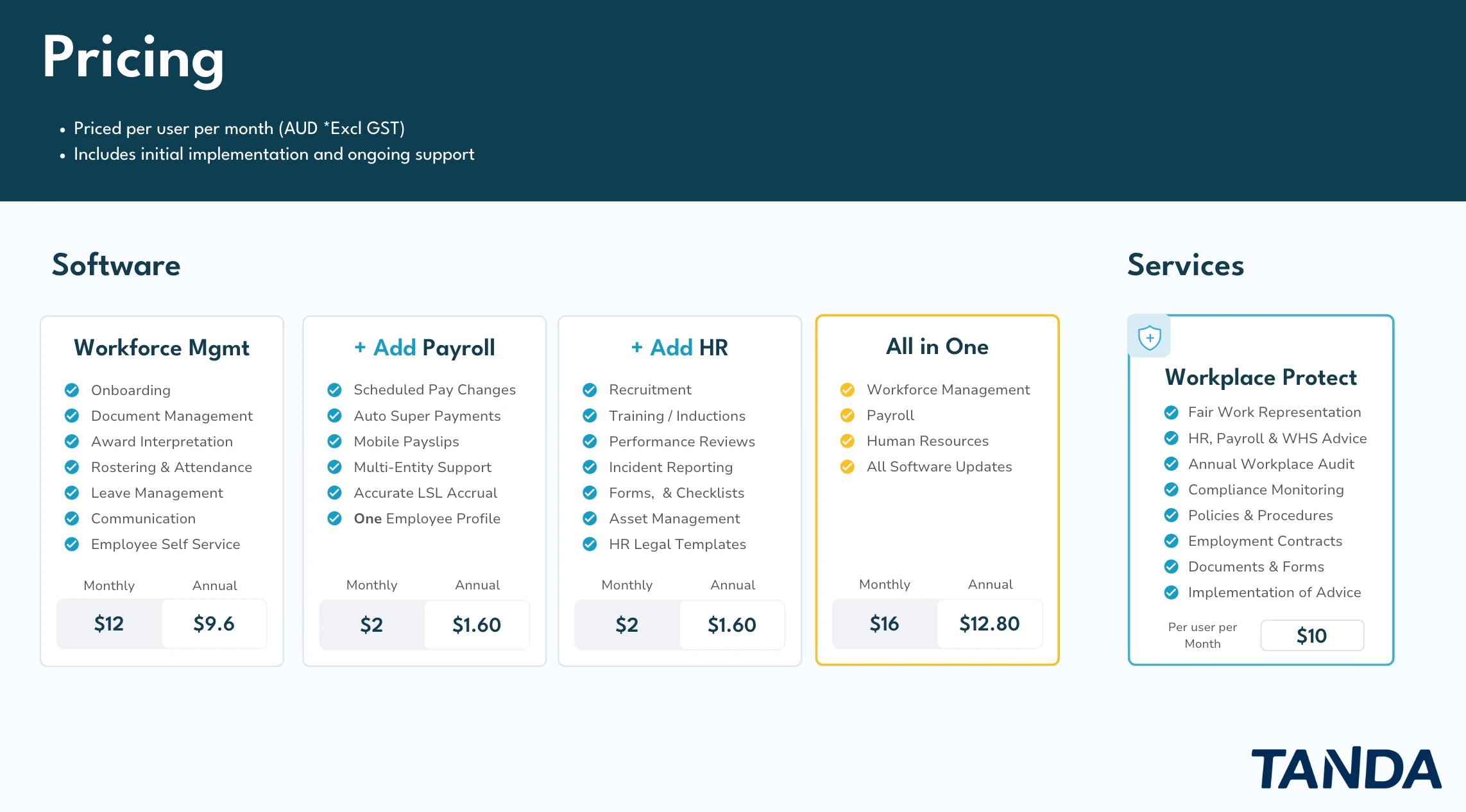
Tanda uses a modular, per-user pricing model, where businesses pay a base rate per employee per month and then add additional modules depending on their needs. This structure gives organisations flexibility to tailor the platform to their operations, but it also introduces complexity—particularly for small and growing businesses trying to forecast total costs.
Unlike many modern SaaS platforms, Tanda does not clearly display live pricing on its website, instead relying on plan breakdowns, add-on descriptions, and sales-led pricing explanations. In 2026, this lack of upfront price transparency can feel unnecessarily frustrating for customers comparing options.
How Tanda structures pricing
At a high level, Tanda pricing is built around a Core workforce management plan (rostering, time & attendance) with optional add-on modules priced per user per month. Common add-ons include Payroll, HR, Messaging+, and Analytics+.
Each module is priced separately, meaning businesses only pay for the features they enable. While this can be appealing for larger or more complex organisations, it also means the headline price often understates the real monthly cost for most day-to-day use cases.
What works well
Tanda's pricing model works best for larger or more operationally complex organisations. Businesses with dedicated payroll or HR teams, multiple locations, or advanced forecasting and analytics needs can selectively enable the modules they require while leaving others switched off.
This avoids paying for features that aren't relevant and allows the platform to slot into an existing tech stack rather than replace it entirely. For organisations that value configurability and enterprise-style control, this modular approach can be a good fit.
Where it falls short
For smaller teams and growing businesses, pricing predictability is where Tanda's model struggles. While the Core plan may appear competitive at first glance, many businesses quickly discover they need to add multiple modules—such as HR, messaging, analytics, or payroll—to achieve a complete, day-to-day workflow. As these add-ons are priced per user, costs can increase incrementally as staff numbers grow.
Another downside is price visibility. Not displaying clear, live pricing on the website adds friction to the buying process and makes side-by-side comparisons harder than they need to be. In an era where most SaaS tools are transparent about costs, this approach feels dated. Compare this with all-inclusive rostering solutions.
Strengths & limitations
Strengths
- Flexible modular pricing
- Pay only for enabled features
- Scales well for larger teams
- Suitable for complex workforce environments
Limitations
- Total cost can be hard to predict
- Add-ons significantly increase spend
- Less SME-friendly pricing structure
- Limited pricing transparency online
Pros & cons
| Pros | Cons |
|---|---|
| Modular, flexible pricing | Hard to forecast true cost |
| Scales for large teams | Add-ons increase monthly spend |
| Suitable for enterprises | Not always SME-friendly |
| Customisable feature set | Prices not clearly shown online |
★ Verdict
We found Tanda's pricing to be flexible but complex. The modular structure works well at scale and suits organisations that want granular control over features. However, for smaller or growing businesses, the lack of upfront pricing transparency and the cumulative cost of add-ons can make budgeting more difficult than expected. For teams seeking a simple, all-in-one solution with predictable monthly pricing, Tanda's approach may feel fragmented. For larger organisations that prioritise configurability over simplicity, the pricing model can make sense—provided there's clear internal oversight of costs.
Tanda use cases: who is it best for?
Use cases score: 7.8/10
Tanda performs best in larger organisations that prioritise time tracking accuracy, award interpretation, and compliance—and have the internal resources to manage a more complex platform. It's less suited to small businesses seeking simplicity or those who need quick, action-oriented mobile management.
Best suited for:
Tanda's strengths in time & attendance (8.5/10), reporting (8.3/10), and communication tools (7.9/10) make it well suited for:
- Multi-location businesses – Strong geofencing, location-based clock-ins, and centralised reporting support businesses managing staff across multiple sites
- Hospitality and retail – Award interpretation features and compliance tools address the complexity of Australian workplace awards
- Businesses with dedicated admin or HR resources – The platform's depth requires time to configure and maintain, making it better suited to teams with capacity for setup and ongoing management
- Organisations prioritising time tracking accuracy – Photo verification, geofencing, and detailed clock-in controls reduce time theft and improve payroll accuracy
- Teams wanting all-in-one workforce management – For businesses willing to invest in the full suite (workforce, payroll, HR), Tanda consolidates multiple functions into one platform
Less suited for:
Based on our review findings, Tanda may not be the best fit for:
- Small businesses seeking simplicity – The platform's learning curve, menu complexity, and configuration depth can overwhelm smaller teams without dedicated admin time
- Teams needing quick mobile management – The mobile app (7.6/10) is strong for monitoring but limited for on-the-fly changes; core configuration requires desktop access
- Budget-conscious businesses wanting predictable pricing – Modular pricing (7.1/10) can make costs hard to forecast, with add-ons significantly increasing spend
- Businesses without existing payroll expertise – Payroll setup (7.6/10) is complex and requires careful configuration; simpler integrations may suit less technical teams
- Organisations needing lightweight rostering – Rostering tools (7.5/10) are functional but not exceptional; businesses focused primarily on scheduling may find better options elsewhere
Industry fit
Strong fit
- Hospitality (cafes, restaurants, hotels)
- Retail (multi-store operations)
- Healthcare & aged care
- Warehousing & logistics
- Franchise networks
Moderate fit
- Professional services
- Small retail (single location)
- Startups and micro-businesses
- Fixed-schedule teams
- Businesses with simple award structures
Pros & cons
| Pros | Cons |
|---|---|
| Strong time tracking and compliance | Steep learning curve for small teams |
| Comprehensive reporting and analytics | Mobile limited for quick changes |
| All-in-one potential with add-ons | Pricing complexity and add-on costs |
| Multi-location and geofencing support | Rostering not a standout feature |
★ Verdict
In our assessment, Tanda is best suited to larger Australian businesses that need strong time tracking, award compliance, and operational reporting—and have the internal capacity to manage a more complex platform. For smaller teams, those prioritising simple rostering, or businesses wanting predictable pricing, Tanda's depth may introduce more friction than value. The platform rewards investment in setup and configuration, but that investment needs to align with your team's capacity and operational priorities.
Tanda security and privacy
Security score: 8.2/10
Tanda includes a range of security and privacy controls designed to support businesses managing sensitive employee, payroll, and HR data. The platform is positioned to meet the expectations of Australian businesses operating in regulated environments, particularly those with payroll and workforce compliance requirements.
Tanda's security posture aligns with standard best practices for workforce management software. While security features are present and functional, detailed certifications and technical documentation are less prominently communicated than with some enterprise-focused platforms.
Security features
| Feature | Tanda |
|---|---|
| Data encryption (at rest & in transit) | Yes |
| Role-based access controls | Yes |
| Two-factor authentication (2FA) | Yes |
| Single Sign-On (SSO) | Available on higher-tier plans |
| GDPR compliance | Yes |
| Australian data hosting | Yes |
| Audit logs | Yes |
| Public SOC 2 certification | Not publicly advertised |
Tanda supports role-based permissions, allowing businesses to control access to sensitive areas such as payroll, HR records, and reporting. This is particularly important for organisations with multiple managers or decentralised operations. Data is encrypted in transit and at rest, which aligns with modern SaaS security standards.
Access controls & identity management
Tanda provides configurable permission levels across the platform, enabling businesses to separate access between owners, managers, payroll administrators, and general staff.
Two-factor authentication is supported, adding an additional layer of account security. Single Sign-On (SSO) is available for organisations on higher-tier or enterprise-style plans, supporting centralised identity management for larger teams. For small to mid-sized businesses, these controls are generally sufficient to manage access securely without introducing unnecessary complexity.
Data hosting & privacy considerations
Tanda hosts data within Australia, which is a key requirement for many Australian businesses—particularly those handling payroll, employee records, and HR documentation.
The platform states compliance with relevant privacy and data protection standards, including GDPR where applicable. While GDPR compliance is less critical for most Australian-only businesses, it signals alignment with internationally recognised data protection frameworks.
Transparency & certifications
One area where Tanda is less explicit is around third-party security certifications. Unlike some enterprise platforms, certifications such as SOC 2 Type II are not prominently advertised in public-facing materials. This does not indicate weak security, but it does mean businesses with strict procurement or compliance requirements may need to engage directly with Tanda to obtain detailed security documentation or assurance reports.
Strengths & limitations
Strengths
- Strong role-based access controls
- Encrypted data handling
- Australian data hosting
- 2FA and audit logging supported
Limitations
- Security certifications not prominently disclosed
- SSO restricted to higher-tier plans
- Limited public technical security documentation
Pros & cons
| Pros | Cons |
|---|---|
| Solid baseline security controls | Limited public certification detail |
| Australian-hosted data | SSO not standard on all plans |
| Suitable for payroll & HR data | Less enterprise-facing transparency |
| Meets SME security expectations | May require sales contact for assurance |
★ Verdict
We found Tanda's security and privacy controls to be appropriate and reliable for most Australian businesses, particularly those managing payroll, HR, and workforce data within a single platform. The platform delivers the core protections expected of modern SaaS software, including encryption, access controls, and auditability. While enterprise-grade certifications are not as prominently communicated, the overall security posture is more than adequate for SMEs and mid-sized organisations. For businesses with highly regulated or procurement-driven security requirements, additional due diligence may be required. For most teams, Tanda's security offering provides a solid and dependable foundation.
Tanda support and onboarding
Support score: 6.9/10
Tanda positions itself as a full workforce management platform, but the support and onboarding experience plays a critical role in how quickly businesses can adopt and use the software effectively.
Tanda's support offering feels sales-led rather than onboarding-led, with limited self-service resources and uneven follow-through once access is granted. This can make early-stage adoption slower than expected—particularly for small businesses without internal implementation resources.
Trial access & onboarding experience
Unlike many modern SaaS platforms, Tanda does not offer an immediate self-serve trial. To access the platform, we were required to register interest, wait several days for contact, speak with a sales representative, and be manually provisioned a trial account.
From start to actual platform access, the process took close to a week. While this approach may suit larger organisations, it creates friction for small businesses looking to evaluate software quickly.
An onboarding demo was scheduled for 45 minutes, but the session concluded earlier than planned. There was one follow-up call, though no clear onboarding plan, confirmation email, or structured next steps were provided afterward.
Ongoing support availability
Tanda support is provided during AEST business hours only, which presents challenges for businesses operating outside the eastern states.
There is no after-hours support, no WA-aligned support hours, and calls may arrive outside local business hours regardless of location settings. For WA-based businesses, this effectively reduces the available support window and leaves limited options if issues arise later in the day.
Help resources & self-service support
A recurring theme across the platform is the lack of embedded guidance. There are few on-screen setup guides, no clear step-by-step onboarding walkthroughs, and limited feature explanations within the interface.
Tanda does offer a chatbot-style help tool, but it often struggles to return relevant answers to specific questions. The tool functions as an overlay rather than an external help centre, making it difficult to browse or reference while using the platform. There is no visible AI-powered assistance designed to explain features or guide configuration in-context, which increases reliance on direct support.
Learning curve & independence
Because many features lack inline documentation or contextual help, users are often required to work things out independently or rely on scheduled calls. For businesses that want to be self-sufficient, this can slow down adoption—particularly when combined with limited support hours and a sales-driven onboarding flow.
Strengths & limitations
Strengths
- Live onboarding demos available
- Human-led sales and support contact
- Suitable for larger organisations with structured rollouts
Limitations
- No instant self-serve trial
- Inconsistent onboarding follow-up
- Limited self-service documentation
- Support hours not Australia-wide
- Weak in-platform guidance
Pros & cons
| Pros | Cons |
|---|---|
| Live demo onboarding | Slow trial access |
| Direct human contact | Limited self-service help |
| Sales-led engagement | Support hours restrictive |
| Works for enterprise rollouts | Less SME-friendly |
★ Verdict
We found Tanda's support experience to be less accessible and less structured than expected, particularly for small and time-poor businesses. While live demos and human support are available, the lack of immediate trial access, limited self-service guidance, and regionally restrictive support hours create friction during onboarding and early use. For larger organisations with dedicated rollout teams, this model may be workable. For small businesses seeking quick setup, clear guidance, and responsive local support, the experience may feel underwhelming.
Tanda review: final verdict
Tanda is a comprehensive workforce management platform that performs strongest in time & attendance (8.5/10), reporting (8.3/10), and security (8.2/10). It's best suited to larger Australian businesses that need accurate time tracking, award compliance, and operational analytics—and have the internal resources to manage a more complex platform.
That said, Tanda comes with notable trade-offs. Rostering tools (7.5/10) are functional but not exceptional. The mobile app (7.6/10) excels at monitoring but is limited for on-the-fly management. Pricing (7.1/10) lacks transparency and can be hard to predict with modular add-ons. And HR tools (7.4/10), while feature-rich, are gated behind higher-cost plans with limited in-product guidance.
Tanda is best suited to:
- Hospitality, retail, and healthcare businesses
- Multi-location operations with geofencing needs
- Teams prioritising time tracking accuracy and compliance
- Organisations with dedicated admin or HR resources
- Businesses wanting all-in-one workforce, payroll, and HR
Tanda may be less suitable for:
- Small businesses seeking simplicity
- Teams needing quick mobile management
- Budget-conscious businesses wanting predictable pricing
- Those focused primarily on rostering
Tanda pros and cons
| Pros | Cons |
|---|---|
| Strong time tracking with geofencing | Pricing complexity and add-on costs |
| Comprehensive reporting & analytics | Rostering not a standout feature |
| Australian data hosting & compliance | Mobile app limited for quick changes |
| All-in-one potential with add-ons | Steep learning curve for small teams |
★ Overall verdict
Tanda is a capable workforce management platform that excels at time tracking, compliance, and operational reporting. However, its depth comes with complexity—and the platform rewards businesses willing to invest in setup, configuration, and ongoing management. For larger organisations with dedicated resources, Tanda delivers strong value. For smaller teams seeking simplicity or predictable pricing, simpler alternatives may be a better fit.
 4.8+ stars
 See what RosterElf customers say
Verified reviews from 30,000+ Australian workplaces on Google, Xero App Store and G2.
Read customer reviewsLooking for a Tanda alternative?
Step-by-step guide to switching from Tanda, plus what to look for in a replacement.
Read switching guideTanda vs RosterElf, capability by capability
Assessed on 43 capabilities across 7 areas. RosterElf is a rostering-first Australian product; Tanda is included here because the two are frequently shortlisted together.
| Capability area | RosterElf | Tanda |
|---|---|---|
| Rostering & scheduling | 8/8 | 7/8 |
| Time & attendance | 7/7 | 7/7 |
| Payroll & award interpretation | 7/7 | 7/7 |
| Team communication | 5/5 | 3/5 |
| Mobile apps | 4/5 | 4/5 |
| HR & compliance | 6/6 | 6/6 |
| Reporting & analytics | 5/5 | 5/5 |
In RosterElf, not Tanda
- Unfilled shift alerts— Rostering & scheduling
- Read receipts— Team communication
- Manager channels— Team communication
In Tanda, not RosterElf
Nothing in this assessment that RosterElf does not also offer.
Assessments are maintained in a shared data layer and applied identically across every review and comparison on this site. Feature sets change — check each vendor's own documentation before deciding.
Our review methodology
Learn how we evaluate workforce management platforms through hands-on testing and verified user feedback.
Feature comparisons are checked against each vendor's public documentation at the time of writing. Assessments of usability, fit and value are our reviewers' opinions, not statements of fact, and products change often. We'd encourage you to trial both platforms and judge for yourself. Spotted something out of date? Tell us and we'll correct it .
Real support from people who understand your business
At RosterElf, support isn't a ticket system — it's part of the product. Our Australian-based team helps you set up correctly, understand award rules, and stay compliant as your business changes. No scripts. No offshore handoffs. Just real help when you need it.
-
Guided setup and onboarding
-
Award and payroll questions answered
-
Ongoing help as your team grows

 5.0 average rating
 Rated 5.0 by Australian businesses
Tanda FAQ
- Tanda pricing starts at $5.50 AUD per user per month for the Starter plan. The Growth plan is $7.50/user/month and includes additional features like leave management and HR tools. Enterprise pricing is custom and includes advanced reporting, dedicated support, and custom integrations. All plans require annual billing. Visit our Tanda alternatives guide for pricing comparisons.
- Tanda's pricing is relatively straightforward compared to some competitors, but there are additional costs to consider. Advanced features like HR onboarding, custom integrations, and priority support are only available on higher-tier plans. Implementation and training fees may also apply for larger deployments. Check the RosterElf pricing page for transparent all-in-one pricing.
- No. Tanda offers a free trial but no free plan. Its published pricing is a single bundle covering HR, payroll and workforce management at $12.80 per user per month plus GST; individual module pricing is quote-on-request. Checked against Tanda's pricing page on 25 August 2026. See Tanda vs RosterElf for a side-by-side.
- Yes, Tanda offers a free trial so businesses can test the platform before committing. The trial provides access to core features including rostering, time tracking, and basic reporting. Be sure to test all the features your business needs, as some advanced functionality requires paid plans.
- Tanda's entry-level pricing appears competitive at $5.50 per user, but most businesses need the Growth plan ($7.50/user) for essential features like leave management. RosterElf offers all-in-one pricing with award interpretation, rostering, time tracking, payroll integration, HR, and team communication included. See our Tanda alternatives guide for detailed comparisons.
- Most Australian businesses need the Growth plan or higher. The Starter plan lacks key features like leave management and advanced HR tools that most businesses require. Enterprise plans add custom integrations and dedicated support but come at significantly higher costs. Consider whether a simpler all-in-one solution like RosterElf might better suit your needs.