
An honest When I Work review 2026:
Pricing, features, pros & cons

We evaluated When I Work's scheduling and time tracking tools hands-on, focusing on how the platform supports day-to-day workforce management.

Written by
Steve Harris
Steve Harris
Workforce management specialist with 10+ years experience in Australian HR tech. Former operations manager in hospitality.

Edited by
Georgia Morgan
Georgia Morgan
Senior editor and compliance researcher. Background in employment law and Fair Work regulations.
When I Work review - quick summary

Overall Score
7.6/10
Key takeaways
- Strong scheduling & self-service – When I Work excels at shift swaps, open shifts, and availability management
- Excellent mobile apps – High app store ratings (4.7-4.8/5) with strong employee adoption
- No Xero integration – Significant gap for Australian businesses using Xero for payroll
- No phone support – Limited to email and chat support during business hours
Score breakdown
When I Work pricing and plans
Pricing score: 8.3/10
When I Work pricing is per-user, per-month across three tiers, and every tier now includes time and attendance. The detail that matters most for Australian buyers is currency rather than modules: When I Work publishes no AUD price list, so what you pay moves with the exchange rate.
Figures below were last checked in September 2026. For current pricing, visit When I Work's pricing page.
Pricing overview
| Plan | Price per user/month | What it adds |
|---|---|---|
| Essentials | US$2.50 | Scheduling, messaging and time & attendance |
| Pro | US$5 | Adds advanced scheduling and reporting |
| Premium | US$8 | Adds forecasting and enterprise controls |
Time and attendance is included in every plan. When I Work previously sold time tracking as a paid upgrade, so older comparisons show a lower "scheduling only" price beside a higher one. The figures above are the current single price per plan.
Pros & cons
| Pros | Cons |
|---|---|
| Competitive per-user pricing for scheduling | Time tracking increases costs |
| No platform fees mentioned | USD pricing for Australian businesses |
| Clear tier ladder | Multi-location may have different pricing |
★ Verdict
Pricing is a strength for teams that truly want scheduling as the core. Our advice: be clear on what your "must-have" list includes — especially time tracking — because that's where the real monthly cost becomes clearer. For Australian businesses, factor in USD conversion.
Who is When I Work?
When I Work is a US-based employee scheduling and time tracking platform designed for hourly workforces. Founded in 2010, it serves businesses primarily in hospitality, retail, healthcare, and other shift-based industries. We found it focuses on making scheduling simple and giving employees self-service tools to manage their availability and shifts.
From our testing, When I Work's strongest areas are ease of scheduling, shift swapping workflows, and mobile app usability. It's a practical step up from spreadsheets for businesses that want straightforward rostering without complex setup.
Where we found When I Work shows limitations is in deeper workforce management needs. It's not designed to be a full HR system, lacks native integration with Australian payroll systems like Xero and MYOB, and doesn't include built-in award interpretation. For Australian businesses with compliance-heavy requirements, this creates gaps that may require workarounds or additional software.
When I Work review methodology
We tested When I Work by creating a live account, building rosters, and evaluating core features as both a manager and employee. This review is based on actual product use, not marketing claims.
- Built schedules, tested shift swaps, and evaluated the drag-and-drop interface
- Tested mobile clock-in/out on iOS and Android devices
- Reviewed integration options and timesheet export workflows
- Evaluated pricing tiers and feature access at each level
This means you can trust our assessment is based on real-world experience with When I Work — not vendor-provided demos or marketing materials.
How we tested When I Work
We tested When I Work by creating a live account, building rosters, configuring time tracking, and evaluating timesheet exports. We also analysed verified reviews from Capterra, G2, and app stores.
25%
Compliance
Award support, record-keeping
25%
Ease of use
Setup time, daily usability
20%
Value
Pricing, hidden costs
15%
Support
Response times, channels
15%
Integrations
Payroll, accounting tools
Our testing process
- • Created a live When I Work account and built rosters with sample staff data
- • Tested shift swapping, open shifts, and availability management workflows
- • Evaluated mobile clock-in/out on iOS and Android devices
- • Reviewed timesheet export options and integration capabilities
- • Contacted When I Work support to assess response times and helpfulness
- • Analysed 1,200+ verified user reviews from Capterra, G2, and app stores
What other users say
User ratings score: 8.0/10
No Xero App Store reviews available
Unlike competitors such as Deputy and RosterElf, When I Work is not listed on the Xero App Store because it doesn't offer native Xero integration. This means we can't assess feedback from verified Australian Xero users — a key data point given that Xero is the dominant accounting platform for Australian small businesses. For teams that rely on Xero for payroll, this integration gap may outweigh strong ratings elsewhere.
Beyond our own testing, When I Work has accumulated a significant volume of reviews across major software review platforms and app stores. The high review counts — particularly on mobile app stores — suggest broad adoption among shift-based teams.
App store ratings typically reflect the employee experience (checking shifts, swaps, notifications), while Capterra and G2 feedback often reflects manager and admin perspectives. We reviewed both to validate our findings.
When I Work ratings on key platforms
| Review source | Rating | Review volume |
|---|---|---|
| Capterra | 4.5 / 5 | 1,252 reviews |
| Software Advice | 4.5 / 5 | 1,252 reviews |
| GetApp | 4.5 / 5 | 1,252 reviews |
| G2 | 4.4 / 5 | 360 reviews |
| Apple App Store | 4.8 / 5 | ~51,000 ratings |
| Google Play Store | 4.7 / 5 | ~73,000 reviews |
| Trustpilot | 3.8 / 5 | 6 reviews |
What users highlight positively
- Easy scheduling — Templates, drag-and-drop, and availability visibility praised by managers
- Shift swapping — Employees can swap shifts and pick up open shifts, reducing manager workload
- Mobile experience — Staff adoption is strong due to intuitive mobile apps
Common concerns from users
- Mobile reliability — Some users report clock-in glitches, refresh issues, and sync delays
- No phone support — Limited to email and chat with restricted hours
- Limited integrations — No direct Xero or MYOB integration for Australian businesses
What users are saying
"Value for the money, the customer support, the ease of use, the user interface, the features to track absences and days off requested, reporting, employee management and just a nice format for setting up schedules."
— Capterra reviewer, 5/5 stars
"Many times I find that my clock in or clock out submission does not go through - it's like the app glitches and doesn't allow me to do anything."
— App store reviewer
Pros & cons
| Pros | Cons |
|---|---|
| High ratings across platforms | Mobile glitches mentioned |
| Ease of use commonly praised | Clock-in reliability concerns |
| Large review volume adds confidence | Support limitations noted |
★ Verdict
Strong ratings overall, which aligns with our testing experience. Mobile reliability issues are the most consistent concern in user feedback. When I Work does scheduling well, but expectations should be calibrated for a scheduling-first tool rather than a full workforce suite.
When I Work rostering and scheduling
Rostering score: 8.4/10
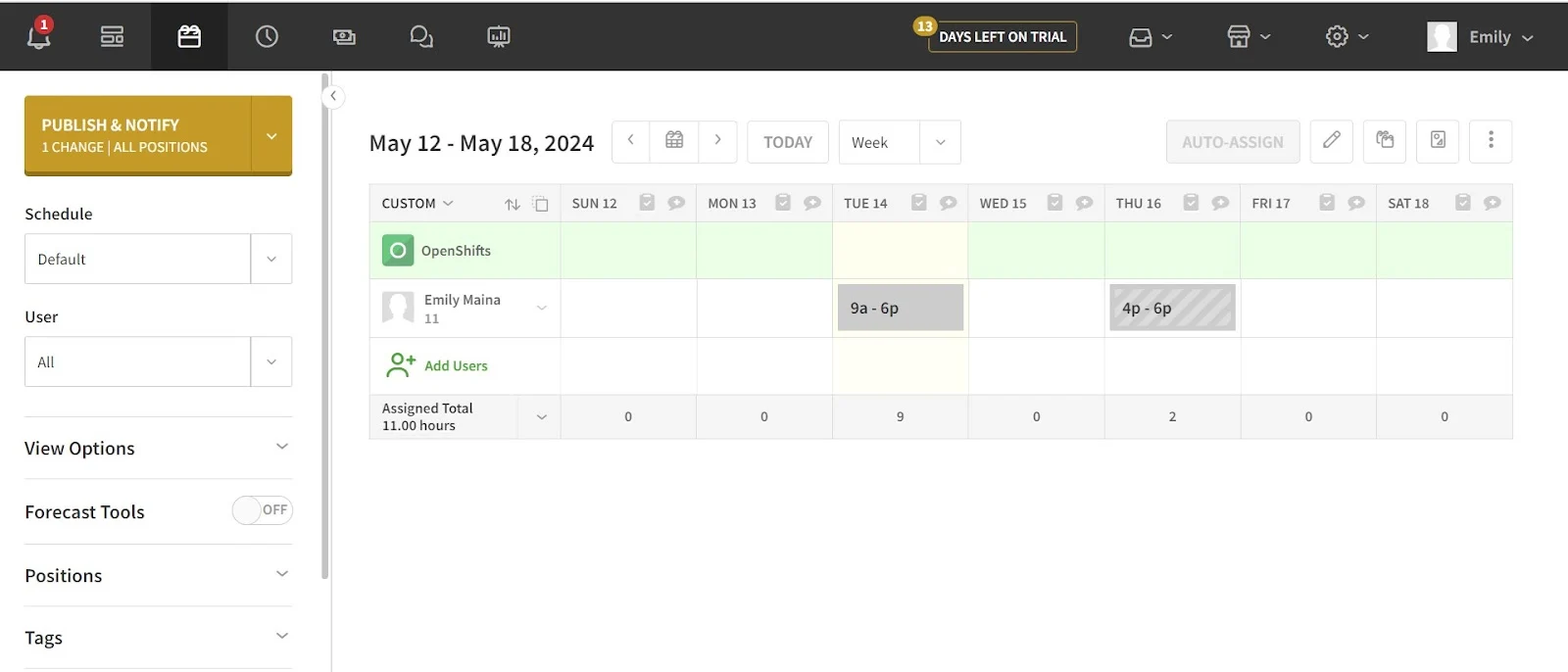
Scheduling is where When I Work performs best. In our testing, we found it easy to learn, quick to use, and practical for managers who want to build rosters without wrestling with the tool.
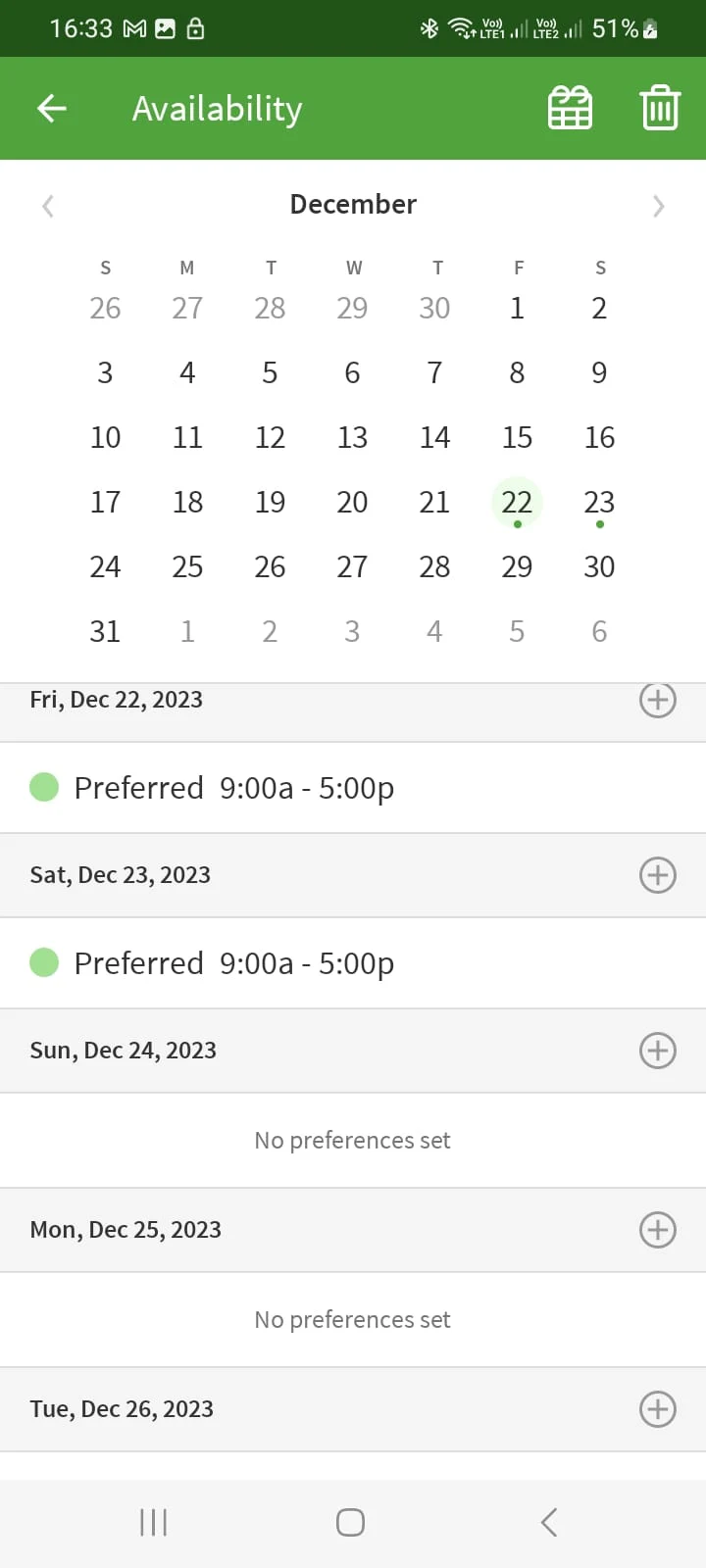
The features that stood out include templates, schedule copying, availability visibility while scheduling, open shifts and pick-up workflows, shift trades with approvals, and a responsive drag-and-drop interface.
Strengths
- Availability visibility reduces guesswork and scheduling conflicts
- Shift swapping and open shifts are frequently described as "the feature that makes staff buy in"
- Templates speed up weekly schedule creation
- Many teams frame it as a clear step up from spreadsheets
Limitations
- Complex rule-based scheduling may hit edges where the platform feels lighter
- No built-in Australian award interpretation
- Labour cost forecasting not emphasised in the core scheduling flow
- Teams wanting a broader operations layer may find it "scheduling-first"
Pros & cons
| Pros | Cons |
|---|---|
| Intuitive drag-and-drop scheduling | Limited compliance automation |
| Availability visibility while building rosters | No Australian award interpretation |
| Shift swapping reduces admin workload | Less suited for complex rule-based scheduling |
★ Verdict
For the core job of rostering a shift team — fast schedules, fewer mistakes, better staff self-service — this is where we found When I Work at its strongest. Teams with complex compliance needs should verify the platform can handle their specific requirements.
When I Work time tracking and attendance
Time tracking score: 7.7/10
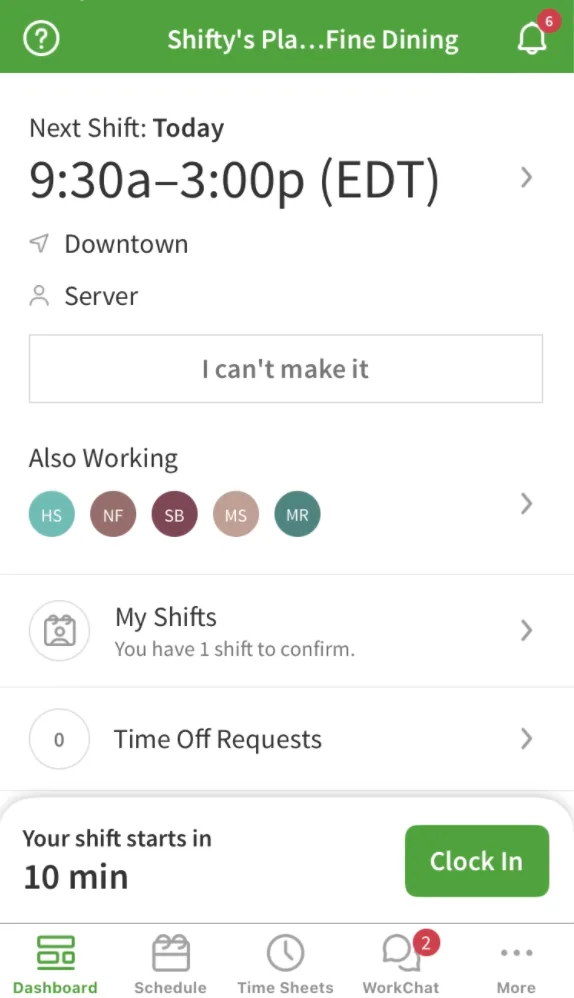
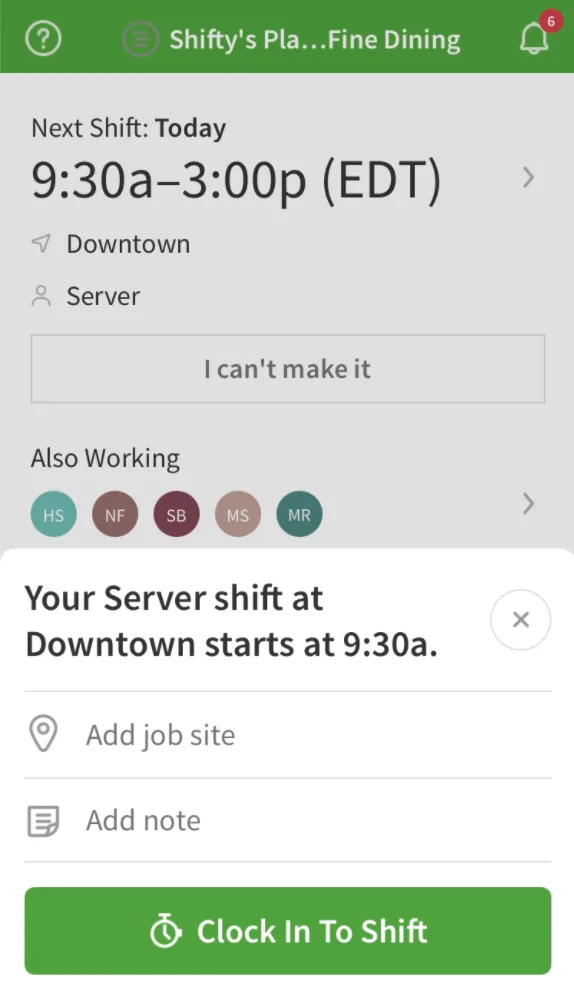
When I Work supports time tracking through mobile clock-in/out and kiosk-style setups. In our testing, it covers essential needs well, though we did encounter occasional mobile friction that could frustrate staff in busy environments.
The core capabilities include mobile clock in/out, GPS geofencing for clock-in restrictions, photo verification, break handling, and scheduled vs worked comparisons.
Strengths
- Kiosk/terminal options are practical for on-site teams
- Scheduling and timesheets connected in one place
- GPS restrictions help prevent buddy punching
Limitations
- Mobile reliability complaints: refresh issues, sign-outs, sync delays
- No continuous GPS tracking — only at clock-in/out points
- Internet required for all clock-ins (no offline mode)
Pros & cons
| Pros | Cons |
|---|---|
| Scheduling and timesheets unified | Mobile app reliability issues reported |
| GPS geofencing available | No continuous GPS tracking |
| Kiosk mode for on-site teams | Internet required for clock-ins |
★ Verdict
For many SMB teams, time tracking appears to do the job well. The biggest risk we'd flag isn't the feature list — it's whether the mobile clock-in experience feels smooth enough for your workforce. If strict clock-in reliability is critical, we'd recommend validating that experience carefully.
When I Work payroll integrations
Payroll score: 4.0/10
No Xero integration impacts score — otherwise 7/10. Critical for most Australian businesses.
When I Work's payroll workflow works in two ways: exporting timesheets for manual processing, or syncing with a smaller set of payroll tools via direct integrations.
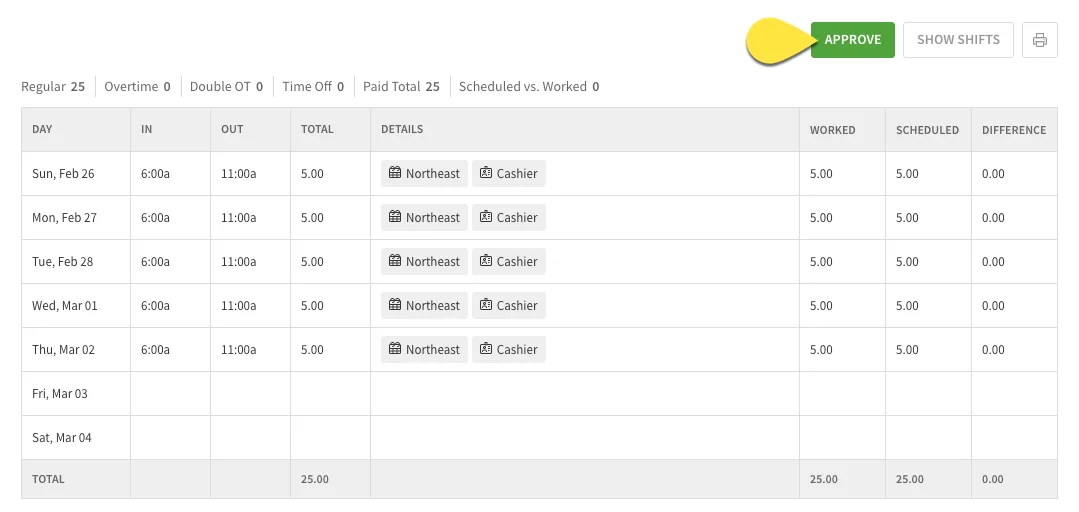
The available integrations include ADP, Gusto, OnPay, QuickBooks, Paychex, and Square Payroll. An optional built-in payroll add-on is also available; When I Work does not publish its price.
Strengths
- Integrates with major US payroll providers
- Timesheet exports available for manual processing
- Clear "approve time → send to payroll" workflow
Limitations
- No direct Xero integration — significant gap for Australian businesses
- No direct MYOB integration
- No built-in Australian award interpretation
- May require middleware (Zapier) for unsupported systems
Pros & cons
| Pros | Cons |
|---|---|
| Integrates with US payroll providers | No direct Xero integration |
| Timesheet exports available | No MYOB integration |
| Optional built-in payroll add-on | No Australian award interpretation |
★ Verdict
Payroll connectivity is sufficient for teams using US-based payroll systems. For Australian businesses using Xero or MYOB, we see the lack of native integrations as a notable gap. If seamless Xero integration is important, consider alternatives with native support.
When I Work communication tools
Communication score: 7.1/10
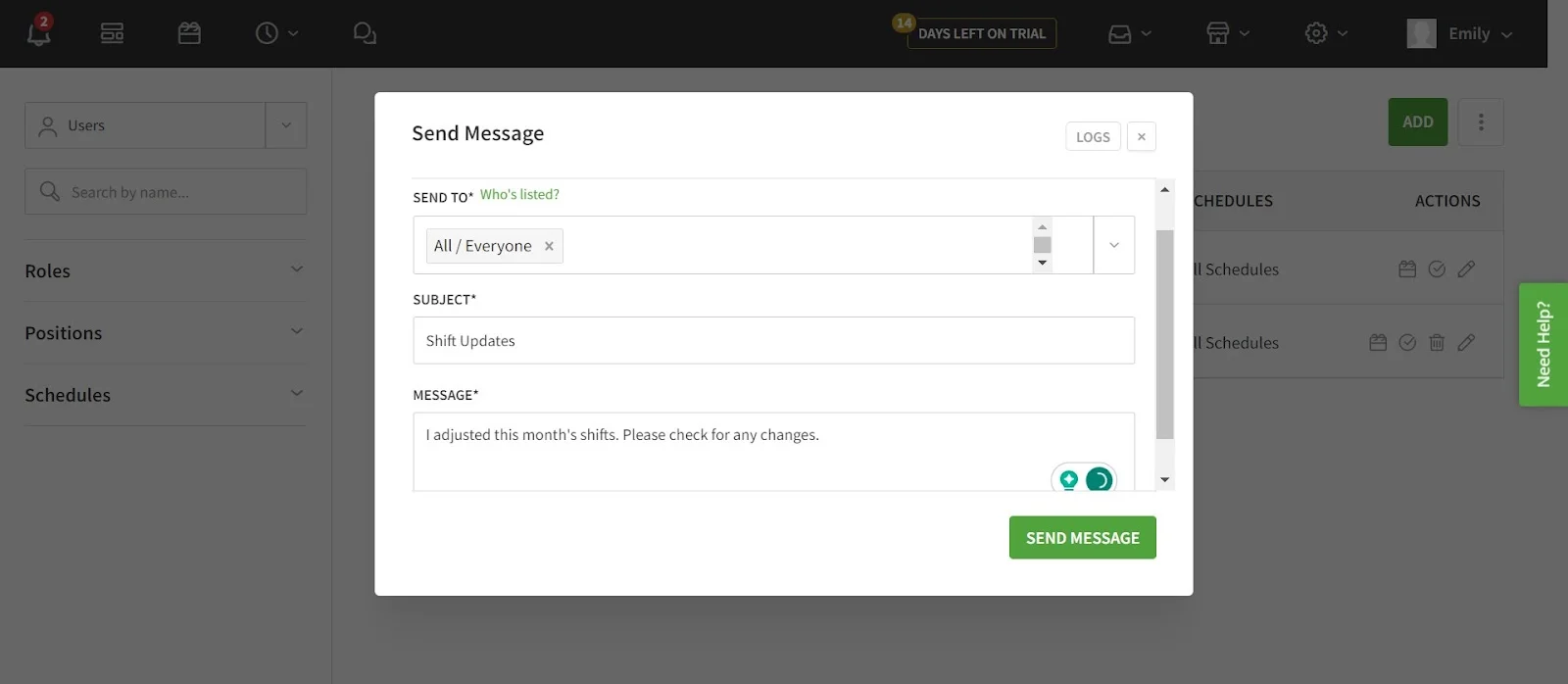
When I Work includes in-app messaging and schedule notifications. We'd describe the communication layer as "supporting infrastructure" rather than a full collaboration tool.
The convenience factor is clear: staff are already in the app for shifts, so it makes sense to keep schedule-related communication there too.
Strengths
- Messages and announcements reduce need for personal phone numbers
- Schedule change notifications support the rostering workflow
- 1-to-1 and group messaging available
Limitations
- Messaging is functional but not sophisticated
- Notification consistency concerns mentioned by some users
- Not designed to replace dedicated team communication tools
★ Verdict
We'd call it a solid "scheduling companion" communication layer. If you want best-in-class chat and collaboration, you may prefer a platform where comms is a deeper focus.
When I Work mobile apps
Mobile apps score: 8.6/10
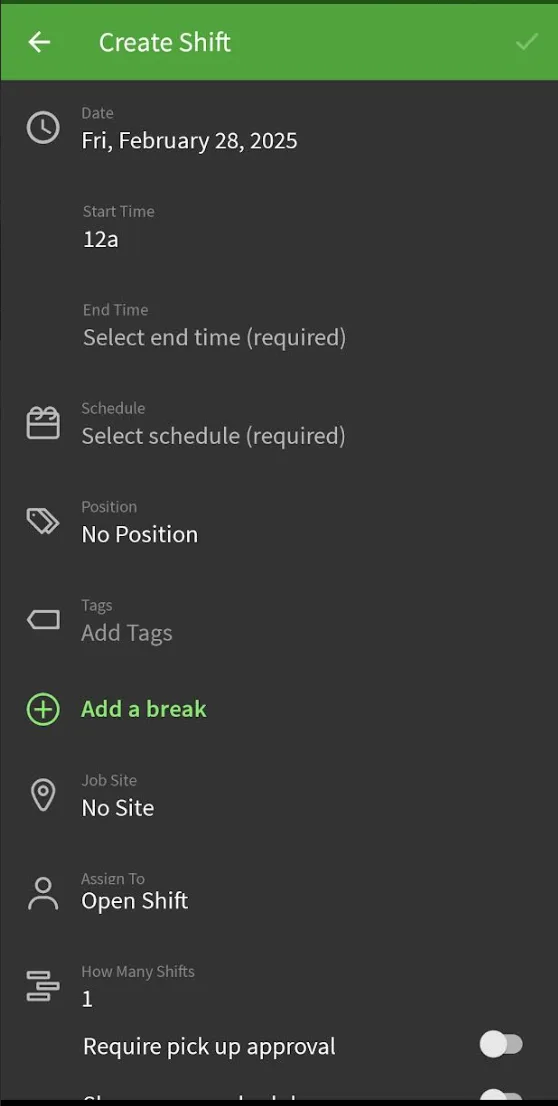
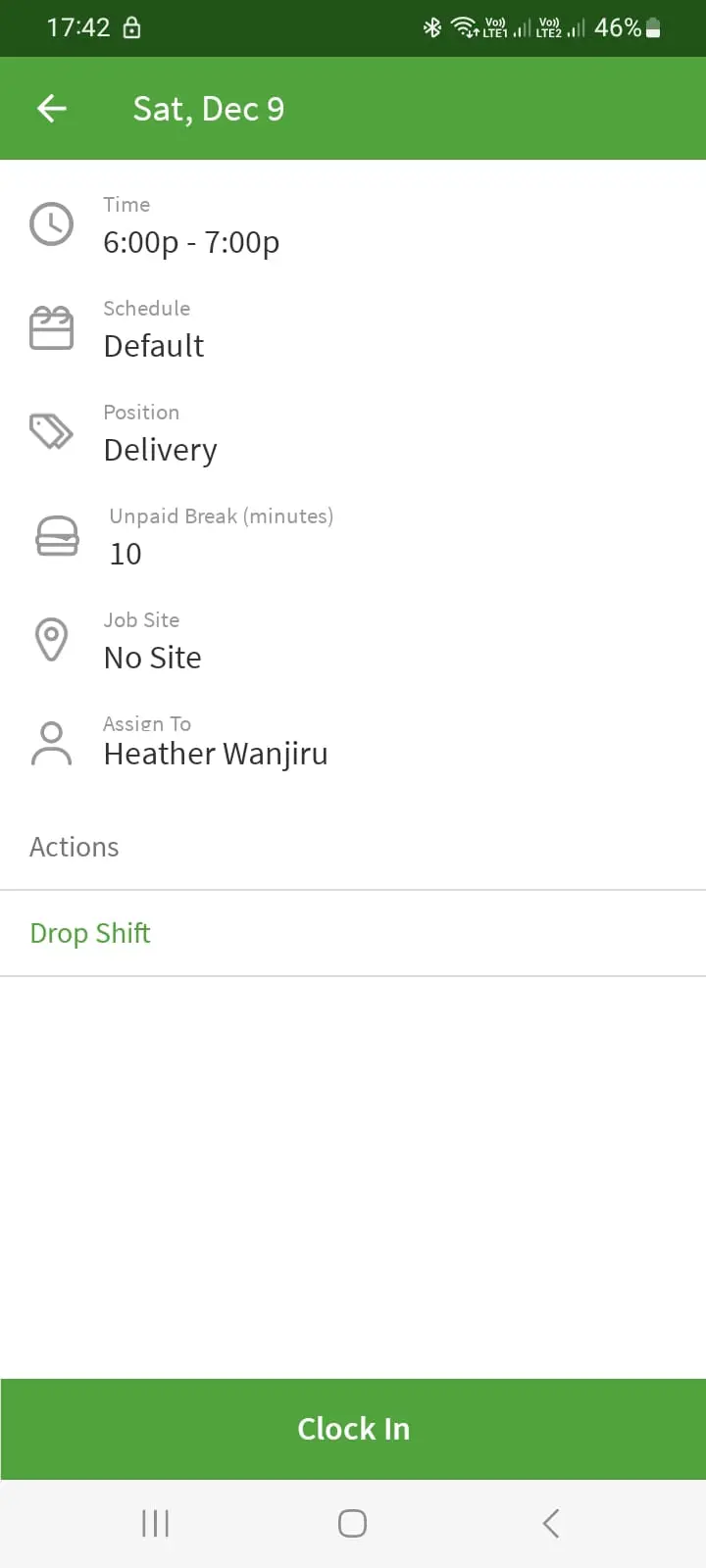
Mobile is a clear strength. We tested both iOS and Android apps, and found them intuitive and well-designed. When a scheduling platform fails, it often fails because staff don't adopt it — so strong mobile experience matters significantly.
The app store ratings (4.8/5 on iOS with ~51K ratings, 4.7/5 on Android with ~73K reviews) back up what we experienced. That said, we did encounter occasional friction — small bugs, refresh issues, and sync delays that align with what users report.
Strengths
- High app store ratings suggest strong employee experience
- Core features accessible: check shifts, request changes, swap, pick up open shifts
- Available on both iOS and Android
- User-friendly interface praised in reviews
Limitations
- Clock-in glitches can cause friction at critical moments
- Some reviews mention app freezing or slow loading during peak usage
- Occasional sync delays reported
★ Verdict
We see mobile as a positive overall. The normal caveat applies: if your team's success depends on flawless clock-in flows, validate that experience carefully before committing.
When I Work HR tools
HR tools score: 6.5/10
When I Work isn't designed as a full HR platform, and we wouldn't position it that way. It's scheduling plus attendance, with some people admin around the edges.
HR-adjacent features include staff profiles, availability and time-off management, PTO request workflows, and basic employee management that supports scheduling.
Strengths
- Time-off and availability sit close to scheduling where they're most useful
- For teams that don't want an HR suite, this level may be enough
Limitations
- No document management or digital contracts
- No onboarding workflows
- No compliance document tracking
- Teams wanting broader HR workflows will find it too light
★ Verdict
We'd evaluate it as workforce scheduling software with attendance, not as an HR system. Teams needing document management, onboarding, or compliance tracking should look elsewhere.
When I Work reporting and analytics
Reporting score: 7.3/10
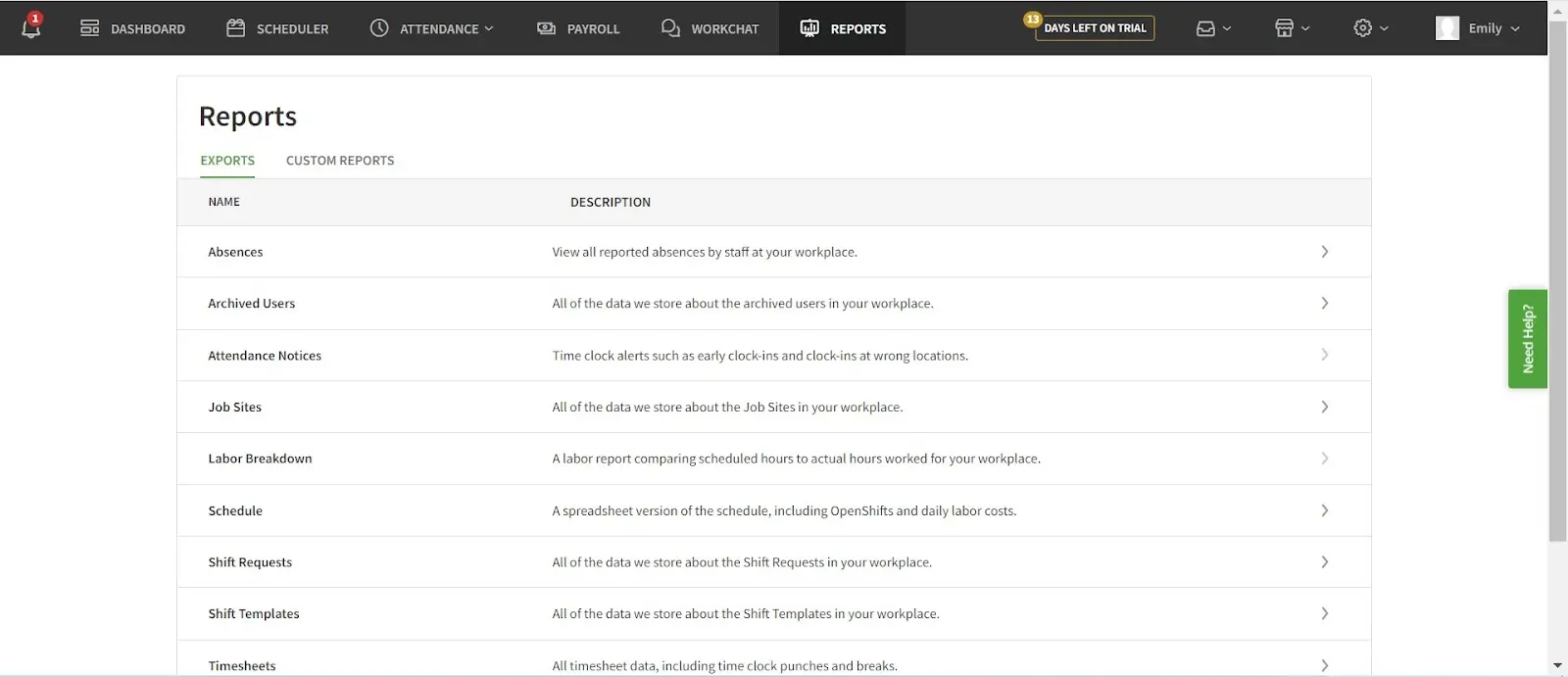
Reporting is adequate for core workforce needs — timesheets, scheduled vs worked comparisons, and payroll exports. In our testing, we found the more "power user" your reporting expectations, the more likely you'll hit limitations.
Strengths
- Baseline reports cover what many SMB teams need for payroll prep
- Labour cost tracking available on higher tiers
- Export functionality available
Limitations
- Deeper analytics and custom reporting are limited
- No demand forecasting
- Some users describe reporting as "basic"
★ Verdict
Good baseline reporting for scheduling/time workflows. If workforce analytics is a central requirement, we'd suggest considering whether you'll need supplementary tooling.
When I Work use cases: who is it best for?
Use cases score: 8.2/10
In our assessment, When I Work's fit is clearest when you run shift-based teams, want scheduling plus time tracking plus basic communication in one place, and need staff adoption without heavy training.
Best suited for:
- Restaurants, cafes, and hospitality venues
- Retail stores and multi-site operations
- Healthcare clinics with frequent shift changes
- Small to mid-sized teams moving away from spreadsheets
- High-change environments where swaps drive the weekly workload
Less suited for:
- Compliance-heavy environments requiring deep rule automation
- Australian businesses needing native Xero/MYOB integration
- Organisations wanting robust operational workflows as a core feature
- Teams requiring phone support as a baseline
★ Verdict
The product's sweet spot is straightforward: get schedules out cleanly, keep everyone aligned, track hours, and simplify payroll handoff. For Australian businesses with specific compliance needs, we'd recommend verifying fit before committing.
When I Work security
Security score: 7.4/10
We reviewed When I Work's security features based on what's available in the platform and vendor documentation:
| Feature | Availability |
|---|---|
| SSO (Single Sign-On) | Premium tier |
| Role-based access controls | Yes |
| GPS-based restrictions | Yes (clock-in geofencing) |
| Photo verification | Yes |
| Data encryption | Standard |
| Australian data hosting | Not specified |
★ Verdict
Standard security features are present, with SSO available on higher tiers. For organisations with strict compliance requirements, we'd recommend verifying specific certifications and data residency directly with the vendor.
When I Work customer support
Support score: 7.0/10
We tested support responsiveness and found it adequate for basic queries. Frustration tends to appear when support channels don't match expectations — especially when phone support is important to the buyer.
Available support channels
- Email/ticket support
- Live chat (limited hours)
- Help center documentation
- No phone support available
Pros & cons
| Pros | Cons |
|---|---|
| Help documentation available | No phone support |
| Live chat option | Limited chat hours |
| Email ticketing available | Time zone challenges for AU users |
★ Verdict
If your team is comfortable with ticket or chat-style support, you'll likely find the experience acceptable. If phone support is essential for your operations, we'd suggest validating the support model early.
When I Work review: final verdict
When I Work is a scheduling-and-attendance platform that does the basics well and earns loyalty through simplicity. Based on our testing, it's clearly positioned for shift-based teams that want to get rosters out cleanly without wrestling with complex software.
Score summary
| Category | Score |
|---|---|
| User ratings | 8.0/10 |
| Rostering | 8.4/10 |
| Time tracking | 7.7/10 |
| Payroll (no Xero) | 4.0/10 |
| Communication | 7.1/10 |
| Mobile apps | 8.6/10 |
| HR tools | 6.5/10 |
| Reporting | 7.3/10 |
| Pricing | 8.3/10 |
| Use cases | 8.2/10 |
| Security | 7.4/10 |
| Support | 7.0/10 |
| Overall score | 7.6/10 |
The clearest positives from our testing:
- Fast rostering with practical scheduling tools
- Strong staff self-service around swaps, open shifts, and requests
- Broad mobile adoption and generally positive sentiment
- Competitive per-user pricing for scheduling-first teams
The most consistent cautions we'd raise:
- Not designed to be a full HR or operations suite
- No direct Xero or MYOB integration for Australian businesses
- No phone support and limited chat hours
- Mobile reliability concerns surface in some feedback
When I Work is best suited to:
- Hospitality, retail, and service businesses
- SMBs wanting simple, mobile-first scheduling
- Teams that rely heavily on shift swaps and open shifts
- Businesses using US-based payroll systems (ADP, Gusto, QuickBooks)
- Workplaces prioritising staff self-service and mobile adoption
When I Work may be less suitable for:
- Australian businesses needing native Xero or MYOB integration
- Teams requiring phone-based customer support
- Compliance-heavy industries needing built-in award interpretation
- Businesses wanting HR document management or onboarding tools
- Companies requiring advanced workforce analytics
★ Final verdict
If you want a focused tool that keeps scheduling and time tracking organised without becoming a heavyweight system, we consider When I Work a credible shortlist option. If you need deeper feature categories, Australian payroll integration, or compliance tooling, we'd suggest comparing it with more comprehensive workforce platforms like RosterElf — with built-in award interpretation, intuitive rostering, and seamless Xero integration.
Our review methodology
Learn how we evaluate workforce management platforms through hands-on testing and verified user feedback.
Feature comparisons are checked against each vendor's public documentation at the time of writing. Assessments of usability, fit and value are our reviewers' opinions, not statements of fact, and products change often. We'd encourage you to trial both platforms and judge for yourself. Spotted something out of date? Tell us and we'll correct it .
Real support from people who understand your business
At RosterElf, support isn't a ticket system — it's part of the product. Our Australian-based team helps you set up correctly, understand award rules, and stay compliant as your business changes. No scripts. No offshore handoffs. Just real help when you need it.
-
Guided setup and onboarding
-
Award and payroll questions answered
-
Ongoing help as your team grows
When I Work review FAQ
- When I Work publishes three plans: Essentials at US$2.50 per user per month, Pro at US$5 per user per month, Premium at US$8 per user per month. Time and attendance is included in every plan — it was previously a paid upgrade. Prices are shown in US dollars and When I Work publishes no AUD price list, so Australian buyers pay the converted amount plus any card FX fee. A 14-day free trial is available. Figures last checked 1 September 2026.
- When I Work does not offer a permanent free plan. They provide a 14-day free trial for new users. For teams needing a free option, some competitors like Connecteam offer free tiers for small teams.
- No. When I Work publishes no AUD price list — its prices are shown in US dollars, so Australian businesses need to factor in currency conversion and any foreign transaction fee. For AUD pricing and local support, consider RosterElf.
- Time and attendance features include mobile clock in/out, GPS-based clock-in restrictions, break tracking, and timesheet exports. These are included in every plan, including the entry-level Essentials tier — When I Work previously sold them as a paid upgrade.