
How to track employee hours
Accurate time tracking ensures employees are paid correctly, prevents payroll disputes, and keeps you compliant with Fair Work regulations. Whether you choose paper timesheets, mobile apps, or biometric systems, the right method depends on your team size and work environment.

Written by
Georgia Morgan
This guide provides general information about tracking employee hours for Australian businesses. It does not constitute legal, HR, or professional advice and should not be relied on as a substitute for advice specific to your business, workforce, or circumstances.
Summarise with AI
Key takeaways
- Accurate time records protect you in Fair Work audits and must be kept for 7 years
- Choose a tracking method to match your team — paper, spreadsheets, biometric, mobile apps or software
- Mobile and GPS clock-ins verify location and stop buddy punching for field and multi-site teams
- Integrating time data with payroll automates award and penalty calculations and cuts errors
Why accurate time tracking matters
Tracking employee hours isn't just about payroll—it's about compliance, fairness, and avoiding costly disputes. Under Australian workplace laws, employers must keep accurate time and attendance records for all employees and be able to produce them during Fair Work audits.
According to Fair Work Ombudsman, employers must keep payroll records for 7 years, showing start/finish times, break periods, and overtime. A simple staff hours tracker template is an easy starting point, but the right tracking system makes this automatic.
Break compliance calculator
Ensure your time tracking meets Fair Work break requirements. Calculate paid and unpaid breaks based on shift length and award rules. Used by 10,000+ Australian businesses.
Sample digital timesheet
Here's what a typical digital timesheet looks like with key data highlighted.
Weekly timesheet
Employee: Sarah Johnson | ID: EMP-1234
TIME ENTRIES
| Date | Clock in | Clock out | Hours |
|---|---|---|---|
| Mon 16 Dec | 8:00 AM | 5:00 PM | 8.0 |
| Tue 17 Dec | 8:00 AM | 5:30 PM | 8.5 |
| Wed 18 Dec | 8:00 AM | 5:00 PM | 8.0 |
SUMMARY
A typical timesheet includes:
- Date — Each shift date
- Clock in/out — Start and end times
- Hours — Total hours worked
- Breaks — Paid and unpaid breaks
- Overtime — Extra hours beyond ordinary
Watch: how to clock in and out with time tracking
See how employees clock in using the RosterElf time clock app with password confirmation and optional photo proof—all in under 3 minutes.
Tablet time clock
PIN or password confirmation
Photo verification
Optional selfie at clock-in
Secure & accurate
Prevent buddy punching
Want to see more product tutorials?
View all time tracking guidesSix ways to track employee hours
From paper timesheets to biometric systems, each method has trade-offs in cost, accuracy, and features.
Paper timesheets
Employees manually write start/end times. Simple but error-prone and time-consuming.
Best for: Tiny teams (1-3 staff)
Spreadsheets
Excel or Google Sheets with formulas for digital timesheets. More organized but still requires manual input. See our guide on calculating payroll from timesheets.
Best for: Small teams (3-10 staff)
Time clock / punch cards
Physical device where employees swipe cards. Prevents some fraud but hardware costs.
Best for: Single-site businesses
Biometric systems
Fingerprint or facial recognition. Most secure, prevents buddy punching entirely.
Best for: High-security sites
Mobile apps
Clock in from phones with GPS tracking. Flexible and great for remote teams. Learn more about implementing digital clock-in systems and preventing time theft.
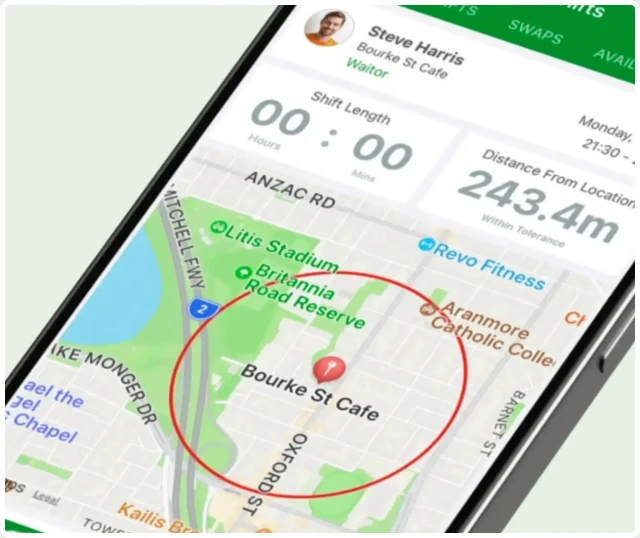
Best for: Remote/field staff
Integrated with payroll. Automated, accurate, and simplified for growing businesses. Read about GPS geofencing to prevent time theft.
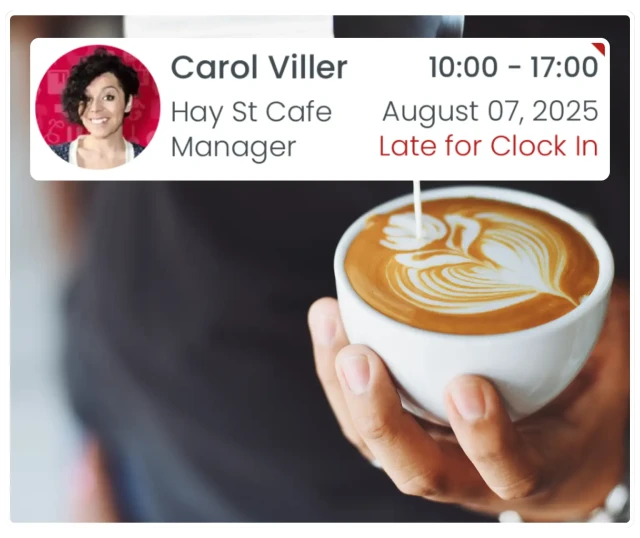
Best for: Growing businesses (10+ staff)
Try the Fair Work Ombudsman's free app
For very small businesses, Fair Work offers a free Record My Hours app where employees can log their own hours. It's basic but meets compliance requirements for simple timekeeping.
Free time tracking apps & tools
Best options for very small businesses and sole traders
Government & free tools
- Fair Work Record My Hours — Basic time logging, Fair Work compliant
- Google Sheets — Free templates with formulas
- Clockify — Free tier with unlimited users (limited features)
When free isn't enough
- No GPS or location verification
- No Australian award interpretation
- Manual payroll export required
- Limited support & compliance updates
Cost-benefit reality: While free apps work for 1-3 staff, most businesses save money with paid software once they reach 5+ employees. One payroll error from manual tracking can cost more than a year of software subscriptions. Calculate your break-even point with our payroll cost calculator.
Time tracking setup checklist
Complete these items before rolling out your time tracking system to employees.
Time tracking method selected
EssentialChoose between paper, apps, biometric, or software
Policy document created
EssentialRules for clock-in/out, breaks, and corrections
Software or app configured
EssentialSystem set up with pay periods and rules
Mobile access enabled
Employees can clock in from phones if needed
GPS tracking configured
Location verification for field teams
Payroll integration tested
EssentialTime data flows to payroll correctly
Employee training completed
EssentialStaff know how to use the system
Privacy policy updated
GPS and biometric consent documented
Audit schedule set
Regular timesheet review process
Backup process established
EssentialRecords stored securely for compliance
How to track employee hours
Follow these steps to implement accurate time tracking for your business.
Choose your tracking method
Select a method that suits your team size, work environment, and accuracy needs.
Key actions:
- For office teams: Digital apps or spreadsheets work well
- For field teams: GPS-enabled mobile apps ensure location verification
- For high-security environments: Biometric systems prevent buddy punching
- Start simple and upgrade as your business grows
Set clear policies
Establish rules for clocking in/out, breaks, overtime, and time corrections.
Key actions:
- Define when employees should clock in (on arrival or at workstation)
- Clarify paid vs unpaid break requirements
- Set overtime approval procedures
- Document how to correct timesheet errors
Implement the system
Set up your chosen method and train employees on proper usage.
Key actions:
- Configure software with your pay periods and award rules
- Provide clear instructions on how to clock in/out
- Run a trial period to identify issues
- Ensure mobile access if employees work remotely
Monitor and verify hours
Regularly review timesheets for accuracy, anomalies, and compliance. Learn more about timesheet approval workflows and spotting attendance anomalies.
Key actions:
- Check for missing clock-ins or unusual patterns
- Verify overtime hours against approved requests
- Compare GPS data against scheduled locations
- Address discrepancies promptly with employees
Integrate with payroll
Connect time tracking data to your payroll system to automate calculations.
Key actions:
- Export time data in a format compatible with your payroll system
- Automate award interpretation and penalty rates
- Set up approval workflows before payroll processing
- Keep audit trails for Fair Work compliance
Audit and improve
Regularly review your time tracking process for accuracy and efficiency.
Key actions:
- Conduct monthly audits of timesheet data
- Survey employees about system usability
- Identify bottlenecks in approval workflows
- Update policies as regulations or needs change
Industry-specific time tracking considerations
Different industries face unique challenges when tracking employee hours.
Healthcare & aged care
- 24/7 shift rotations and overnight staffing
- Complex award requirements (SCHADS, Nurses Award)
- Strict break requirements for long shifts
Hospitality & retail
- Split shifts and variable casual hours
- High staff turnover requiring simple systems
- Peak period tracking (weekends, holidays)
Construction & field Services
- GPS tracking for multiple site locations
- Weather-related variations and delays
- Mobile-first clock-in requirements
Retail
- Variable shift patterns and casual staff management
- Peak trading period tracking (Black Friday, Christmas)
- Multi-location employee time tracking
Security
- 24/7 shift verification across multiple sites
- GPS proof of attendance at patrol checkpoints
- Night shift penalty rate tracking
Childcare
- Educator-to-child ratio compliance tracking
- Split shift and early/late hour management
- Qualification verification and record-keeping
Tracking hours for remote & WFH employees
Remote work adds unique challenges to time tracking. The key is balancing accountability with trust and privacy.
Recommended approaches
- Mobile apps with GPS — Verify location at clock-in for field workers
- Task-based tracking — Focus on deliverables rather than constant monitoring
- Regular check-ins — Combine automated tracking with manager visibility
- Clear policies — Document expectations for remote time tracking
Avoid these methods
- Screenshot monitoring — Invasive and damages trust
- Continuous GPS tracking — Privacy concerns, only track at clock-in/out
- Keystroke logging — Excessive surveillance, illegal in some contexts
- Webcam monitoring — Major privacy violation
Best practice: Use time tracking software that captures clock-in/out times with optional GPS verification, then focuses on work output rather than micromanagement. For field teams, geofencing ensures staff are at correct job sites without continuous tracking.
Time tracking tips
Follow these principles for accurate, efficient time tracking.
Automate when possible
Reduce human error and save time with automated clock-ins, calculations, and alerts.
Enable mobile access
Allow employees to clock in from their phones for flexibility and real-time tracking.
Integrate with payroll
Connect time data directly to payroll systems for accurate, simplifyd wage calculations.
Use GPS for field staff
Verify employee locations for remote or multi-site teams with geofencing capabilities.
Regular audits
Review timesheets frequently to catch errors, fraud, or compliance issues early.
Clear communication
Ensure employees understand how, when, and where to clock in and out.
Try our break compliance calculator
Ensure your break policies meet Fair Work requirements across different shift lengths.
Calculate Break Requirements →Calculate overtime and penalty rates
Automatically calculate correct overtime and penalty rates based on tracked hours and shift times.
Calculate Overtime & Penalties →GPS tracking and employee privacy
If you use GPS tracking to verify employee locations, you must comply with Australian privacy laws:
Learn more about GPS tracking compliance in our workplace policy guide. For privacy requirements, see the Privacy Act guidelines from OAIC. The Australian HR Institute (AHRI) provides additional guidance on employee monitoring best practices.
Track hours with RosterElf
Automate time tracking with mobile apps, GPS verification, and smooth payroll integration.
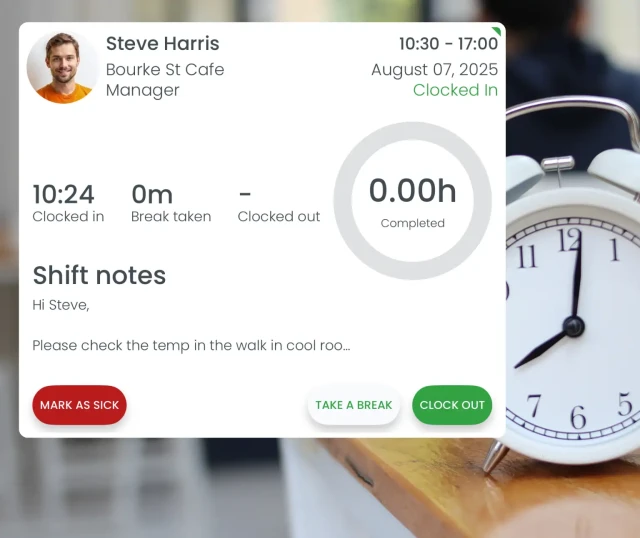
Mobile clock in/out
Employees clock in from their phones or tablets. Works anywhere, anytime.
GPS location verification
Verify employees are at the right location with geofencing and GPS tracking.
Automatic payroll integration
Time data flows directly to your payroll system. No manual entry, no errors.
Real-time reporting
View attendance, overtime, and timesheet approvals in real-time dashboards.
Calculate your payroll costs
Estimate your true hourly labour costs including wages, super, leave, and other employment costs.
Calculate Payroll Costs →Calculate individual shift costs
See the true cost of each shift including base pay, penalties, super, and oncosts based on tracked hours.
Calculate Shift Costs →No credit card required
Compare time tracking solutions
RosterElf isn't the only option. See how we compare to other popular time tracking systems for Australian businesses.
Method comparison
See exactly how each time tracking method compares across key features.
Setup time
Accuracy
Prevents buddy punching
Location verification
Mobile access
Payroll integration
Cost
Best for
| Feature | Paper | Spreadsheet | Biometric | Mobile app | Software |
|---|---|---|---|---|---|
| Setup time | 5 minutes | 30-60 minutes | 2-4 hours | 30 minutes | 1-2 hours |
| Accuracy | Low | Medium | Very high | High | Very high |
| Prevents buddy punching | No | No | Yes | GPS helps | With biometric |
| Location verification | No | No | No | Yes (GPS) | Yes (GPS) |
| Mobile access | No | Limited | No | Yes | Yes |
| Payroll integration | Manual | Semi-manual | Often limited | Varies | Automated |
| Cost | Very low | Low | High upfront | $2-8 per user/month | Variable |
| Best for | Tiny teams (1-3) | Small teams (3-10) | Large sites | Field teams | Growing businesses |
Read verified user reviews
Compare time tracking software based on thousands of verified user reviews from independent platforms:
Common time tracking mistakes
Learn from others' errors. These mistakes lead to payroll disputes and compliance issues.
No clear policy on breaks and overtime
Consequence: Employees unsure when to clock out for breaks, leading to payroll disputes and Fair Work issues
Solution: Create clear policies and communicate them through your workplace policy documentation
Manual data entry from paper timesheets
Consequence: Time-consuming, error-prone, and increases risk of payroll mistakes and underpayments
Solution: Avoid costly errors by reading our guide on payroll errors from bad timesheets
No location verification for field staff
Consequence: Unable to verify employees were actually at client sites, leading to billing disputes
Solution: Implement GPS tracking through mobile time and attendance apps
Ignoring timesheet anomalies
Consequence: Fraud goes undetected, compliance risks increase, and payroll costs spiral
Solution: Learn how to identify anomalies and set up proper approval workflows with our timesheet approval workflow guide
Not keeping proper records
Consequence: Cannot prove compliance during Fair Work audits, risk of fines and penalties
Solution: Create audit-ready records following our guide on legally defensible timesheets
Assess your underpayment risk
Check if your time tracking and payroll practices meet Fair Work compliance standards.
Check Compliance Risk →Download free time tracking templates
Get started with our library of free HR templates. Written by HR experts, ready to customise.
Leave and attendance
8+ templates
HR software
Employee records
Digital HR records
HR management
Time and attendance software
Software solution
Product guides & setup
Step-by-step instructions for implementing time tracking with RosterElf:
Fair Work compliance requirements
Understanding and meeting Australian record-keeping obligations for employee hours.
What must be recorded
- Start and finish times for each shift
- Paid and unpaid break times
- Overtime hours worked
- Leave taken (sick, annual, unpaid)
- Public holidays worked
Record-keeping obligations
- Records must be kept for 7 years
- Must be in English or easily translated
- Readily accessible during Fair Work inspections
- Protected from falsification or alteration
- Digital records must be backed up securely
Penalties for non-compliance
Failing to keep accurate time and attendance records can result in:
Monitor labour cost percentage
Track if your employee hours and wage costs align with revenue and budget targets for optimal profitability.
Calculate Labour Cost % →Learn more: Review the official Fair Work record-keeping requirements, check your industry Modern Award from Fair Work Commission, and review ATO employer record-keeping guidelines. For payroll compliance advice, see CPA Australia resources.
Regulatory sources
This guide is aligned with official Australian workplace regulations on hours of work and record-keeping.
Simplify time tracking
RosterElf provides GPS clock-in, automatic timesheet generation, and real-time attendance monitoring. Built for Australian small businesses.
How RosterElf helps with tracking employee hours
Purpose-built tools to make tracking employee hours faster, easier, and compliant for Australian businesses.
Related guides
More resources for time and attendance management.
Time & Attendance
Track employee hours accurately with digital timesheets.
Learn moreApprove Timesheets
Simplify your timesheet approval workflow.
Read guideImplement Digital Clock-In
Set up mobile and kiosk clock-in systems for your team.
Read guideSchedule Breaks Compliantly
Ensure break scheduling meets Fair Work requirements.
Read guideCalculate Payroll from Timesheets
Convert timesheet data into accurate payroll calculations.
Read guideConduct a Payroll Audit
Verify payroll accuracy and identify compliance gaps.
Read guide



Stop chasing timesheets
Join thousands of Australian businesses using RosterElf for accurate time tracking and timesheet approval.
Frequently asked questions about tracking employee hours
- The best method depends on your business needs. For small teams (1-10 staff), spreadsheets or simple mobile apps work well. For growing businesses (10+ staff), dedicated time and attendance software with payroll integration is most efficient. For field teams, GPS-enabled mobile apps ensure location verification. For high-security environments or large sites, biometric systems prevent buddy punching. Learn more about hours worked tracking requirements.
- To track hours for payroll: (1) Implement a time tracking system (app, software, or biometric), (2) Have employees clock in/out for shifts and breaks, (3) Review and approve timesheets regularly, (4) Export or integrate time data with your payroll system, (5) Verify calculations match award rates and penalties, (6) Keep records for 7 years as required by Fair Work.
- You don't legally need software, but it's highly recommended for businesses with 5+ employees. Software eliminates manual errors, automates payroll calculations, supports compliance with Fair Work record-keeping requirements, and saves significant time. Manual methods (spreadsheets, paper timesheets) become error-prone and time-consuming as teams grow.
- Time tracking software typically costs $3-10 per employee per month. Basic apps start around $3/user/month, while comprehensive workforce management systems with payroll integration cost $8-10/user/month. Many providers offer free trials. The cost is usually offset by reduced payroll errors, time savings, and improved compliance.
- Yes, most modern time tracking systems allow employees to clock in/out themselves via mobile app, web portal, or biometric terminal. Self-service tracking improves accuracy, reduces administrative burden, and gives employees visibility of their hours. Managers can review and approve timesheets before payroll processing.