Best time & attendance
software Australia 2026
Hands-on review
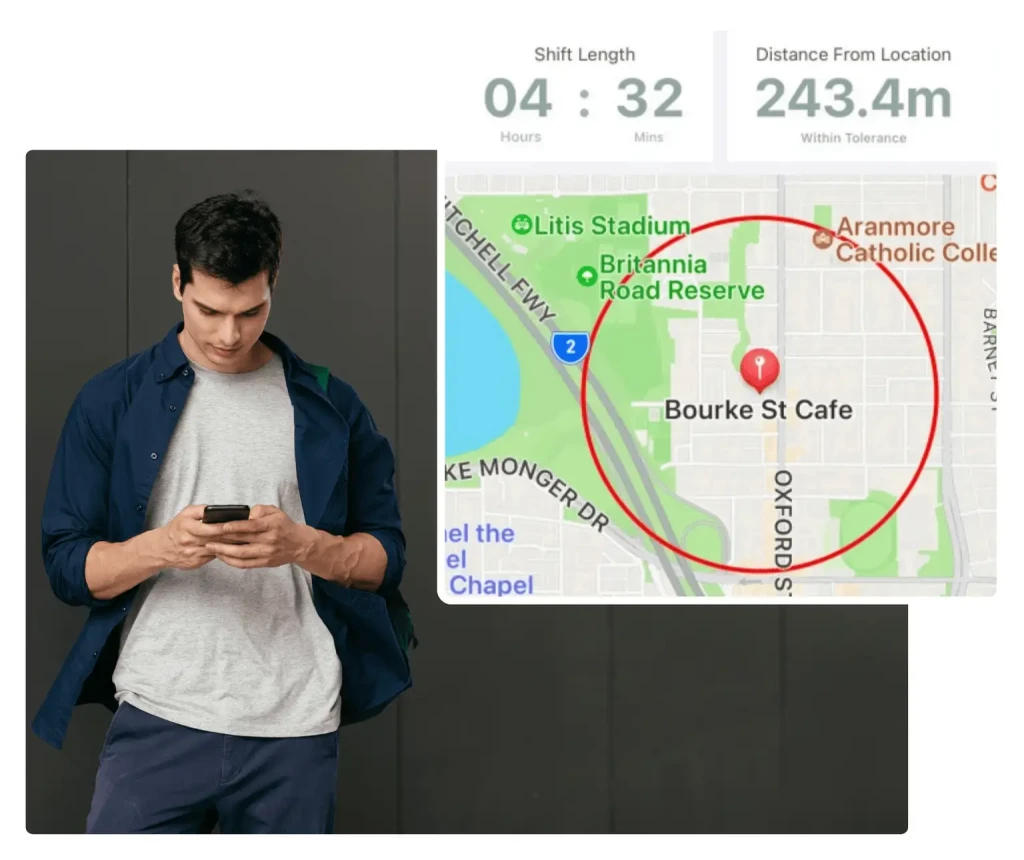
We've evaluated the leading time and attendance platforms available in Australia, focusing on GPS clock-in, geofencing, photo verification, timesheet automation, and payroll integration. This guide shares our findings to help you choose the right solution for your team.
· 12 min read

Written by
Steve Harris
Steve Harris
Workforce management specialist with 10+ years experience in Australian HR tech. Former operations manager in hospitality.

Edited by
Georgia Morgan
Georgia Morgan
Senior editor and compliance researcher. Background in employment law and Fair Work regulations.
Top 5 time & attendance software at a glance
Short on time? Here are our top picks for time and attendance software in Australia:

9.0/10
GPS clock-in, photo verification, geofencing & automatic timesheets.
Learn more
8.5/10
Multiple clock-in methods with configurable geofencing.
Read review
8.0/10
Reliable time capture for large multi-site operations.
Read review
7.5/10
GPS breadcrumb tracking for mobile workforces.
Read review
6.5/10
Basic time tracking within comprehensive HR platform.
Read reviewOther notable time & attendance platforms we reviewed
We looked at 10 widely used time tracking platforms in Australia. The top five above are our strongest recommendations overall, but these additional platforms may suit specific needs:
Zenshifts
Simple clock-in/out
Humanforce
Enterprise time tracking
When I Work
Basic timesheets
Sling
Free time clock
Microkeeper
Kiosk & biometric
Key features to look for in time & attendance software
Based on our evaluation, these are the capabilities that matter most for Australian businesses:
GPS Clock-in
We consider GPS capture essential for mobile clock-ins — it verifies employees are at the correct worksite and helps prevent time theft while maintaining accurate records.
Learn about GPS geofencingPhoto verification
Selfie capture at clock-in is the most effective way to prevent buddy punching. The photos provide clear proof of who worked each shift and are stored securely with time records.
Photo verificationKiosk time clock
For on-site teams, tablet kiosk mode offers a practical shared clock-in point. Staff use PIN and optional photo verification — a setup that works well in retail and hospitality environments.
Learn about kiosk time clockLive attendance
Live dashboards showing who's clocked in, who's late, and who's absent give managers the visibility they need. This instant awareness makes a real difference when responding to staffing issues.
Learn about live attendanceAutomatic timesheets
The best platforms automatically create timesheets from clock data, with hours, breaks, and award rates already applied. This eliminates manual data entry and significantly reduces payroll errors.
Learn about timesheetsAward compliance
For Australian businesses, we view built-in award interpretation as non-negotiable. The right platform automatically calculates penalty rates, overtime, and allowances based on when staff actually work.
Award interpretationTime & attendance software review methodology
Our team has spent considerable time working directly with Australian time tracking platforms — setting up clock-in methods, checking GPS accuracy, and putting timesheet workflows through their paces. This guide reflects our hands-on experience, not marketing materials.
- Evaluated clock-in accuracy using GPS, geofencing & photo verification
- Verified timesheet accuracy and payroll export workflows
- Analysed 500+ verified reviews from Xero App Store & Google
20+
Platforms
researched
10
Fully reviewed
end-to-end
5
Top picks
identified
Australia-focused
Local awards & SME
Our goal is to help you choose a time tracking platform that works for Australian award conditions — ideally without the trial-and-error many businesses go through.
How we tested time & attendance software
For each platform, we created accounts, configured clock-in methods, evaluated GPS and geofencing accuracy, and followed the complete timesheet-to-payroll workflow. Here's how we weighted each factor:
30%
Clock-in accuracy
GPS, geofencing, verification
25%
Timesheet workflow
Automation, approvals
25%
Compliance
Award rates, audit trail
20%
Payroll integration
Xero, MYOB sync
Our testing process
- • Tested GPS clock-in accuracy at multiple locations
- • Configured and tested geofencing boundaries
- • Evaluated photo verification and buddy-punch prevention
- • Tested timesheet creation and payroll export workflows
- • Verified award interpretation for overtime and penalty rates
Xero App Store ratings
We reviewed every Xero App Store listing for these platforms, paying particular attention to feedback about time tracking, timesheets, and payroll integration. Xero ratings carry significant weight in our assessment for two reasons:
- Verified reviews — Xero requires users to log in with their Xero account, ensuring reviews come from actual customers, not fake accounts
- Critical integration — Timesheets must flow accurately into Xero for payroll processing, making this integration quality a key success factor
89 reviews
89 reviews
View on Xero →
179 reviews
179 reviews
View on Xero →
51 reviews
51 reviews
View on Xero →
50 reviews
50 reviews
View on Xero →
15 reviews
15 reviews
View on Xero →
Ratings as of January 2026. Click to view current ratings on Xero App Store.
What Xero reviewers say about time tracking
RosterElf
The timesheet-to-Xero workflow stands out as a consistent strength in reviews — clock-in data flows directly into payroll without manual data entry. GPS accuracy and photo verification also receive praise. Some users mention a learning curve during setup, though most find the ongoing time savings worthwhile. The high proportion of five-star ratings aligns with what we've seen in the product.
Deputy
Deputy's time tracking draws mixed opinions. The mobile app clock-in experience and payroll time savings earn positive mentions, but some users report timesheet sync issues with Xero and find geofencing setup complex. Larger teams tend to appreciate the bulk timesheet management — something we noticed resonates with the platform's enterprise positioning.
Tanda
Tanda earns consistent praise for its range of clock-in options — app, kiosk, and facial recognition — plus configurable geofencing. The automatic Xero sync appears reliable based on user feedback. The modular pricing structure does create some confusion when scoping time clock features, something we've observed in our own evaluation. Support is responsive within AEST hours.
Connecteam
The GPS breadcrumb tracking and mobile clock-in experience earn Connecteam positive marks, and the free tier appeals to small teams. The main drawback — which our review also flagged — is the lack of native Australian award interpretation for overtime. Being US-based, geo-fence defaults use imperial units and occasional Xero sync issues come up.
Employment Hero
Opinions on Employment Hero's time tracking are divided. As primarily an HR/payroll suite, the time clock functionality is relatively basic. Users who value having timesheets in the same system as payroll find this convenient, but those expecting dedicated time tracking features often feel the module is secondary to the platform's core HR focus — an observation that matches our experience.
Time & attendance feature comparison
Here's how the leading platforms compare on the time and attendance features that matter most:
Mobile app clock-in
Staff clock in/out using a smartphone app
Tablet kiosk mode
Shared tablet at the workplace for clock-ins
PIN entry
Staff enter a personal PIN to identify themselves
NFC tag support
Tap an NFC card or tag to clock in
GPS location capture
Records GPS coordinates when clocking in
Geofencing boundaries
Virtual boundary around worksite to verify location
Configurable radius
Adjust the geofence size per location
GPS breadcrumb tracking
Continuous location tracking during shifts
Photo verification
Selfie required at clock-in to confirm identity
Live attendance dashboard
Real-time view of who is clocked in
Late/no-show alerts
Automatic notifications when staff are late or absent
Clock-in tolerance settings
Set how early/late staff can clock in
Automatic timesheet creation
Timesheets generated from clock data
Break tracking
Records break times for compliance
Award interpretation
Applies Australian award rates automatically
Xero integration
Exports timesheets directly to Xero
MYOB integration
Exports timesheets directly to MYOB
| FEATURE | | | | | |
|---|---|---|---|---|---|
| Clock-in methods | |||||
| Mobile app clock-in Staff clock in/out using a smartphone app | |||||
| Tablet kiosk mode Shared tablet at the workplace for clock-ins | |||||
| PIN entry Staff enter a personal PIN to identify themselves | |||||
| NFC tag support Tap an NFC card or tag to clock in | |||||
| Location verification | |||||
| GPS location capture Records GPS coordinates when clocking in | |||||
| Geofencing boundaries Virtual boundary around worksite to verify location | |||||
| Configurable radius Adjust the geofence size per location | |||||
| GPS breadcrumb tracking Continuous location tracking during shifts | |||||
| Verification & security | |||||
| Photo verification Selfie required at clock-in to confirm identity | |||||
| Live attendance dashboard Real-time view of who is clocked in | |||||
| Late/no-show alerts Automatic notifications when staff are late or absent | |||||
| Clock-in tolerance settings Set how early/late staff can clock in | |||||
| Timesheets & payroll | |||||
| Automatic timesheet creation Timesheets generated from clock data | |||||
| Break tracking Records break times for compliance | |||||
| Award interpretation Applies Australian award rates automatically | |||||
| Xero integration Exports timesheets directly to Xero | |||||
| MYOB integration Exports timesheets directly to MYOB | |||||
| Features supported | 15/17 | 15/17 | 14/17 | 14/17 | 9/17 |
Feature data based on hands-on testing. Last verified January 2026.
RosterElf time & attendance
Comprehensive time and attendance with GPS clock-in, photo verification, geofencing, and automatic timesheet creation. Built for Australian businesses with award-compliant pay calculations.
 Best for Australian SMEs
 Time tracking assessment
RosterElf's time and attendance features are comprehensive and well-integrated. The GPS clock-in with geofencing works reliably, and photo verification effectively prevents buddy punching.
What sets RosterElf apart is the seamless flow from clock-in to payroll. Attendance data automatically creates timesheets with award-compliant rates applied, then exports directly to Xero or MYOB. The live attendance dashboard gives instant visibility into who's on shift.
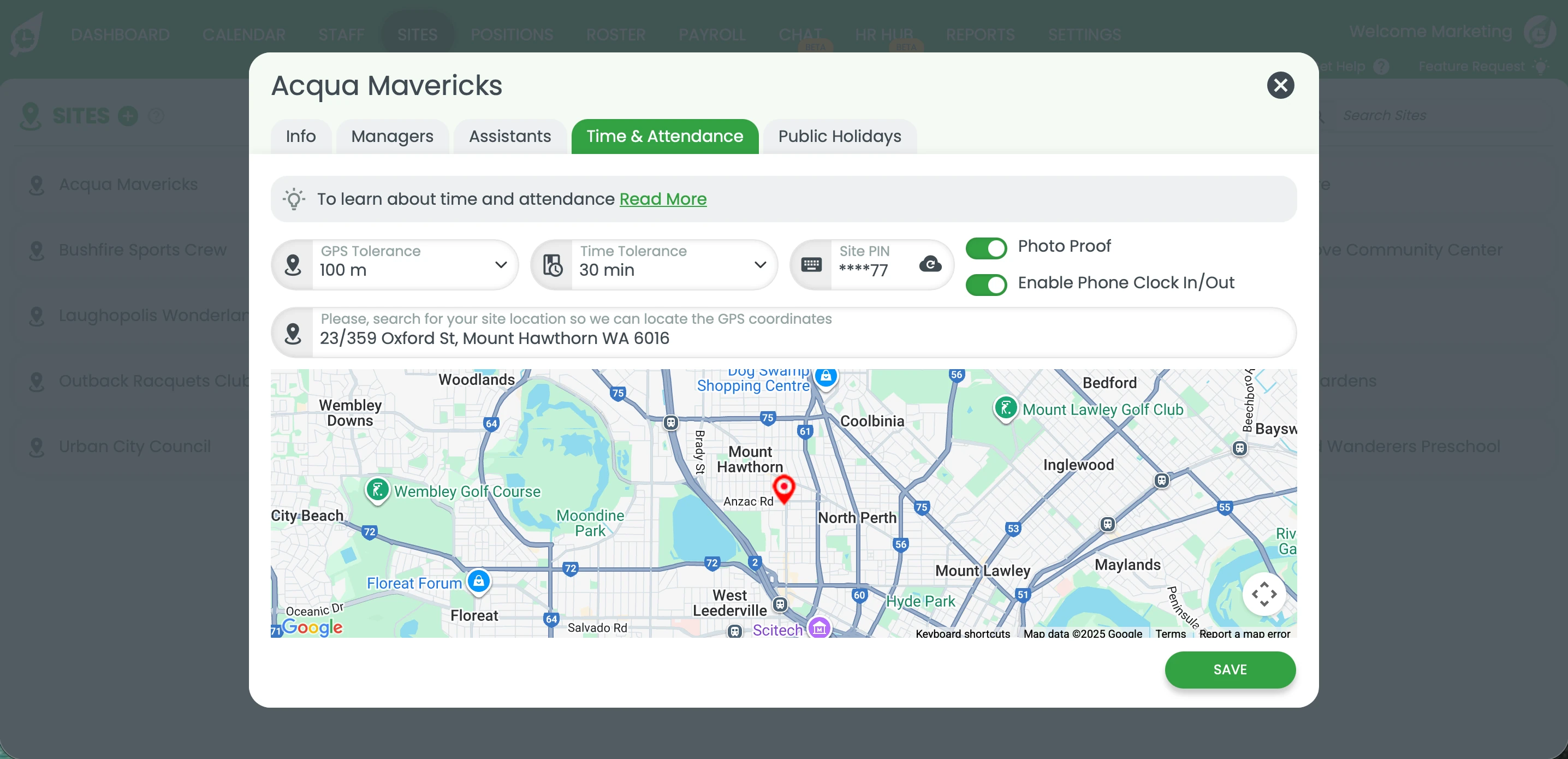
GPS geofencing ensures accurate clock-in at work locations
Strengths
- GPS mobile clock-in with geofencing
- Photo verification prevents buddy punching
- Live attendance dashboard
- Automatic timesheet creation from clock data
- Award-compliant pay calculations
Limitations
- Less suited for 500+ employee enterprises
- No biometric hardware integrations
Tanda time & attendance
Time and attendance is Tanda's core strength. Multiple clock-in methods, configurable geofencing, and comprehensive timesheet workflows make it a solid choice for time tracking focused businesses.
 Best for Time Tracking Depth
 Time tracking assessment
Tanda was built around accurate time capture, and this shows in the depth of its clock-in options. Mobile app, tablet kiosk, PIN entry, and photo verification are all supported. The geofencing is configurable per location with a visual map interface for setting boundaries.
Clock-ins display colour-coded icons showing whether they occurred within or outside the geofence. You can block out-of-bounds clock-ins entirely or allow them with warnings. The main consideration is ensuring correct address setup for geofencing to work properly.
Strengths
- Multiple clock-in methods (app, kiosk, PIN)
- Configurable geofencing with visual map
- Photo verification option
- Strong compliance integration
Limitations
- Modular pricing hard to predict
- Support limited to AEST hours
- Geofencing requires correct address setup
Deputy time & attendance
Reliable time and attendance system designed for businesses operating across multiple locations. Flexible clock-in options with GPS and kiosk support.
 Best for Enterprise
 Time tracking assessment
Deputy provides a comprehensive time and attendance system for businesses operating across multiple locations and shift patterns. Clock-in methods include mobile app, GPS, and kiosk support. The platform focuses on capturing accurate clock-ins, enforcing location rules, and managing approvals at scale.
Note that time and attendance is a paid module in Deputy — it's not included in the base scheduling price. For businesses that need full workforce management, this modular approach can add complexity and cost.
Strengths
- Flexible clock-in options
- GPS and kiosk support
- Reliable time capture
- Suitable for multi-site operations
Limitations
- Time & attendance is a paid add-on
- Timesheet edits can add workload
- Not fully automated
Connecteam time & attendance
GPS breadcrumb tracking makes Connecteam ideal for mobile workforces. Multiple clock-in methods and job-based time allocation suit field service businesses and teams that move between locations.
 Best for Field Teams
 Time tracking assessment
Connecteam offers two location tracking modes: Breadcrumbs (continuous tracking during shift) and Clock in/out only (location captured at start and end). The breadcrumbs feature provides enhanced accountability for field-based teams, though some employees may have privacy concerns.
Clock-in methods include mobile app, PC/web, dedicated kiosk mode, and NFC tags. The main limitation for Australian businesses is the lack of award interpretation — you'll need to calculate penalty rates manually, which defeats much of the purpose of automated time tracking.
Strengths
- GPS breadcrumb tracking during shifts
- Multiple clock-in methods (mobile, PC, kiosk, NFC)
- Job-based time allocation
- Affordable flat-rate pricing
Limitations
- Limited Australian award support
- No time tolerance for early/late clock-ins
- Geo-fence defaults to feet not metres
Employment Hero time & attendance
Basic time and attendance features within a comprehensive HR platform. Mobile clock-in with geo-fence and selfie capture, but limited customisation compared to dedicated time tracking platforms.
 HR Platform with Time Tracking
 Time tracking assessment
Time and attendance features are enabled through the settings tab. Staff can clock in and out via the Employment Hero Work app, with geo-fence support and optional selfie capture for verification. The geo-fence feature allows you to set boundaries and optionally allow clock-ins outside (triggering a timesheet warning).
Customisation is limited compared to dedicated time tracking platforms. There's no option to set a specific pin drop location, no kiosk-style app option, and you can't set different rules for different sites. If time tracking accuracy is your primary concern, a dedicated platform will serve you better.
Strengths
- Mobile clock in/out
- Geo-fence with flexible rules
- Selfie capture verification
- Integrated with HR and payroll
Limitations
- No pin drop location setting
- No kiosk-style app option
- Cannot set different rules per site
- Limited customisation
Best time & attendance by use case
Different work environments call for different time tracking approaches. Here's what we'd recommend based on common scenarios:
On-site teams
Retail, hospitality, healthcare
Teams clocking in at a fixed location work well with tablet kiosk mode — PIN entry plus photo verification keeps things accurate. Geofencing prevents early clock-ins, and live dashboards give managers instant visibility.
Our pick: RosterElf
Kiosk time clock with photo verification and award compliance.
Mobile/field workers
Construction, trades, delivery
Mobile workers moving between job sites need GPS-enabled clock-ins at minimum. If you also want to track location during shifts, look for continuous GPS breadcrumb tracking.
Our pick: Connecteam
GPS breadcrumb tracking throughout shifts for field teams.
Multi-site operations
Chains, franchises, agencies
Managing staff across multiple sites means you'll want configurable geofencing per location, centralised reporting, and the flexibility to set different rules for different venues.
Our pick: Tanda or RosterElf
Both offer strong multi-location support with centralised management.
Large enterprises
200+ staff, complex requirements
Organisations with dedicated admin staff and complex compliance requirements may justify an enterprise platform's depth, even with the higher costs and complexity that entails.
Our pick: Deputy
Comprehensive features for large-scale operations.
How to choose time & attendance software
1. Consider your workforce type
On-site teams typically work best with tablet kiosks, while mobile workers need GPS-enabled apps. Many businesses need both — so confirm your chosen platform supports the clock-in methods that match how your team actually works.
2. Prioritise Australian compliance
For Australian businesses, award interpretation is critical. We've found that international platforms typically lack this functionality, which means you'll still be manually calculating penalty rates — defeating much of the purpose of automated time tracking.
3. Check the timesheet-to-payroll flow
The best time and attendance software creates timesheets automatically from clock data, applies award rates, and exports directly to your payroll system. We'd recommend walking through this workflow during any trial period.
4. Evaluate total cost
Pricing structures vary significantly — some platforms charge extra for time and attendance features, others bundle them into higher tiers. It's worth calculating the total cost for your team size with all the features you actually need before making a decision.
What is time and attendance software?
Time and attendance software replaces paper timesheets and manual clock-in systems with digital tools. At its core, the software tracks when employees start and finish work, records breaks, and creates accurate timesheets ready for payroll.
The platforms we've reviewed go well beyond basic timekeeping. Most offer GPS clock-in with geofencing, photo verification, tablet kiosk mode, and live attendance dashboards — though implementation quality varies.
Benefits of digital time tracking
- Accuracy — GPS and photo verification ensure employees are where they say they are
- Automation — Clock data flows automatically into timesheets, reducing manual data entry
- Compliance — Digital records provide the audit trail Fair Work requires
- Payroll accuracy — Award rates applied automatically, reducing underpayment risk
- Real-time visibility — Managers see attendance instantly across all sites
Time & attendance software FAQ
- Based on our evaluation, RosterElf offers the strongest combination of GPS clock-in, photo verification, geofencing, and automatic timesheet creation with award compliance for most Australian SMEs (5-200 staff). Tanda is a strong alternative if you prioritise time tracking depth. Ultimately, the right choice depends on your team size, whether staff are mobile or site-based, and your specific compliance requirements.
- GPS clock-in uses your employees' smartphone location to verify they're at the correct worksite when clocking in or out. The system captures GPS coordinates and compares them against your configured work locations. Some platforms like RosterElf and Tanda allow you to set geofencing boundaries so staff can only clock in within a certain radius of the workplace.
- Geofencing creates a virtual boundary around your work location. When employees try to clock in via mobile, the system checks if they're within this boundary. If they're outside, you can either block the clock-in entirely or allow it with a warning for manager review. This prevents time theft from employees clocking in while not at work.
- Photo verification requires employees to take a selfie when clocking in. This photo is stored with the time record, making it easy to verify the correct person worked the shift. It effectively prevents one employee clocking in for another (buddy punching), which is a common form of time theft in businesses using PIN-only systems.
Start your free 15 day RosterElf trial today
Join 30,000+ Australian businesses using RosterElf to simplify rostering, payroll and HR.