
What is the newsfeed?
RosterElf now includes a newsfeed — a built-in broadcast tool that lets managers and admins post announcements, share documents, and send updates to the entire team. Staff see posts directly in their RosterElf app, ensuring important information reaches everyone without relying on group chats, emails, or notice boards.
The newsfeed is a one-directional communication tool — think of it as a digital company noticeboard. Managers post; staff read and optionally acknowledge. For two-way conversation, RosterElf's team chat handles that separately. The newsfeed is for official updates that the whole team needs to see.
This article explains what the newsfeed does, why it improves team communication for Australian businesses, how the posting and acknowledgement workflow operates, and how to get started using it in your account.
Why the newsfeed matters for team communication
Keeping a distributed workforce informed is one of the biggest operational challenges for businesses with shift-based teams. Staff work different hours, may not check email, and important updates can get buried in group chats. Missed communications lead to confusion, policy non-compliance, and staff who feel out of the loop.
The newsfeed gives managers a single place to post important updates, with confidence that staff will see them. Posts appear prominently in the RosterElf app — the same tool staff already use to check their roster. This means no separate app, no email required, and no update buried under unrelated messages.
Real scenario: hospitality venue
A bar manager updates the dress code policy before a busy weekend. Rather than hoping staff read an email or check a pinned message, they post the update to the newsfeed with acknowledgement required. Before the Friday shift starts, the manager can see exactly which staff have confirmed they've read the update — and follow up with anyone who hasn't.
Three key benefits
One place for updates
All team announcements in one feed. Staff don't need to check multiple channels or rely on word of mouth.
Confirmed acknowledgement
Require staff to acknowledge critical posts. Track exactly who has read important updates before shifts start.
Attach files and documents
Share rosters, policy documents, menus, or any file directly alongside the post — no separate email needed.
How the newsfeed works
The newsfeed has a simple workflow: managers create and publish posts; staff view and acknowledge them. Posts can include a title, description, file attachments, and an optional acknowledgement requirement.
Creating a newsfeed post
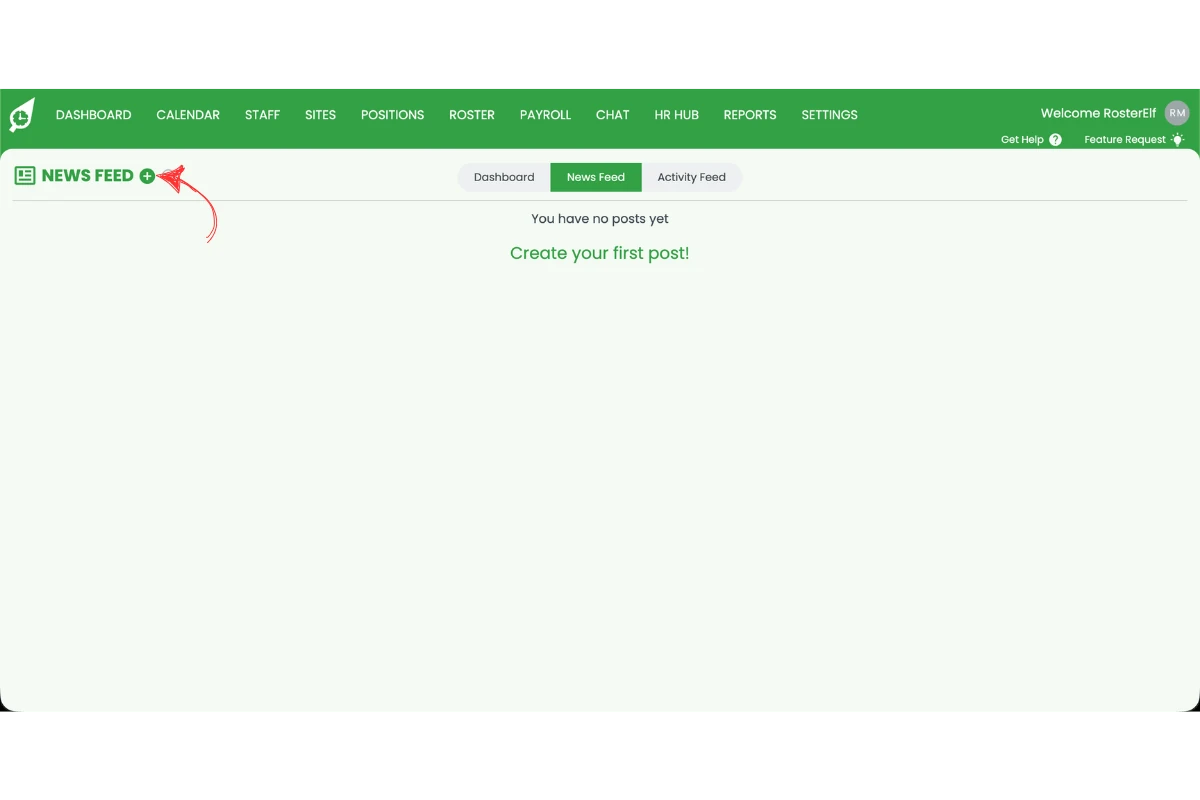
Managers access the newsfeed from the main navigation in the RosterElf web app or smartphone app. Creating a post takes under a minute:
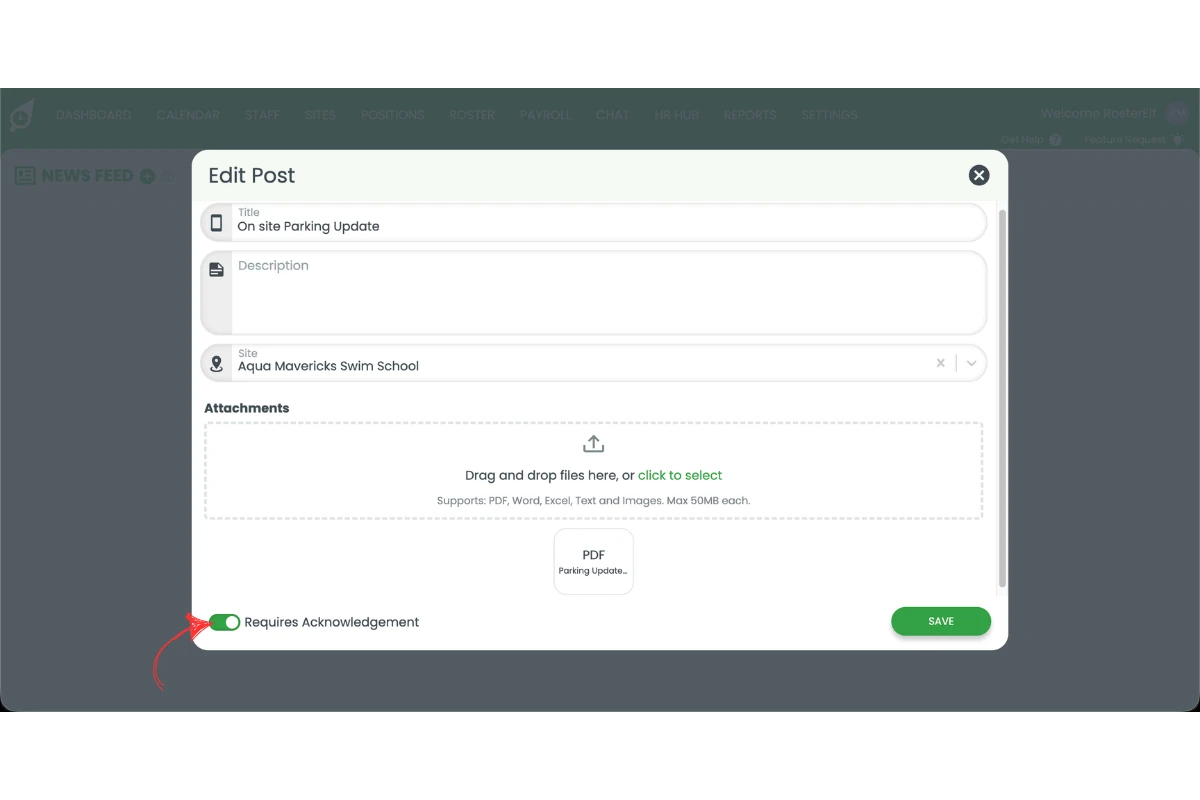
- Add a post title and description
- Select which site the post applies to (or all sites)
- Attach any relevant files or documents
- Toggle on Require acknowledgement if staff need to confirm they've read it
- Press Save to publish
Acknowledgement tracking
When acknowledgement is required, staff see the post with a prompt to confirm they've read it. The post remains visible until they acknowledge. Managers can view an acknowledgement status list showing which staff have responded and which haven't — making follow-up easy before critical shifts.
Best for the newsfeed
- Policy updates and procedure changes
- Safety notices and reminders
- Roster announcements and closures
- Welcome messages for new staff
- Menu or product updates
Better suited to team chat
- Quick shift coordination questions
- Back-and-forth conversations
- Swapping shifts or availability checks
- Informal team updates
- Personal messages between staff
How to get started with the newsfeed
The newsfeed is available in your RosterElf account now. No additional setup is required — simply open the newsfeed from the main navigation and create your first post. Use the guides below for step-by-step walkthroughs for each part of the workflow.
Ready to use the newsfeed?
Step-by-step guides for every part of the newsfeed workflow: