Best employee scheduling software & apps Australia 2026
Compared & tested

IN SHORT
Employee scheduling software is a digital tool that builds staff shift schedules, tracks availability and time-off requests, records worked hours through a time clock, and sends the approved timesheets to payroll. In Australia it does one more job that overseas platforms often skip: interpreting the relevant Modern Award so penalty rates, overtime and casual loading are costed into the schedule before you publish it.
We built real shift schedules in every leading platform, then judged each on how well it matches staffing to demand, applies Australian penalty rates, and keeps a team of casuals covered without double-booking. This guide shows which employee scheduling software actually earns its place.
· 15 min read

Written by
Steve Harris
Steve Harris
Workforce management specialist with 10+ years experience in Australian HR tech. Former operations manager in hospitality.

Edited by
Georgia Morgan
Georgia Morgan
Senior editor and compliance researcher. Background in employment law and Fair Work regulations.
Top 5 scheduling platforms at a glance
These five are ranked 1-5 of the ten platforms in this guide, and are the ones we scheduled real shifts in. Positions 6-10 follow below.
Short on time? Here are the shift-scheduling tools that scored highest in our hands-on testing:
 RosterElf
 9.2/10
Australian-built scheduling with penalty rates applied per shift and live wage costing.
Learn more Deputy
 8.3/10
Demand-forecast scheduling for large, multi-country workforces.
Read review Tanda
Tanda 7.7/10
Attendance-led platform with geofencing. Scheduling plays a supporting role.
Read review Connecteam
 7.2/10
Flat-rate app for simple shift planning — but no Australian award interpretation.
Read review Employment Hero
 6.2/10
Full HR and payroll suite with scheduling offered as an add-on module.
Read reviewRanked 6-10: the rest of the shortlist
The five platforms above are the ones we scheduled real shifts in. These next five are the other tools Australian employers most often shortlist. We have not scored them, because we have not run a full test cycle on each — what follows is what each is built for, and where it leaves an Australian award employer exposed.
Simple shift scheduling and swaps
Clean scheduling and shift-swap workflow with a well-rated staff app. Built for US labour rules, so Modern Award interpretation and penalty rates are not handled natively.
Very small teams wanting a free tier
Generous free plan covering basic scheduling and a time clock for a single location. Payroll and compliance features are built around US requirements rather than Fair Work.
Lightweight scheduling with task tools
Combines shift scheduling, task lists and internal messaging in one lightweight app. No Australian award interpretation, so penalty rates must be handled in payroll.
Hospitality demand forecasting
Strong restaurant-focused forecasting that ties labour to projected sales. Its compliance rules target North American jurisdictions, not Australian awards.
Teams already standardised on Microsoft 365
Shift scheduling and self-service built into Microsoft Teams, so there is no extra app for staff already using it. Microsoft publishes no pricing for it, lists labour-law automation as coming soon, and documents no payroll sync — so award interpretation and pay still happen elsewhere.
Also considered but not ranked: Zenshifts and Microkeeper (Australian-built, smaller feature sets) and Humanforce (aimed at enterprise workforces rather than SMEs).
How we reviewed scheduling software
We spent 40+ hours inside these platforms — opening real accounts, scheduling live shifts, and checking that each one applied the right penalty rate to the right shift. Every judgement below comes from actual product use, not vendor marketing.
- Scheduled real shifts, including nights, weekends, and public holidays
- Verified award interpretation for Hospitality, Retail & SCHADS
- Analysed 500+ verified reviews from Xero App Store & Google
20+
Platforms
researched
10
Fully reviewed
end-to-end
4
Top picks
identified
Australia-focused
Local awards & SME
This means you can choose a scheduling platform that holds up under Australian award conditions — without a month of trial and error.
How we tested employee scheduling software
We scored each platform on the five things that decide whether a schedule is worth publishing: whether it keeps you compliant, how fast it is to build shifts, what it really costs, how good the support is, and how cleanly it syncs to payroll.
25%
Compliance
Award interpretation, Fair Work
25%
Ease of use
Time to build a schedule
20%
Value
Pricing, hidden costs
15%
Support
Response times, onboarding
15%
Integrations
Xero, MYOB, other tools
Our testing process
- • Opened real accounts and scheduled sample staff across a full trading week
- • Checked penalty-rate accuracy on weekend and public-holiday shifts (Hospitality, Retail, SCHADS)
- • Pushed approved timesheets to Xero and compared the payroll export line by line
- • Contacted support as a prospective buyer to gauge response times
- • Read 500+ verified user reviews from the Xero App Store, Google, and Capterra
Xero App Store ratings
We read every Xero App Store review for each platform, looking for repeated praise and repeated complaints. We weight Xero ratings heavily for two reasons:
- Verified reviews — Xero requires users to log in with their Xero account, so reviews come from real customers, not fake accounts
- Critical integration — Xero is the accounting backbone for most Australian SMEs, so how well a schedule syncs to it is a make-or-break factor
93 reviews
93 reviews
View on Xero →
147 reviews
147 reviews
View on Xero →
51 reviews
51 reviews
View on Xero →
50 reviews
50 reviews
View on Xero →
17 reviews
17 reviews
View on Xero →
Ratings as of January 2026. Click to view current ratings on Xero App Store.
What Xero reviewers say
RosterElf
Reviewers repeatedly single out how cleanly scheduled hours flow into Xero payroll without re-keying, and how responsive the Australia-based support team is when award questions come up. A few note an occasional GPS clock-in glitch and a short learning curve at setup, but most describe the move away from spreadsheet schedules as well worth it. The 94% five-star rating reflects strong satisfaction among hospitality and retail schedulers.
Deputy
Deputy's Xero sync draws mixed reactions. Fans highlight the time saved on payroll and the depth of scheduling features for bigger teams; critics report the integration "never worked" for them and flag slow offshore support. Businesses with intricate award requirements say the initial setup can be involved. The split of five- and one-star reviews suggests your experience depends heavily on complexity and support needs.
Tanda
Tanda's Xero sync is generally well-liked, with reviewers praising automatic timesheet transfer and accurate award interpretation. Its Australian focus resonates locally, though some find the modular pricing confusing when totalling costs. Support is responsive within AEST hours but limited outside them, which can frustrate late-trading venues. The attendance and kiosk features earn the most consistent praise.
Connecteam
Connecteam is praised for its generous free tier and friendly mobile app, and for bundling scheduling with chat and training. The recurring limitation reviewers flag is the absence of native Australian award interpretation — pay rules must be set by hand, and some report hours not always syncing correctly to Xero. As a US-based platform, its support hours and default settings lean American.
Employment Hero
Reviews are the most polarised of the five, and it carries the lowest Xero rating here. Supporters praise the breadth of the HR and payroll suite and call the Xero link "seamless once set up." Detractors cite a complex setup, hard-to-reach support, and leave-calculation errors. Several experienced payroll users find it more complicated than it needs to be, and the scheduling module gets less attention than the core HR product.
Need a deeper Xero comparison? See our Xero payroll sync guide for line-by-line testing of how accurately each app sends timesheet data to Xero, including award calculations and manual correction time.
Feature comparison
How the top platforms compare on the scheduling features Australian businesses actually use:
Drag-and-drop roster builder
Availability & unavailability rules
Shift conflicts & overlap warnings
Unfilled shift alerts
Multi-location rostering
Shift templates
Publish & notify staff instantly
Manager override & approvals
GPS clock-in / clock-out
Photo proof on clock-in
Tablet time clock mode
Device restrictions (lockdown)
Unscheduled shift detection
Manager timesheet approval
Break enforcement rules
Auto-generated timesheets
Xero payroll integration
MYOB payroll integration
Award interpretation (AU)
Overtime & penalty rules
Export-ready payroll files
Pay run preview & validation
In-app staff messaging
Shift change notifications
Read receipts
Announcements / broadcast messages
Manager-only communication
iOS app
Android app
Employee self-service
Manager mobile approvals
Offline clock-ins
Digital contracts & onboarding
Policy acknowledgements
Certificate & licence tracking
Compliance reminders
Employee document storage
HR tools without payroll lock-in
Labour cost reporting
Attendance & punctuality reports
Overtime & penalty analysis
Export to CSV / Excel
Custom report filters
Features supported
| FEATURE | RosterElf | Deputy | Tanda | Connecteam | Employment Hero |
|---|---|---|---|---|---|
| Rostering & scheduling | |||||
| Drag-and-drop roster builder | |||||
| Availability & unavailability rules | |||||
| Shift conflicts & overlap warnings | |||||
| Unfilled shift alerts | |||||
| Multi-location rostering | |||||
| Shift templates | |||||
| Publish & notify staff instantly | |||||
| Manager override & approvals | |||||
| Time & attendance | |||||
| GPS clock-in / clock-out | |||||
| Photo proof on clock-in | |||||
| Tablet time clock mode | |||||
| Device restrictions (lockdown) | |||||
| Unscheduled shift detection | |||||
| Manager timesheet approval | |||||
| Break enforcement rules | |||||
| Timesheets & payroll | |||||
| Auto-generated timesheets | |||||
| Xero payroll integration | |||||
| MYOB payroll integration | |||||
| Award interpretation (AU) | |||||
| Overtime & penalty rules | |||||
| Export-ready payroll files | |||||
| Pay run preview & validation | |||||
| Communication | |||||
| In-app staff messaging | |||||
| Shift change notifications | |||||
| Read receipts | |||||
| Announcements / broadcast messages | |||||
| Manager-only communication | |||||
| Smartphone apps | |||||
| iOS app | |||||
| Android app | |||||
| Employee self-service | |||||
| Manager mobile approvals | |||||
| Offline clock-ins | |||||
| HR tools | |||||
| Digital contracts & onboarding | |||||
| Policy acknowledgements | |||||
| Certificate & licence tracking | |||||
| Compliance reminders | |||||
| Employee document storage | |||||
| HR tools without payroll lock-in | |||||
| Analytics & reporting | |||||
| Labour cost reporting | |||||
| Attendance & punctuality reports | |||||
| Overtime & penalty analysis | |||||
| Export to CSV / Excel | |||||
| Custom report filters | |||||
| Features supported | 42/43 | 37/43 | 39/43 | 26/43 | 38/43 |
Feature data based on hands-on testing. Last verified January 2026.
Mobile app comparison
Scheduling now lives on a phone. Staff need to check their shifts, clock in, and swap shifts on the go, while managers build and adjust the schedule between tasks. A strong rostering software app decides how well that works day to day. Here is how the top platforms compare.
This is how each scheduling app performs on iOS and Android.
| Platform | iOS rating | Android rating | GPS clock-in | Shift swaps | Push notifications |
|---|---|---|---|---|---|
| RosterElf | 4.6/5 | 4.5/5 | |||
| Deputy | 4.5/5 | 4.3/5 | |||
| Tanda | 4.2/5 | 3.9/5 | |||
| Connecteam | 4.8/5 | 4.7/5 | |||
| Employment Hero | 4.1/5 | 3.8/5 |
App store ratings as of January 2026. Ratings may vary by region.
Staff app vs manager app
Most scheduling platforms split the experience in two. The staff app is about seeing your shifts and clocking on; the manager app is about building the schedule and approving requests. The best tools keep both fast.
What staff can do
- See their upcoming shifts at a glance
- Clock in/out with GPS verification
- Request shift swaps with colleagues
- Submit leave and set availability
- Get a push alert on any schedule change
What managers can do
- Build and publish the schedule from a phone
- Approve swaps and leave in one tap
- See who is on the clock in real time
- Fill open shifts and message the team
- Watch labour cost as they schedule
Our mobile app recommendation
For Australian teams, RosterElf strikes the best balance of app quality and award compliance. The employee work app is quick for staff, and managers keep full scheduling control on mobile. Connecteam scores higher in the app stores but does not interpret Australian awards on the shifts you schedule, and Deputy's app is powerful but can overwhelm a small team.
App store ratings as of January 2026. Ratings may vary by region.
RosterElf deep dive
Drag-and-drop shift scheduling with penalty rates calculated live as you build each shift. Purpose-built for Australian award compliance, with Xero/MYOB sync and local support — ideal for hospitality, aged care, and retail teams of 5-200.
 Best for Australian SMEs
 Our assessment
RosterElf wins for Australian shift-based businesses because scheduling and compliance are the same action: as you drop a shift onto the roster, the correct penalty rate and wage cost appear instantly. We had a Hospitality Award schedule — including Saturday and Sunday loadings — running in under an hour, with the running labour cost sitting right next to our sales budget so we could size each shift to demand.
The pricing is refreshingly flat: one per-user price includes every scheduling feature, with no modules to unlock. Perfect Match suggests staff who are qualified, available, and under their overtime threshold, which takes the guesswork out of filling an open shift. Between the free Australian onboarding and the tablet-kiosk plus GPS clock-in, it is the shortest path from a spreadsheet schedule to a compliant, mobile one. For the local-rostering framing of the same product, see our rostering software feature page.

Clean, intuitive schedule view with live cost tracking

Perfect Match auto-scheduling finds the best staff for each shift
Strengths
- Live wage cost shown against your sales budget as you schedule
- Penalty rates and overtime applied automatically per shift
- Highest-rated Xero timesheet sync in the category (4.9/5)
- Perfect Match auto-scheduling suggests the right, available staff
- Free onboarding to migrate your schedule off spreadsheets
- Tablet kiosk + GPS smartphone clock-in with photo proof
Limitations
- Not built for 500+ employee, multi-country scheduling
- Fewer third-party integrations than Deputy
Deputy deep dive
Enterprise-grade scheduling with demand forecasting and auto-scheduling that maps staffing to predicted footfall. Genuinely strong for large and multi-country teams, though module pricing and support responsiveness can frustrate smaller operators.
 Best for Enterprise
 Our take on Deputy
Deputy is the pick when scheduling gets big and complex. Its demand-forecast engine builds shifts against predicted trade, and it handles multi-site, multi-country rosters that would stretch most SME tools. The catch for smaller operators is that scheduling, time tracking, and tasking arrive as separate paid modules, so the per-shift cost climbs quickly — and support response times vary, with some users reporting long waits at peak. For a 20-person cafe it is more machine than the job needs; for a 500-strong retail chain it earns its keep.
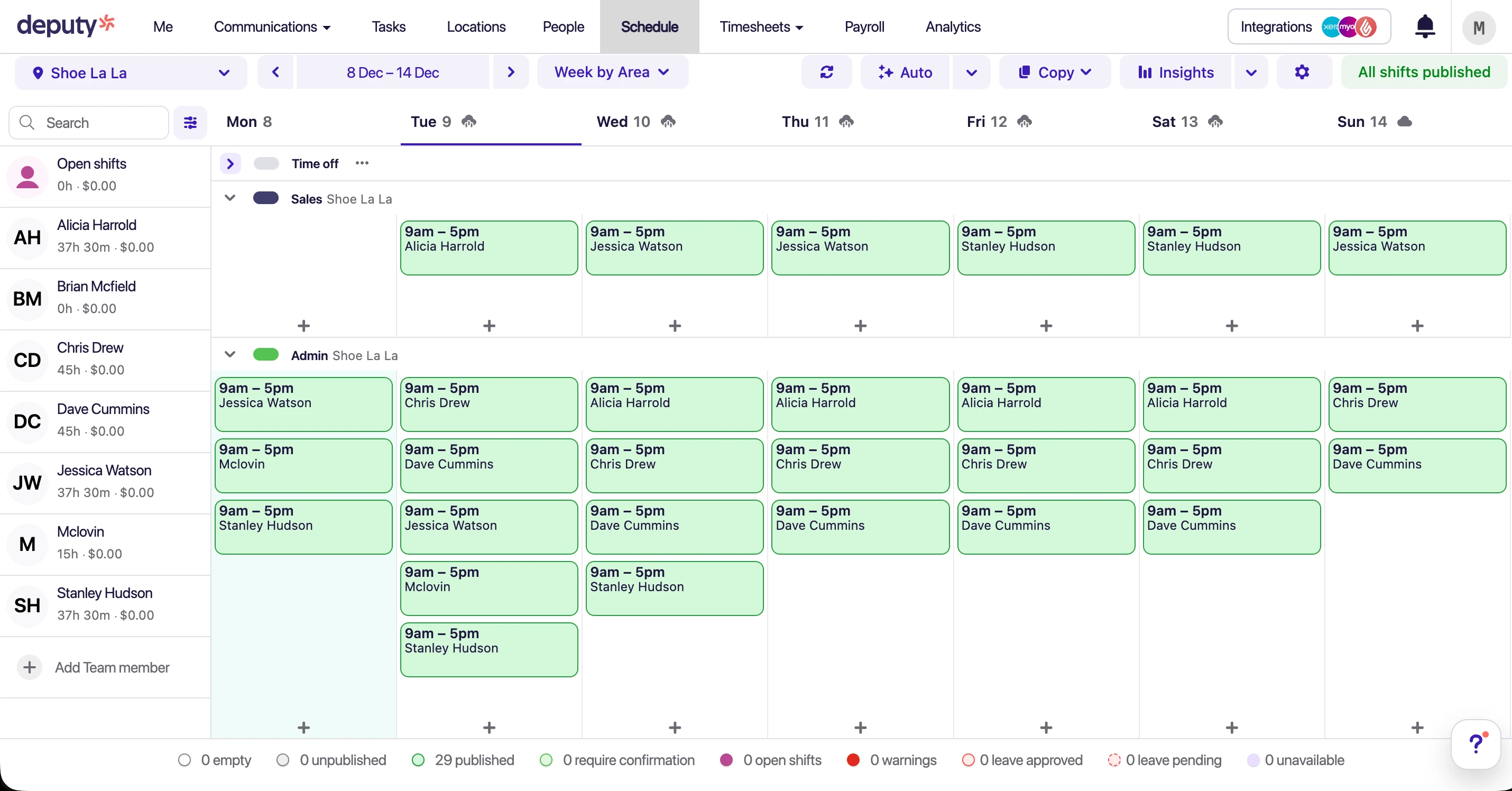
Deputy's weekly schedule with colour-coded shifts

Auto-scheduling driven by demand forecasting
Strengths
- Demand-forecast scheduling for large sites
- Deep multi-location and multi-country support
- Large integration marketplace
- Sophisticated auto-scheduling engine
Limitations
- Scheduling split across paid modules
- Support response times vary
- Heavier than most SMEs need to schedule a shift
- Award setup can be involved
Tanda deep dive
An Australian-built platform where the clock-in engine leads and scheduling follows. Excellent for proving exactly who worked which shift, but the shift-building side is capable rather than the headline act.
 Best for Time Tracking
 Our take on Tanda
Tanda's strength is certainty about attendance — geofencing, photo verification, and kiosk mode make it hard to fudge a clock-in, and its rostered-versus-worked reporting is genuinely detailed. Where it lags our top picks is the scheduling experience itself: building and adjusting shifts is functional but less fluid, the modular pricing makes total cost hard to forecast, and support is confined to AEST hours. If your first question is "did the shift happen as scheduled?" Tanda answers it well; if it is "how fast can I build next week's schedule?" the dedicated tools pull ahead.
Strengths
- Best-in-class attendance capture with geofencing (8.5/10)
- Detailed rostered-vs-worked reporting (8.3/10)
- Strong security controls (8.2/10)
- Australian-built and award-aware
Limitations
- Modular pricing hard to forecast
- Sales-led onboarding (no instant scheduling trial)
- Support limited to AEST hours
- Shift building is functional, not exceptional (7.5/10)
Connecteam deep dive
All-in-one deskless-team app that bundles scheduling with team communication and training at a flat rate. Great value for simple shift planning — but Australian award interpretation is not built in.
 Best Budget Option
 Our take on Connecteam
Connecteam is a smart pick when price is the deciding factor and your shifts do not attract Modern Award penalty rates. The US$35/month Operations Hub covering the first 30 users is hard to beat, and the bundled chat and checklists genuinely help a deskless team. The honest caveat is compliance: because it has no native Australian award interpretation, every penalty rate and overtime line on a scheduled shift is yours to configure and check by hand — which erodes much of the point of scheduling software for an award-covered Australian business.
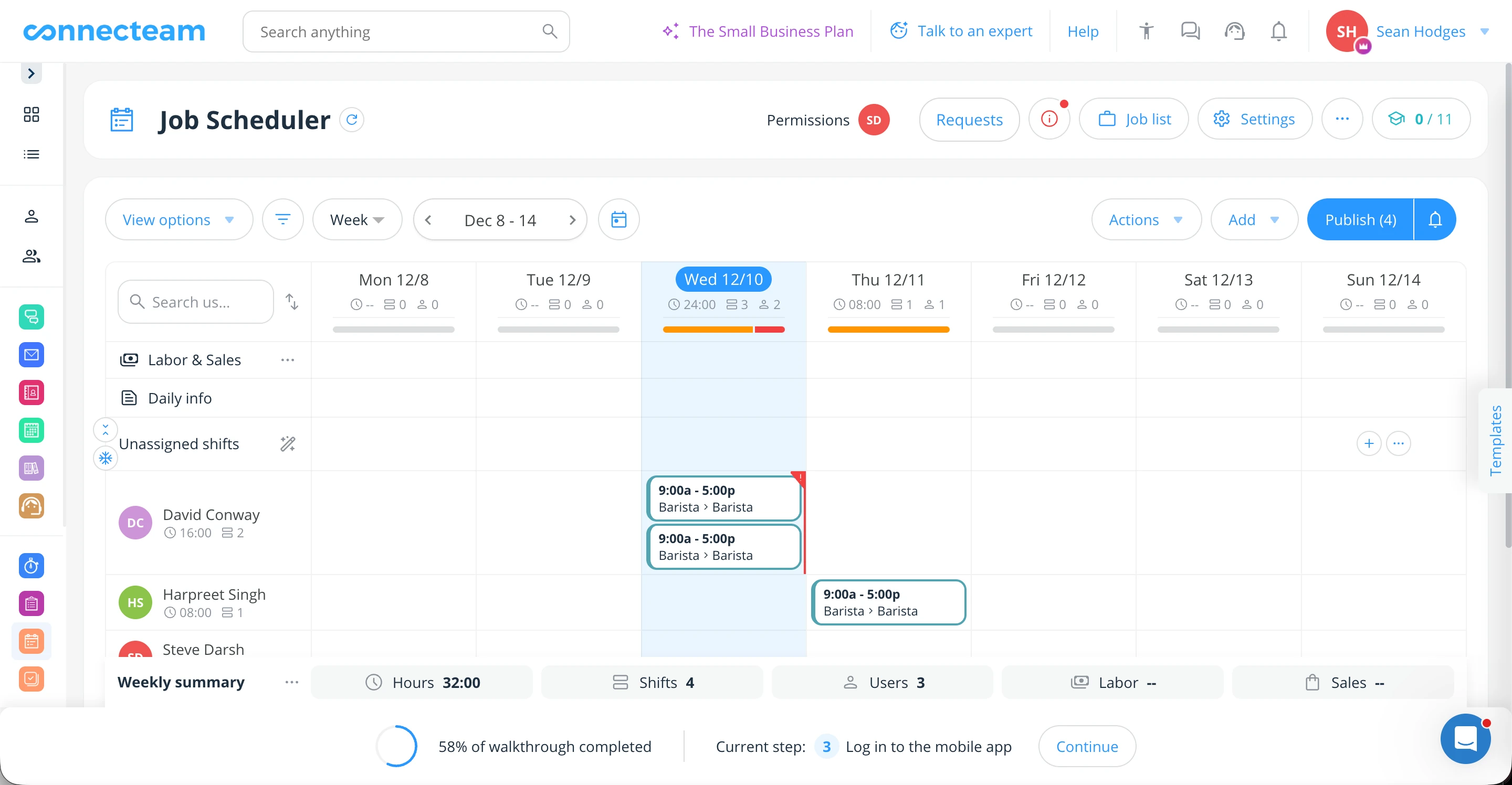
Connecteam's main scheduler interface

Shift details with notes and attachments
Strengths
- Flat pricing that suits small, budget-first teams
- Strong in-app messaging alongside the schedule
- Built-in training and checklists
- Free plan for up to 10 users
Limitations
- No native Australian award interpretation on shifts
- Xero timesheet sync issues reported
- Manual pay rules make complex scheduling risky
Employment Hero deep dive
A full HR and payroll suite that offers scheduling as one module among many. Strong if HR compliance and payroll are your centre of gravity, though the shift-building experience is less refined than a dedicated scheduling tool.
 Best for HR-First
 Our take on Employment Hero
Employment Hero is first and foremost an HR and payroll platform — scheduling is bolted on rather than built in. If you want onboarding, performance reviews, policies, and learning under one roof, with shift scheduling as a bonus, it is a reasonable single-vendor choice. But if building the schedule is your daily job, the module feels like an afterthought next to purpose-built tools: fewer scheduling shortcuts, and a UX that does not match its polished HR side.

Scheduling module — functional but less intuitive

HR features are comprehensive and polished
Strengths
- Comprehensive HR and payroll around the schedule
- Solid Australian employment-law coverage
- Single vendor for HR, pay, and shifts
- Hero AI assistant
Limitations
- Scheduling is a secondary module, not the focus
- Complex per-module pricing
- Support responsiveness varies
- Shift-building UX needs work
Employee scheduling for Australian award compliance — by industry
This is where most global scheduling apps quietly fall down. Building a nice-looking shift grid is easy; building one that pays people correctly under an Australian Modern Award is not. The same Sunday shift can attract a different rate depending on the award, the employee's classification, and whether they are permanent or casual — and scheduling software that does not understand those rules simply moves the arithmetic from your spreadsheet into a prettier interface. Below is how award-aware scheduling should behave in the five industries that live and die by it. For any exact figure, always confirm against the linked award rate guides, which we keep current with Fair Work.
The common thread: your scheduling tool should apply the right penalty rate, overtime threshold, break rule, and minimum engagement as you build the shift, using award interpretation rather than leaving you to reconcile it at payroll.
Hospitality — Hospitality Award (MA000009)
Hospitality is the toughest scheduling test in the country: heavily casual rosters, late trading, and penalty rates that swing by day and time. Schedule a Sunday shift and permanent staff move to 150% while a casual sits at 175% (the casual figure already folds in the 25% loading) — so the software has to know both the day and the employment type before it can cost the shift. Weekend and evening loadings, public-holiday rates, and split-shift allowances all need to apply automatically, and casual shifts must respect the award's minimum engagement (commonly two hours) so you cannot accidentally schedule a 45-minute shift the law does not allow. Confirm current rates in the Hospitality Award rate guide.
Retail — General Retail Industry Award (MA000004)
Retail scheduling has to cope with long trading hours, late-night shifts, and seasonal peaks where your casual headcount balloons. Under the General Retail Award a Sunday shift lands around 150% for full-time and part-time staff and 175% for casuals, with separate evening loadings once trading runs past the ordinary-hours window and full public-holiday rates on top. Good scheduling software surfaces the wage cost of extending trading hours before you commit to the roster, so a "let's stay open until 9pm for the sale" decision is made with the penalty-rate impact visible. Check the current numbers in the General Retail Award rate guide.
Fast food — Fast Food Industry Award (MA000003)
Fast food and quick-service brands schedule large numbers of young, level-based crew, and the penalties are level-dependent — a Sunday shift is around 125% for Level 1 crew but steps up for higher levels, so the software has to read the classification, not just the day, to cost a shift correctly. Late-night loadings, junior pay rates by age, and tight minimum-shift rules all compound the problem across a roster of dozens of casuals. Scheduling by hand here is where underpayments creep in; award-aware scheduling applies the right level and rate to each named crew member automatically. See the Fast Food Award rate guide for the level-by-level detail.
Aged care — Aged Care Award (MA000018)
Aged care runs 24/7, which turns scheduling into a compliance exercise as much as a coverage one. Sunday work attracts roughly a 75% loading and public holidays step higher again, while night and weekend rotations, broken shifts, and sleepovers each carry their own rules. On top of the rates, care rosters have to respect qualification and check requirements — you cannot schedule someone whose clearance has lapsed — and honour break and fatigue rules across back-to-back shifts. Scheduling software for aged care needs to hold all of that at once; confirm the loadings in the Aged Care Award rate guide.
Nursing — Nurses Award (MA000034)
Nursing rosters combine rotating shift patterns with night-duty and weekend loadings — Saturday work commonly sits at 150% for permanents and 175% for casuals, with Sunday and public-holiday rates higher still, plus shift allowances layered on morning, afternoon, and night rotations. Because nurses often move between wards and sites, the scheduling tool also has to prevent double-booking and flag when a rotation would breach rest-break requirements. This is a poor fit for any app without genuine award interpretation; the Nurses Award rate guide sets out the current shift loadings.
The takeaway: only score a scheduling platform as compliant if it applies your award automatically as you build shifts. Of the tools reviewed here, RosterElf and Deputy interpret these awards natively; Connecteam does not, and Tanda and Employment Hero handle them with varying depth. Browse every award we cover in the award rate guides hub.
Best scheduling software by use case
Every industry schedules differently. Here is our pick based on how your business runs its shifts:
Hospitality
Cafes, restaurants, bars, hotels
Casual-heavy schedules with penalty rates that shift by day and hour, plus RSA and food-safety certificates to track and constant last-minute swaps to approve.
Recommended: RosterElf
Pre-built Hospitality Award rates on every shift, certificate tracking, and one-tap swap approvals.
Healthcare & aged care
Nursing homes, clinics, home care
24/7 rotations under SCHADS and the Nurses Award, qualification and clearance checks before a shift is assigned, and careful break compliance across nights and weekends. See healthcare scheduling and aged care scheduling for the sector detail.
Recommended: RosterElf
Aged Care and Nurses Award rates set once in the pay rate builder, qualification tracking, and compliance-first scheduling.
Retail
Shops, supermarkets, franchises
General Retail Award rates on long and late trading hours, staff-to-sales visibility as you schedule, and easy scaling for seasonal peaks.
Recommended: RosterElf
Retail Award rates set once in the pay rate builder (a pre-built Retail pack is coming soon), live labour budgeting, and per-user pricing that flexes with seasonal staff.
Multi-site & enterprise
Franchise groups, large chains
Scheduling across many locations, role-based permissions, demand forecasting, and sometimes multi-country rosters.
Recommended: Deputy or RosterElf
Deputy for 500+ or multi-country. RosterElf for Australian multi-site groups up to 200 staff per location.
Budget-first businesses
Startups, small teams
If price rules and your shifts have no award penalty rates to interpret, flat-rate scheduling can work — as long as you accept the compliance trade-off.
Consider: Connecteam
$35/month for up to 30 users — but no award interpretation, so only where compliance is not a concern.
Attendance-critical teams
Field service, construction, mobile teams
When proving exactly who worked which shift matters most — geofencing, photo verification, multiple job sites — clock-in accuracy outweighs scheduling flexibility.
Consider: Tanda
Strong geofencing and time-clock controls. Scheduling is functional but secondary.
HR-first businesses
HR compliance priority
If comprehensive HR (onboarding, policies, performance) matters more than day-to-day scheduling, an HR suite with a scheduling module may fit.
Consider: Employment Hero
Full HR suite with a scheduling module. Better for HR-first than scheduling-first teams.
Pricing comparison
What each platform actually costs to schedule a team. Watch for module-based pricing that hides the real per-shift cost.
| Platform | Base price | Pricing model | Hidden costs? |
|---|---|---|---|
| RosterElf | $6/employee/month | Per employee, all rostering & time features | None — the HR Hub is included in Full Suite |
| Deputy | $8.75 /user/month | Per user, per module | Yes — modules priced separately |
| Tanda | $12.80 /user/month | Per user, bundled | Bundle covers HR, payroll and workforce management |
| Connecteam | $35 USD /month (Per hub, first 30 users. US$29 if billed yearly) | Flat rate, tiered by users | Hubs priced separately |
| Employment Hero | $10 | Per employee, per tier | Yes — payroll only in the top custom-priced tier |
Cost example: 20-person hospitality team
- • RosterElf: $120/month (20 × $6) — all scheduling features
- • Deputy: $195-390/month depending on which modules you need
- • Connecteam: $35-59/month — but no award interpretation
- • Employment Hero: $180-240/month for HR + scheduling modules
How to choose the right scheduling software
Work through these four questions and the shortlist narrows itself:
Do your shifts fall under a Modern Award?
If you schedule staff under an award (most Australian shift-based businesses), award interpretation is non-negotiable. Without it you are still calculating penalty rates by hand on every shift — and carrying the underpayment risk.
How big is the team you schedule?
Some platforms are overkill for a small roster; others do not scale to enterprise scheduling.
Which payroll system will the schedule feed?
A clean sync from schedule to payroll saves hours every pay run. Use App Store ratings as a quality signal.
What is your budget priority?
Cheapest is not best value if it adds compliance risk or manual work back onto every schedule.
What is employee scheduling software?
You will also see these tools called job scheduling software — in an Australian workforce context the two mean the same thing. The distinction worth making is between scheduling people onto shifts, which is what every platform on this page does, and scheduling jobs onto a field calendar, which is what job-management tools like ServiceM8 do. If your staff work rostered shifts, you want the former.
Employee scheduling software — also called staff scheduling software, shift scheduling software, or, in Australia, rostering software — is a cloud tool for building staff schedules, tracking attendance, and controlling labour cost. It replaces the spreadsheet, the paper roster, and the whiteboard with a shared, live schedule that staff see on their phones the moment it is published.
A modern scheduling platform does far more than plot shifts on a grid. It typically brings together:
Shift scheduling
Drag-and-drop shift building, recurring patterns, templates, and open-shift management.
Time and attendance
GPS clock-in/out, timesheets, overtime monitoring, and break tracking against the schedule.
Award interpretation
Penalty rates, overtime, allowances, and loadings applied to each shift as you schedule it.
Mobile apps
Staff view their schedule, clock in, request leave, and swap shifts from their phones.
Payroll integration
Scheduled and worked hours sync straight to Xero, MYOB, and other payroll platforms.
Labour cost tracking
Live wage cost as you schedule, with budget warnings and staff-to-sales reporting.
How scheduling software matches staff to demand
The whole point of demand-based scheduling is to have the right number of people on at the right time — no more, no less. The best tools let you schedule against a signal: expected sales, bookings, or foot traffic. As you drag shifts onto the grid, the running wage cost sits next to your budget so you can see, before you publish, whether Friday night is over-staffed or the Sunday lunch rush is exposed. That is the difference between a schedule that merely fills slots and one that protects your margin.
It is also where dedicated scheduling software pulls away from a calendar tool or spreadsheet. Because different shift times carry different penalty rates under Australian awards, the software costs each shift correctly on the fly, warns you the moment you double-book someone who is already rostered or on leave, and lets staff request a swap that a manager approves in one tap — so coverage never rests on a last-minute group chat.
How does cloud scheduling software work?
Cloud scheduling software runs in a browser or app — nothing to install. The typical loop looks like this:
- Build the schedule — Drag shifts onto the grid and publish to staff instantly via the mobile app.
- Staff clock in and out — Employees use GPS on their phones or a shared tablet kiosk; attendance is logged live.
- Timesheets sync to payroll — Approved hours feed straight into Xero or MYOB with no re-keying.
- Compliance runs underneath — Award rates, overtime, and penalties apply automatically to the hours actually worked.
Not all scheduling software understands Australian awards
Many global scheduling apps have no award interpretation. Without it, a tidy-looking schedule still leaves you exposed to underpayments and Fair Work compliance issues.
Why Australian businesses need scheduling software
Australia has one of the most intricate employment-law environments in the world. With 121+ Modern Awards, each carrying dozens of pay rates, penalties, and allowances, scheduling by hand is a compliance minefield — and every shift you build is a chance to get a rate wrong.
The Fair Work compliance challenge
The Fair Work Act 2009 and the Modern Awards create obligations that are hard to hold in your head while scheduling:
- Penalty rates — Saturday, Sunday, and public-holiday rates vary by award and can reach 250% of base pay
- Overtime thresholds — Daily, weekly, and fortnightly overtime triggers differ by award
- Break requirements — Mandatory rest and meal breaks with specific timing you must schedule around
- Minimum engagement — Casual and part-time staff often have a minimum shift length you cannot schedule below
- Allowances — Split shifts, uniforms, meals, travel, and other award-specific extras
The cost of getting a schedule wrong
Wage theft is now a criminal offence in most Australian states. Beyond the legal penalties, underpayment scandals have cost Australian businesses hundreds of millions in back-pay, legal fees, and reputational damage — most of it traceable to shifts costed incorrectly at the scheduling stage.
High-profile cases include 7-Eleven ($173M), Woolworths ($400M+), Commonwealth Bank ($16.5M), and countless hospitality operators.
The payoff of award-aware scheduling
Compliance confidence
Award interpretation applies the correct rate to each shift automatically, cutting underpayment risk at the source.
Time saved
A schedule that takes hours in a spreadsheet takes minutes here, freeing managers for the floor.
Labour cost control
See wage cost live as you schedule, so you match staffing to demand and avoid needless overtime.
Happier staff
Mobile schedules, easy swaps, and clear communication lift engagement and cut no-shows.
Ready to simplify your scheduling?
Join 30,000+ Australian workplaces using RosterElf to schedule shifts, track time, and stay award compliant.
Employee scheduling software FAQs
Common questions about choosing scheduling software in Australia
- RosterElf is the best employee scheduling app for most Australian shift-based teams in our testing (9.2/10): penalty rates you set up once are costed into every shift as you schedule, staff get a free mobile app, and timesheets sync to Xero and MYOB. Deputy (8.3/10) suits 500+ staff or multi-country scheduling; Connecteam (7.2/10) is the budget option.
- For most Australian shift-based SMEs (5-200 staff), RosterElf is the best employee scheduling software because it builds Modern Award penalty rates into every shift as you schedule, syncs timesheets to Xero and MYOB, and is backed by an Australian support team. Deputy is the stronger pick for 500+ or multi-country scheduling, while Connecteam is the budget option for teams that do not schedule under an award. The right choice depends on your team size, industry, and whether penalty rates apply.
- In Australia the two terms describe the same category — "rostering" is the traditional local word and "employee scheduling software" is the more global term. Both mean a cloud tool for building shift schedules, tracking attendance, and controlling wage cost. If you searched for scheduling software but want the Australian-first framing, our best rostering software guide covers the same platforms from that angle, and staff scheduling vs rostering unpacks the terminology.
- Most platforms charge $6-15 per user per month. RosterElf starts at $6/user/month on annual plans with every scheduling feature included, Deputy from $8.75/user/month plus add-on modules, and Connecteam charges per hub from US$35/month (about A$49) covering the first 30 users. Always confirm what is bundled — some vendors charge extra for time tracking, HR, or award interpretation, which changes the real per-shift cost.
- For Australian teams the essentials are: drag-and-drop shift building, live labour-cost visibility against your sales budget, native award interpretation (penalty rates and overtime per shift), GPS clock-in, shift-swap approvals, availability management, and Xero or MYOB payroll sync. Hospitality and healthcare should also look for certificate and qualification tracking. Prioritise vendors with Australian support who understand Fair Work.
- Yes. You can build a schedule at no cost with RosterElf's free scheduling tool, which runs in your browser with no signup. Some platforms also have free tiers — Connecteam is free for up to 10 users and Microsoft Shifts is free inside Teams — but free plans generally lack Australian award interpretation and payroll sync, so most businesses upgrade to a paid plan (from around $6/user/month) once compliance matters. Our breakdown of free vs paid scheduling tools covers exactly where the free tier stops being enough.
- Yes — Microsoft Teams includes Shifts, a built-in scheduling app where managers publish rosters and staff view shifts, swap them and request time off inside Teams. It suits organisations already standardised on Microsoft 365, because staff need no extra app. For Australian shift employers the gap is compliance: Microsoft documents no payroll sync and lists labour-law automation as a future capability, so Modern Award interpretation, penalty rates and timesheet-to-pay still have to happen in another system. We compare the two approaches in detail in Microsoft Teams Shifts vs rostering software.
- Shifts is part of Microsoft Teams, which is included in most Microsoft 365 business plans, so there is usually no separate licence to buy for basic staff scheduling. Microsoft does not publish standalone pricing for Shifts. Treat it as schedule distribution rather than workforce management — it will tell your team when they work, but it will not cost the shift against a Modern Award or send approved hours to payroll.
- Google has no dedicated staff rostering product. Google Calendar handles appointments and can receive published shifts — RosterElf syncs to it through our Google Calendar integration — but it has no concept of availability, shift swaps, wage cost or award rates. Most small teams that start with Google end up using a spreadsheet instead; if that is you, our free roster templates and the guide to building a staff roster in Google Sheets are a better starting point than Calendar alone.
- Some tools schedule well within a narrow niche but are not built for the breadth of Australian workforce needs. To keep the comparison honest, we only score platforms that compete across general shift-scheduling use cases. Those listed as "notable alternatives" may shine in a specific setting but lack the all-round versatility of our top five.