
Free rostering software suits very small teams — under about five staff with simple, predictable shifts and no award complexity — where all you need is a shared digital schedule. Paid rostering software is the better choice once you need automatic Australian award interpretation, payroll integration with Xero or MYOB, time and attendance tracking, and Fair Work-ready records. For most Australian businesses beyond a handful of employees, the time spent working around a free tool’s limitations quietly costs more than a paid subscription — often within a few months.
When you’re running a small business, every dollar counts. So when you discover there’s free rostering software available, it seems like an obvious choice. Why pay for something you can get for nothing? The answer lies in what “free” actually costs you in time, compliance risk, and operational headaches that don’t show up on a price tag. If you want the paid options ranked side by side, our guide to the best employee scheduling software in Australia compares ten platforms on award compliance, pricing and payroll sync.
Australian businesses face unique challenges that most international rostering tools weren’t built to handle. Modern Awards with complex penalty rate structures, Fair Work record-keeping requirements, and integration with local payroll systems like Xero and MYOB all require functionality that free tools rarely provide. Understanding where free software falls short helps you make an informed decision about whether the upfront savings are worth the hidden costs.
This guide examines the real differences between free and paid rostering software for Australian businesses. We’ll cover what free tools can genuinely do well, where they create problems, and how to calculate whether paid software would actually save you money. If you’re evaluating multiple options, our rostering software comparison guide provides detailed feature and pricing comparisons.
Quick summary
- Free works for tiny teams:
Free tools suit very small teams (under 5 staff) with simple scheduling and no award complexity
- The compliance gap:
Most free rostering software lacks Australian award interpretation, creating compliance risks
- The payroll gap:
Payroll integration is rare in free tools, meaning double data entry and increased errors
- The hidden cost:
Time spent on manual workarounds often exceeds the cost of paid software within months
What free rostering tools actually offer
Free rostering software exists in several forms: completely free standalone apps, free tiers of paid products, and spreadsheet roster templates. Each has a place, and understanding what they do well helps you decide if they’re sufficient for your needs. For a side-by-side breakdown of all three, see our guide to free roster generator options for Australian businesses.
At their best, free tools provide a visual way to plan shifts and share schedules with staff. They replace paper rosters pinned to a noticeboard with something digital that employees can access from their phones. For a café owner with three casual staff working predictable hours, this might be all you need.
What free tools do well
- Basic drag-and-drop shift scheduling
- Simple staff visibility of rosters
- Basic shift notifications
- Calendar view of upcoming shifts
- Copy rosters week-to-week
- Basic availability collection
Common limitations
- No award rate interpretation
- Limited or no payroll integration
- Basic or no time tracking
- No labour cost forecasting
- Limited user/location capacity
- Minimal or no customer support
Free tiers of paid products typically limit the number of employees, locations, or features you can access. A common pattern is allowing 5-10 employees on the free plan, then requiring payment to scale. This works fine if you genuinely have a tiny team, but creates friction as you grow—often at the exact moment when you’re busiest and least able to handle a software migration.
Spreadsheet templates (including Google Sheets and Excel) offer maximum flexibility but require significant manual work. You’re building and maintaining the system yourself, which means every formula, notification, and integration is your responsibility. For technically minded business owners with time to spare, this can work. For most, it becomes a maintenance burden that consumes hours better spent running the business.
What you miss with free rostering software
The features absent from free tools aren’t luxuries—they’re the functionality that prevents errors, saves time, and keeps you compliant. Understanding these gaps—from automatic award interpretation to AI-powered rostering—helps you calculate the true cost of “free.”
Award interpretation and penalty rates
Australian Modern Awards contain hundreds of rules about pay rates depending on time of day, day of week, employee classification, and more. The Hospitality Award alone has different rates for ordinary hours, evening work, Saturday, Sunday, public holidays, and overtime—each with specific thresholds and calculation methods.
Free rostering software almost never includes automatic award interpretation. This means you’re either calculating rates manually for every shift, or you’re scheduling blind without knowing what shifts will actually cost. Both approaches create problems: manual calculation is time-consuming and error-prone, while blind scheduling leads to budget blowouts and potential underpayments.
Time and attendance tracking
Most free tools handle scheduling but not actual time and attendance. There’s no clock-in/clock-out, no tracking of actual hours worked versus scheduled hours, and no timesheet generation. This creates a disconnect between what you planned and what actually happened.
Without integrated time tracking, you need a separate system to record actual hours—whether that’s paper timesheets, another app, or a time clock. Then someone has to reconcile scheduled shifts with actual times worked, identify discrepancies, and manually transfer everything to payroll. Each step adds time and introduces potential for errors.
Payroll system integration
Payroll integration is where free tools most obviously fall short. Without a direct connection to systems like Xero, MYOB, or KeyPay, you’re manually exporting data from one system and entering it into another. This isn’t just tedious—it’s a significant source of payroll errors.
Every manual data transfer is an opportunity for mistakes: transposed numbers, missed shifts, incorrect employee assignments, forgotten penalty rates. Even small errors compound over time, and correcting payroll mistakes—whether through backpay or refunds—costs more than getting it right the first time.
Labour cost forecasting
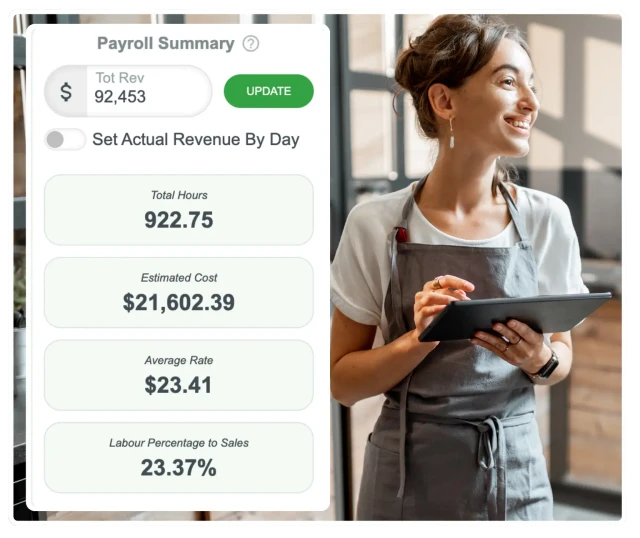
Knowing what a roster will cost before you publish it is essential for budget management. Paid rostering software shows you the projected labour cost as you build the schedule, including all applicable penalty rates and loadings. Free tools typically show you shifts and hours, but not dollars.
Without cost forecasting, you might create a perfectly logical roster that unexpectedly blows your labour budget because you didn’t account for Sunday rates or overtime thresholds. Discovering this after the fact—when timesheets are already submitted—is too late to make changes.
Compliance risks with free rostering tools
Australian workplace law requires employers to keep detailed records of hours worked, pay rates applied, and leave taken. The Fair Work Ombudsman can request these records during investigations, and inadequate record-keeping is itself a breach—separate from any underlying pay issues.
Record-keeping failures
Free tools often lack audit trails showing when rosters were created, modified, or published. Without this history, you may be unable to demonstrate compliance during a Fair Work investigation, even if you actually paid correctly.
Penalty rate errors
Manual calculation of penalty rates across different days, times, and employee classifications inevitably leads to errors. Even small, consistent mistakes compound into significant underpayment claims over time.
Leave accrual tracking
Without integrated leave management, tracking accrued leave, leave taken, and remaining balances becomes a manual spreadsheet exercise. Errors here can lead to both underpayment of leave entitlements and unexpected leave liability.
Overtime threshold breaches
Most Awards specify overtime thresholds that trigger higher pay rates. Without automatic tracking, it’s easy to accidentally schedule staff beyond these thresholds without budgeting for the increased cost.
The consequences of compliance failures extend beyond back-payment. Fair Work penalties for record-keeping breaches can reach $16,500 per contravention for individuals and $82,500 for companies. Serious or repeated breaches can result in court-ordered compliance measures and public naming. For small businesses, a single investigation can be financially devastating—and the reputational damage persists long after fines are paid.
The payroll integration gap
Most Australian small businesses use Xero or MYOB for accounting and payroll. These systems need accurate timesheet data to process wages correctly. The question is how that data gets there.
With free rostering software, the typical workflow looks like this: create roster in the rostering app, staff work their shifts, manually collect actual hours worked (paper timesheets or separate time tracking), manually calculate any penalty rates or allowances, manually enter all this data into Xero or MYOB, review and process payroll.
With integrated paid software, the workflow is: create roster, staff clock in and out via the app, system automatically calculates pay including penalties, approved timesheets sync directly to payroll, review and process payroll.
The difference isn’t just convenience—it’s accuracy. Every manual step in the first workflow is an opportunity for error. Transposed digits, missed shifts, incorrect classifications, forgotten allowances—these mistakes happen, and they happen more frequently when someone is rushing through payroll at month-end.
Manual vs integrated payroll workflow. Scroll horizontally on mobile to see both columns.
| Step | Manual (free software) | Integrated (paid software) |
|---|---|---|
| 1 | Export roster data (CSV/PDF) | Staff clock in/out via app |
| 2 | Collect actual hours separately | System calculates pay automatically |
| 3 | Reconcile planned vs actual | Manager approves timesheets |
| 4 | Calculate penalty rates manually | One-click sync to Xero/MYOB |
| 5 | Enter into payroll system | Done |
| 6 | Double-check for errors | — |
Free vs paid rostering software: feature comparison
Before running the numbers, it helps to see the practical feature gaps side by side. This is where free tools and paid Australian rostering software diverge most for a growing team:
Free vs paid rostering software feature comparison. Scroll horizontally on mobile to see all columns.
| Capability | Free tools | Paid software |
|---|---|---|
| Shift scheduling | Yes | Yes |
| Staff mobile access | Sometimes | Yes |
| Australian award interpretation | No | Yes |
| Time and attendance / clock-in | Rarely | Yes |
| Xero / MYOB payroll integration | Rarely | Yes |
| Labour cost forecasting | No | Yes |
| Fair Work-ready audit trail | No | Yes |
| Multi-location support | Limited | Yes |
| Dedicated support | Minimal | Yes |
Feature availability varies by product; free tiers of paid tools may unlock some paid features at higher plans.
Calculating the true cost of free software
Free software has a price—you pay in time instead of money. The question is whether the time cost exceeds what paid software would cost. For most businesses beyond a handful of employees, the answer is yes.
Time costs to consider
Consider the weekly time spent on rostering-related tasks that paid software would automate or eliminate:
- Manual timesheet collection and entry: Collecting paper timesheets or separate time records, then entering data into payroll. Estimate 5-15 minutes per employee per week.
- Penalty rate calculations: Working out weekend rates, evening loadings, overtime, and public holiday pay manually. Can easily consume 30+ minutes per pay run.
- Roster-to-actual reconciliation: Comparing scheduled shifts with what actually happened, identifying no-shows, late arrivals, and unexpected overtime. Another 15-30 minutes weekly.
- Payroll data entry: Manually entering approved hours into Xero or MYOB instead of syncing automatically. 15-45 minutes depending on team size.
- Error correction: Fixing mistakes discovered after payroll runs, issuing corrections, adjusting future pay. Sporadic but significant when it happens.
For a 15-person team, these tasks might consume 2-4 hours weekly. At a manager’s effective hourly rate of $40-60, that’s an estimated $4,000-12,000 annually in labour just to work around the limitations of free software.
Paid software costs
Australian rostering software typically costs $2-10 per active employee per month, depending on features. For a 15-person team:
- Basic plans ($2-4/employee): $360-720 annually. Includes scheduling, basic notifications, simple time tracking.
- Mid-tier plans ($4-6/employee): $720-1,080 annually. Adds award interpretation, payroll integration, advanced time tracking.
- Comprehensive plans ($6-10/employee): $1,080-1,800 annually. Full feature set including HR tools, compliance reporting, multi-location support.
Even comprehensive paid software at $1,800 annually costs less than the time wasted on manual workarounds. And that calculation doesn’t include the cost of errors—underpayment corrections, compliance penalties, or the staff dissatisfaction that comes from payroll mistakes. For a deeper breakdown, see our true-cost analysis of manual rostering vs software.
Estimated cost comparison for a 15-employee team. Figures are illustrative estimates.
| Cost type | Free software | Paid software |
|---|---|---|
| Software subscription | $0 | $1,080/year |
| Manager time (manual tasks) | $6,000+/year | Included |
| Error correction costs | $500-2,000/year | Minimal |
| Compliance risk | Elevated | Reduced |
| Estimated total cost | $6,500-8,000+ | $1,080 |
Signs it's time to upgrade from free software
Not every business needs to upgrade immediately. If you have 3-4 employees working predictable hours under a simple award, free tools might genuinely suffice. But certain warning signs indicate you’ve outgrown free software:
Team size exceeds 10
Manual processes that work for 5 staff become unmanageable at 10+. The time required scales faster than headcount.
Payroll takes hours
If you’re spending 2+ hours on payroll processing each pay period, automation would return that time immediately.
Complex award coverage
Multiple classifications, varied penalty rates, or staff across different awards make manual calculation impractical.
Payroll errors occurring
Regular corrections or staff complaints about pay indicate your current system isn’t reliable enough.
Multiple locations
Managing staff across more than one site requires centralised visibility that free tools rarely provide.
Business is growing
Anticipating growth? It’s easier to implement proper systems before you’re overwhelmed than during rapid expansion.
The transition from free to paid software is often smoother than business owners expect. Most paid platforms offer onboarding support, data import tools, and training resources. Staff typically adapt quickly when the new system means more reliable pay and easier schedule access through a mobile app.
How RosterElf addresses these challenges
RosterElf was built specifically for Australian small businesses dealing with exactly these issues. The platform combines scheduling, time tracking, HR management, and payroll integration into one system:
- Australian award interpretation: Built-in understanding of Modern Awards calculates the correct pay rate for every shift automatically, including penalties, loadings, and overtime thresholds.
- Mobile clock-in/clock-out: Staff use the app to record actual hours worked, with GPS verification options. No paper timesheets or separate time tracking systems needed.
- Direct Xero and MYOB integration: Approved timesheets sync directly to your payroll system with correct pay codes and amounts. No manual data entry, no transposition errors.
- Labour cost forecasting: See the projected cost of your roster as you build it, with full penalty rate calculations, helping you stay within budget before you publish.
- Compliance-ready record keeping: Complete audit trail of rosters, timesheets, and pay calculations ready for any Fair Work inquiry.
- Local Australian support: Sydney-based team that understands Australian workplace law and can help resolve issues quickly.
Related RosterElf features
Employee Rostering
Award Interpretation
Payroll Integration
Time and Attendance
HR Hub
Communication
Rostering software built for Australian businesses. RosterElf combines rostering, time tracking, award interpretation, and payroll integration in one platform designed for Australian workplace law — with automatic Modern Award interpretation, direct Xero and MYOB integration, and mobile clock-in with GPS verification.
Frequently asked questions
Is free rostering software good enough for a small Australian business?
Free rostering software can work for very small teams (under 5 employees) with simple scheduling needs. However, most Australian businesses quickly outgrow free tools due to lack of award interpretation, payroll integration, and compliance features. The time spent on manual workarounds often costs more than paid software.
What are the main limitations of free rostering software?
Free rostering tools typically lack automatic award interpretation, payroll system integration, advanced time tracking, compliance reporting, multi-location support, and dedicated customer support. These limitations create manual work and compliance risks that increase as your team grows.
How much does paid rostering software cost in Australia?
Paid rostering software in Australia typically costs $2-5 per employee per month for basic plans, or $5-10 per employee for comprehensive solutions with payroll integration and award interpretation. For a 20-person team, this translates to $40-200 monthly—often recovered through reduced overtime and compliance costs. For detailed pricing across different platforms, see our comparison of Australian rostering software.
Can free rostering software handle Australian award rates?
Most free rostering tools don’t include automatic Australian award interpretation. This means you must manually calculate penalty rates, allowances, and overtime—a time-consuming process prone to errors that can lead to underpayment claims and Fair Work penalties. Software with built-in award interpretation applies the correct rate to every shift automatically.
Does free rostering software integrate with Xero or MYOB?
Free rostering software rarely offers direct integration with Australian payroll systems like Xero or MYOB. This means manually exporting data and re-entering it into your payroll system—doubling the work and increasing the risk of data entry errors. Paid tools with payroll integration sync approved timesheets straight through.
When should I upgrade from free to paid rostering software?
Consider upgrading when you have more than 5-10 employees, spend excessive time on manual data entry, need award interpretation, require payroll integration, manage multiple locations, or have experienced compliance issues. The time savings alone typically justify the investment.
What compliance risks come with using free rostering software?
Free rostering tools often lack proper record-keeping for Fair Work requirements, automatic award calculation, and audit trails. This can lead to underpayment claims, penalty rate errors, and incomplete records during Fair Work investigations—all of which carry significant financial and legal consequences under the applicable Modern Awards.
Is Excel a good alternative to rostering software?
Excel can work for very basic scheduling but lacks real-time updates, mobile access, automatic notifications, time tracking integration, and award calculations. As teams grow, Excel rosters become error-prone and time-consuming. Most businesses find dedicated rostering software pays for itself quickly through time savings.
What's the difference between free scheduling tools and paid rostering software?
Free scheduling tools help you create and share a shift schedule — a digital replacement for a paper roster. Paid rostering software does that and manages the process that follows: automatic award interpretation, time and attendance, labour cost forecasting, payroll integration, and Fair Work-ready records. Free is right for tiny, simple teams; paid is for businesses that need accuracy, automation, and compliance as they grow.