

Enable HR Hub in your account
This article explains how to enable HR Hub in your account so you and your team can manage employee information, documents, and HR processes efficiently. By activating HR Hub, you’ll unlock key features that centralize employee management, streamline document handling, and provide secure access for staff, managers, and admins.
Once enabled, HR Hub allows your team to view and manage personal information, employment contracts, policies, certifications, and more — all within a single platform. Account owners can also decide which modules to activate or deactivate, tailoring HR Hub to match business requirements.
1. Enabling HR Hub
This section explains how to activate HR Hub from your account settings. Only account owners have permission to enable this feature. Once turned on, you can configure modules, such as personal information or policies, to suit your company’s needs.
1.1 Accessing HR Hub settings
1.1.1 Go to Settings in the top right corner of the main menu.
1.1.2 Click HR Hub in the dropdown menu.
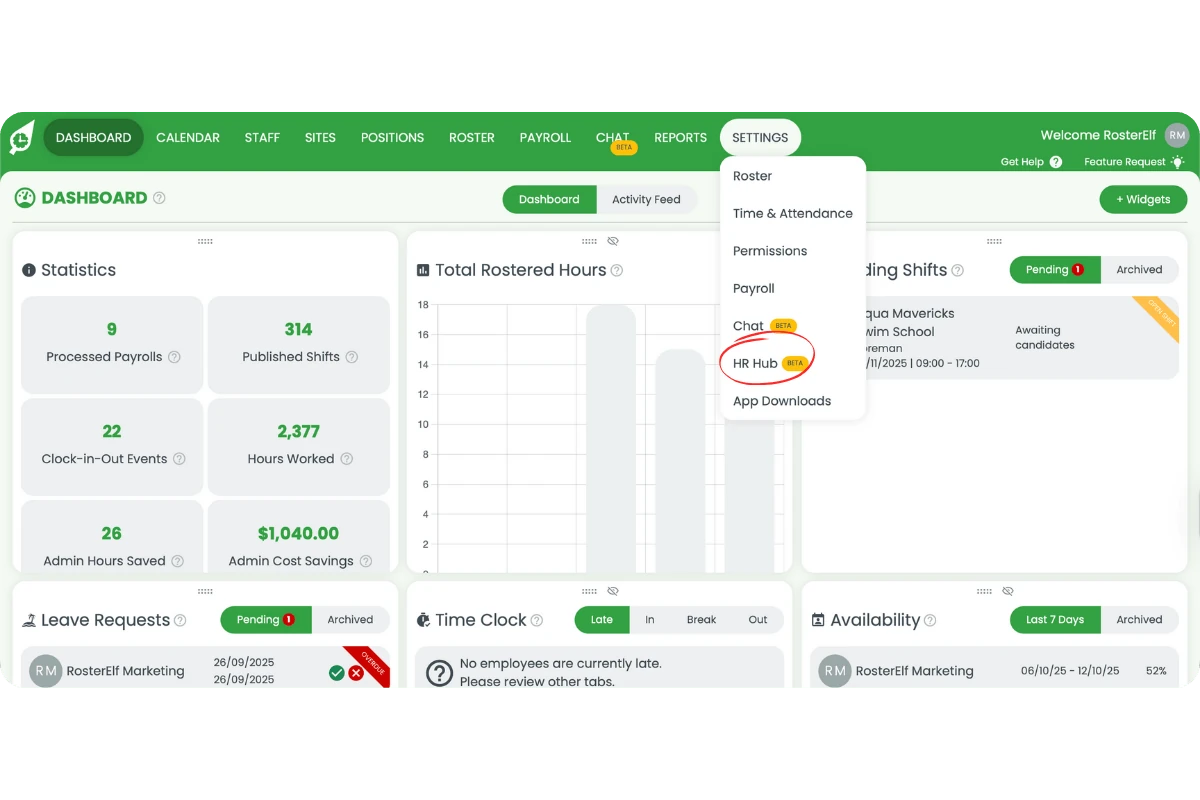
1.1.3 A modal window will open.
1.2 Enabling HR Hub
1.2.1 Click Toggle to allow employees to access My HR Hub, where they can manage personal information and documents.
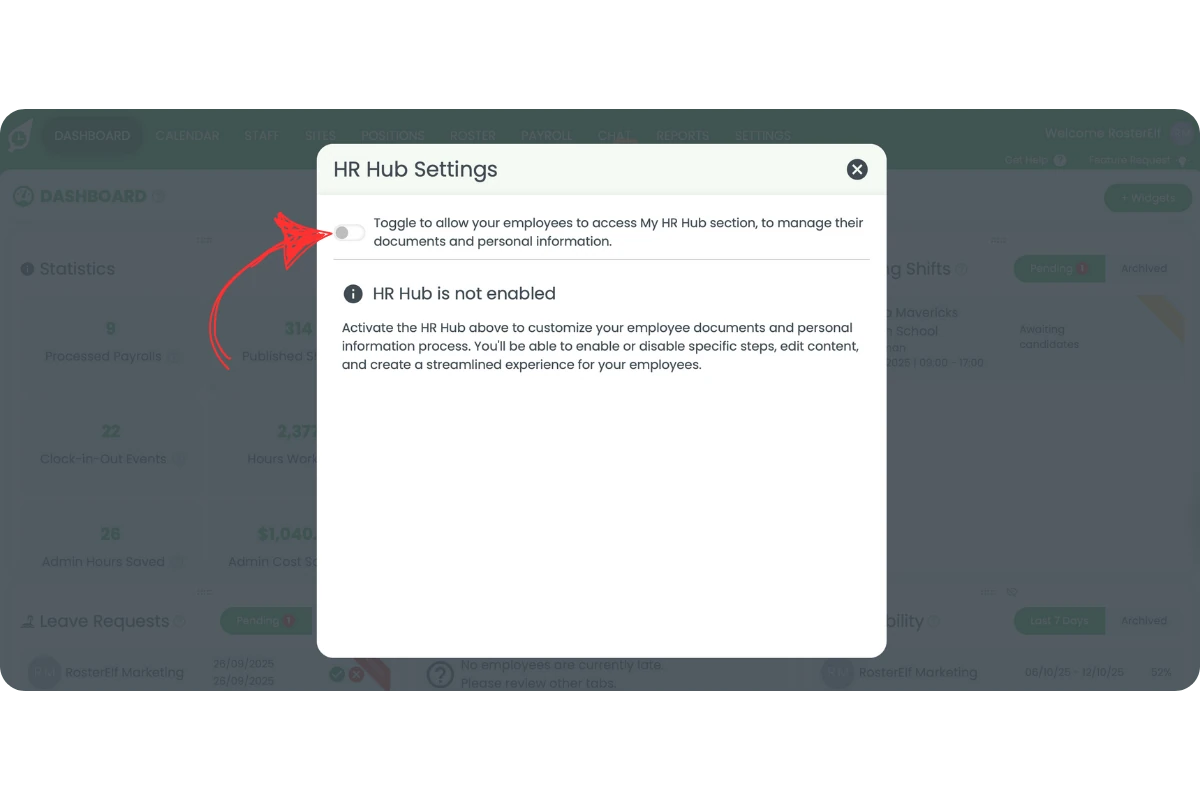
1.2.2 The toggle color shows the status: Green = enabled, White = disabled.
1.2.3 By default, HR Hub is disabled. To make it active, the Account Owner must enable it.
1.2.4 Admins and managers cannot turn HR Hub on — only the Account Owner has permission.
1.3 Customizing HR Hub modules
1.3.1 Once HR Hub is on, a list of modules appears in the modal.
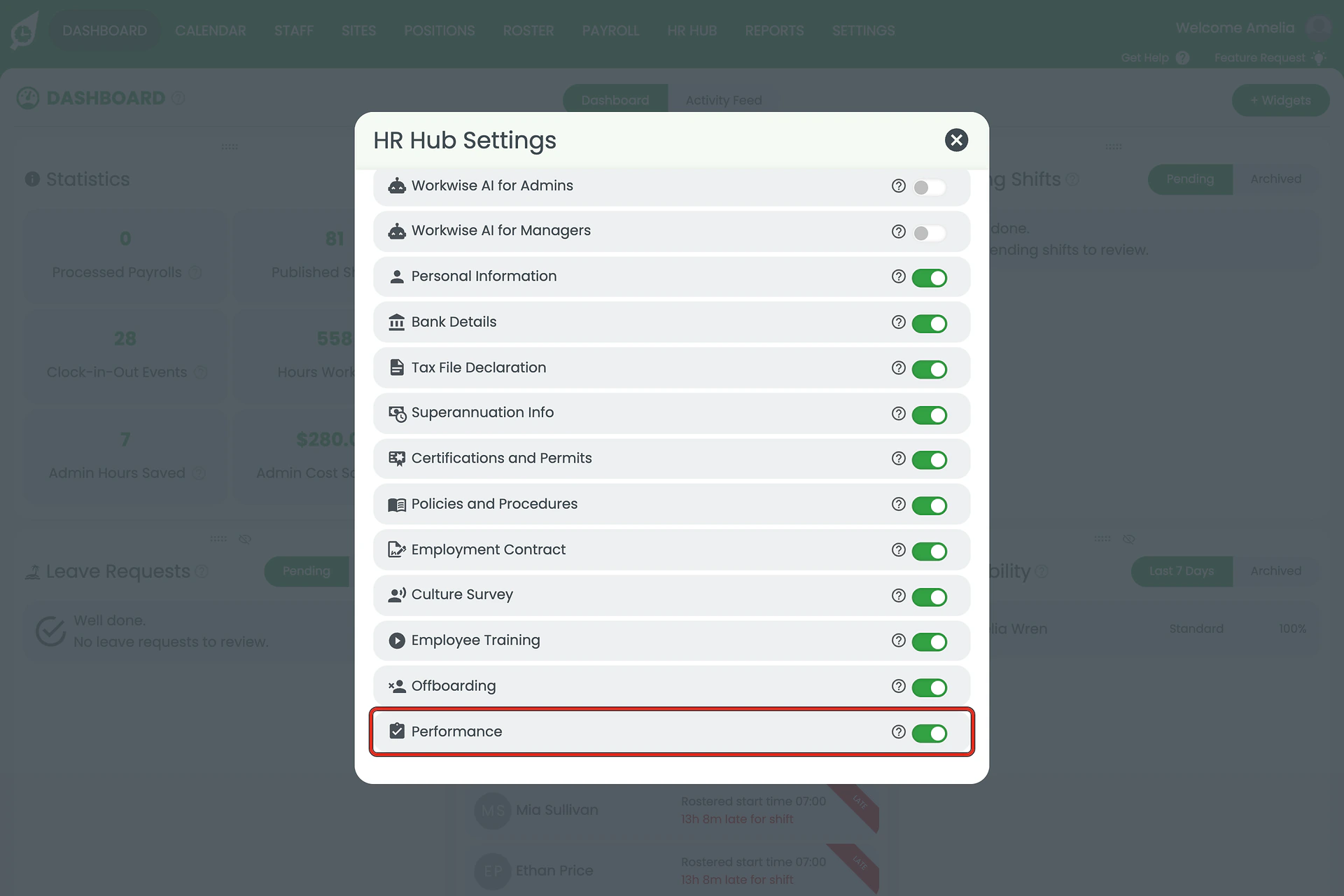
1.3.2 Turn each module ON or OFF according to your needs.
1.3.3 The available modules include:
- Workwise AI for Admins
- Workwise AI for Managers
- Personal Information
- Bank Details
- Tax File Declaration
- Superannuation Info
- Certifications and Permits
- Policies and Procedures
- Employment Contract
- Culture Survey
- Employee Training
- Offboarding
- Performance
1.3.4 By default, Workwise AI for Admins and Managers are turned OFF. Turn them ON manually to grant access.
1.3.5 Once modules are enabled, admins and managers can use HR Hub tools.
2. Understanding HR Hub module permissions
Each HR Hub module provides access to specific employee management areas. However, access varies by role. This section explains which users can view and manage different modules to ensure proper access control.
2.1 Module access by role
2.1.1 The following modules are available to Admins only:
- Personal Information
- Bank Details
- Tax File Declaration
- Superannuation Info
- Certifications and Permits
- Policies and Procedures
- Employment Contract
2.1.2 Staff can only access and update their Personal Information.
3. What's included in HR Hub
HR Hub offers a wide range of features to support your organization’s HR functions. Once enabled, it centralizes employee data, streamlines document management, and introduces automation through Workwise AI.
3.1 Available and upcoming HR Hub modules
3.1.1 When HR Hub is enabled, you’ll have access to:
- My HR Hub
- Workwise AI
- Hiring (coming soon)
- Employment Contracts
- Policies and Procedures
- Certificates & Permits
- Training
- Performance
- Culture
- Offboarding
HR Hub does not include leave management
Leave requests, approvals, and leave balances are managed in the main RosterElf app — not in HR Hub. Go to Dashboard → Leave on the web app, or Home → Leave in the mobile app to manage leave for your team.
Note
During onboarding, all modules toggled ON in HR Hub will be available for staff to add and complete their personal and employment information. The HR Hub currently supports Australian employment details only.
Frequently asked questions
1. How do I enable HR Hub?
Only the account owner can enable HR Hub from the settings menu by toggling it on in the HR Hub modal.
2. Who can access HR Hub modules?
Admins can access all modules, while staff can only view and update their personal information.
3. Are Workwise AI modules active by default?
No, Workwise AI for Admins and Managers are off by default and must be turned on manually.
4. What features are included in HR Hub?
HR Hub includes modules for personal information, contracts, policies, certifications, training, culture surveys and offboarding — with additional features like hiring coming soon.
5. Can managers enable HR Hub?
No, only the account owner can enable HR Hub. Managers and admins can use it once it is activated.
6. Does HR Hub include leave management?
No. HR Hub covers staff documents, contracts, policies, certifications, and HR compliance tools (Workwise AI). Leave requests and leave balances are managed in the main RosterElf app — go to Dashboard → Leave on the web app, or Home → Leave in the mobile app.
7. Why can't I see HR Hub on a staff member's card?
There are two reasons this can happen. HR Hub is not included in your current plan: HR Hub is a paid add-on. If it is not part of your subscription, the HR Hub tab will not appear on staff cards. Contact us at customersupport@rosterelf.com to add HR Hub to your plan. HR Hub has not been enabled yet: Even if your plan includes HR Hub, the account owner must turn it on first. Go to your account overview → Settings → HR Hub and toggle it on.