

This article explains the three main rostering views in RosterElf: Daily, Weekly, and Monthly. Each view has a unique layout and functionality to help businesses manage their rosters efficiently. The Daily View provides a detailed perspective for managing daily shift coverage, while the Weekly and Monthly Views offer broader overviews. With these views, businesses can maintain proper shift coverage, control labour costs, and ensure staff meet required hours. This guide will help you understand when and how to use each view to streamline your scheduling.
If you want to display the roster from a custom start date — for example, Monday to Sunday even when your payroll runs from Tuesday — see customise roster week start without changing payroll.
1. Daily view
The Daily View offers a detailed, visual display of each day’s roster. This view uses a Gantt chart style, allowing you to adjust shift start and end times visually. It’s ideal for businesses with varied shifts throughout the day, enabling clear insight into coverage gaps and budget alignment for each shift.
1.1 Adjusting shifts in the daily view
Use the following steps to adjust shifts in the Daily View.
1.1.1 Click ROSTER in the top menu, then click Daily at the top centre of the Roster page.
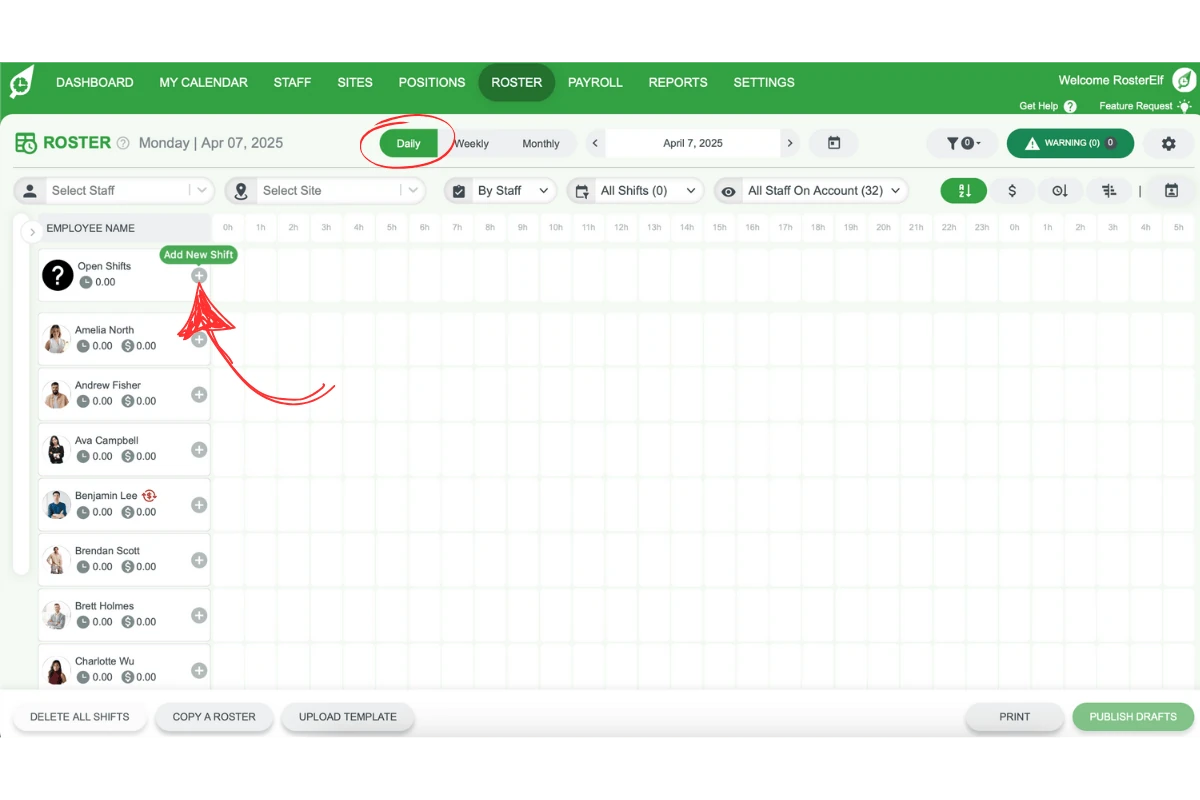
1.1.2 Locate the shift you want to adjust on the Gantt chart.
1.1.3 Drag the handle at either end of the shift to adjust its start and end times as needed. Hovering a shift also shows Delete, Copy and Edit icons.
1.1.4 Confirm the changes to save the updated shift times.
1.2 Benefits of using the daily view
The Daily View offers benefits for closely managing daily shift details.
1.2.1 Allows you to see individual shifts visually.
1.2.2 Identifies coverage gaps at a glance.
1.2.3 Provides flexibility to adjust shifts for budget and staffing needs.
2. Weekly and monthly views
The Weekly and Monthly Views offer a broader perspective of the roster, allowing businesses to review overall shift coverage, manage staff hours, and prevent fatigue. These views are beneficial for seeing shift patterns over time and managing labour costs at a higher level.
2.1 Viewing weekly or monthly rosters
Switch to Weekly or Monthly Views to see the complete picture of the roster.
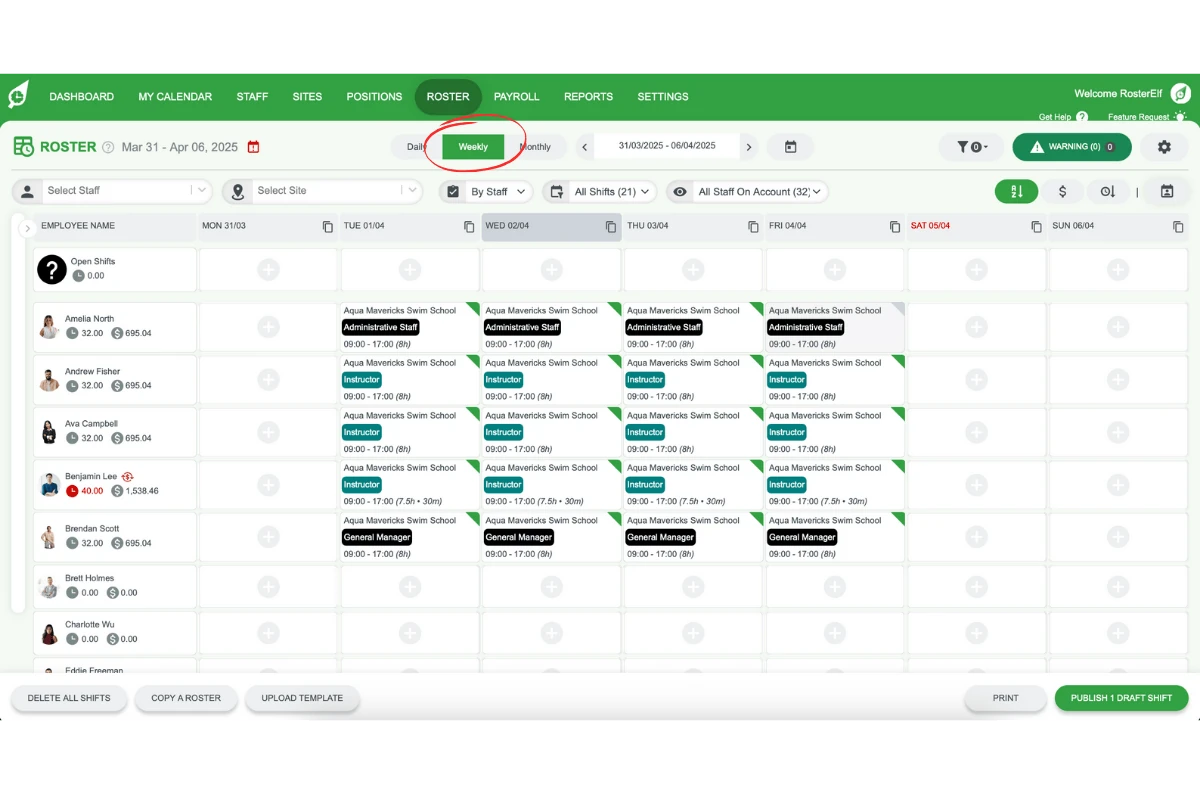
2.1.1 Click ROSTER in the top menu, then click Weekly or Monthly at the top centre of the page. The Monthly View opens scrolled to the current week; scroll sideways to see the rest of the month.
2.1.2 Review the schedule to check for consistent staff coverage.
2.1.3 Make adjustments as necessary to align with your labour budget and staff hours.
2.2 Benefits of using weekly and monthly views
Weekly and Monthly Views provide a macro perspective on staffing.
2.2.1 Shows overall coverage for extended periods.
2.2.2 Helps manage employee hours across weeks or months.
2.2.3 Ensures a balance between budget control and adequate staffing.
Frequently asked questions
1. What is the Daily View in RosterElf?
The Daily View in RosterElf is a detailed, Gantt chart-style view that displays each day’s shifts, allowing you to adjust start and end times visually. This view is ideal for businesses with varied shift times, enabling quick insights into shift coverage and budget alignment.
2. How do I adjust shift times in the Daily View?
To adjust shift times in the Daily View, click Daily at the top centre of the Roster page. Locate the shift on the Gantt chart and drag the handle at either end of the shift to adjust its start and finish times. Confirm the changes to save the updated shift times.
3. What are the benefits of using the Weekly View in RosterElf?
The Weekly View provides a broader overview of shift coverage, helping businesses manage staff hours, prevent fatigue, and monitor labour costs. This view is ideal for ensuring consistent coverage over a week and keeping track of employee hours.
4. How can the Monthly View help in managing labour costs?
The Monthly View allows businesses to review shift patterns over longer periods, supporting better labour cost management and staff scheduling. It helps identify patterns in staffing needs, making it easier to control budgets across the month.
5. When should I use the Daily, Weekly, or Monthly View?
Use the Daily View for detailed, day-to-day shift management. The Weekly View is best for a broader perspective on weekly staff coverage and hours, while the Monthly View provides insights into long-term patterns, assisting with overall cost and staff management.