

Switch between RosterElf accounts
This article explains how to switch between multiple RosterElf accounts using the same login credentials. If you have access to more than one RosterElf account, this guide will help you seamlessly transition between them. It also covers what to do if you have different credentials for each account and wish to merge them for simpler access.
1. Switching accounts with the same credentials
If your RosterElf accounts are linked to the same login credentials, switching between them is straightforward. This section will guide you through the steps to change between accounts quickly.
1.1 How to switch accounts
Web app: use the logo, not the profile
The account switcher is the RosterElf logo in the top-left corner. The profile avatar in the top-right corner opens your personal settings — it does not switch accounts.
1.1.1 Click on the RosterElf logo at the top left of the screen (not the profile avatar in the top right).
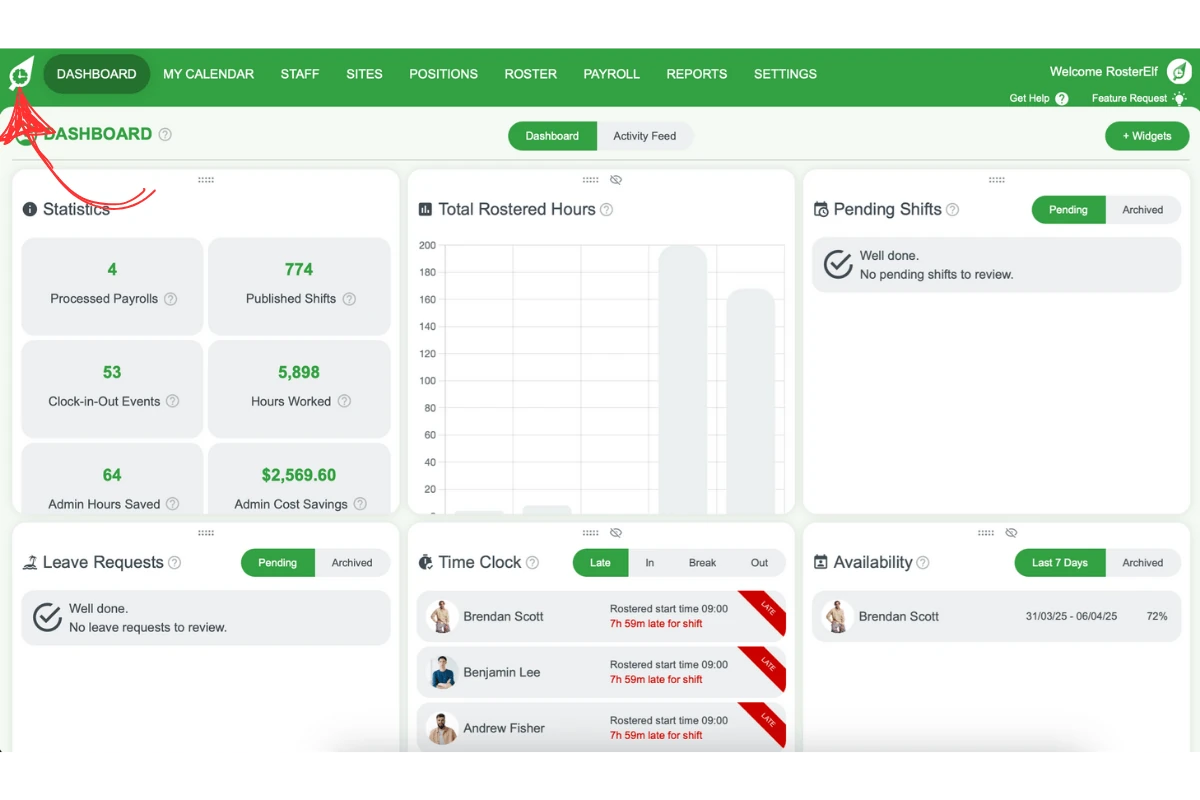
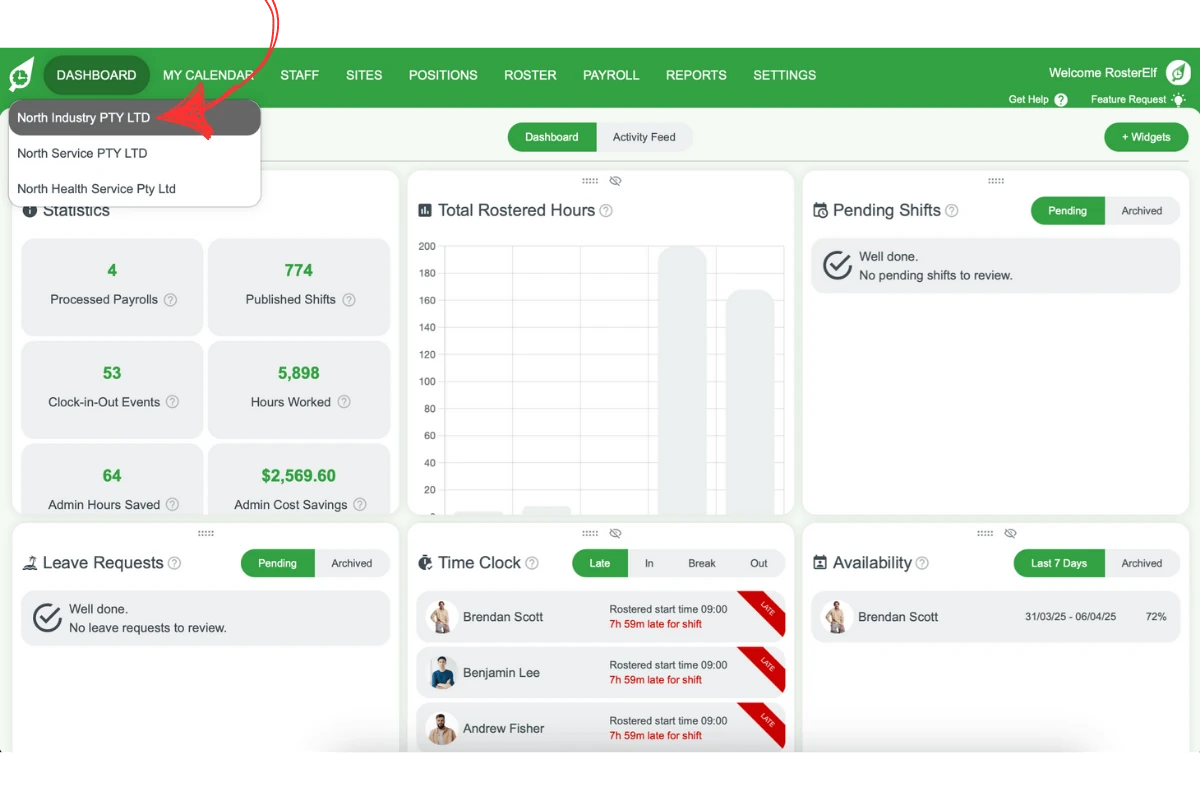
1.1.2 A dropdown menu will appear with your linked accounts. The list only appears when your login is linked to more than one account — on a single-account login the logo isn’t clickable. If you expected to see another account, see section 2 below.
1.1.3 Select the account you want to switch to from the list.
2. Merging accounts with different credentials
If your RosterElf accounts use different credentials, you may wish to merge them for simpler access. This section explains how to get assistance from RosterElf support to merge your accounts.
2.1 How to merge user credentials
2.1.1 Contact the RosterElf support team through their help desk or email.
2.1.2 Provide details of the accounts you want to merge.
2.1.3 The support team will process the merge and inform you once it’s completed.
Ways to contact us
- Ask Elf AI: Click Questions? Let’s Chat! at the bottom right of any RosterElf page, or tap More → Support & Questions in the mobile app. Elf AI answers 24/7 and hands you to our support team when it can’t solve something.
- Book a support call: Schedule a free 30-minute support call with our RosterElf Customer Success Team.
- Email: Reach out to us at customersupport@rosterelf.com.
Frequently asked questions
1. How can I switch between RosterElf accounts with the same login?
If your RosterElf accounts share the same login credentials, click on the RosterElf logo at the top left of your screen. A dropdown menu with your linked accounts will appear. Select the account you want to switch to from the list. The dropdown only exists when your login is linked to more than one account — with a single account, the logo isn’t clickable.
2. What should I do if my RosterElf accounts have different login details?
If you have multiple RosterElf accounts with different login credentials, you can request a merge. Contact RosterElf support through their help desk or email, and provide the details of the accounts you want to merge.
3. Can I merge multiple RosterElf accounts into one?
Yes, you can merge accounts with different login credentials. Reach out to RosterElf support, provide details of each account, and they will assist with the process. The support team will notify you once the merge is complete.
4. How long does it take for RosterElf support to merge accounts?
The time taken for merging accounts depends on the complexity of the request. Typically, RosterElf support will inform you about the expected timeline after you submit your request.
5. Is it possible to switch accounts directly from the RosterElf mobile app?
Yes, if your accounts are linked with the same login credentials, you can switch between them from the RosterElf mobile app. Tap on the company name at the top of the screen to access the dropdown menu and select your desired account.
6. Where do I find the account switcher on the web app?
On the web app, the account switcher is in the top-left corner — click the RosterElf logo to open a dropdown showing all accounts linked to your login. It is not accessed via the profile avatar in the top-right corner, which opens your personal settings instead. If clicking the logo does nothing, your login is linked to only one account.