What is HR Hub training?
Keeping staff training organised usually means spreadsheets, separate learning platforms, and chasing people to finish inductions. HR Hub training brings it all into RosterElf — build training courses, assign them to the right people, and track completion in the same platform your team already uses for rostering and time and attendance.
This article explains HR Hub training in RosterElf. You will learn how training works, what courses and modules are, when to use the feature, and how to get set up. We also cover how staff complete their training and how to track completion across your business.
Training is available as part of the HR Hub module. Admins create courses, assign them to staff, and monitor progress through statistics and reports. Staff complete their training via the web app or smartphone app — no separate learning system needed.
Build your own courses
Create courses made up of modules with content and multiple-choice questions, and set a pass rate and estimated completion time.
Assign to the right staff
Assign a course to everyone or search and select specific employees. Staff complete it on the web app or smartphone app.
Track completion
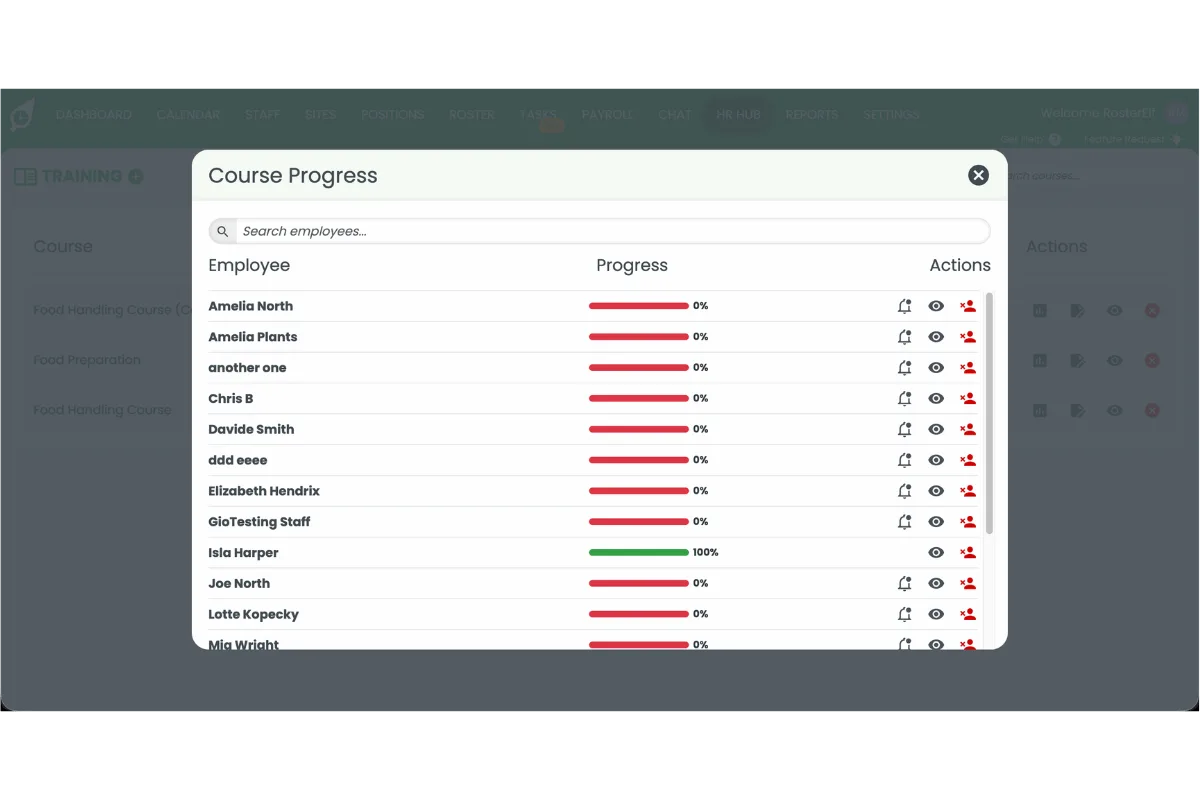
See progress at a glance with course statistics, send reminders, and run the Training Summary report for compliance records.
How HR Hub training works
HR Hub training follows a simple three-stage flow: build a course, assign it to staff, and track completion. Every stage happens inside HR Hub — there is no separate learning platform to manage or pay for.
Real scenario
A café group needs every new hire to complete a food-safety induction before their first shift. The HR manager builds a "Food safety basics" course with three modules and a short quiz, sets an 80% pass rate, and assigns it to all new starters. Staff complete it on their phones during onboarding, and the manager checks the course statistics to confirm everyone has passed — then runs the Training Summary report at audit time to prove it.
Stage 1 — build a course
Open HR Hub → Training and press the plus icon to create a course. Give it a title, set the pass rate and estimated completion time, and add a description. Then add modules — each with its own content and multiple-choice questions that test whether staff have understood the material.
Stage 2 — assign it to staff
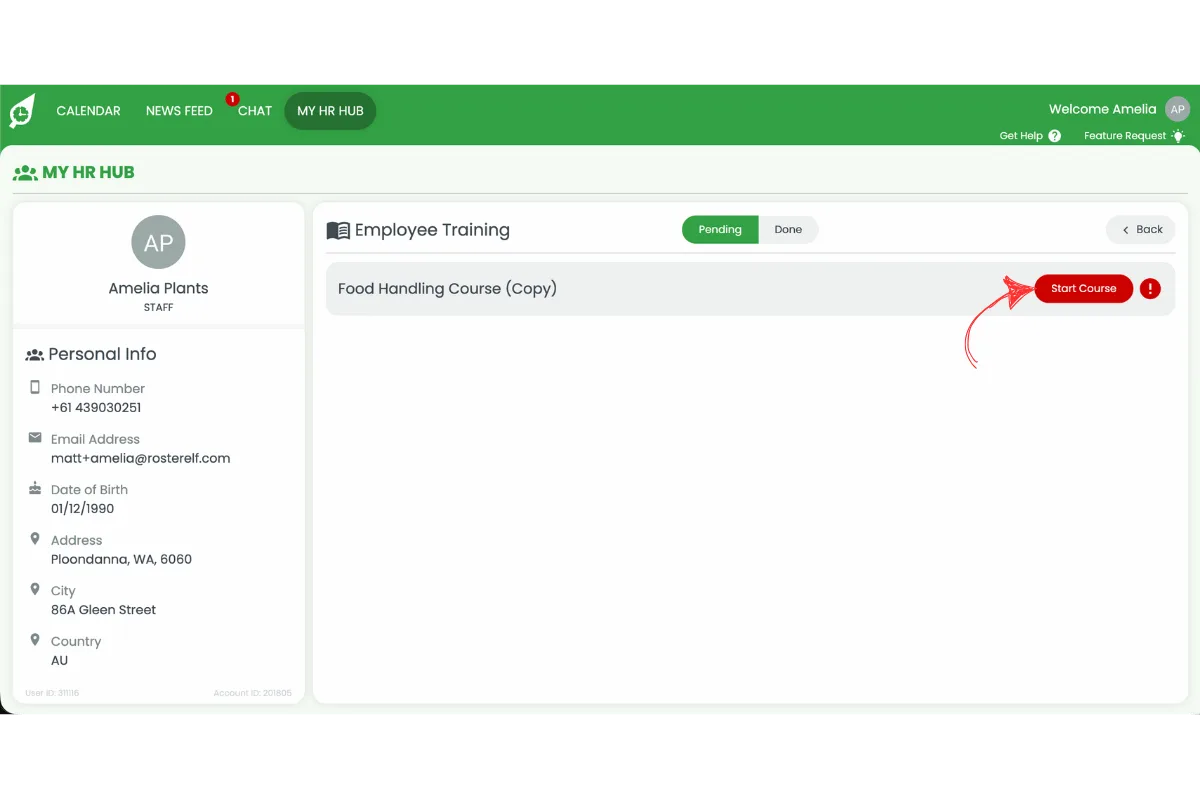
When the course is ready, assign it to all employees or search for and select specific staff. Assigned employees are notified and can complete the course from the web app or the RosterElf smartphone app, working through each module and answering the questions to finish.
Stage 3 — track completion
Open a course and press Stats to see who has completed their training, search for individual employees, and send reminders to anyone outstanding. For a workforce-wide record, run the HR Hub Training Summary report under Reports → HR Hub — ideal for audits and compliance recordkeeping.
Courses and modules explained
A course is a single piece of training — for example, "Food safety basics" or "Workplace health and safety induction". Each course has a title, a pass rate, an estimated completion time, and a description so staff know what to expect.
Inside a course, modules hold the actual learning content and the multiple-choice questions that assess understanding. Breaking a course into modules keeps training focused and lets you cover several topics within one course. Staff must meet the pass rate to complete the course.
Preview and duplicate
Preview a course before assigning it, and duplicate an existing course to quickly build similar training without starting from scratch.
Edit and archive
Update course content, pass rates, or descriptions at any time, and archive courses that are no longer required to keep your Training area tidy.
Best use cases
HR Hub training is most valuable when learning needs to be consistent, trackable, and tied to the people who actually do the work. Three common situations:
Onboarding and inductions
Give every new hire the same induction — company policies, systems, and role basics — as part of onboarding. Because training sits alongside rostering, you can make sure staff complete their induction before their first shift rather than learning on the floor.
Compliance and mandatory training
For industries with mandatory requirements — food safety, workplace health and safety, responsible service — training with a pass rate and a completion record makes compliance provable. The Training Summary report gives you the evidence auditors ask for.
Upskilling your team
Roll out product knowledge, service standards, or new-process training to selected staff and track who has completed it. Consistent training across every site helps standardise how your team works — especially valuable for multi-location and franchise businesses.
How to set up HR Hub training
Training is available inside HR Hub. You need HR Hub enabled on your account first — see how to manage and enable HR Hub access if you have not set this up yet.
1. Activate training
Go to Settings → HR Hub, toggle Training on, and press Save. The Training area then appears inside HR Hub.
2. Create a course
Open HR Hub → Training, press the plus icon, and set a title, pass rate, estimated completion time, and description.
3. Add modules
Build out the course with modules that contain your content and multiple-choice questions to assess understanding.
4. Assign the course
Assign the course to all employees, or search for and select the specific staff who need it. They are notified and can complete it on the web app or smartphone app.
5. Track and report
Open the course and press Stats to monitor completion and send reminders, or run the Training Summary report under Reports → HR Hub for a full record across your workforce.