
What is shift confirmation?
No-shows cost Australian businesses thousands in lost productivity, last-minute scrambling, and customer service failures. Shift confirmation solves this by requiring staff to confirm they can work scheduled shifts before they start. When staff don't confirm, managers get early warning and time to find cover.
This update introduces two connected features: shift confirmations for managers and mobile shift acceptance for staff. Managers enable confirmations in rostering software settings and choose which shifts require confirmation. Staff receive notifications on their mobile app and respond with a tap—accept or reject.
This article explains how shift confirmation works, why it matters for Australian businesses, and how to use both features to reduce no-shows and improve attendance. We also cover compliance considerations under Australian workplace law, particularly for casual employees and shift refusal rights.
Why shift confirmations matter for Australian businesses
No-shows create immediate operational problems: understaffed shifts, disappointed customers, overworked remaining staff, and urgent calls to find cover. For businesses in hospitality, retail, and healthcare, a single no-show can disrupt service for hours.
Shift confirmations give managers advance notice when staff can't work. Instead of discovering a no-show when the shift starts, managers know days ahead. This time buffer allows you to contact other staff, adjust the roster, or prepare for reduced coverage. The result: fewer disruptions, better customer service, and less stress for everyone.
Real scenario: Melbourne cafe
A Melbourne cafe roster includes three casual staff for Saturday morning. Two staff confirm their shifts Thursday night. One doesn't respond by the Friday confirmation deadline. The manager calls the unresponsive staff member, discovers they're unavailable, and arranges cover Friday afternoon—avoiding a Saturday morning scramble and maintaining service standards.
Three key benefits
Early warning system
Unconfirmed shifts alert managers days before the shift starts, not minutes before.
Improved accountability
Staff take ownership of their scheduled shifts. Confirming creates a clear commitment, reducing casual forgetfulness or ambiguity.
Better communication
The confirmation process opens dialogue. Staff who can't work a shift reject it immediately, allowing managers to plan rather than react.
How shift confirmation works
Shift confirmation has two sides: manager setup and staff response. Managers control which shifts require confirmation and set response deadlines. Staff receive notifications and respond via the mobile app.
Manager side: enable shift confirmations
Managers enable shift confirmations from roster settings. You choose between two modes:
All shifts require confirmation
Every published shift prompts staff to confirm. Use this for casual workforces, high-turnover environments, or businesses where no-shows are costly.
Per-shift confirmations
Apply confirmations only to specific shifts. For example, require confirmation for weekend shifts, last-minute additions, or casual staff only. This flexibility helps manage different employment types and shift risk levels.
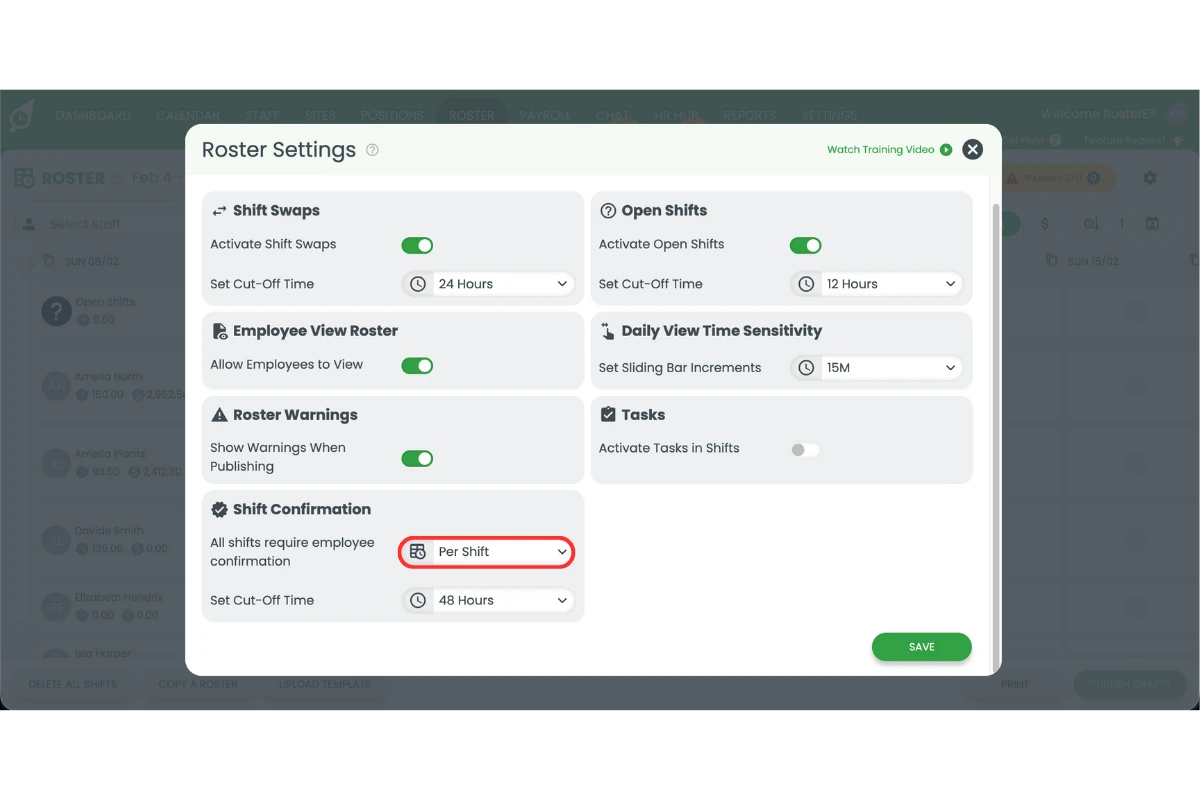
You also set a confirmation cut-off time—the deadline for staff to respond. Common settings include 24 hours, 48 hours, or a specific time before the shift starts. Staff who don't respond by the deadline appear as "unconfirmed" in your roster, triggering follow-up action.
Staff side: accept or reject shifts
Staff receive push notifications when shifts require confirmation. Opening the RosterElf mobile app shows pending shifts under a dedicated "Pending" tab. Staff tap into a shift to see details—date, time, location, position—then choose:
✓ Accept shift
Confirms they can work the shift. The shift is locked in, and the manager sees confirmation immediately.
✕ Reject shift
Indicates they cannot work the shift. The manager receives instant notification, allowing them to find replacement staff before the shift starts.
This mobile-first process ensures staff can respond quickly, even when they're not at home or work. Push notifications mean no email checking or app hunting—staff see the confirmation request the moment it's published. For additional communication needs, team chat provides instant messaging alongside shift confirmations.
Australian workplace compliance and shift confirmations
Shift confirmations align with Australian workplace laws, particularly regarding casual employment and shift refusal rights under the Fair Work Act 2009. Understanding these regulations helps businesses use shift confirmations correctly while respecting employee rights.
Casual employee rights and reasonable notice
Under the Fair Work Act 2009, casual employees have the right to refuse shifts on reasonable grounds. Reasonable grounds include family responsibilities, other employment, personal illness, or inadequate notice. Shift confirmation features support this right by allowing staff to reject shifts without needing to explain reasons or contact managers directly.
Reasonable notice for roster changes varies by Modern Award, but typically ranges from 7 days to 14 days. Shift confirmations don't replace notice requirements, but they do help ensure staff are genuinely available for rostered shifts. When staff reject shifts, managers get advance warning to make changes within required notice periods.
Record-keeping and dispute resolution
The Fair Work Act requires employers to keep accurate records of hours worked, shifts offered, and shift refusals (for casual conversion purposes). RosterElf automatically records shift confirmations, rejections, and timestamps. This creates an audit trail useful for:
- Casual conversion assessments: Track patterns of shift offers and refusals to determine casual-to-permanent conversion eligibility.
- Dispute resolution: Documented confirmation history provides evidence if questions arise about shift assignments or availability.
- Fair Work Ombudsman compliance: Accurate records demonstrate compliance with rostering and record-keeping obligations.
Right to refuse vs. shift confirmation
Shift confirmation is not a workaround for casual refusal rights. Casual staff can still reject confirmed shifts on reasonable grounds. The confirmation process simply ensures staff actively acknowledge shifts and communicate availability early. This benefits both parties: staff avoid misunderstandings about scheduled shifts, and managers get advance notice to adjust rosters within legal notice requirements.
Important compliance note
Shift confirmations should complement, not replace, your existing rostering practices and compliance processes. Always check your applicable Modern Award for specific notice periods, shift refusal rights, and record-keeping requirements. If you're unsure, consult the Fair Work Ombudsman or seek legal advice.
When to use shift confirmations
Shift confirmations work best in specific situations. Here are three common use cases where confirmations deliver the most value:
Casual and variable workforces
Businesses with predominantly casual staff benefit most from shift confirmations. Casual employees typically work variable hours across multiple employers, making availability less predictable. Confirmations ensure casual staff actively commit to scheduled shifts, reducing no-shows and giving managers time to find replacement staff when needed. This is particularly valuable in hospitality, retail, and event staffing where casual employment is common.
High-risk shifts and peak periods
Some shifts are harder to cover than others: early morning shifts, late-night shifts, weekend shifts, or shifts during peak trading periods (like Christmas or January sales). Apply confirmations to these high-risk shifts to ensure staff are committed. If someone rejects a challenging shift, you have time to offer incentives, adjust rostering, or find cover before the shift starts.
Last-minute roster changes
When you add shifts at short notice or adjust rosters after publication, confirmations verify that staff have seen the changes and can work the updated shifts. This prevents confusion about last-minute changes and ensures staff aren't surprised by shifts they didn't agree to. Use per-shift confirmations for these situations to avoid overwhelming staff with confirmation requests for every shift.
How to get started with shift confirmations
Setting up shift confirmations takes just a few minutes. Follow these steps to enable confirmations and start reducing no-shows:
1. Enable shift confirmations
Navigate to Roster → Settings → Enable shift confirmations. Choose whether to apply confirmations to all shifts or enable per-shift confirmations. Set your confirmation cut-off time (e.g., 24 hours
before shift start).
2. Publish shifts with confirmations
If using per-shift confirmations, tick the "Require confirmation" checkbox when creating or editing shifts. Staff receive push notifications when you publish confirmed shifts.
3. Monitor confirmation status
Your roster shows confirmed, unconfirmed, and rejected shifts. Follow up with staff who haven't responded by the confirmation deadline. Use this information to adjust rosters or find cover before shifts
start. Pair shift confirmations with time and attendance tracking for complete workforce accountability.
4. Train staff on mobile acceptance
Ensure staff know how to accept or reject shifts in the mobile app. Share our step-by-step guide below or run a quick training session showing staff the "Pending" tab and confirmation process.
Ready to enable shift confirmations?
See the full shift confirmation feature overview, then follow our detailed setup guides for managers and staff: