
What are recurring staff hours?
Manually entering the same staff hours every week wastes time and creates opportunities for errors. Recurring staff hours let you define regular working patterns once, then reuse them for rostering and payroll—saving hours each month while improving accuracy.
This article explains the new recurring staff hours feature for payroll in RosterElf. You will learn why repetitive roster entry drains productivity, how recurring hours solve this problem, and when to use this feature for your staff. We also cover the simple setup process and how recurring hours integrate with availability rules and payroll systems.
Recurring staff hours are designed for Australian businesses with full-time, part-time, or contract staff who work regular patterns. By the end of this article, you will understand how to save time, reduce errors, and improve payroll consistency using recurring hours.
The cost of repetitive roster entry
For staff with fixed or regular schedules, creating rosters often means entering the same shifts week after week. Full-time employees who work Monday to Friday, part-time staff with consistent patterns, and contractors with regular hours all require repetitive data entry every roster cycle.
This repetition doesn't just waste time—it creates risk. Copy-paste errors, inconsistent hours, and data entry mistakes affect payroll accuracy. When you're entering dozens of similar shifts across multiple staff members, small mistakes compound quickly.
Time cost example
A small business with 20 staff creates rosters weekly. If 15 staff have regular, repeating schedules and each takes 2 minutes to enter manually, that's 30 minutes per week just on repetitive data entry. Over a year, that's 26 hours spent entering information that rarely changes—time that could be spent on higher-value tasks.
How recurring hours save time
Recurring staff hours eliminate repetitive data entry by storing each staff member's regular working pattern. When building rosters, these hours appear as a reference baseline, reducing manual entry and improving consistency. This gives you three key benefits:
Save hours every month
Define each staff member's regular working pattern once in their payroll settings. When building rosters, these hours appear as a reference baseline, eliminating repetitive manual entry and saving you hours each month. For businesses with 10+ staff on regular schedules, the time savings add up significantly.
Improve accuracy
Eliminate copy-paste errors and inconsistent data entry. Recurring hours ensure the same baseline pattern is used each roster cycle, reducing mistakes that affect payroll processing and staff pay calculations. This is especially valuable during busy periods when errors are more likely.
Payroll confidence
Consistent baseline hours improve payroll accuracy. When staff work regular patterns, recurring hours provide a reliable foundation for payroll exports, timesheet validation, and pay calculations—helping you meet Fair Work obligations. This reduces reconciliation time and payroll queries from staff.
When to use recurring staff hours
Recurring staff hours work best for employees with consistent weekly patterns. Here are three situations where recurring hours deliver the most value:
Full-time staff with fixed schedules
Full-time employees often work the same hours every week—Monday to Friday, 9am to 5pm, for example. Recurring hours eliminate the need to manually enter these standard patterns each roster cycle, giving you consistent baseline schedules for salaried staff. This is ideal for office workers, managers, and administrative roles.
Part-time staff with regular patterns
Part-time employees with consistent weekly patterns benefit from recurring hours. Whether they work Tuesday and Thursday mornings or three afternoon shifts per week, defining these patterns once saves time and ensures their hours remain consistent across roster periods. This works well for retail, hospitality, and healthcare part-time staff.
Contractors with consistent hours
Contractors who work regular hours each week—such as specialists who come in every Monday and Wednesday—can have their patterns defined as recurring hours. This improves roster consistency and helps track their engagement more accurately over time. It also simplifies invoicing and contract management.
How to set up recurring hours
Setting recurring staff hours takes just a few minutes per staff member. Here's how it works:
1. Open staff payroll settings
Navigate to the Staff tab, select the staff member, and open their Payroll settings. This is where you'll define their recurring working pattern.
2. Enter regular weekly pattern
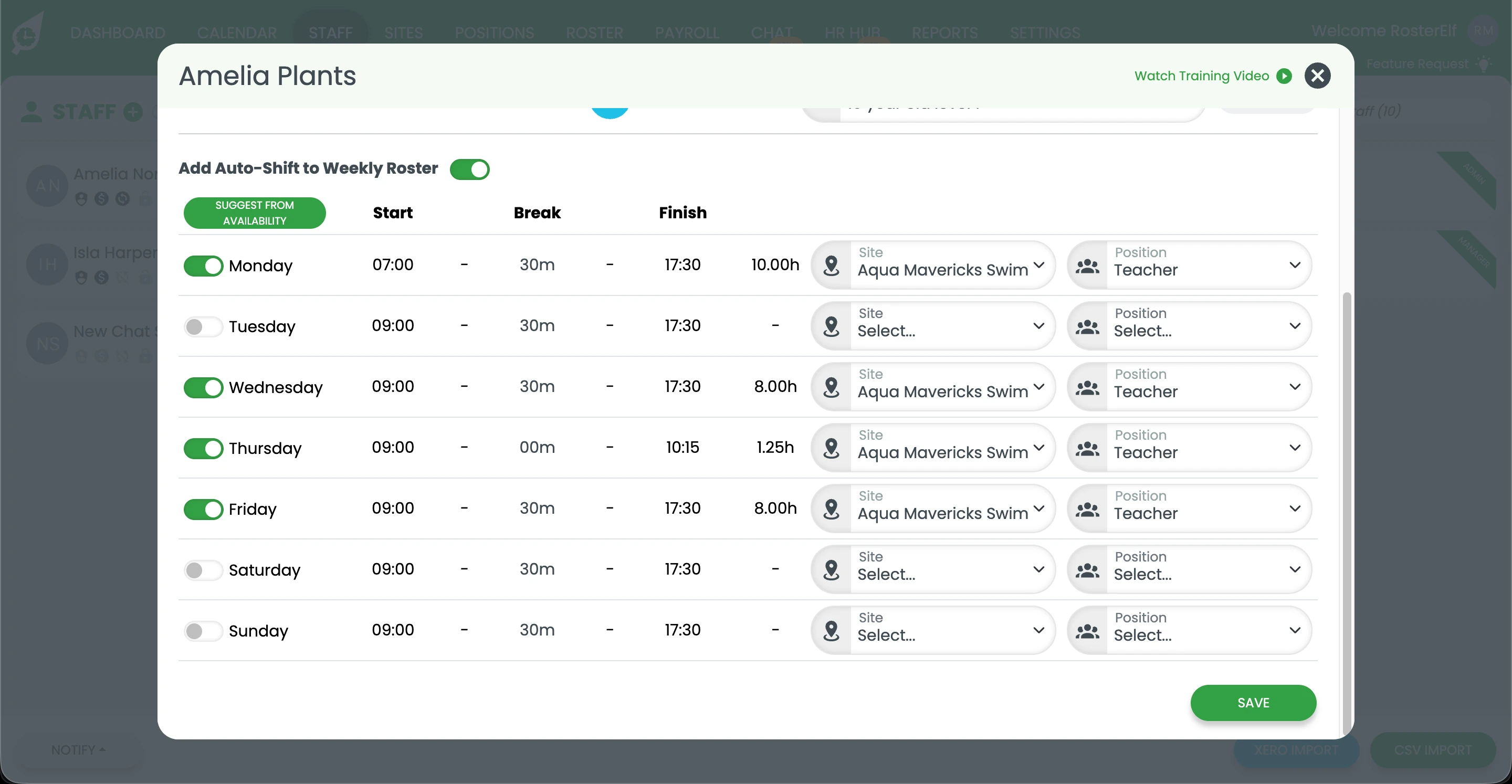
Enter the start and end times for each day of the week that the staff member regularly works. You can also enable "by availability" to ensure hours only appear on days when they're available.
3. System applies hours when rostering
Save the settings and the recurring hours become the baseline for this staff member. When building rosters, you'll see these hours as a reference pattern, making it faster to create accurate schedules
without repetitive data entry.
Ready to set up recurring hours?
Follow our step-by-step guide with screenshots to configure recurring staff hours for your team.
View setup guideIntegration with availability and payroll
Recurring staff hours integrate with RosterElf's availability settings. When you enable the "by availability" option, recurring hours only appear on days when the staff member is available. This prevents scheduling conflicts and ensures hours align with each person's availability preferences.
Recurring hours also work seamlessly with payroll exports. When exporting timesheets to Xero, MYOB, or other payroll systems, the consistent baseline hours improve data accuracy and reduce reconciliation time. This helps you process payroll faster with fewer errors.