
What is auto-approval for open shifts?
Waiting for manager approval slows down shift coverage when you need it most. With auto-approval for open shift software, staff can claim available shifts instantly—no delays, no approval queue, no missed coverage windows.
This article explains the new auto-approval feature for open shifts in RosterElf. You will learn why manual approval creates bottlenecks, how auto-approval solves these challenges, and when to use this feature for your business. We also cover the simple setup process and answer common questions about managing auto-approved shifts.
Auto-approval is designed for Australian businesses that need fast, flexible shift coverage. It works for hospitality, retail, healthcare, and any industry where shift gaps require immediate attention. By the end of this article, you will understand how to use auto-approval to improve rostering efficiency and reduce administrative burden.
Why manual shift approval slows coverage
Manual approval creates bottlenecks. When a staff member accepts an open shift, you need to review the request, check their details, and manually approve before the shift is confirmed. During busy periods or outside business hours, these delays mean shifts stay unfilled longer than necessary.
The approval queue adds administrative burden for managers who are already juggling multiple priorities. Staff wait for confirmation while other team members might miss the opportunity. By the time approval happens, the coverage window may have passed or the shift urgency has escalated.
Real scenario
A cafe manager posts an open shift at 6am for coverage starting at 9am. A staff member accepts at 6:15am, but the manager doesn't check their phone until 8am. By the time they approve the shift, there's barely time for the staff member to prepare and arrive. With auto-approval, the shift would be confirmed instantly at 6:15am, giving everyone proper notice.
How auto-approval speeds up shift coverage
Auto-approval eliminates the manual review step for open shifts. When staff claim a shift with auto-approval enabled, it confirms immediately—no waiting, no approval queue, no delays. This gives you three key benefits:
Instant coverage
Staff claim shifts and get immediate confirmation. No waiting, no uncertainty. The shift is assigned instantly when they accept, giving you faster coverage when you need it most. This is especially valuable during last-minute staffing changes or unexpected demand spikes.
Reduced admin burden
Eliminate the approval queue for shifts you trust staff to take. Managers save time by removing the review step, allowing you to focus on higher-value tasks instead of routine approvals. For businesses with high shift turnover, this can save hours every week.
Staff autonomy
Empower your team to pick up extra work on their own schedule. Auto-approval gives staff confidence that when they commit to a shift, it's confirmed immediately without needing to wait for manager response. This improves staff satisfaction and makes your business more attractive to flexible workers.
Best situations for auto-approved shifts
Auto-approval works best in specific scenarios where speed and flexibility are priorities. Here are three situations where auto-approval delivers the most value:
Last-minute shift gaps
When you need urgent coverage due to call-ins, no-shows, or unexpected demand, auto-approval ensures the first available staff member can claim the shift immediately. This is perfect for hospitality, retail, and healthcare businesses where shift gaps create immediate operational issues. Fast coverage prevents service disruptions and maintains customer satisfaction.
High-trust established teams
For experienced staff who consistently demonstrate reliability, auto-approval removes unnecessary approval steps. This is ideal when you already trust your team to pick up shifts appropriately and want to streamline the process for everyone. High-trust teams benefit from the autonomy and faster response times.
Peak periods needing fast coverage
During busy trading periods, school holidays, or seasonal peaks, you need shifts filled quickly without administrative delays. Auto-approval ensures your roster fills faster so you can meet customer demand without coverage gaps. This helps you maximize revenue during your busiest periods.
How to enable auto-approval for shifts
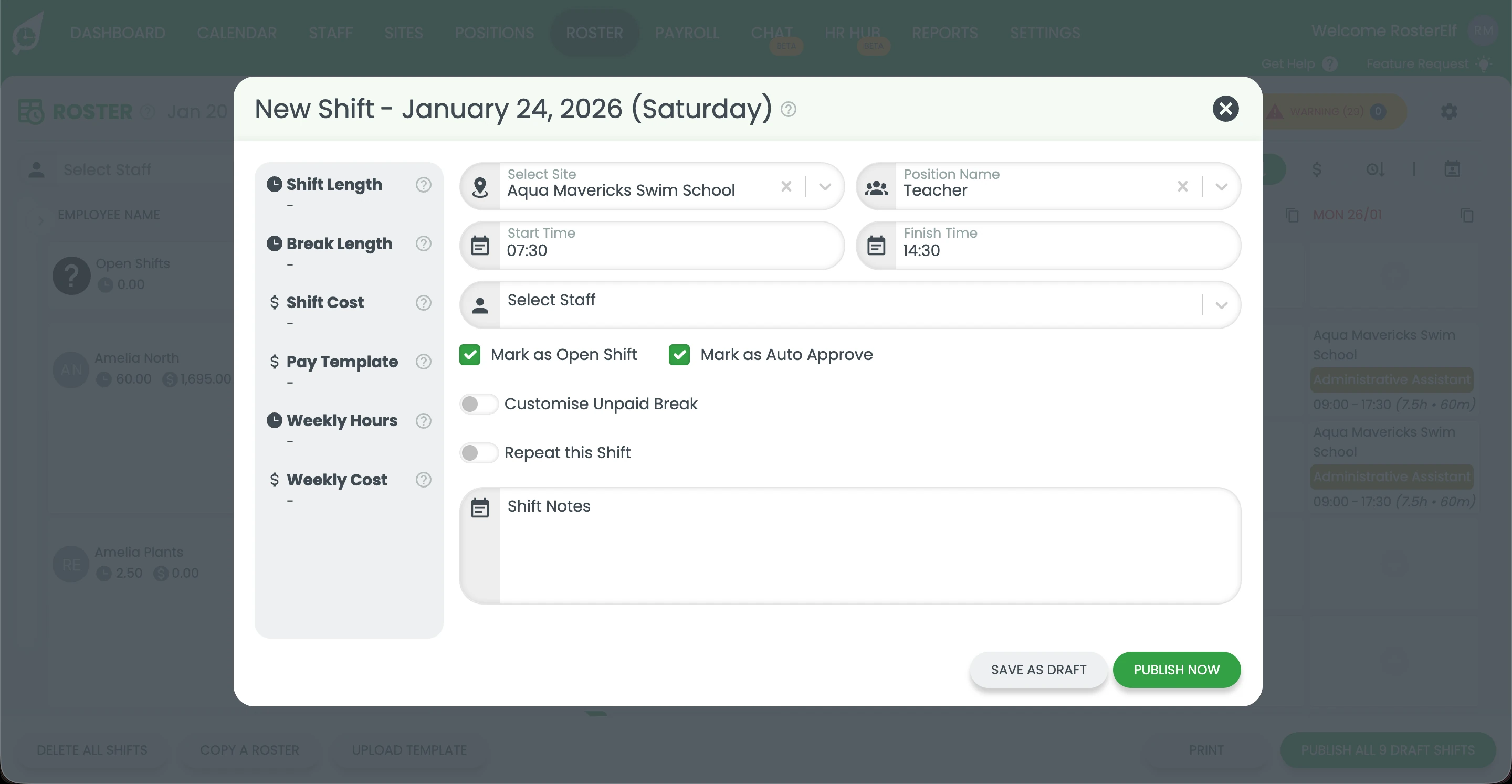
Auto-approval takes seconds to enable when creating open shifts. Here's how it works:
1. Create your open shift
Add a new shift to your roster as usual, entering the date, time, position, and site details. Leave the shift unassigned to any specific staff member.
2. Toggle auto-approval on
Enable the auto-approval option in the shift creation form. This tells RosterElf to automatically confirm the shift when staff accept it.
3. Publish and staff can claim instantly
Publish the shift to make it visible to your team. When a staff member accepts the shift, it's confirmed immediately without needing your approval. You'll receive a notification that the shift has been
filled.
Ready to enable auto-approval?
Follow our step-by-step guide with screenshots to set up auto-approval for open shifts.
View setup guide