
What is PIN authentication?
Shared tablet time clocks require staff to log in with full passwords—slow, inconvenient, and prone to errors. A PIN keeps the tablet's Time Clock App logged in, so the device is unlocked once instead of every shift—faster authentication, better security, and smoother shift starts.
This article explains PIN authentication for time clocks in RosterElf. You will learn why password-based clocking creates friction, how PIN codes improve speed and security, and when to enable PIN authentication for your kiosks. We also cover the simple setup process and answer common questions about security and management.
PIN authentication is designed for Australian businesses using shared tablet time clocks in kiosk mode. It works for any workplace where multiple staff use the same device to clock in and out. By the end of this article, you will understand how to use PIN authentication to speed up clocking while maintaining individual accountability.
Why passwords slow clocking
When tablet time clocks require full password login for each staff member, clocking becomes slow. Staff fumble with typing complex passwords on touchscreens, forget credentials, or share passwords to save time—all creating delays and security risks. Login failures mean calling supervisors, resetting passwords, and wasted time at shift starts.
The alternative—leaving tablets logged in to a single admin account—removes individual accountability. You can't verify who actually clocked in, buddy punching becomes easy, and audit trails are meaningless. This creates Fair Work compliance risks and payroll accuracy problems.
Real scenario
A healthcare facility has 5 staff arriving for morning shift at 7am. Each person spends 30-60 seconds typing their password on the tablet, with 2 people failing login and needing password resets. Total time wasted: 5-8 minutes every morning. With PIN authentication, each person enters their 4-digit code in 3 seconds—total time: 15 seconds for all 5 staff.
How PIN authentication works
A PIN keeps the Time Clock App logged in on the tablet. It is entered once when the device is set up — the account PIN covers every site, or a site PIN limits that tablet to one location. Staff then clock in and out without anyone signing in. This provides three key benefits:
Faster clocking
The tablet is unlocked once with a PIN instead of someone signing in with a full password each shift. No more login screens, forgotten credentials, or password reset delays. Shift starts are smoother, queues at the time clock disappear, and staff get to work faster.
Individual accountability
Each staff member has a unique PIN that only they know. Every clock in and out is tied to their individual identity, creating reliable audit trails for Fair Work compliance and preventing buddy punching.
Reduced IT friction
Fewer password resets, no login troubleshooting, and less time spent managing tablet access. PINs are simple to remember, quick to change if needed, and don't expire like complex passwords.
Best use cases
PIN authentication works best for shared tablet time clocks where speed matters. Here are three situations where it delivers the most value:
High-volume shift starts
Workplaces where many staff arrive simultaneously—factories, warehouses, hospitals, call centers—benefit from faster clocking. PIN codes eliminate queues at the time clock and get everyone working faster without login delays.
Shared kiosk devices
Businesses using tablets in kiosk mode—mounted at entrances, break rooms, or reception—need secure but convenient authentication. PIN codes balance security with speed for shared devices accessed by multiple staff throughout the day.
Staff with varying tech comfort
Teams with diverse digital literacy levels find PINs easier than complex passwords. Simple 4-digit codes work for everyone regardless of technical ability, reducing support burden and login frustration.
How to enable PINs
Enabling PIN authentication takes just a few steps. Here's how it works:
1. Turn on tablet time recording
Go to Settings → Time & Attendance and switch on Allow Employees to Record Time and Attendance on Tablets. The slider turns green, and a PIN covering every
site on the account is activated.
2. Find, or reset, your PIN
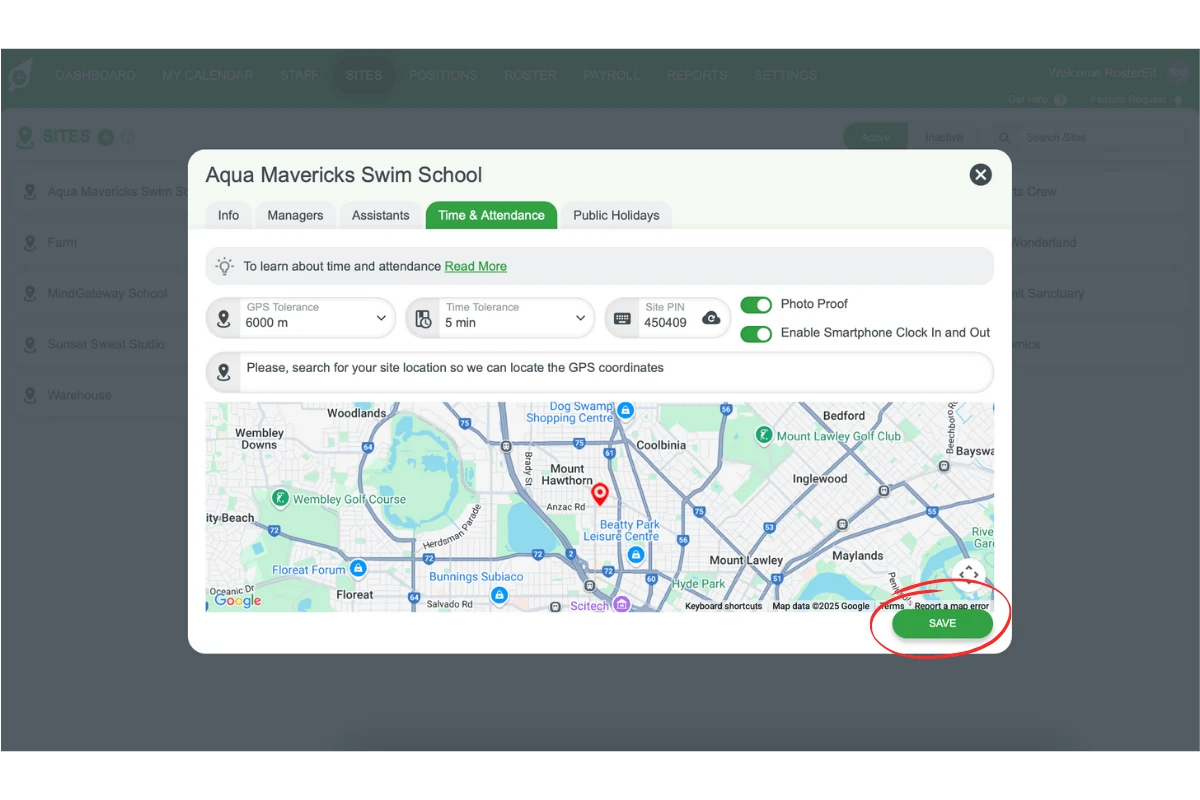
Scroll down the same Time & Attendance screen to see the account PIN. To reset it, click the cloud icon beside it and Save. Each site can also carry its own PIN — open
Site → Time & Attendance to set one, so that tablet only shows shifts for that site.
3. Unlock the Time Clock App
Open the Time Clock App on the tablet and enter the PIN — the account PIN for every site, or a site PIN for just that location. The app then stays logged in, and staff clock in and out without anyone
signing in again.
Ready to enable PIN authentication?
Follow our step-by-step guide to set up PIN codes for your tablet time clocks.
View setup guide