
What are shift notes reports?
Important shift information lives in handover notes, staff comments, and incident reports. Shift notes reporting compiles all shift communication into exportable reports—making it easy to track issues, document events, and maintain accountability across shifts.
This article explains shift notes reporting in RosterElf. You will learn why shift communication needs proper documentation, how shift notes reports work, and when to use them for your business. We also cover the simple reporting process and answer common questions about filtering and exporting.
Shift notes reporting is designed for Australian businesses where handover communication, incident tracking, and accountability matter. It works for any industry where documenting shift events helps prevent issues and maintain quality. By the end of this article, you will understand how to use shift notes reports to improve communication tracking and compliance documentation.
Why shift communication matters
Shift handovers rely on verbal communication and scattered notes. Important information—equipment problems, customer issues, safety incidents, operational changes—gets lost when not properly documented. Without a centralized record, managers can't review what happened during shifts or track recurring issues.
The problem compounds when you need historical context. When a customer complains about an incident from three weeks ago, or when investigating a pattern of equipment failures, there's no easy way to search past shift communications. Information exists in individual shift notes but isn't consolidated or searchable.
Real scenario
A healthcare manager receives complaints about medication delays during evening shifts. They suspect there's been multiple incidents but can't easily review past shift notes. With shift notes reporting, they generate a report for the last month, filter by evening shifts, and immediately see a pattern of delays documented by night staff—revealing a staffing issue that needs addressing.
How shift notes reporting works
Shift notes reporting compiles all shift communication into a single, searchable report. Select your date range, apply filters, and export the results. This gives you three key benefits:
Centralized communication history
See all shift notes, handover comments, and incident reports in one place. Search by date range, site, or staff member to find specific information. No more manually checking individual shifts to piece together what happened.
Pattern identification
Identify recurring issues by reviewing shift notes over time. Spot equipment problems that keep appearing, operational bottlenecks mentioned repeatedly, or communication gaps between shifts. This helps you address root causes rather than individual incidents.
Compliance documentation
Export shift notes reports for incident documentation, compliance audits, or legal recordkeeping. Create permanent records of shift communications that can be referenced for investigations, insurance claims, or regulatory inspections.
Best use cases
Shift notes reporting works best when documentation and accountability matter. Here are three situations where it delivers the most value:
Incident investigation
When investigating complaints, safety incidents, or operational issues, shift notes reports provide historical context. Review what staff documented during relevant shifts, identify who was on duty, and understand the sequence of events leading to incidents.
Quality and compliance audits
Industries with regulatory requirements—healthcare, aged care, childcare, food service—benefit from documented shift communications. Export shift notes reports to demonstrate proper handover procedures, incident documentation, and operational oversight during compliance audits.
Operational improvement
Review shift notes regularly to identify process improvements. When staff consistently document the same problems or inefficiencies, shift notes reports reveal patterns that warrant operational changes or additional training.
How to generate reports
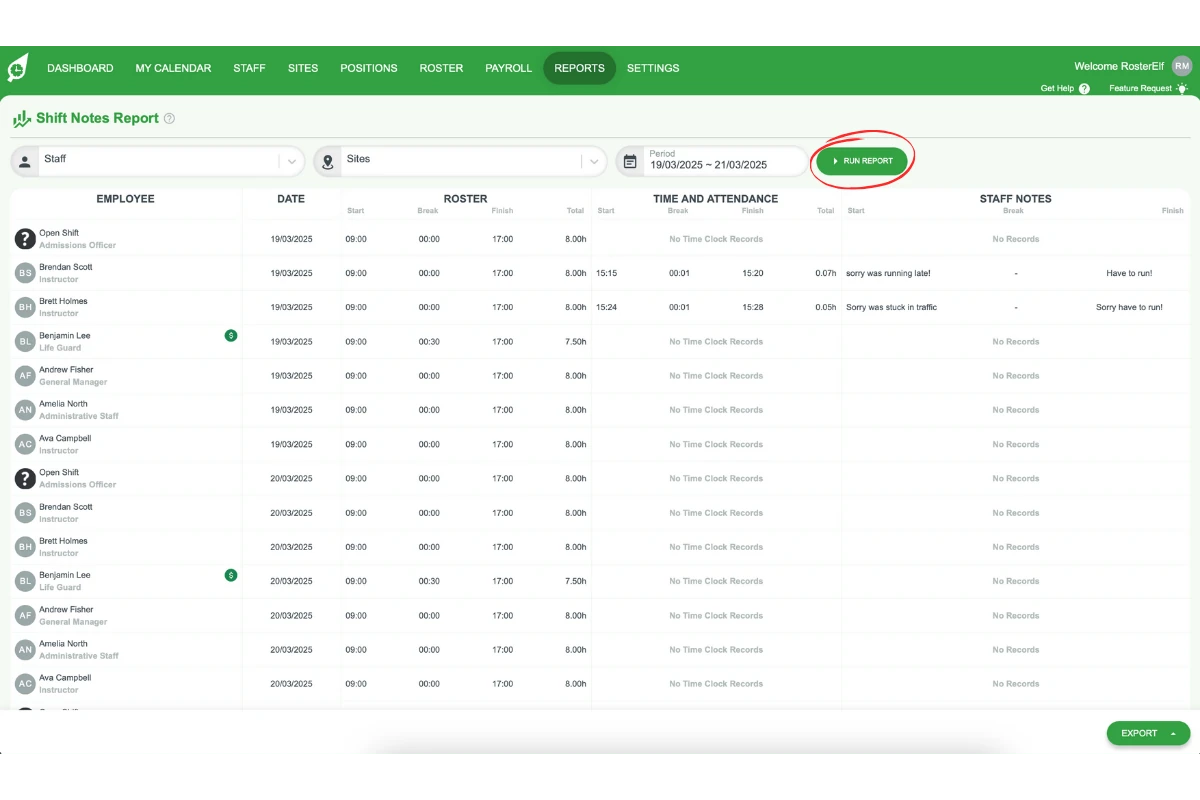
Generating shift notes reports takes just a few clicks. Here's how it works:
1. Open reporting
Navigate to the Reports section in RosterElf and select Shift Notes Report.
2. Select date range and filters
Choose the date range you want to review. Optionally filter by site, staff member, or other criteria to narrow results.
3. Generate and export
Click Generate Report to compile all shift notes matching your criteria. Export the report as a file for recordkeeping or further analysis.
Ready to generate shift notes reports?
Follow our step-by-step guide to create and export shift notes reports.
View setup guide