
What is workwise AI?
Australian workplace law is complex. Workwise AI gives you instant, plain-English answers to HR compliance questions—Fair Work rules, leave entitlements, award rates, and employer obligations—without leaving RosterElf.
This article explains Workwise AI, our new HR compliance assistant in RosterElf. You will learn why Australian workplace compliance is challenging, how Workwise AI simplifies HR queries, and when to use it for your business. We also cover how to access the feature and answer common questions about what it can and cannot do.
Workwise AI is designed for Australian businesses managing employees under modern awards, enterprise agreements, or employment contracts. It works for any industry where managers need quick access to Fair Work information. By the end of this article, you will understand how to use Workwise AI to get HR answers faster and reduce compliance uncertainty.
Why HR compliance is complex
Australian workplace law includes hundreds of modern awards, constantly changing Fair Work regulations, and industry-specific requirements. When managers need to answer staff questions about leave, pay rates, or termination procedures, they often spend hours searching Fair Work websites or calling advisors.
The consequences of getting compliance wrong are serious—underpayment claims, Fair Work penalties, and staff disputes. But navigating the Fair Work website, interpreting award clauses, and understanding your obligations takes expertise and time that most small business managers don't have.
Real scenario
A hospitality manager receives a question about casual loading rates for Sunday shifts. They spend 30 minutes searching the Hospitality Award on the Fair Work website, reading through complex clauses, and trying to interpret penalty rate tables. With Workwise AI, they ask "What's the Sunday casual loading rate in hospitality?" and get an instant answer with links to the source.
How workwise AI helps
Workwise AI translates complex Fair Work information into plain English answers. Ask questions in natural language, get instant responses, and see links to official sources. This gives you three key benefits:
Instant compliance answers
Ask about leave entitlements, minimum wages, award rates, probation periods, or termination rules and get immediate answers. No more spending hours searching Fair Work websites or waiting for advisor callbacks. Workwise AI references official sources and explains them in language you can understand.
Accessible HR knowledge
Staff don't need HR expertise to find answers. Managers, supervisors, and business owners can all ask compliance questions without specialized training. This democratizes HR knowledge across your organization and reduces reliance on a single person for all compliance queries.
Source transparency
Every answer includes links to Fair Work sources—the Fair Work Act, modern awards, or Fair Work Ombudsman guidance. You can verify information, read the full context, and show staff where the answer comes from. This builds trust and ensures you're working from official information.
Best use cases
Workwise AI works best for quick compliance queries and general HR questions. Here are three situations where it delivers the most value:
Staff leave and entitlement questions
When staff ask about annual leave accrual, sick leave entitlements, parental leave rights, or long service leave, Workwise AI provides instant answers with Fair Work references. This helps you respond to staff queries confidently without researching awards or calling advisors. Learn more about managing leave entitlements.
Pay rate and penalty verification
Check minimum wage rates, penalty rates for weekends and public holidays, overtime calculations, and casual loading requirements. Workwise AI references your industry award and explains how rates apply to different employment types and shift times.
Termination and dismissal procedures
Understand notice periods, redundancy obligations, fair dismissal procedures, and unfair dismissal protections before taking action. Workwise AI explains the rules and points you to Fair Work guidance, helping you avoid costly compliance mistakes when managing staff exits.
How to access workwise AI
Accessing Workwise AI takes seconds. Here's how it works:
1. Open HR Hub
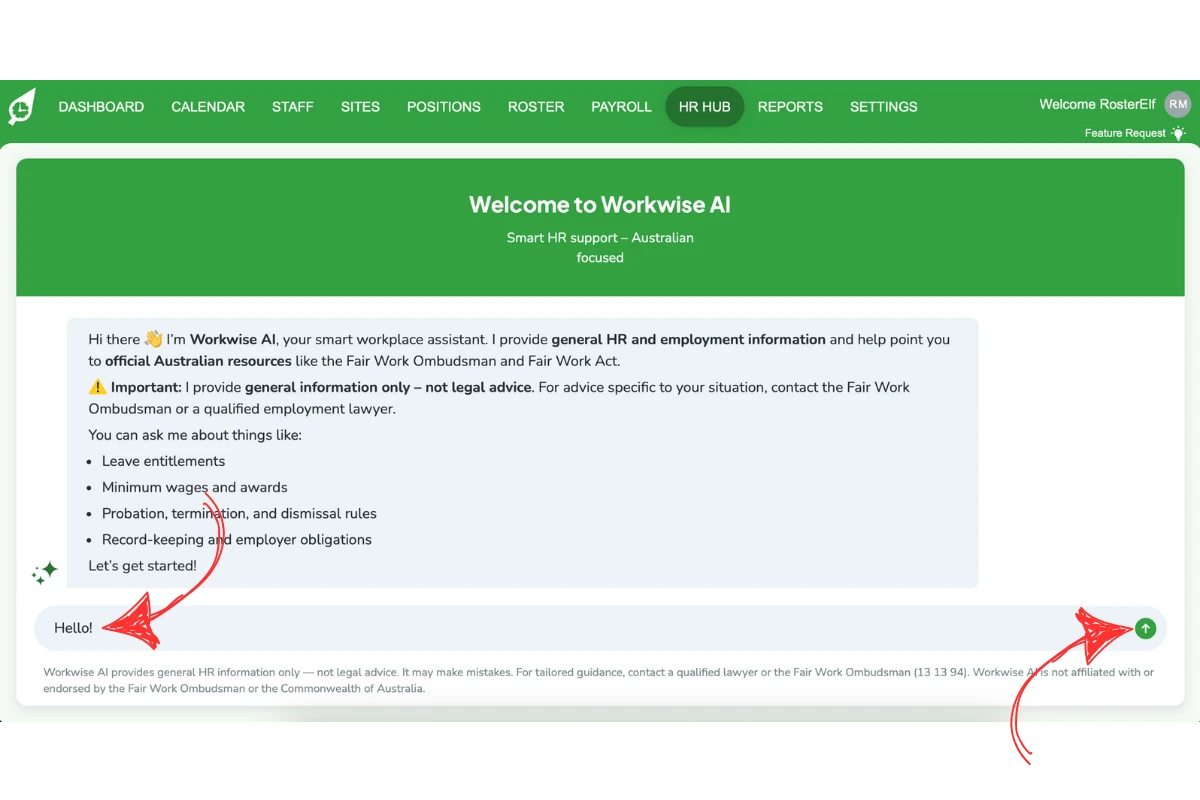
Click HR Hub in the top navigation menu of RosterElf.
2. Select Workwise AI
Choose Workwise AI from the dropdown menu to open the chat interface.
3. Ask your question
Type your HR question in plain English—"What's the minimum wage for casuals in retail?"—and get an instant answer with Fair Work sources linked.
Ready to try Workwise AI?
Follow our step-by-step guide with screenshots to start using Workwise AI for HR compliance questions.
View setup guide