

Use workwise AI for HR answers
Workwise AI is a smart assistant built into your HR Hub. It delivers quick, plain-English answers to common workplace questions that follow Australian law. With a few clicks you can understand annual-leave entitlements under the Fair Work Act, check minimum award wages, or review employer record-keeping rules. The assistant links straight to trusted sources such as the Fair Work Ombudsman and the Fair Work Act, saving you time and reducing risk.
This article shows you how to open Workwise AI, ask a question, and use the results with confidence. You will learn what topics the tool covers, its limits, and when to call a professional. Whether you manage a small team or a national workforce, reliable information at your fingertips keeps operations smooth and compliant.
1. Accessing workwise AI in HR Hub
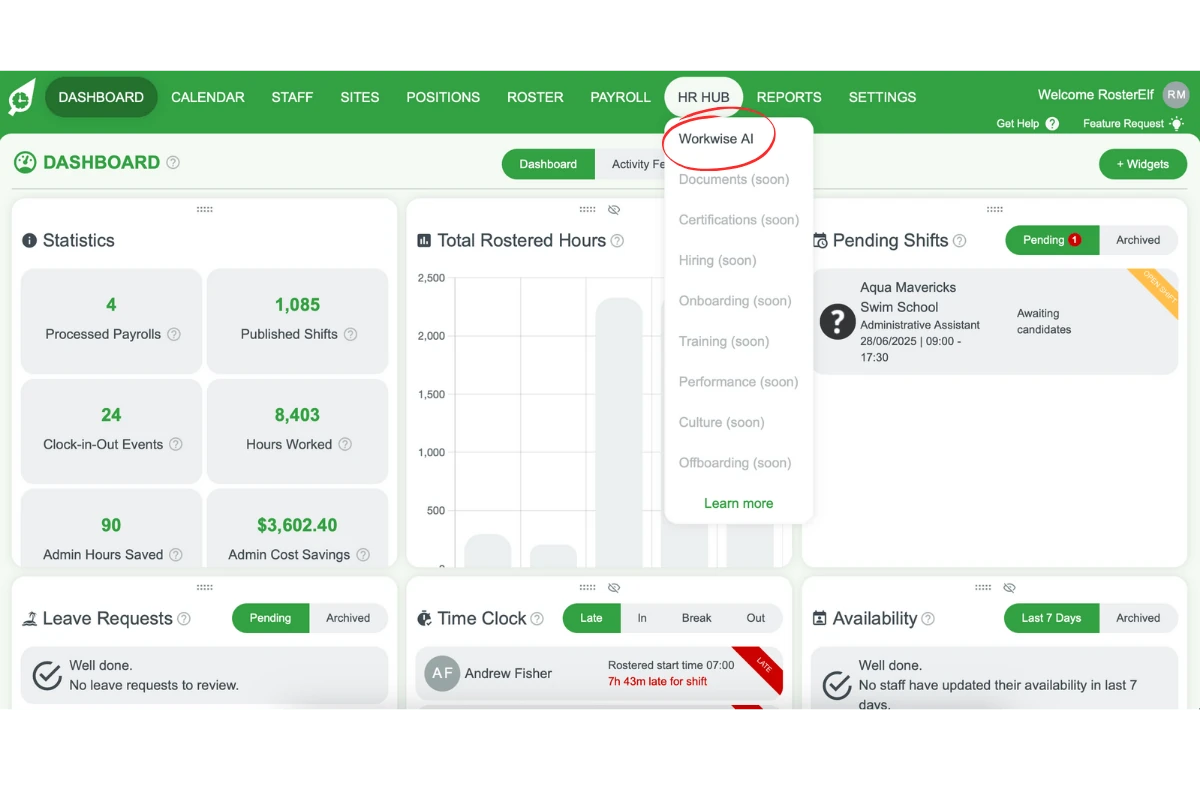
This section shows you how to locate Workwise AI inside your HR Hub account. The steps are the same whether you are at your desk or on a mobile browser. You will learn which menu to click and how to open the assistant in seconds.
1.1 Open HR Hub to reach workwise AI
1.1.1 Click HR Hub in the top menu.
1.1.2 Select Workwise AI from the drop-down list.
2. Asking questions with workwise AI
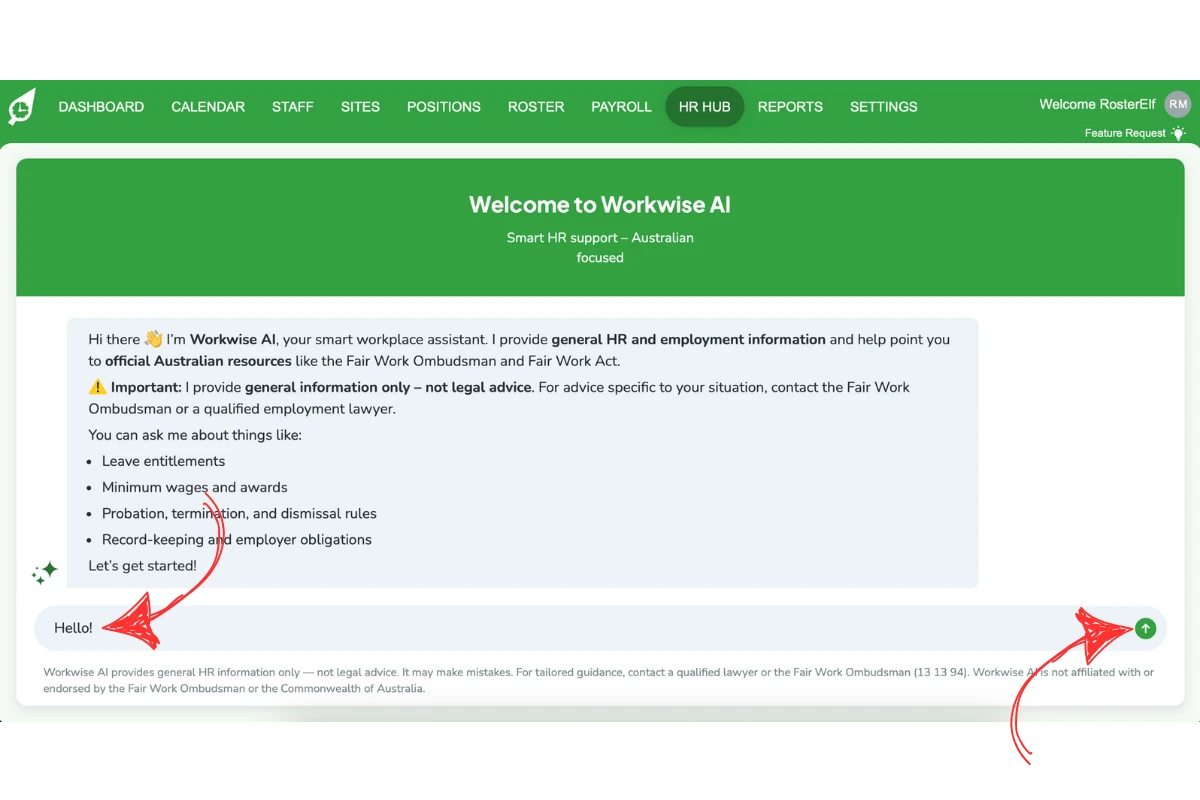
With Workwise AI open, the next task is to ask a clear question. The chat interface accepts sentences, keywords, or short phrases and responds almost instantly. This section explains how to type your question, submit it, and read the reply.
2.1 Submit your question
2.1.1 Click the chat field.
2.1.2 Type your question.
2.1.3 Press Enter or click Submit at the bottom right.
3. What workwise AI can help with
Workwise AI handles everyday employment queries that arise in Australian workplaces. This section outlines the main subject areas the tool covers so you know when it can help.
3.1 Key topics covered by workwise AI
3.1.1 Leave entitlements.
3.1.2 Minimum wages and awards.
3.1.3 Probation, termination, and dismissal rules.
3.1.4 Record-keeping and employer obligations.
Leave management is in the main app, not HR Hub
Workwise AI answers questions about leave rules under the Fair Work Act — such as minimum entitlements and accrual rates. It does not manage leave requests or display staff leave balances. To submit, approve, or view leave requests, go to Dashboard → Leave in the main RosterElf web app, or Home → Leave in the mobile app.
4. Important limitations of workwise AI
While Workwise AI is a powerful reference tool, it does not replace professional advice. This section explains the limits of the information provided and why you must verify critical decisions.
4.1 When to seek professional advice
4.1.1 Treat answers as general guidance only.
4.1.2 For tailored advice, call the Fair Work Ombudsman (13 13 94) or consult an employment lawyer.
4.1.3 Remember that Workwise AI is not affiliated with or endorsed by the Fair Work Ombudsman or the Commonwealth of Australia.
Note
Workwise AI provides general information only and should not be relied upon as legal advice. Always verify critical decisions with the Fair Work Ombudsman or a qualified employment lawyer.
Frequently asked questions
1. What is Workwise AI?
Workwise AI is a smart assistant in HR Hub that provides plain-English answers on Australian HR rules and links to sources such as the Fair Work Ombudsman and Fair Work Act.
2. How do I access Workwise AI in HR Hub?
Click HR Hub in the top menu, then select Workwise AI from the drop-down list to open the chat window.
3. What HR topics can Workwise AI help with?
Ask about leave entitlements under the Fair Work Act (annual leave rules, sick leave minimums, etc.), minimum wages, awards, probation, termination, dismissal rules, record-keeping, and employer obligations. Note: leave requests and leave balances in RosterElf are managed separately — go to Dashboard → Leave in the main app.
4. Does Workwise AI provide legal advice?
No. It offers general information only. For advice specific to your situation, contact the Fair Work Ombudsman or a qualified employment lawyer.
5. Is Workwise AI affiliated with the Fair Work Ombudsman?
No. Workwise AI is not endorsed by the Fair Work Ombudsman or the Commonwealth of Australia. It simply links you to their public resources.
6. Does HR Hub manage leave requests or leave balances?
No. HR Hub and Workwise AI cover Fair Work leave rules — such as minimum entitlements and accrual rates under the National Employment Standards — but they do not process leave requests or display staff leave balances. To submit, approve, or view leave requests and balances, go to Dashboard → Leave in the main RosterElf app.