

Common Xero errors in RosterElf and how to solve them
Are you encountering issues processing payroll in RosterElf or difficulties syncing with Xero? While RosterElf automates much of the process, problems can arise when account details don’t align between both platforms.
This article addresses the most common error messages users experience and provides simple steps to resolve them. By following these quick guides, you’ll be able to fix the issues and get back to processing payroll smoothly.
If payroll fails with a 500 error, start with section 2.
1. Invalid EmployeeID error in RosterElf and Xero
This issue happens when employee details in RosterElf don’t match Xero. Check if both platforms’ spelling, characters, and cases (upper/lower) align.
Sometimes, this error occurs due to duplicate employee records in Xero. To fix this, remove the duplicate staff member in Xero and contact the RosterElf support team. We will manually disconnect the duplicate, and the system will automatically relink the correct staff member.

If you’re using Xero with employees across multiple sites linked to various Xero entities, this issue may arise. Please contact the customer support team for assistance.
2. 500 Internal Server Error when sending payroll to Xero
If Process Payroll or Send to Xero fails with a 500 error, your browser may show “500 (Internal Server Error)” on process-export. Refresh the Xero connection first.
2.1.1 Go to Settings > Payroll.
2.1.2 Click the green refresh arrow beside Payroll Entity and follow the prompts to reconnect.
2.1.3 Go back to Payroll and send the pay period again. See resend timesheets to Xero.
Full steps and screenshots are in refresh Xero connection. If the error continues after a refresh, contact our support team with the pay period and roughly when it failed.
3. You don't have permission to send timesheets to this account
If Send to Xero shows “You don’t have permission to send timesheets to this account”, the timesheets did not reach Xero. This usually means the Xero login connected to RosterElf no longer has payroll access.
3.1.1 Check whether permissions changed in Xero recently. You need Standard or Adviser access with Payroll Admin. See required Xero permission levels.
3.1.2 Sign in to Xero as a user with Payroll Admin. In RosterElf, go to Settings > Payroll, click the green refresh arrow beside Payroll Entity and follow the prompts.
3.1.3 Go back to Payroll and send the pay period again. See resend timesheets to Xero.
If the message continues, check that you are an Admin or Payroll Admin in RosterElf, then contact our support team with the pay period and the exact message.
4. Missing earnings rate in Xero
This error occurs when RosterElf sends payroll data to Xero, but the employee in Xero doesn’t have the corresponding pay items. Ensure the same pay items are assigned to staff in both Xero and RosterElf. This problem often arises after changes in Xero, like pay rate or award adjustments, which are not updated in RosterElf.
5. Missing pay calendar error in Xero
If your payroll cannot be processed due to a Missing Pay Calendar error, this must be corrected in Xero. Follow the instructions in the missing pay calendar solution guide.
6. Missing ordinary hours rate in Xero
When payroll processing fails due to a Missing Ordinary Hours Rate error, this needs to be resolved in Xero. Use the ordinary hours rate solution guide to fix the issue.
7. TrackingItemID required for timesheet lines
The TrackingItemID error requires every timesheet line to have a TrackingItemID. Learn how to resolve this issue by following the TrackingItemID solution guide.
Xero errors when sending leave to payroll
This article explains the most common errors encountered when sending leave data from RosterElf to Xero and provides solutions for each issue. By following these steps, you can resolve issues such as missing leave types, earnings rates, and mismatched payroll calendars, ensuring smooth data integration between RosterElf and Xero. This guide benefits users by simplifying error resolution, saving time, and minimising disruptions in employee leave management.
Employee missing leave type setup in Xero
This section explains how to resolve errors related to missing leave types in Xero. Setting up leave types ensures that leave data from RosterElf is accurately reflected in Xero. Follow the steps provided to assign default or additional leave types to an employee. For full details, refer to Xero’s guide on setting up employee leave entitlements.
Default leave types
1.1.1. Log into Xero.
1.1.2. In the Payroll menu, select Employees.
1.1.3. Choose the relevant Employee.
1.1.4. In the Employment tab, confirm the employee has a payroll calendar and earnings rate.
1.1.5. In the Leave tab, select Assign Default Leave Types.
1.1.6. Click on the balance shown under the leave type to edit accrual settings.
1.1.7. Select the Leave Calculation Method and complete the remaining fields.
1.1.8. Click Save.
Additional leave types
1.2.1. In the Payroll menu, select Employees.
1.2.2. Click the employee’s name.
1.2.3. In the Leave tab, select Assign Leave Type.
1.2.4. In the Leave field, choose the desired leave type.
1.2.5. Select a Leave Calculation Method and complete the fields.
1.2.6. Choose Not Paid Out or Paid Out for termination balance treatment.
1.2.7. Click Save.
Missing ordinary hours earning rate in Xero
This section covers the steps needed if the employee does not have an Ordinary Hours earnings rate in Xero. Assigning this rate is essential for correct leave accruals and payments. Refer to Xero’s guide on adding an employee for additional information.
2.1. Log into Xero.
2.2. In the Payroll menu, select Employees.
2.3. Choose the Employee.
2.4. Go to the Employment tab.
2.5. Under Ordinary Earnings Rate, select the employee’s usual earnings rate. Ensure this rate matches the one in the employee’s pay template.
2.6. Click OK and then Save.
Mismatched pay calendar cycle between RosterElf and Xero
This section provides steps to fix issues arising from mismatched pay calendar cycles between RosterElf and Xero. Ensuring the pay cycle aligns in both systems is critical for accurate payroll processing. More information can be found in Xero’s guide on adding an employee.
3.1. Log into Xero.
3.2. In the Payroll menu, select Employees.
3.3. Choose the Employee.
3.4. Go to the Employment tab.
3.5. Under Payroll Calendar, set the employee’s pay frequency to match the cycle in RosterElf.
3.6. Click OK and then Save.
Validation error when sending leave to Xero
If RosterElf shows a validation error when sending an employee’s leave to Xero, this usually means that employee’s Xero connection needs to be refreshed rather than a problem with the leave request itself.
In RosterElf, go to Settings > Xero Employees. From there you have two options:
- Press Reset Employee Sync to refresh the Xero connection for every linked employee.
- Or, to fix just the one affected employee, open the Linked tab and press Relink next to their name.
Once the employee is reconnected, resend the leave request to Xero. For the full steps and screenshots, see sync staff list with Xero.
FAQ: resolving common RosterElf and Xero leave errors
1. What should I do if a leave type is missing for an employee in Xero?
Ensure the missing leave type is assigned by navigating to Payroll Employees [Employee Name] Leave in Xero. You can then assign either default or additional leave types, ensuring the leave data from RosterElf accurately integrates with Xero.
2. How do I set up an ‘Ordinary Hours’ earnings rate for an employee in Xero?
To assign the Ordinary Hours earnings rate, go to Payroll Employees [Employee Name] Employment in Xero. Under Ordinary Earnings Rate, select the correct earnings rate and confirm it matches the rate in the employee’s pay template.
3. What steps should I take if the pay calendar cycle doesn’t match between RosterElf and Xero?
To align pay cycles, navigate to Payroll Employees [Employee Name] Employment in Xero and update the Payroll Calendar to match RosterElf’s pay cycle. This ensures seamless payroll processing. More information on this process can be found in Xero’s guide on adding an employee.
4. Why is accurate leave setup important for RosterElf and Xero integration?
Accurate leave setup is crucial to reflect employee leave data correctly in both RosterElf and Xero. It minimises payroll errors, ensuring leave accruals and payments are correctly processed without disruptions.
5. How can I confirm that a leave type has been successfully added to an employee in Xero?
After adding a leave type, check the Leave tab in the employee’s profile under Payroll Employees in Xero. You’ll see the assigned leave types with their accrual settings, confirming successful integration.
6. What if RosterElf shows a validation error when sending leave to Xero?
This usually means the employee’s Xero connection needs refreshing rather than there being an issue with the leave itself. In RosterElf, go to Settings > Xero Employees and either press Reset Employee Sync for all employees, or press Relink next to the affected employee in the Linked tab, then resend the leave request.
Xero error: invalid organisation type
If you encounter error messages related to the organisation type in RosterElf while using Xero, this guide provides solutions to resolve them. Incorrect organisation types can prevent timesheets from importing correctly, especially if Individual is selected instead of Sole Trader or other valid types. This article explains how to resolve this by updating your organisation type in Xero.
Xero organisation type errors
This section covers the common error messages related to Xero’s organisation type settings and explains why they might occur in RosterElf. Understanding these errors helps you quickly identify and correct organisation type issues for seamless timesheet imports.
Common Xero error messages in RosterElf
1.1.1 Error Message: Invalid value for ‘organisation_type’, must be one of …, followed by Xero’s list of accepted organisation types (written in capitals with underscores, such as SOLE_TRADER and COMPANY).
1.1.2 Explanation: This error means the organisation type in Xero doesn’t match an accepted value. Ensure it’s one of the listed valid types.
1.1.3 Suggested Fix: Check and update your organisation type in Xero to align with one of the following: Sole Trader, Company, Partnership, Not for Profit, Trust, Charity, Accounting Practice, Look Through Company, Self-Managed Superannuation Fund, Superannuation Fund, Club or Society, or S-Corporation.
Xero timesheet import restriction error
1.2.1 Error Message: Xero does not allow your ‘Organisation type’ to import timesheets.
1.2.2 Explanation: This issue often arises if Individual is set instead of Sole Trader or another acceptable organisation type.
1.2.3 Suggested Fix: Update your organisation type in Xero by visiting Xero Organisation Settings and selecting from the approved types below:
- Sole Trader
- Company
- Partnership
- Not for Profit
- Trust
- Charity
- Accounting Practice
- Look Through Company
- Self-Managed Superannuation Fund
- Superannuation Fund
- S-Corporation
Fixing Xero organisation type errors in RosterElf FAQs
1. Why does RosterElf show an “Invalid value for ‘organisation_type’” error?
This error occurs because the organisation type in Xero doesn’t align with a valid selection. To fix it, ensure that Xero is set to one of the accepted organisation types like Sole Trader, Company, or Partnership.
2. How can I resolve the “Xero does not allow your ‘Organisation type’ to import timesheets” error?
This error typically appears when the organisation type in Xero is set to Individual. To fix it, update your organisation type in Xero to a valid type, such as Sole Trader, Company, or Charity.
3. What organisation types in Xero are compatible with RosterElf?
Compatible organisation types include Sole Trader, Company, Partnership, Trust, Charity, Accounting Practice, and others. Using a compatible type ensures smooth timesheet imports.
4. Can I select ‘Individual’ as my Xero organisation type in RosterElf?
No, selecting Individual may prevent timesheet imports in RosterElf. Instead, choose a valid organisation type like Sole Trader or Partnership to avoid issues.
5. Where can I update my organisation type in Xero?
You can update your organisation type in Xero by going to Xero Organisation Settings and selecting a compatible organisation type such as Sole Trader, Not for Profit, or S-Corporation.
Xero error: employees on different pay calendars
When processing payroll for fixed salary staff on a different pay calendar to Xero, you might encounter an error stating that employees are on different pay calendars. This article provides simple steps to resolve the issue, ensuring you can process payroll smoothly.
Identifying the Xero error
This section will help you recognise the Xero error in RosterElf, where fixed-salary employees cannot be processed due to being on a different pay calendar. Understanding the issue is key to resolving it efficiently.
Identify the issue
1.1.1 You’ll notice that the fixed salary employee is greyed out and cannot be unticked from the payroll view in RosterElf when in the by day filtered view.
Changing the filtered view in Xero
This section explains how to change the filtered view to address the visibility issue for fixed salary staff when using the Xero integration with RosterElf.
Switch to by employee view
2.1.1 Click on the relevant field to switch the filtered view to by employee in RosterElf.
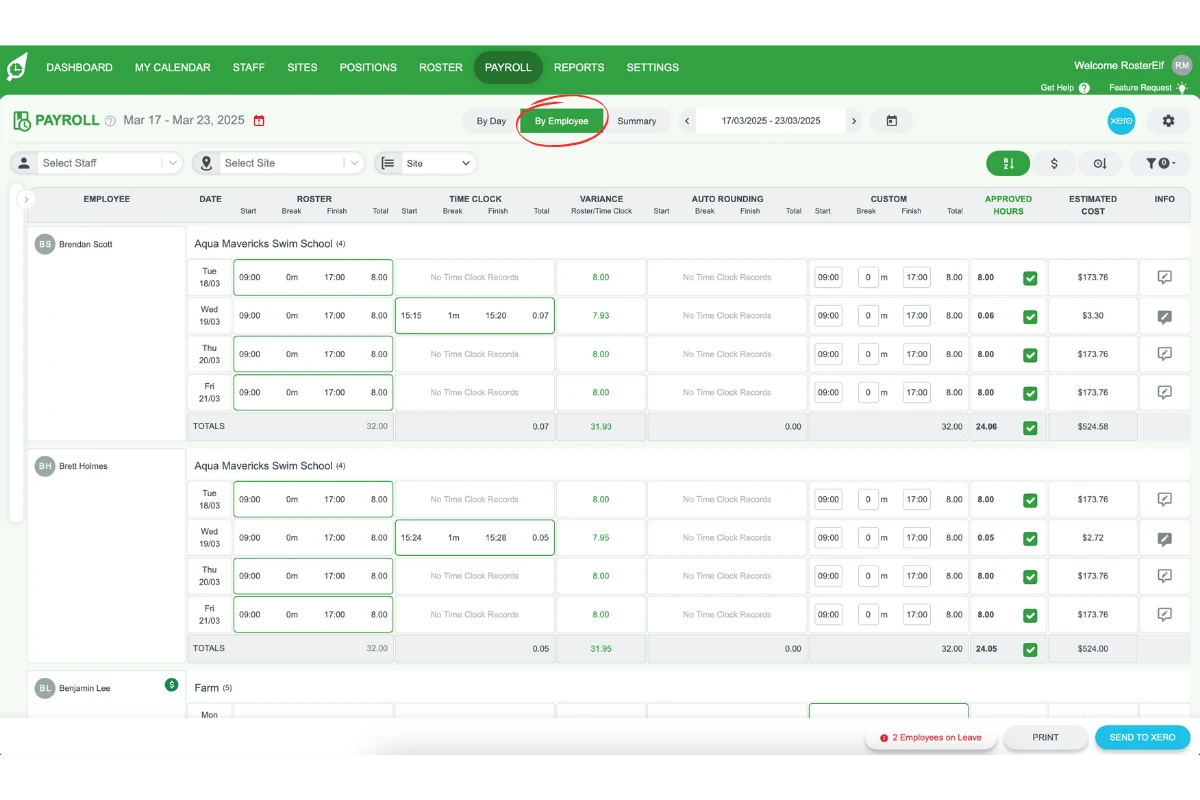
2.1.2 This will show all period shifts by the employee.
Unticking salary staff from payroll
In this section, you will learn how to untick salaried staff from the payroll process in RosterElf to Xero.
Remove salaried staff
3.1.1 In the by employee view in RosterElf, find the salaried staff.
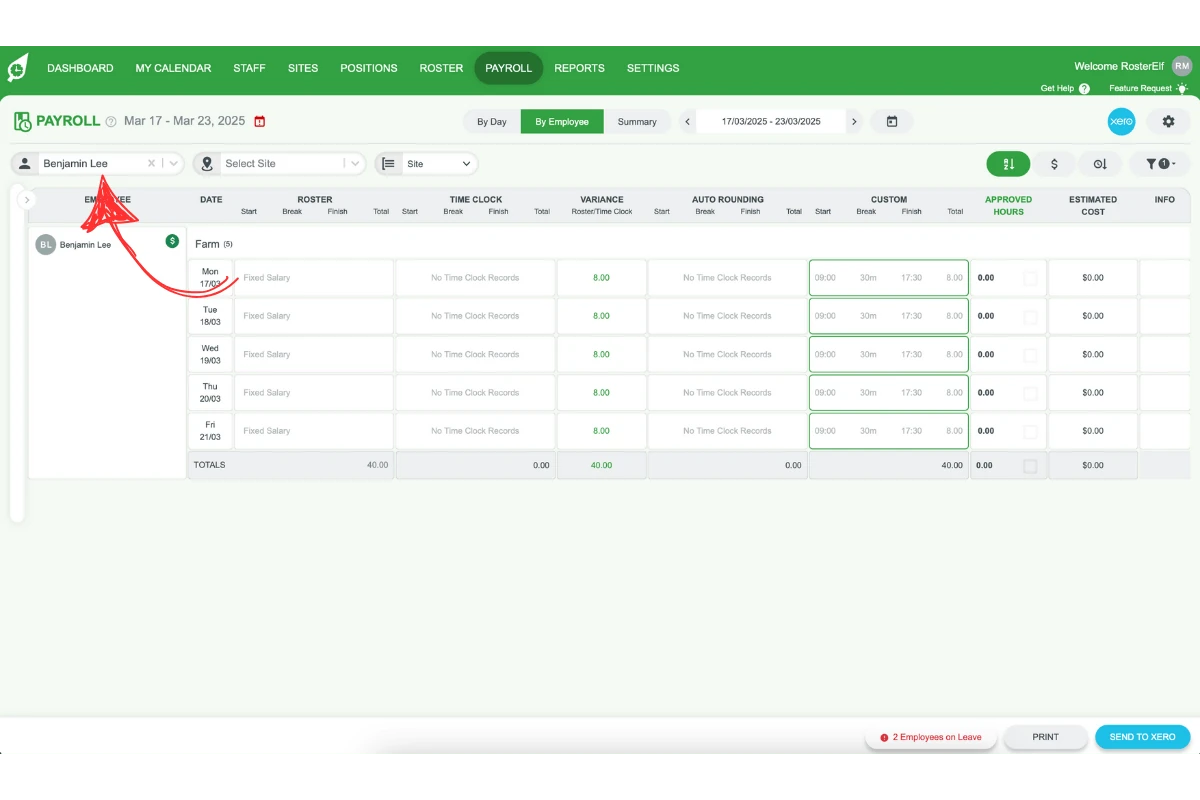
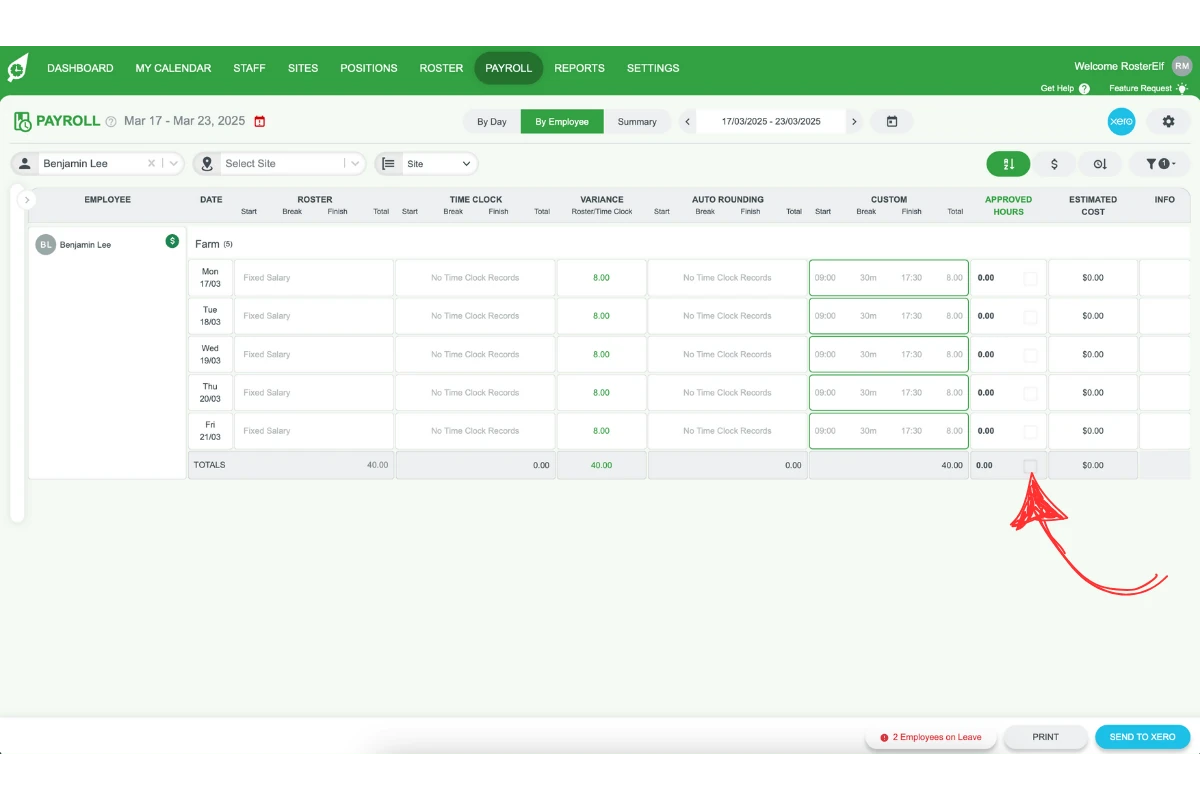
3.1.2 Untick them by selecting the bottom box for all salaried employees.
Processing payroll to Xero
After resolving the issue with different pay calendars, this final section guides you through completing the payroll process to Xero.
Finalise payroll processing
4.1.1 Now that salaried staff have been unticked in RosterElf, you can proceed to process payroll.
4.1.2 Follow the detailed payroll processing guide to Xero for final instructions.
These steps will fix the Xero error related to employees on different pay calendars and ensure smooth payroll processing.
Xero error: your Xero account does not have payroll enabled
If you’ve received the Xero Connection Error message, it means your Xero account does not have Payroll enabled. RosterElf requires Xero’s payroll feature to manage your employee data seamlessly. This guide explains how to check and enable the payroll settings in Xero to ensure smooth integration with RosterElf. By following these steps, you can resolve the connection issue, connect Xero to RosterElf, and take advantage of Xero’s payroll dashboard features. This setup ensures your payroll data is managed efficiently, reducing manual tasks and helping you keep employee records up-to-date.
If payroll is already enabled in Xero and you still see a connection error, refresh the Xero connection from Settings > Payroll.
Checking organisation type in Xero
To connect RosterElf with Xero, you need to set the Organisation Type in Xero, ensuring it’s compatible with RosterElf. This step is essential to start using Xero for payroll and avoid connection issues.
Setting organisation type in Xero
1.1.1 Log in to your Xero account.
1.1.2 Go to Organisation Details from the main menu.
1.1.3 Check the Organisation Type setting, considering the types supported by RosterElf.
1.1.4 If needed, update the Organisation Type to align with RosterElf’s requirements.
1.1.5 Save changes before proceeding.
Enabling payroll in Xero
Enabling payroll in Xero is necessary for full functionality with RosterElf. Follow these steps to enable payroll and avoid the Xero Connection Error message. Once payroll is active, you can manage employee data directly in Xero’s payroll dashboard.
Accessing the payroll dashboard
2.1.1 Go to Xero Payroll Dashboard.
2.1.2 Check if payroll is already set up.
Preparing Xero for payroll
For more detailed setup, refer to Xero’s payroll guide.
2.2.1 Follow the preparation steps in Xero’s payroll article.
2.2.2 Confirm all required payroll fields and settings are completed.
Reconnecting Xero to RosterElf
Once payroll is set up in Xero, you’re ready to reconnect to RosterElf. This process ensures that RosterElf can access necessary payroll details, eliminating previous connection errors.
Retrying the Xero connection in RosterElf
3.1.1 Return to RosterElf and click Try Again to reconnect to Xero.
3.1.2 Verify that the connection is successful and no error messages appear.
3.1.3 If you are not offered Try Again, go to Settings > Payroll and click the green refresh arrow beside Payroll Entity.
Resolving Xero connection errors for payroll
1. Why am I seeing the Xero Connection Error message?
The Xero Connection Error appears when payroll is not enabled in your Xero account. RosterElf requires Xero’s payroll feature to manage employee data. Enabling payroll in Xero should resolve this issue.
2. How can I enable payroll in Xero for RosterElf?
To enable payroll, go to the Xero Payroll Dashboard and follow the setup steps. Once complete, payroll data will sync with RosterElf, allowing seamless integration.
3. What is the Organisation Type setting, and why is it important?
The Organisation Type in Xero needs to align with RosterElf’s requirements for successful integration. You can check and update this setting in Xero’s Organisation Details section.
4. How do I check if payroll is already set up in Xero?
Visit the Xero Payroll Dashboard to see if payroll is active. If payroll is not set up, you will need to follow Xero’s guide to enable it for use with RosterElf.
5. How can I reconnect Xero to RosterElf after enabling payroll?
Once payroll is enabled, go back to RosterElf and select Try Again to reconnect. This should resolve any previous connection errors and allow access to Xero’s payroll features in RosterElf.
Xero error: unable to process the leave request
This article provides a step-by-step guide to resolve the error message stating, We are unable to process the leave XXX request for X hours to Xero for employee XXXXX. This employee doesn’t have XXXX enabled in Xero in their profile. Please log into Xero, assign XXXX to this employee and try again. This error typically occurs when a leave type has not been assigned to an employee in Xero. Following this guide will ensure that your employees have the correct leave types set up in Xero, allowing seamless leave request processing.
For further details, refer to Xero’s in-depth article here.
Note: The steps outlined below are performed within Xero.
Assign default leave types to an employee
Assigning default leave types to an employee in Xero is crucial to ensuring they are eligible for leave entitlements. This section guides you on assigning Xero’s default leave types to employees with a full-time or part-time employment basis.
Steps to assign default leave types
1.1.1 Log into your Xero account and go to the Payroll menu.
1.1.2 Select Employees.
1.1.3 Click on the employee’s name to open their details.
1.1.4 Under the Employment tab, verify that a payroll calendar and earnings rate are assigned to the employee.
1.1.5 Go to the Leave tab and select Assign Default Leave Types.
1.1.6 Click on the balance shown in blue under a leave type to modify default accrual settings.
1.1.7 Select the Leave Calculation Method and complete the required fields.
1.1.8 Click Save.
Add additional leave types
If a specific leave type is unavailable when processing payroll, you can create and assign a new leave type. This section outlines the steps to add additional leave types in Xero’s payroll settings.
Steps to add additional leave types
2.1.1 In Xero, click your organisation name and select Settings.
2.1.2 Under Features, click Payroll settings.
2.1.3 Go to the Pay Items tab and select Leave.
2.1.4 Click Add, then choose Paid Leave or Unpaid Leave.
2.1.5 Enter a name for the leave type. (If selected, this name will show in the employee’s Leave tab and on their payslip.)
2.1.6 Enter the remaining details and click Add.
Assign a new leave type to your employee
After creating a new leave type, it must be assigned to an employee to allow them to request leave under this type. Follow these steps to complete the assignment.
Steps to assign a new leave type
3.1.1 In Xero, go to the Payroll menu and select Employees.
3.1.2 Click on the employee’s name to open their details.
3.1.3 In the Leave tab, select Assign Leave Type.
3.1.4 From the Leave field, choose the leave type you want to assign.
3.1.5 Select a Leave Calculation Method and fill out the necessary details.
3.1.6 Choose between Not Paid Out or Paid Out for outstanding leave balances upon termination.
3.1.7 Click Save.
Xero error: payroll cycle in RosterElf does not match Xero
This guide explains how to align payroll cycles on an employee’s card in Xero to ensure they match with your RosterElf payroll settings. Following these steps will prevent payroll processing errors, like mismatched payroll cycle alerts, which can disrupt your workflow. This article will help you review and adjust payroll cycles for smooth integration between RosterElf and Xero.
Errors related to payroll cycle mismatches can occur if the payroll cycle in RosterElf doesn’t match the one in Xero. For example, one may be set to weekly and the other to fortnightly.
If you have different payroll calendars in Xero, ensure all staff (active and inactive) are set to the same payroll calendar. The steps below show how to fix it.
Why does this error occur?
Understanding the cause of the payroll cycle mismatch error will allow you to correct it efficiently. The error typically appears when RosterElf and Xero payroll cycles (weekly vs. fortnightly) do not align, causing processing conflicts.
Identifying the payroll cycle mismatch error
1.1.1 The error indicates a payroll cycle mismatch between Xero and RosterElf.
1.1.2 Check if RosterElf’s payroll cycle is set to weekly while an employee’s Xero card is set to fortnightly, or vice versa.
1.1.3 If so, an alert similar to the displayed example will appear, pointing to the discrepancy.
How to fix the payroll cycle mismatch
Follow these steps to resolve payroll cycle alignment issues between RosterElf and Xero. You can either update the employee’s payroll cycle in Xero or adjust RosterElf settings to match your Xero configuration.
Updating payroll cycles in Xero
2.1.1 Log into your Xero account.
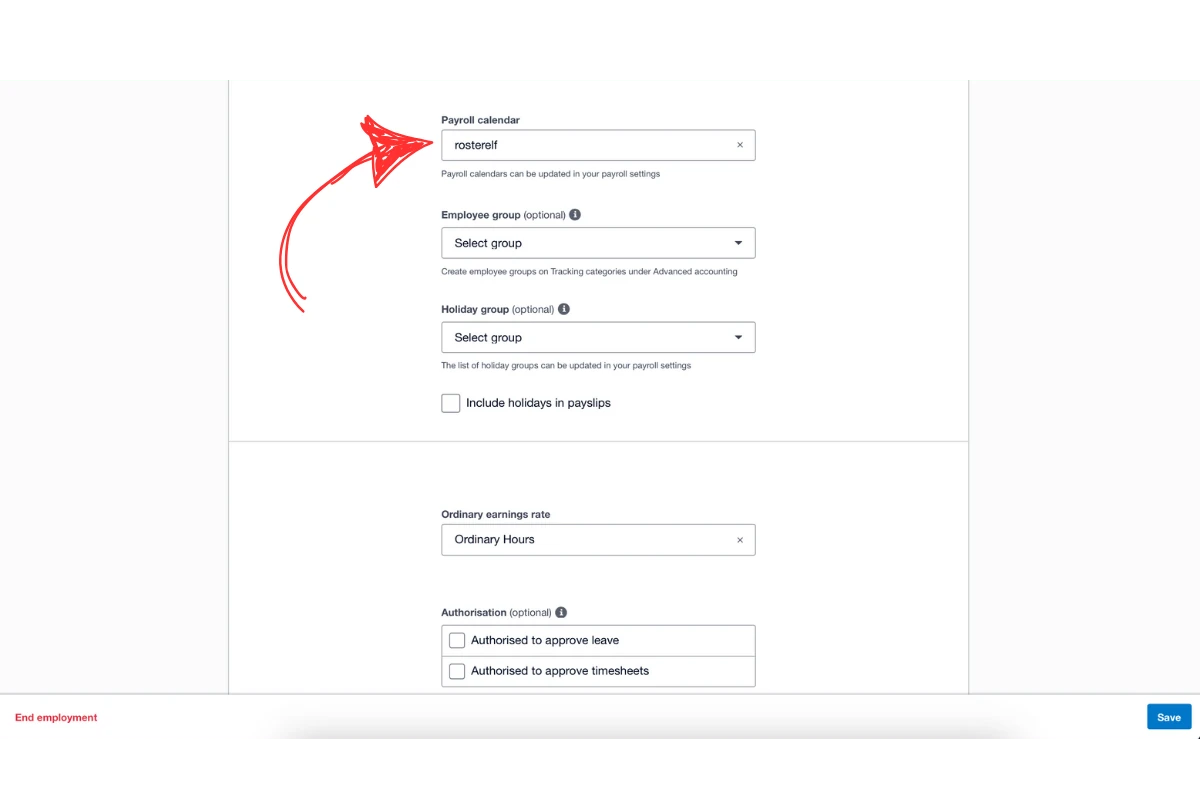
2.1.2 Go to each employee’s file and select the Employment tab.
2.1.3 Confirm that each employee’s Payroll Cycle matches the RosterElf setting (weekly or fortnightly).
Updating payroll cycles in RosterElf
2.2.1 If you prefer to use a fortnightly payroll cycle, log into RosterElf.
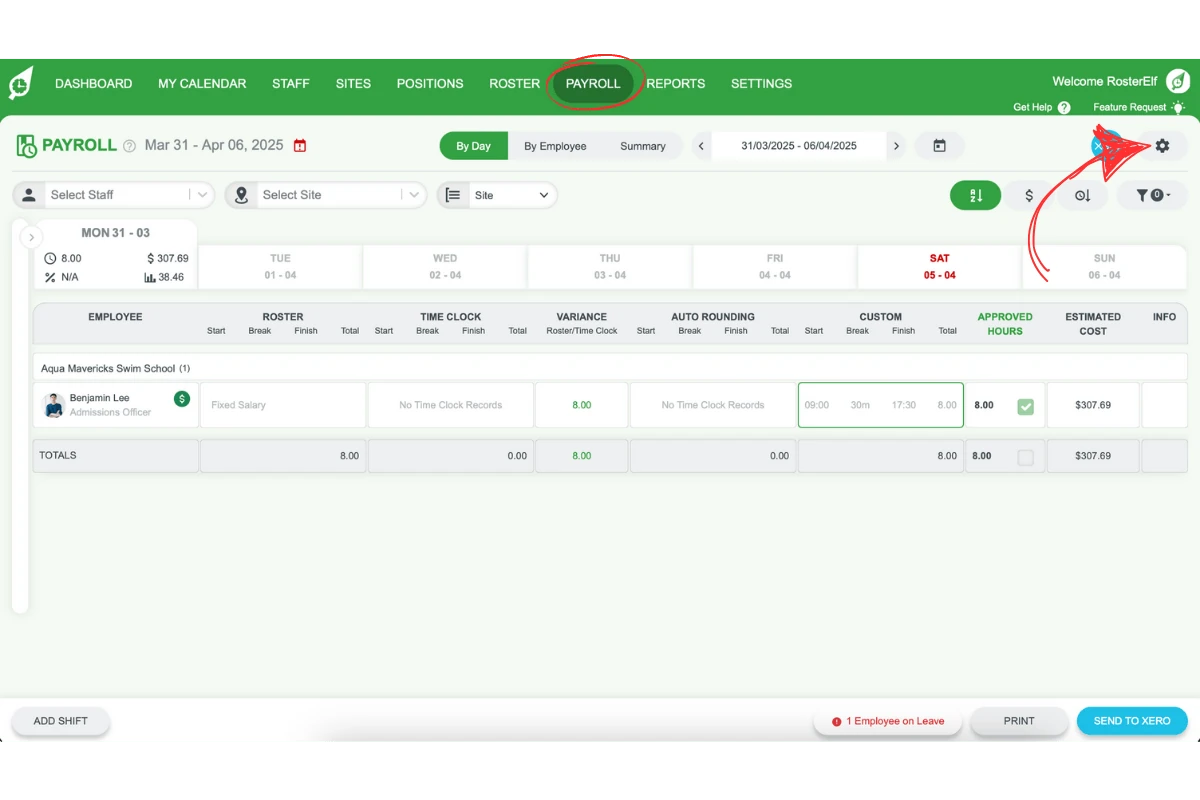
2.2.2 Go to Payroll and click the settings gear icon in the top right.
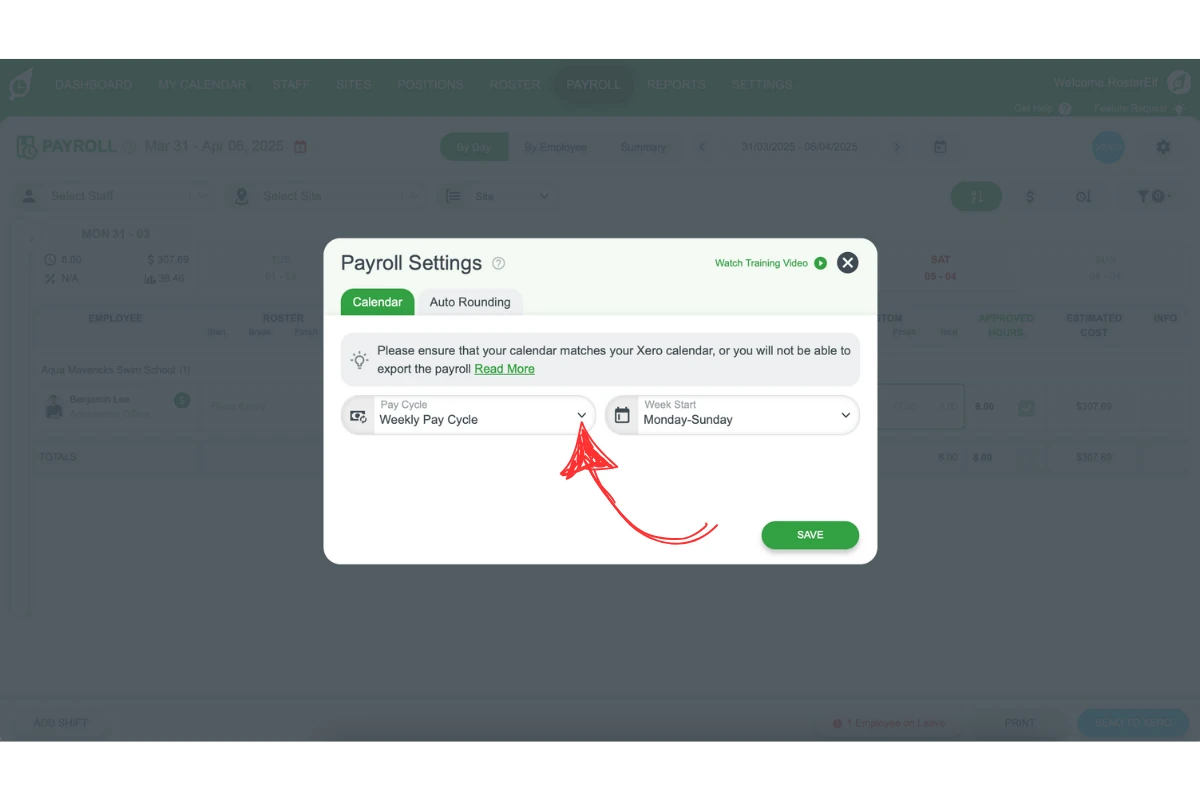
2.2.3 In the Payroll Settings modal, open the Calendar tab and select Fortnightly from the Pay Cycle dropdown to match Xero’s configuration if it differs.
2.2.4 Click Save.
Frequently asked questions
1. How do I fix a 500 Internal Server Error when sending payroll to Xero?
Refresh the Xero connection first. Go to Settings > Payroll, click the green refresh arrow beside Payroll Entity, follow the prompts to reconnect, then send your payroll again. See refresh Xero connection.
2. How do I fix "You don't have permission to send timesheets to this account"?
Check whether permissions changed in Xero recently: you need Standard or Adviser access with Payroll Admin. Then refresh the connection from Settings > Payroll (the green refresh arrow beside Payroll Entity) while signed in as that user, and send again. See required Xero permission levels.
3. What should I do if I get an invalid EmployeeID error in RosterElf and Xero?
This error happens when employee details don’t match between RosterElf and Xero. Check for spelling or case differences between platforms. Duplicate employee records in Xero may also cause this issue. Remove the duplicate in Xero and contact RosterElf support to manually disconnect the error.
4. How do I fix a payroll cycle mismatch between RosterElf and Xero?
Ensure both RosterElf and Xero are set to the same payroll cycle. If Xero has different payroll calendars, make sure all staff are aligned with the same cycle. Follow the payroll cycle solution guide for detailed steps. Learn more about Xero payroll integration.
5. Why am I seeing a missing earnings rate error in Xero?
The Missing Earnings Rate error occurs when payroll data from RosterElf doesn’t match the pay items assigned in Xero. Verify that the same pay items are configured in both platforms, especially after pay rate or award changes.
6. How do I resolve the missing pay calendar error in Xero?
This error occurs when the required pay calendar is not set up in Xero. Fix this issue by updating your pay calendar settings in Xero, or follow the missing pay calendar solution guide for step-by-step instructions.
7. What is the TrackingItemID required for timesheet lines error in Xero?
This error appears when timesheet lines lack a required TrackingItemID. To resolve this, ensure each timesheet line has a valid TrackingItemID. Refer to the TrackingItemID solution guide for further assistance.
8. What does it mean when Xero says employees are on different pay calendars?
When Xero displays the error that employees are on different pay calendars, it means that fixed salary staff cannot be processed because they are scheduled under a different pay calendar than the one selected for payroll in RosterElf. Learn more about Xero payroll integration.
9. How can I identify the error with fixed salary employees in Xero?
You can identify the error by checking the by day filtered view in RosterElf. If a fixed salary employee is greyed out and cannot be unticked, it indicates they are on a different pay calendar.
10. How do I change the filtered view to resolve the visibility issue?
To resolve the visibility issue, switch to the by employee view. Click on the relevant field in Xero to see all period shifts by the employee, which allows you to manage payroll more effectively.
11. What steps do I take to untick salaried staff from payroll?
To untick salaried staff, switch to the by employee view, locate the salaried employees, and select the bottom box to untick all salaried staff before proceeding with payroll processing.
12. What should I do after unticking salaried staff in Xero?
After unticking the salaried staff, you can complete the payroll process. Follow the detailed payroll processing guide in Xero to ensure everything is finalised correctly.
13. Where do I fix a missing leave type or unable-to-process-leave-request error — in RosterElf or in Xero?
This is fixed entirely within Xero, not RosterElf — you need to assign the missing leave type to the employee in Xero’s Payroll settings before resending the leave request.
14. How do I fix a validation error when sending leave to Xero?
This usually means the affected employee’s Xero connection needs refreshing. In RosterElf, go to Settings > Xero Employees, then either press Reset Employee Sync to refresh every linked employee, or open the Linked tab and press Relink next to just the affected employee before resending the leave request. See sync staff list with Xero for the full steps.
15. Why does a payroll cycle mismatch error occur?
This error occurs when the payroll cycle set in RosterElf does not align with the one in Xero. For example, if RosterElf is set to weekly and Xero is set to fortnightly, a mismatch error will appear, disrupting payroll processing. Learn more about Xero payroll integration.
16. How do I check an employee's payroll cycle in Xero?
To check an employee’s payroll cycle in Xero, log in and open the employee’s file. Go to the Employment tab and review the payroll cycle setting. Ensure it matches the cycle set in RosterElf to avoid mismatches.
17. How can I fix the payroll cycle mismatch error in Xero?
To fix this error, you can either update the payroll cycle in Xero under the employee’s Employment tab or change RosterElf’s payroll cycle setting to match the cycle in Xero, ensuring compatibility.
18. Can I switch between weekly and fortnightly payroll cycles in RosterElf?
Yes, you can switch payroll cycles in RosterElf. Go to Payroll - Settings in RosterElf, and select your preferred cycle under Payroll Calendar. Ensure this cycle matches Xero to avoid errors.
19. What are the benefits of matching payroll cycles in Xero and RosterElf?
Matching payroll cycles between Xero and RosterElf prevents payroll errors, streamlines the payroll process, and ensures accurate payroll calculations, improving overall workflow efficiency.