

How to order your roster by name, cost or shift length
This article explains how to order your roster in RosterElf by name, cost, or shift length. Ordering options allow you to efficiently organise staff, site, or position details based on your current roster view, whether by staff, site, or position. Ordering helps streamline your roster, making it easy to access the information you need for effective scheduling and budgeting.
The three ordering options are unlabelled icon buttons at the top right of the roster: A-Z (name), $ (cost) and a clock (shift length).
1. Ordering the roster by name
Learn how to order your roster alphabetically by staff, site, or position. Ordering by name helps you quickly locate individuals, sites, or roles in your roster, providing an organised view that supports scheduling adjustments.
1.1 Steps to order by name
Open the roster in your current view (by staff, site, or position).
Click the A-Z icon button at the top right of the roster.
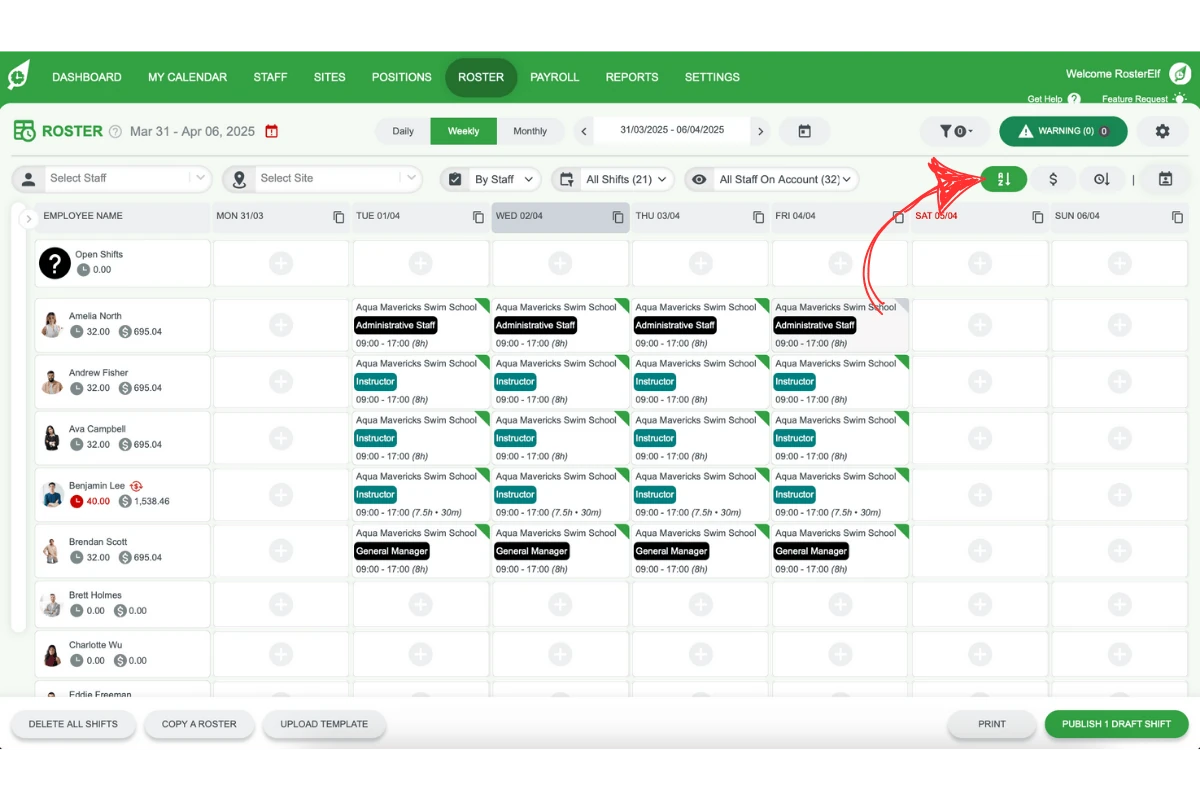
RosterElf will automatically arrange the roster alphabetically (A-Z) by name.
2. Ordering the roster by cost
Find out how to organise your roster by cost to identify the highest to lowest cost by staff, site, or position. Ordering by cost gives a clear view of staffing expenses, helping you stay within budget while managing resources effectively.
2.1 Steps to order by cost
Open the roster in your current view (by staff, site, or position).
Click the $ icon button at the top right of the roster.
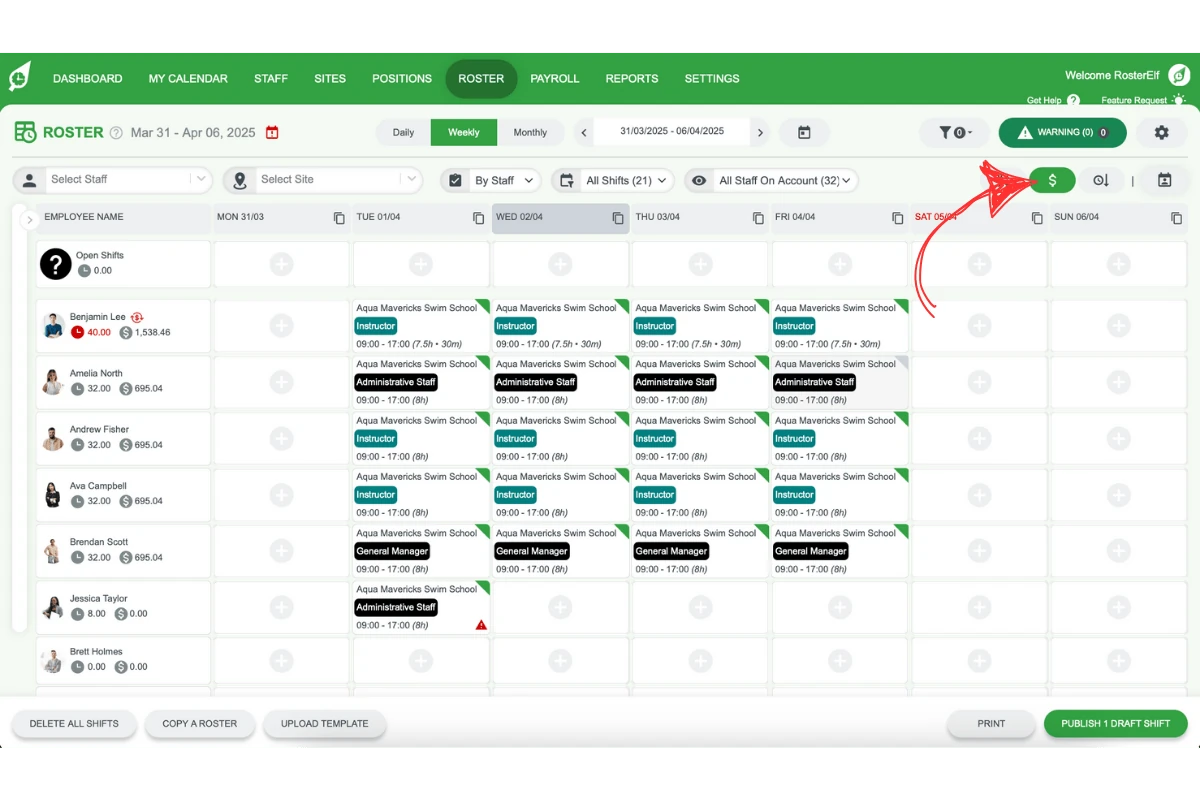
RosterElf will arrange the roster, listing the highest to lowest cost.
3. Ordering the roster by shift length
This section explains how to order the roster by shift length. Ordering by shift length puts the people with the most rostered hours at the top, allowing you to balance workloads or make scheduling adjustments where necessary.
3.1 Steps to order by shift length
Open the roster in your current view (by staff, site, or position).
Click the clock icon button at the top right of the roster.
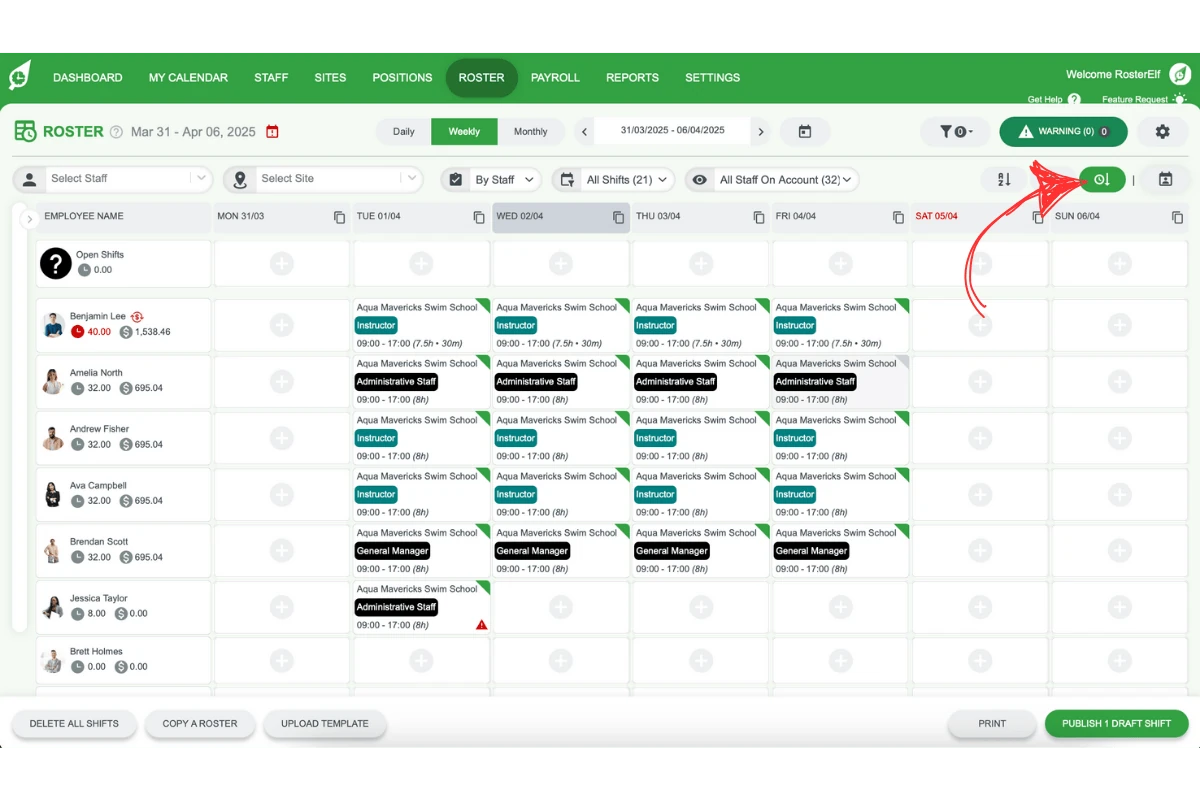
RosterElf will order the roster by each person’s total rostered hours, most first.
Frequently asked questions
1. How do I order my roster by name in RosterElf?
To order your roster by name in RosterElf, open the roster in your selected view (staff, site, or position), click the A-Z icon button at the top right, and RosterElf will arrange the list alphabetically (A-Z).
2. Can I order my roster by cost to manage my budget?
Yes, RosterElf allows you to order the roster by cost. Open the roster in your chosen view, click the $ icon button at the top right, and RosterElf will organise the roster from the highest to the lowest cost, helping you manage expenses.
3. How can I organise my roster by shift length in RosterElf?
To order by shift length, open the roster in the desired view and click the clock icon button at the top right. RosterElf orders people by their total rostered hours, most first, helping with workload distribution.
4. Is it possible to view my roster by staff, site, or position in RosterElf?
Yes, RosterElf offers the flexibility to view and order your roster by staff, site, or position, allowing you to focus on the specific area you want to manage or adjust.
5. What are the benefits of ordering the roster in RosterElf?
Ordering in RosterElf helps streamline your scheduling process, letting you organise by name, cost, or shift length to find information quickly, optimise your budget, and ensure balanced shifts.