

Monitoring late staff using the RosterElf time clock
This guide explains how to monitor staff attendance and identify late employees using the RosterElf Time Clock app. It covers logging in, interpreting colour-coded statuses, and using the dashboard for efficient management. By following these steps, you can quickly spot late arrivals and improve overall accountability for shift management.
Below, you will learn to recognise different banner colours on the dashboard, check for real-time updates, and address lateness as needed. Continue reading to see how the Time Clock helps you maintain a punctual workforce.
1. Identifying late staff on the dashboard
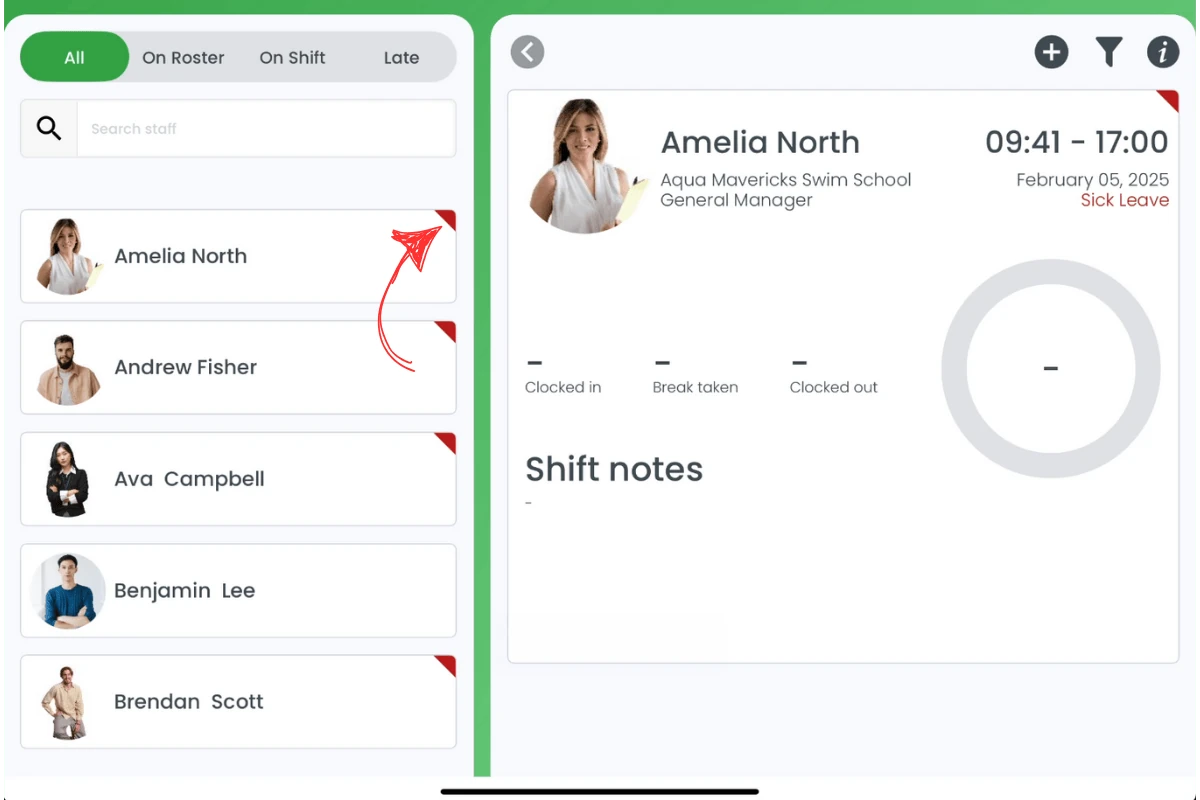
The RosterElf Time Clock dashboard uses colour-coded banners to display employee statuses. Thus, you can quickly identify staff who are late and follow up accordingly.
1.1 understanding the colour codes
1.1.1 Red banners indicate employees who are late.
1.1.2 Green banners indicate employees who are clocked in on time.
1.2 using the dashboard for efficient monitoring
1.2.1 Regularly check the dashboard for real-time employee status updates.
1.2.2 Identify late arrivals using the red corner flags, or open the Late tab, and follow up as needed.
Frequently asked questions
1. How do I identify late employees on the Time Clock app?
A red corner flag on the card, and “Late for Clock In” on the shift, indicate employees who are late. The Late tab lists only late staff. Check these regularly to track late arrivals.
2. How does the dashboard help with managing lateness?
The dashboard provides real-time updates, using colour-coded banners to show which employees are late, clocked in, or on a break.
3. Can I notify employees about being late through the Time Clock app?
The Time Clock does not directly notify employees, but you can use the dashboard information to contact them promptly.
4. What if an employee's lateness is not recorded accurately?
Ensure the employee clocks in correctly. If issues persist, check for technical problems or verify shift start times in the roster.
5. Can I generate reports to review late arrivals over time?
Yes, RosterElf allows you to generate attendance reports, including details on late arrivals. Use these to identify trends and address recurring lateness.