

For businesses with variable staffing needs, budgeting staff rosters based on revenue forecasts can help manage costs effectively. This approach is particularly beneficial for industries like hospitality and retail, where revenue fluctuates daily or seasonally. By forecasting revenue before publishing a roster, business owners can use RosterElf to calculate labour costs as a percentage of revenue. This method supports profitability by allowing dynamic roster adjustments to align with projected income.
This article explains how to set up revenue-based budgeting in RosterElf, including examples and tips on choosing the right forecasting period for your business. Learn how to forecast by day, week, or month to suit your needs, ensuring effective workforce management.
1. Setting a revenue forecast
To start budgeting based on revenue, first decide whether your revenue forecast will be daily, weekly, or monthly. The forecast period should align with your roster period in RosterElf for accurate calculations. This section guides you through setting up a forecast, with tips on adjusting your roster based on forecasted revenue.
1.1 Unhide financial summary in RosterElf
If it is hidden, click the arrow at the left edge of the roster to open the Financial Summary.
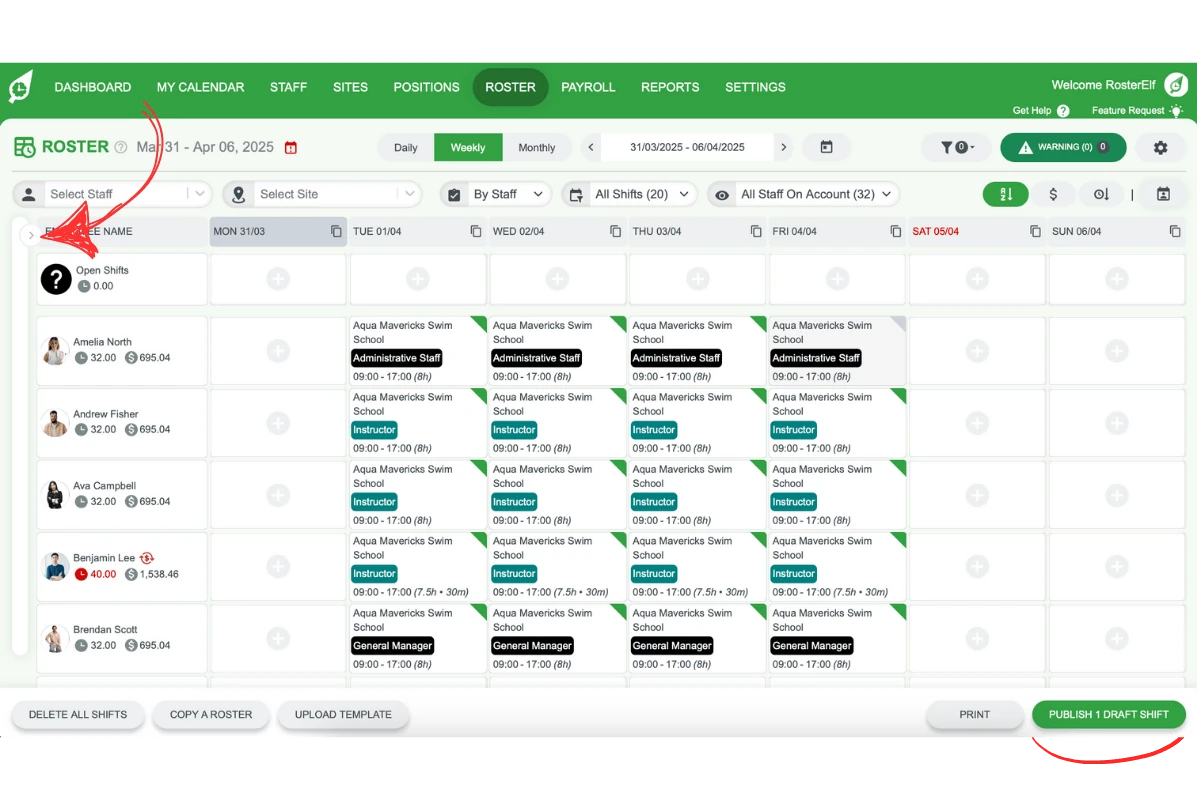
Ensure the roster period aligns with your chosen revenue forecast period.
1.2 Enter revenue forecast and update
Type the forecasted revenue amount in the Revenue field at the top of the Financial Summary. The field appears in the Daily, Weekly and Monthly views.
Click Update to apply the forecast.
The Financial Summary panel will display the labour cost percentage of the forecasted revenue.
2. Choosing a revenue forecast period
Choosing the right forecast period—daily, weekly, or monthly—depends on how granular you need your revenue estimates to be. Consider your industry’s revenue trends and decide whether forecasting by day, week, or month will help balance labour costs accurately.
2.1 Benefits of daily forecasting
Best for businesses with daily fluctuations in revenue, like hospitality.
Allows adjustment based on specific day trends, such as higher weekend traffic.
2.2 Weekly and monthly forecasting options
Weekly Forecasting: Ideal for businesses needing weekly revenue insights to monitor changes in busier or quieter weeks.
Monthly Forecasting: Suitable for businesses with consistent revenue and staff needs over a month.
With weekly or monthly forecasting, RosterElf averages the revenue across days or weeks for proportionate calculations.
Note
When assigning a staff member to a shift, the rate shown is an average rate based off all the pay items activated for that shift.
Frequently asked questions
1. How do I set up a revenue forecast in RosterElf?
To set up a revenue forecast in RosterElf, first choose your forecast period: daily, weekly, or monthly. Ensure this period aligns with your roster period. Then, enter your forecasted revenue amount in the Revenue field of the Financial Summary and click Update. This will display labour cost as a percentage of revenue in the Financial Summary panel.
2. Why should I use a daily revenue forecast for my roster?
Daily forecasting is ideal for businesses with fluctuating daily revenue, such as those in hospitality. It allows adjustments based on specific day trends, helping you optimise staffing for peak times, like weekends.
3. Can I budget my staff roster weekly or monthly in RosterElf?
Yes, RosterElf supports both weekly and monthly revenue forecasts. Weekly forecasting helps you adjust staffing for varying weekly patterns, while monthly is best for consistent revenue trends. RosterElf averages revenue across the selected period for proportionate calculations.
4. How does RosterElf calculate labour cost as a percentage of revenue?
RosterElf calculates labour cost as a percentage of the revenue you enter in the forecast. Once updated, the Financial Summary panel shows the labour cost percentage, helping you align staffing expenses with projected revenue.
5. What industries benefit from revenue-based staff budgeting?
Revenue-based staff budgeting is beneficial for industries with variable revenue, such as retail and hospitality. This method allows businesses to adjust rosters according to expected income, supporting effective cost management and profitability.