

Shift swap feature in RosterElf
RosterElf’s Shift Swap feature enhances scheduling flexibility and efficiency by letting employees offer up a shift for another qualified, available team member to pick up. RosterElf automatically finds and lists the eligible candidates, but a manager still reviews them and confirms who gets the shift — see managing shift swaps and open shifts from a browser for that step. This reduces errors and saves time compared to arranging swaps manually, while keeping a manager in control of the final decision.
1. Benefits of shift swaps
Shift swaps offer a range of benefits for both employees and managers. This section explores how shift swaps improve employee autonomy, reduce administrative workload, and prevent scheduling errors — while a manager still confirms the final outcome.
1.1 employee autonomy and satisfaction
1.1.1 Shift swaps let employees offer up a shift instead of needing a manager to rearrange the roster from scratch.
1.1.2 Increased control can lead to better job satisfaction and work-life balance.
1.2 efficiency in shift management
1.2.1 RosterElf automatically surfaces eligible candidates, saving managers the time of working this out manually.
1.2.2 Reduces administrative tasks and speeds up the review process — managers still select and confirm who gets the shift.
1.3 reduced scheduling errors
1.3.1 RosterElf only lists candidates who match the shift’s site, position, and availability.
1.3.2 Minimises errors or scheduling conflicts.
2. How to activate or deactivate shift swaps
This section provides step-by-step instructions for enabling or disabling the Shift Swap feature in RosterElf. Activating shift swaps allows employees to manage their own schedules, while deactivating it returns control to managers.
2.1 access roster settings
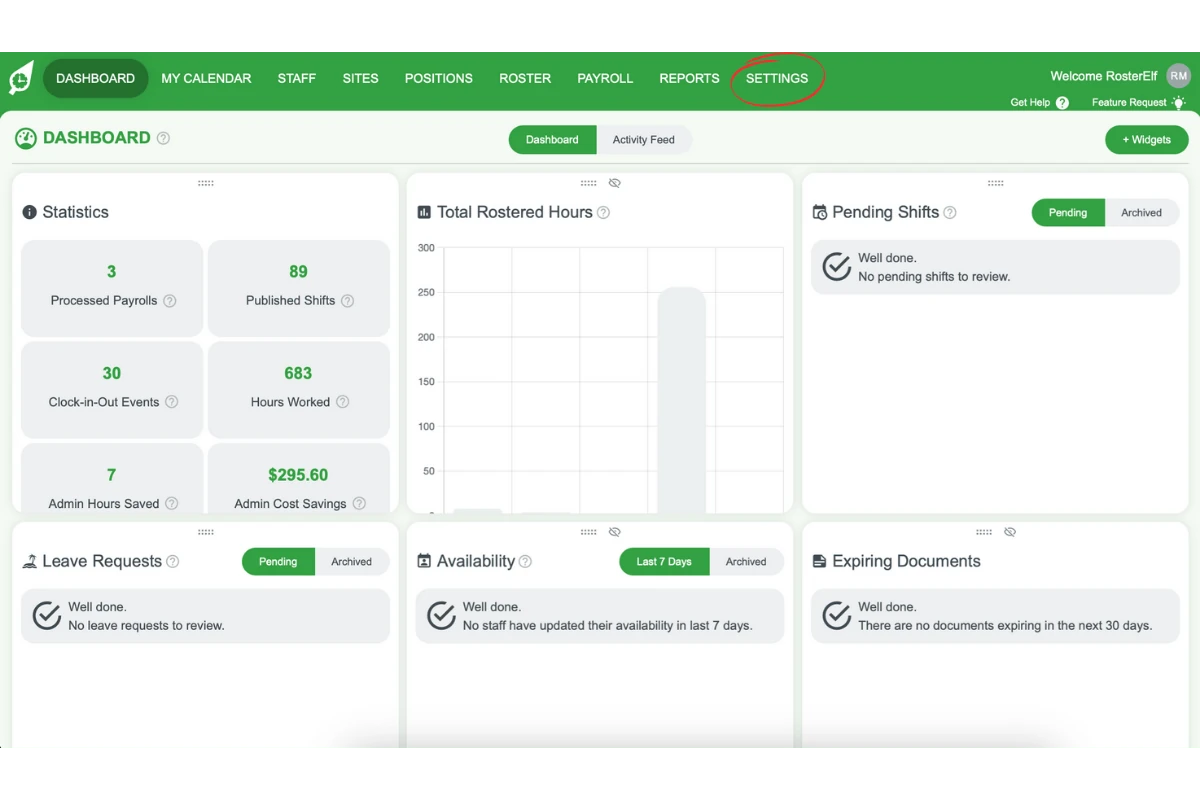
2.1.1 Click the Settings tab on the top menu.
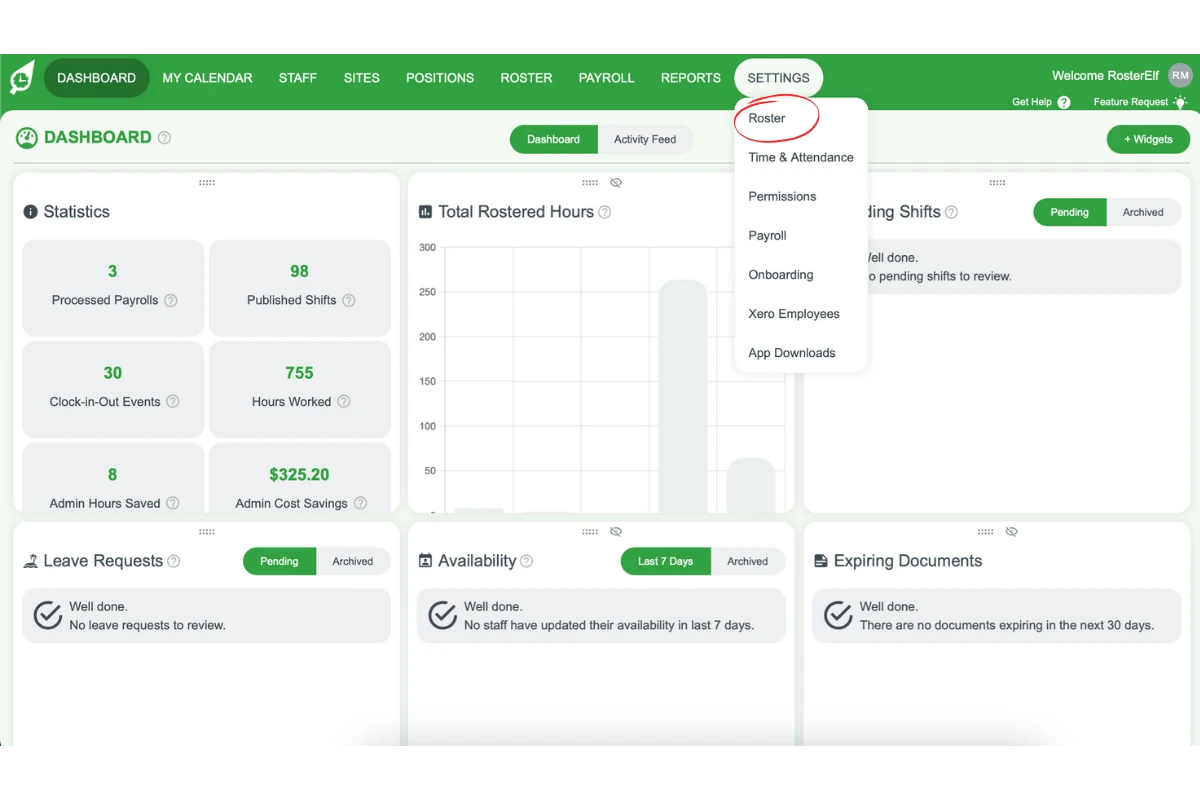
2.1.2 Select Roster from the dropdown.
2.2 activate or deactivate shift swaps
2.2.1 Use the toggle button to turn Shift Swaps on or off.
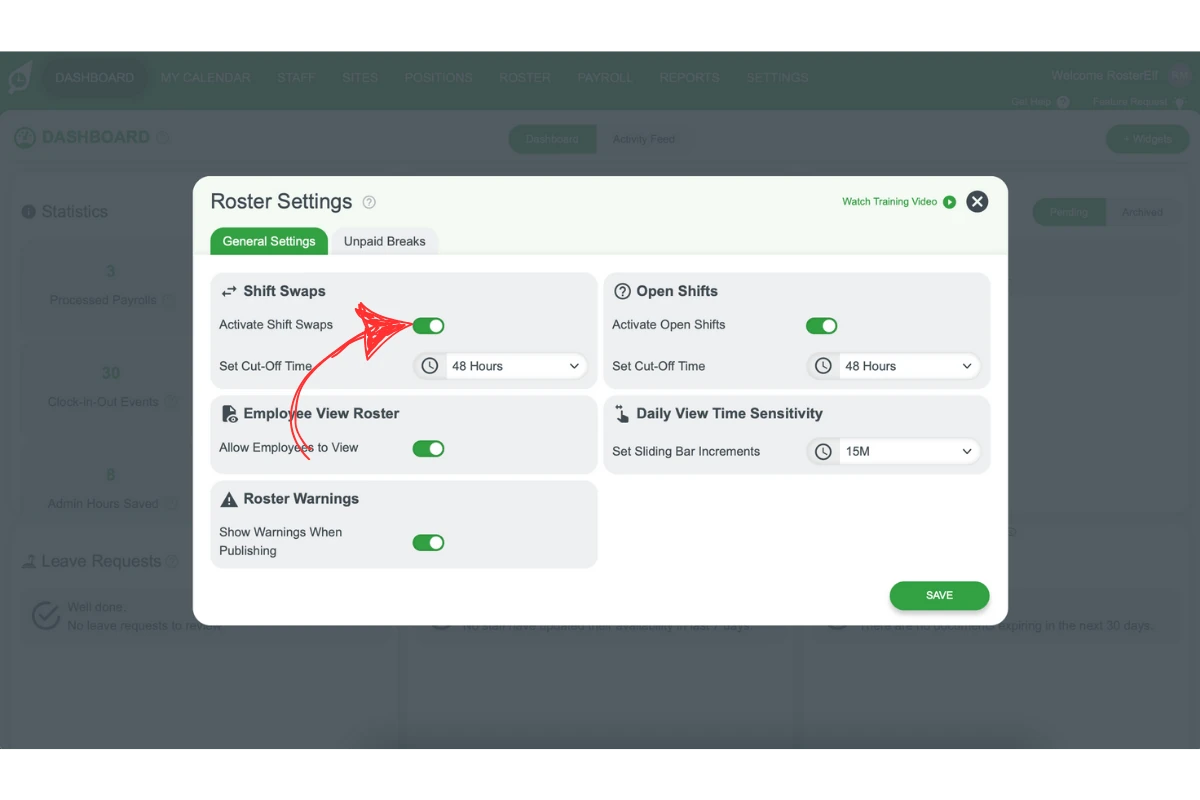
2.2.2 Green indicates activation, while grey shows deactivation.
Note
If you cannot offer up a shift, this may be due to the cut-off time setting. Check with your manager to understand the shift swap cut-off time policy for your organisation.
Frequently asked questions
1. What is the Shift Swap feature in RosterElf?
RosterElf’s Shift Swap feature lets employees offer up a shift to be picked up by another qualified team member, then a manager reviews the eligible candidates and selects who gets it. See managing shift swaps and open shifts from a browser for that review step.
2. Does an employee's shift swap request need manager approval?
Yes. RosterElf automatically finds and surfaces eligible candidates for a swap, but a manager still reviews them and clicks Select and Notify to confirm who gets the shift — see managing shift swaps and open shifts from a browser. This is different from open shifts, which have a separate, optional Auto approval toggle that lets staff claim the shift instantly without a manager step — see add open shift with auto-approval. Shift swaps themselves don’t have this auto-approval option.
3. Can managers deactivate the Shift Swap feature?
Yes. Managers and above can deactivate the Shift Swap feature in RosterElf. By navigating to the Settings tab, they can toggle shift swaps on or off based on scheduling needs.
4. How does the Shift Swap feature reduce admin work for managers?
RosterElf automatically identifies and lists eligible candidates for a swap, so managers don’t have to manually work out who’s available — they just review the list and select who gets the shift, which speeds up the process compared to arranging swaps manually.
5. What happens while an employee's shift swap request is waiting for a decision?
The request stays pending until a manager selects a candidate and confirms it — see managing shift swaps and open shifts from a browser. RosterElf only shows eligible, qualified team members as candidates, which helps reduce errors.
6. Can I stop just one admin or manager from receiving shift swap notification emails?
No, this isn’t currently supported. Shift swap notification settings apply account-wide rather than per admin or manager — there’s no way to opt a single person out while keeping notifications on for everyone else.
7. What makes a team member "eligible" for an automatic shift swap?
RosterElf checks six criteria before matching a team member automatically: they must be assigned to the shift’s site, assigned to the shift’s position, have availability that covers the full shift time, not already have another shift at that time, not be on approved leave, and have an active status. Only staff meeting all six are notified automatically — see Add open shift with auto-approval for full details.