


Staff clocking in system for payroll-ready timesheets

Still chasing paper timesheets on payday? Staff clock in on a shared tablet or their phone, you approve the hours against the rota, and they go straight to Xero Payroll UK.
-
4.9★ on Xero, Xero’s top-rated rota add-on
-
From A$6 per employee a month (about £3.04), billed annually in AUD
-
Free onboarding: we help move your data across
Time and attendance software trusted by 30,000+ workplaces
From independent cafés to national retail chains, UK businesses rota, pay and manage their teams with RosterElf.


Clock in, check and approve this week’s hours
Staff clock in on a shared tablet or their phone, you check the hours against the rota, and approved timesheets go to payroll.
-
Clock in
On the site’s tablet with a PIN, or on their phone once they’re on site. A selfie too, if you switch it on.
-
Check
Clocked times sit beside the rota for every shift, with late reasons and breaks.
-
Approve & export
Pick the right times, save the week, and send it to Xero or a CSV.
On the venue tablet
A shared iPad or Android tablet by the door. Staff confirm it’s them with their 4-digit PIN.
Animated demo of the RosterElf tablet time clock: a bar attendant taps her name on the venue's tablet, taps her shift and Clock in, enters her 4-digit PIN and a reason for being four minutes late, takes a selfie for photo proof, and is clocked in.
1 of 4 · Tap your name
On their own phone
Their phone, once they're inside the site's GPS radius.
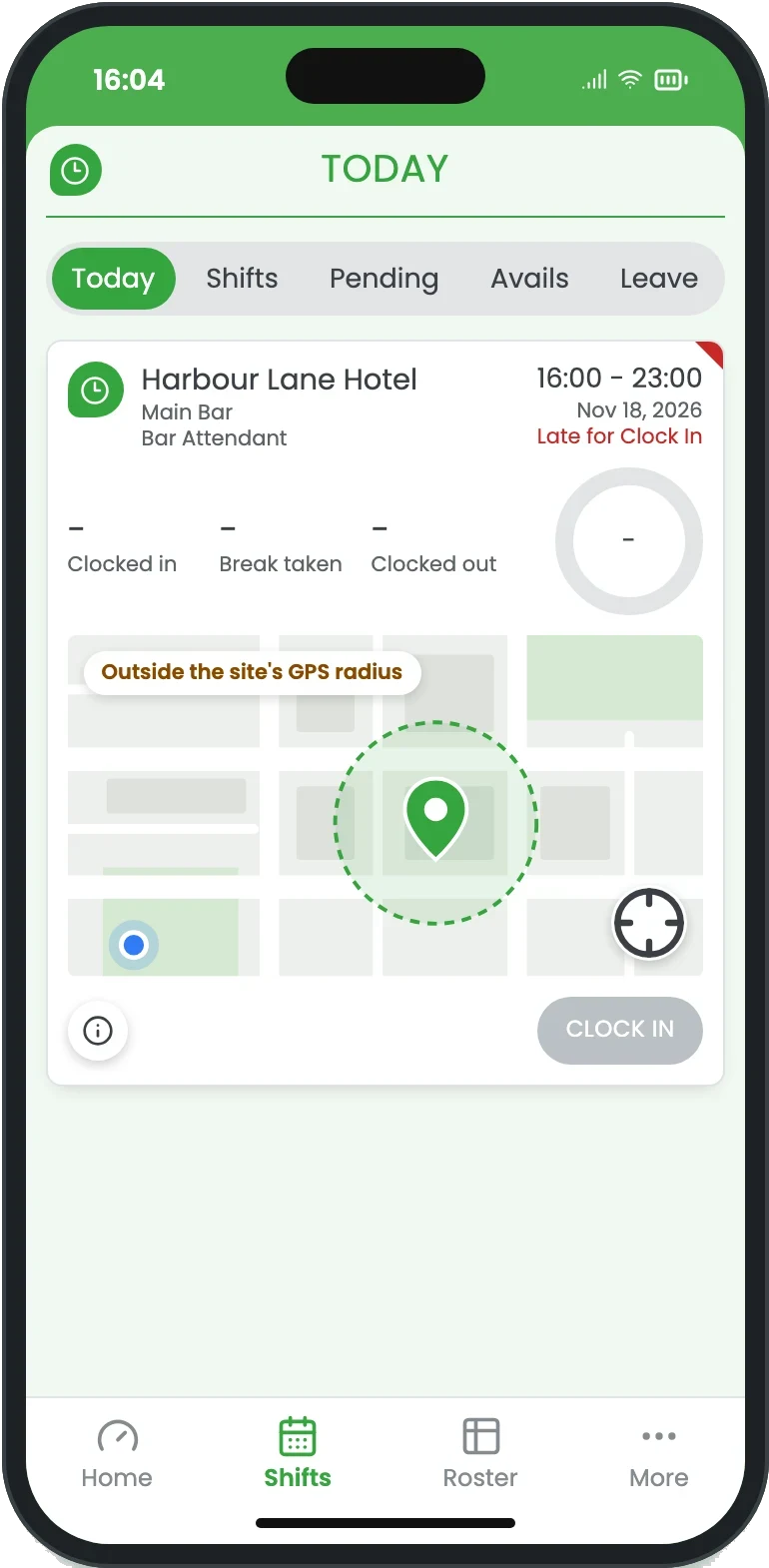
Animated demo of clocking in on the RosterElf staff app: a bar attendant arrives inside her venue's GPS radius, taps Clock In on today's shift, gives a reason for being four minutes late, takes a selfie for photo proof, and her shift card shows Clocked In with Start Break and Clock Out.
1 of 4 · Arrive on site
An employee clock in app that only works on site
Staff clock in from the RosterElf app against their shift on the rota. You set a distance around each site, and outside it the Clock In button stays disabled, so nobody clocks in from home or on the way in.
-
A distance for each site: set the GPS tolerance to suit a small café or a big site
-
Location at clock-in and out: recorded only when staff clock in, start or end a break, or clock out, never continuously
-
The exact spot: add a Plus Code to pin each site
-
iPhone and Android: the same app staff use for their rota

Turn any tablet into a clocking in machine
Put an iPad or Android tablet by the door. Staff pick their name, enter their 4-digit PIN and, if you switch it on, take a selfie. Clock in outside your time tolerance and they’re asked for a reason.
-
iPad or Android: download the RosterElf Time Clock app and sign in to a site
-
A PIN for each person: staff confirm it’s them with their own 4-digit PIN
-
Breaks on the same screen: start and end a break with the same PIN
-
Kiosk mode: lock the iPad to the time clock with Guided Access

Stop buddy clocking with a photo at clock-in
Switch on photo proof for a site and staff take a quick selfie at every clock event: clock in, breaks and clock out. The photo is kept with the time record, so one person can’t clock in for another without it showing.
-
Site by site: turn it on where you need it, leave it off where you don’t
-
Every clock event: clock in, start and end of a break, clock out
-
Kept with the hours: review the photos against the time record
-
Optional: no photo needed at sites where you trust the team

Decide what counts as on time
How close, how early or late, and how it’s proved: set the rules site by site. A minute either way, across a rota and a year, is the difference between a timesheet that matches what was worked and one that gets argued over.
-
How close: how far from the site a clock-in may be
-
How early or late: the minutes either side before staff give a reason
-
How it’s proved: whether a selfie is needed at each clock event
-
Which device: phone and tablet, or the site’s tablet only
See who’s in, late or on a break, live
The live time clock shows every shift on the rota as it happens: who’s in, who’s on a break, who’s clocked out and who’s late, at every site. A late start gets a red flag, and the Late tab lists them all.
-
Every status: late, in, on a break, out or left early
-
Late flags: a red flag and a Late tab for anyone who hasn’t clocked in
-
Every site: filter the time clock by site, or see them all
-
On your dashboard: add the live time clock widget

Break tracking: breaks as they’re taken, not as planned
Staff start and end their breaks on the time clock with their PIN, and a selfie if photo proof is on. The clocked break sits on the timesheet beside the planned one, and the staff break report lists every break taken, so a shift over six hours without a 20-minute break is easy to find.
-
Start and end a break: on the tablet or in the app
-
Planned against taken: the break on the rota beside the clocked one
-
Staff break report: filter by date, site and staff member
-
Paid or unpaid: you set which breaks are paid

Rota against actual, approved in one pass
Every shift shows its times on the rota beside the time clock. Click the one that’s right, or type a custom start, break and finish, then save the row or the whole week. Untick anything you don’t want exported.
-
Rota beside time clock: for every shift, with auto rounding if you use it
-
Shifts not on the rota: add them in payroll, or let staff add them on the clock
-
Save all: approve the whole week at once
-
Every edit logged: the activity feed shows who changed what, past shifts included
Payroll integration: no new payroll to switch to
RosterElf isn’t another payroll system to learn. Approved timesheets go to Xero Payroll UK with your pay rules applied, and a CSV covers everything else. Xero still works out PAYE, National Insurance and pension contributions.
-
Xero: approved timesheets sent to a draft pay run in Xero Payroll UK
-
Your pay rules: overtime, unsocial hours and bank holiday rules already applied
-
Any other payroll: export a CSV, which opens in Excel too
-
Nothing re-keyed: the hours you approve are the hours that get paid
 Xero
Labour cost against sales, before you approve the week
Every shift is costed from the employee’s pay rules. Add your weekly or daily sales in the payroll summary and you see labour cost as a percentage of sales, so a week that ran over shows up while you can still ask why.
-
Every shift costed: from each employee’s pay rules, overtime and unsocial hours included
-
Weekly or daily sales: type the revenue into the payroll summary, for the week or day by day
-
Labour cost as a % of sales: wages beside what you took, site by site
-
Plan ahead: set revenue forecasts on the rota before the week starts
Reports, staff timesheets, sites and more
AI assistant
Ask Claude, ChatGPT or Gemini for last month’s timesheet costs, or who changed a shift and when.
The RosterElf AI assistantStaff timesheets
Let staff record and submit their own hours, for you to accept or amend.
Let staff submit timesheetsAuto rounding
Round start, break and end times to your rules, shown beside the clocked times.
Set up auto roundingSick days and holiday
Record a sick day from the time clock, and send approved holiday to Xero with the timesheets.
Record staff as sickEvery site, one payroll
Each site has its own clock-in rules. Filter the time clock by site, or see them all.
Filter between sitesActivity log
Who created, changed or deleted a shift and when, past shifts included. Admins only.
What gets recordedClock in from a browser
No tablet? Staff can clock in and out on a computer, inside the site’s distance.
Clock in from a browserSee how UK businesses run their rotas on RosterElf
 Painting and decorating · Musselburgh, Scotland
Holidays and scheduling time has been halved.
 Security · Bedford, England
Fewer errors on rosters.
Switching or starting fresh? We’ll set you up.
On Deputy, Planday, PARIM, a clocking in machine or paper timesheets? Send us what you have and we’ll help move your staff, pay rates and sites across, and set up your time clock and pay settings with you. Free onboarding on every plan.
Simple pricing, no hidden add-ons
One price per employee a month. Setup help included on every plan.
Core
Rota and time & attendance
Payroll-ready timesheets to Xero Payroll UK
about £3.04
per employee a month, billed annually
Start free trialFull Suite
Everything in Core, plus HR
Onboarding, contracts, policies & documents
about £3.54
per employee a month, billed annually
Start free trialAnnual prices in Australian dollars for each active employee, whether or not they log in. Prefer to pay monthly? A$8 Core, A$10 Full Suite. All plans on the pricing page.
Prices are in Australian dollars. We bill every customer in A$, wherever they are. The GBP figures are a guide only, converted at A$1 = £0.5063 on 25 Nov 2026; your bank sets the rate actually applied, so your statement will differ slightly.
A$6.00 – A$10.00 ≈ £3.04 – £5.06 per user / month, across all plans
Time and attendance software questions
For anything else, get a quick answer 24/7, or book a call with our Australian team.
- A clocking in system records when each member of staff starts work, takes a break and finishes, and turns those times into timesheets for payroll. RosterElf's clocking in system runs on staff phones, with GPS checking they are at the site, or on a shared iPad or Android tablet with a PIN, and sends approved hours to Xero.
- Time and attendance software records when staff actually start, stop and take breaks, then turns those clock-ins into approved timesheets for payroll. In the UK it doubles as your evidence file: the Working Time Regulations expect adequate records of hours, and minimum wage rules expect you to prove the rate paid for the hours actually worked. What UK employers must record →
- A clocking in system captures the moment someone starts or finishes — on a shared tablet at the door or on their own phone. Timesheet software is what happens next: the hours are checked against the rota, approved by a manager and sent to payroll. RosterElf does both, so the timesheet is built from the clock-in rather than typed up afterwards.
- Use a tablet kiosk where everyone starts at one fixed place — a shop, café, warehouse or care home. Use the mobile app with GPS geofencing for staff who start at client sites, such as security officers, cleaners or decorators. Most multi-site employers run both, and every clock-in lands in the same timesheet.
- Choose your clock-in methods, set tolerance windows for early and late clock-ins, decide whether photo or GPS checks apply to each site, and configure how breaks are recorded. Setting up time and attendance →
- Missed clock-ins show on the live time clock as Late or No Show, so a manager can follow up the same day. Missing clock-outs are the classic cause of a twelve-hour shift that never happened; at approval the scheduled and clocked times sit side by side, so the manager sets the right time before the timesheet reaches payroll.
This week’s timesheets, approved in minutes.
Free for 15 days. No credit card. Real people to set you up and move your data.
No credit card 4.7 stars from 324 reviews on Google, Xero and G2 30,000+ workplaces