
Staff ignore WhatsApp rosters because the app was built for chatting with friends, not managing shifts. Roster photos get buried under other messages within minutes, busy group chats get muted, and there’s no way to see who has actually read their shift. The fix is a purpose-built mobile rostering app that gives each person their own shift view, sends targeted push notifications when anything changes, and confirms who has seen the roster.
You post the roster in the WhatsApp group. Twenty minutes later, someone asks “Am I working Saturday?” The roster image is already buried under memes, lunch orders, and a debate about whose turn it is to close.
If this sounds familiar, you’re not alone. Many Australian shift-based businesses use WhatsApp or Facebook Messenger to share rosters because it’s free and everyone already has it. But personal messaging apps were never designed for workforce management — and the cracks show quickly. Here’s why staff ignore WhatsApp rosters, what it’s actually costing your business, and what a mobile rostering app does differently.
Why WhatsApp fails for roster communication
WhatsApp is great for chatting with friends. It’s terrible for communicating rosters. Here are the specific reasons staff miss, ignore, or can’t find roster information sent through personal messaging apps.
1. Rosters get buried in the chat
A WhatsApp group is a single stream of messages. The roster image you posted at 3pm is invisible by 5pm if the group is active. Staff have to scroll back through dozens of unrelated messages to find it — and most won’t bother. Unlike a dedicated rostering app where shifts are always front and centre, WhatsApp treats your roster like any other message.
2. Staff mute the group
When a work group chat pings 50 times a day with non-roster messages, staff mute it. Once muted, they stop checking regularly. Your roster update competes with every other message in the group — and silence wins. Most people mute busy group chats within weeks of joining them.
3. No way to know who's seen it
WhatsApp’s blue ticks tell you a message was “read” — but in a group chat, you can’t see which specific members have opened the roster image. You have no idea if your new casual has seen their Saturday shift or if they’re going to be a no-show. With a rostering app, managers get shift-specific delivery confirmation.
4. Roster photos are hard to read
Most WhatsApp rosters are photos of a spreadsheet or a whiteboard. Staff need to zoom in, find their name, work out their hours, and remember the details. There’s no tap-to-view-my-shifts experience. A mobile rostering app shows each person only their own shifts with start times, locations, and role details — no hunting required.
5. Changes don't reach everyone
When you update the roster, you post a new photo. But staff who already saw the first version don’t know what changed. Did their shift move? Was a new shift added? Without targeted push notifications highlighting exactly what changed, updates get missed and confusion follows.
6. Work and personal life collide
Staff check WhatsApp to message friends and family — not to check their work schedule. Mixing the two creates friction. Some employees resent getting work messages on their personal app. Others simply don’t associate WhatsApp with “work” and forget to check the group. A separate work app creates a clear boundary.
The real cost of missed roster messages
When staff don’t see the roster, the consequences hit your business directly.
What missed roster messages cost you
- No-shows
Staff don’t turn up because they didn’t see their shift. You scramble to find cover or run understaffed.
- Wrong-shows
Staff arrive at the wrong time or location because they read an outdated roster version.
- Manager time wasted
Hours spent on follow-up calls and texts confirming shifts that should have been seen.
- Staff frustration
Employees blame “bad communication” and disengage. Turnover increases.
- Compliance risk
No audit trail of when rosters were published or acknowledged. Risky if a Fair Work dispute arises.
These aren’t hypothetical problems. For a business with 20 shift workers, even one no-show per week caused by a missed WhatsApp message can cost thousands in agency cover, overtime, and lost productivity over a year.
The privacy and record-keeping risks people miss
Beyond missed shifts, running rosters through a personal messaging app quietly creates risks that most managers never think about until something goes wrong. WhatsApp isn’t a workforce record — it’s a consumer chat app — and that distinction matters when a pay dispute, complaint, or Fair Work request lands on your desk.
Three risks hiding in your group chat
- No reliable audit trail
Australian employers must keep accurate records of what staff were rostered and worked. A stream of roster photos in a chat that anyone can delete, edit-and-repost, or lose when they change phones is not a defensible record if a Fair Work records request or rostering dispute arises.
- Personal data on a personal app
Names, phone numbers, availability, and sometimes health-related leave reasons end up stored on staff members’ personal devices and a third-party consumer platform you don’t control — a privacy exposure most businesses would never accept for other employee data.
- Everyone sees everything
In a group chat, the whole team can read who’s working when, who called in sick, and who swapped out. Individual shift visibility keeps each person’s schedule private and professional.
A dedicated rostering platform closes all three gaps. Every published roster and change is timestamped and stored as a proper business record, employee data stays inside a system you control rather than on personal phones, and each staff member sees only their own shifts. If you want to understand your obligations in detail, our guide to record-keeping standards in Australia and the Fair Work Ombudsman glossary entry are good starting points.
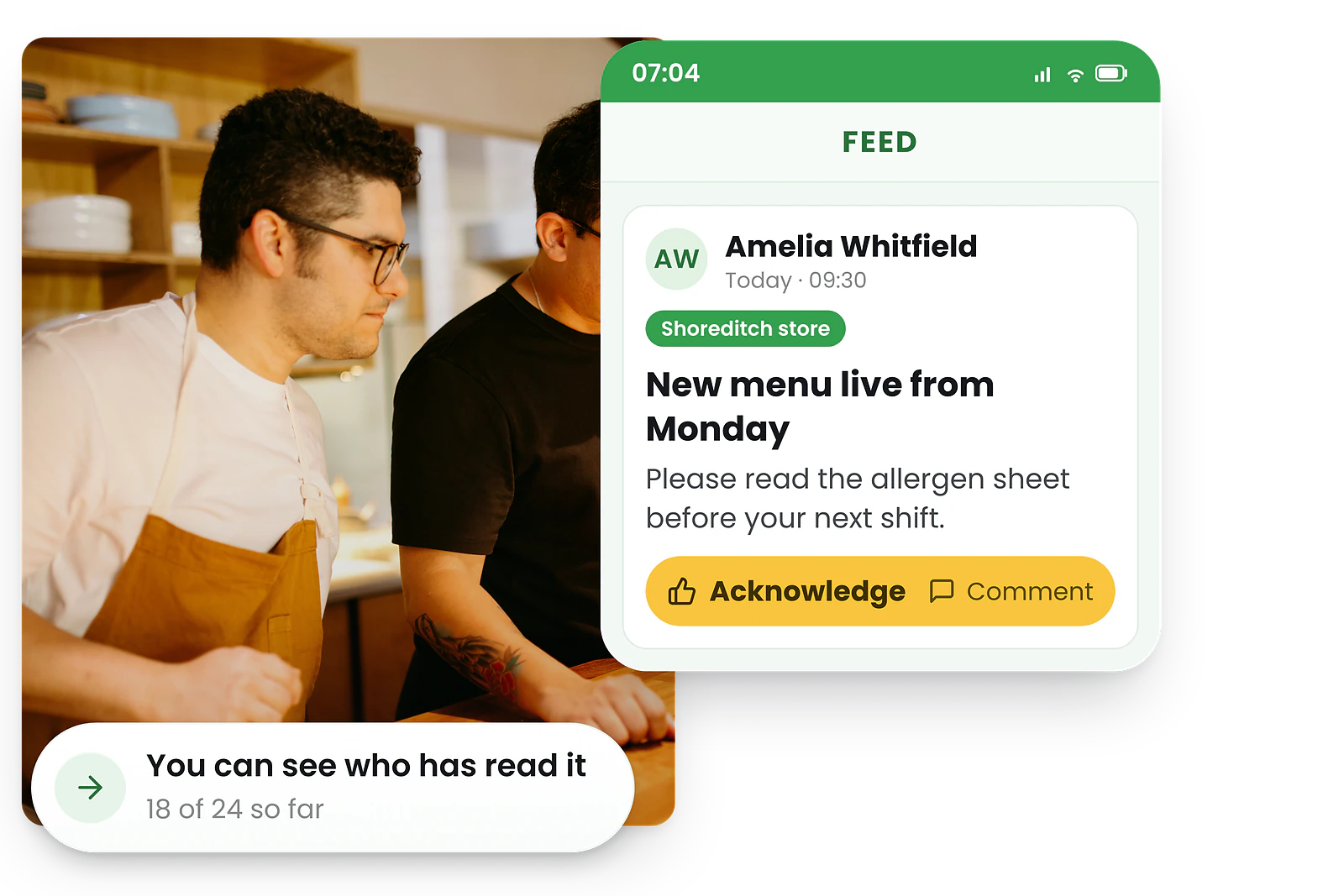
What a mobile rostering app does differently
A mobile rostering app is purpose-built for shift communication. Here’s how it solves every problem WhatsApp creates.
WhatsApp vs a mobile rostering app for roster communication
| What matters | Mobile rostering app | |
|---|---|---|
| Finding your shift | Roster buried in chat history | Shifts always visible on the home screen |
| Getting alerts | Staff mute busy groups | Targeted push notifications per shift |
| Personal view | No per-person shift view | Each person sees only their shifts |
| Read visibility | Can’t track who saw the roster | Delivery confirmation for managers |
| Handling changes | Changes not highlighted | Changes highlighted automatically |
| Work boundary | Mixes work and personal | Dedicated work app, clear boundary |
| Record-keeping | No audit trail | Timestamped, defensible records |
Beyond roster visibility, a mobile rostering app gives staff self-service access to set their availability, swap shifts, request leave, and clock in with GPS — all from the same app. WhatsApp can’t do any of that.
Making the switch from WhatsApp to a rostering app
Switching doesn’t have to be painful. Here’s a practical approach that works for most teams.
4-step transition plan
- 1. Start alongside WhatsApp, not instead of it.
Run both channels for 2 weeks. Post rosters in the app and tell the group chat “roster is live in the app.” This builds the habit without cold turkey.
- 2. Make the app the single source of truth.
After the transition period, stop posting roster photos in WhatsApp. Staff who want to see their shifts go to the app. Keep the WhatsApp group for social chat if you like.
- 3. Emphasise what staff gain.
Staff don’t care about your admin problems — they care about their own experience. Lead with “you’ll see only your shifts, get notified instantly, and swap shifts without calling me.”
- 4. Set expectations clearly.
Tell your team: “The roster is published in the app. Checking your shifts is your responsibility.” See our guide on getting staff to use your rostering app for more strategies.
Most teams complete the switch within two weeks. Once staff experience seeing only their own shifts with instant notifications, they rarely ask to go back to WhatsApp. For a smoother rollout of any change, our guide on how to communicate roster changes covers the timing and messaging that keep staff onside.
Ready to ditch the WhatsApp roster? RosterElf’s mobile rostering app gives every staff member their own shift view, sends instant push notifications, and lets your team manage availability, leave, and swaps — all from one app. Free on iPhone and Android.
Disclaimer
This article provides general guidance only and does not constitute legal advice. Record-keeping and workplace laws change over time. Always verify current requirements using official Fair Work Ombudsman resources before making employment decisions.
Frequently asked questions
Why is WhatsApp bad for sharing rosters?
WhatsApp mixes work and personal messages, roster photos get buried under other conversations, there’s no acknowledgement tracking, and staff often mute busy group chats. A dedicated mobile rostering app solves these problems with push notifications, read receipts, and shift-specific alerts.
What should I use instead of WhatsApp for rosters?
A dedicated mobile rostering app like RosterElf gives each staff member their own shift view, sends targeted push notifications for changes, and provides read receipts so managers know who has seen the roster. Staff can also set availability, request leave, and swap shifts from the same app.
Can I still use WhatsApp for team communication if I have a rostering app?
You can, but it creates split communication channels. A rostering app with built-in team chat keeps all work communication in one place. Staff know where to look for roster updates and team messages without checking multiple apps.
How do I convince my team to stop using WhatsApp for rosters?
Focus on what’s in it for staff: they see only their own shifts, get notified instantly when anything changes, and can swap shifts or request leave without contacting their manager. Once staff experience the convenience, most prefer it over group chat. Our guide on getting staff to use your rostering app has a full playbook.
Is it legal to send rosters over WhatsApp in Australia?
There’s no law banning it, but WhatsApp is a poor way to meet your obligations. Australian employers must keep accurate records of rosters and hours worked, and a chat thread that can be deleted or lost when someone changes phones isn’t a reliable record. If a Fair Work records request or dispute arises, a rostering platform gives you a timestamped, defensible history that WhatsApp can’t.
Are there privacy risks in using WhatsApp group chats for rosters?
Yes. Group chats expose the whole team’s schedules, sick days, and swap requests to everyone in the chat, and employee names, numbers, and availability end up stored on personal devices and a third-party app you don’t control. A rostering app shows each person only their own shifts and keeps staff data inside a system you manage.
How does a rostering app confirm staff have seen their shifts?
A rostering app sends a targeted push notification when the roster is published or changed, then records delivery and read status per person. Managers can see at a glance who has viewed their shifts and follow up with anyone who hasn’t — the accountability that reduces no-shows and that WhatsApp group ticks can’t provide.