


How to export public holiday leave to Xero payroll
Managing leave requests that coincide with public holidays in Xero can be tricky. Submitting a leave request for a public holiday may result in double counting the hours, which can lead to payroll discrepancies. This article explains the steps to ensure accurate payroll processing, so you avoid these discrepancies. By following this guide, you’ll keep payroll accurate, prevent errors, and ensure correct financial records and employee satisfaction.
1. Steps to correct leave requests for public holidays
Handling leave requests for public holidays in RosterElf for Xero requires a few key adjustments. This section explains the recommended steps to avoid payroll errors due to double counting hours. Following these steps will ensure leave records are accurate and payroll runs smoothly.
1.1 manually adjust the hours (recommended)
1.1.1 Open the payroll section in RosterElf.
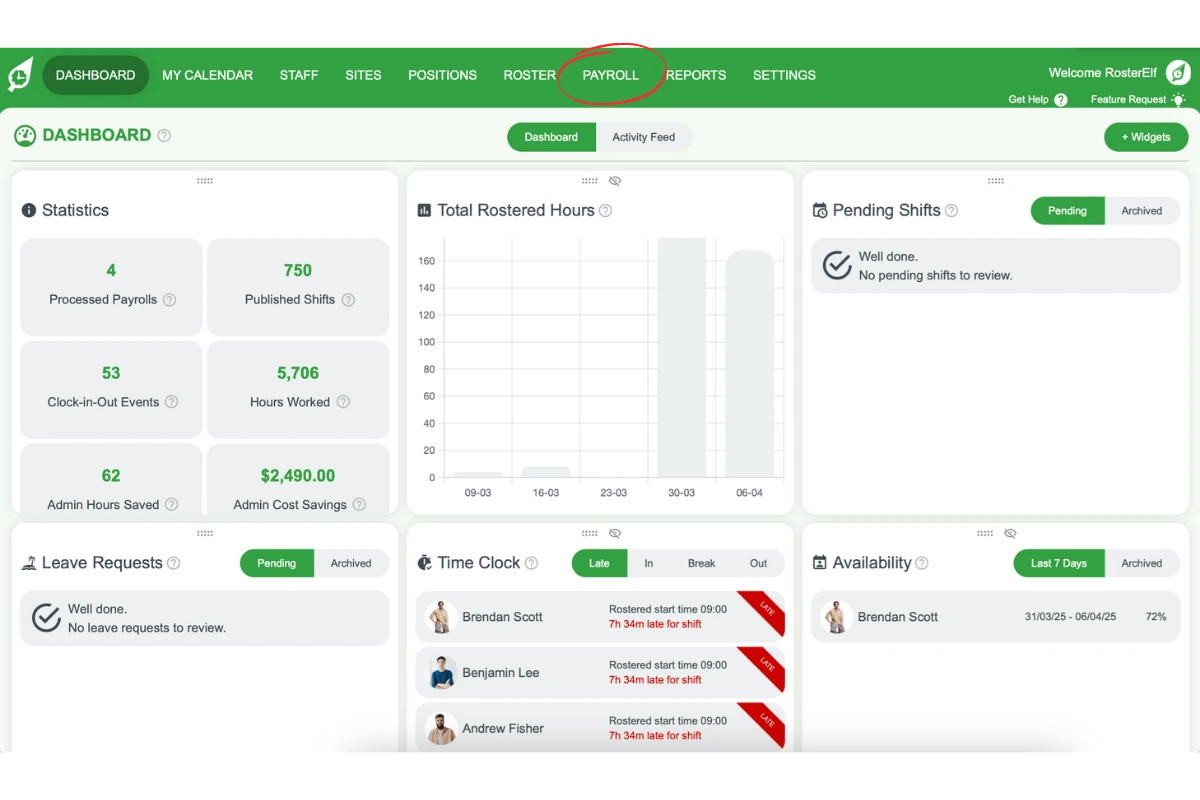
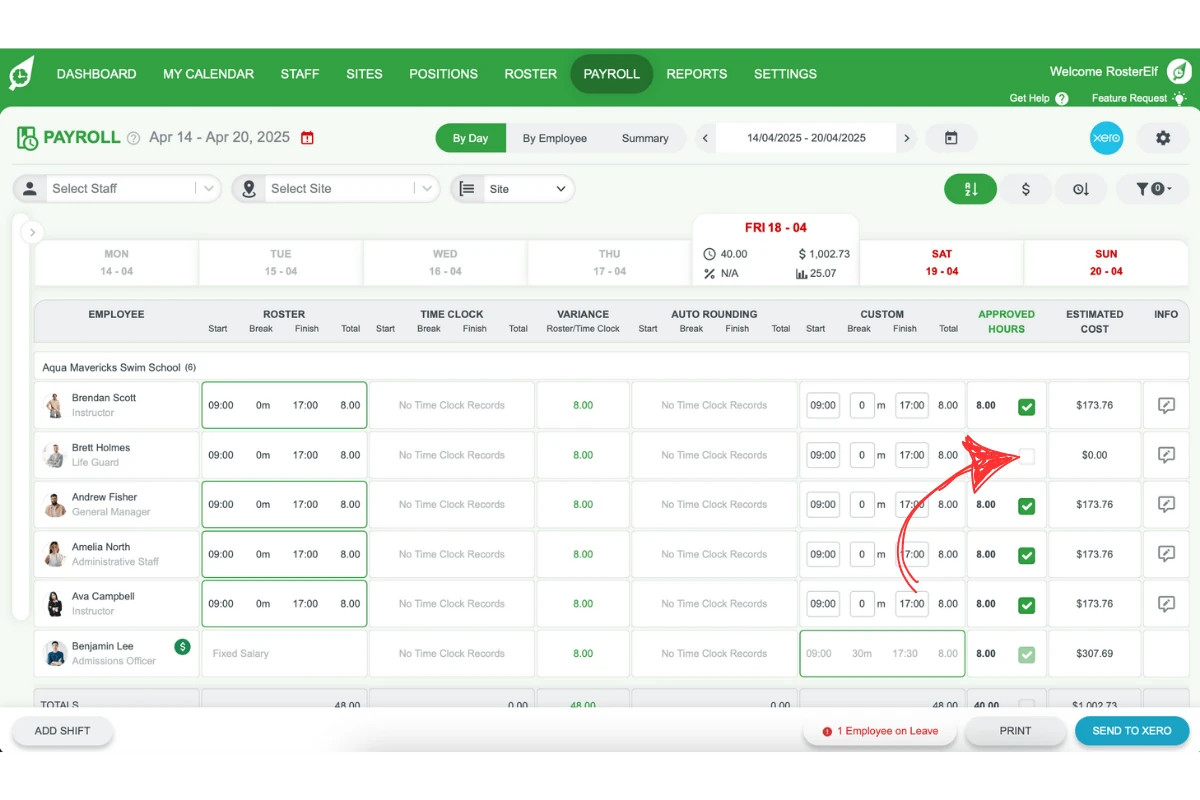
1.1.2 Find the hours that overlap with the public holiday.
1.1.3 Untick the hours for the public holiday.
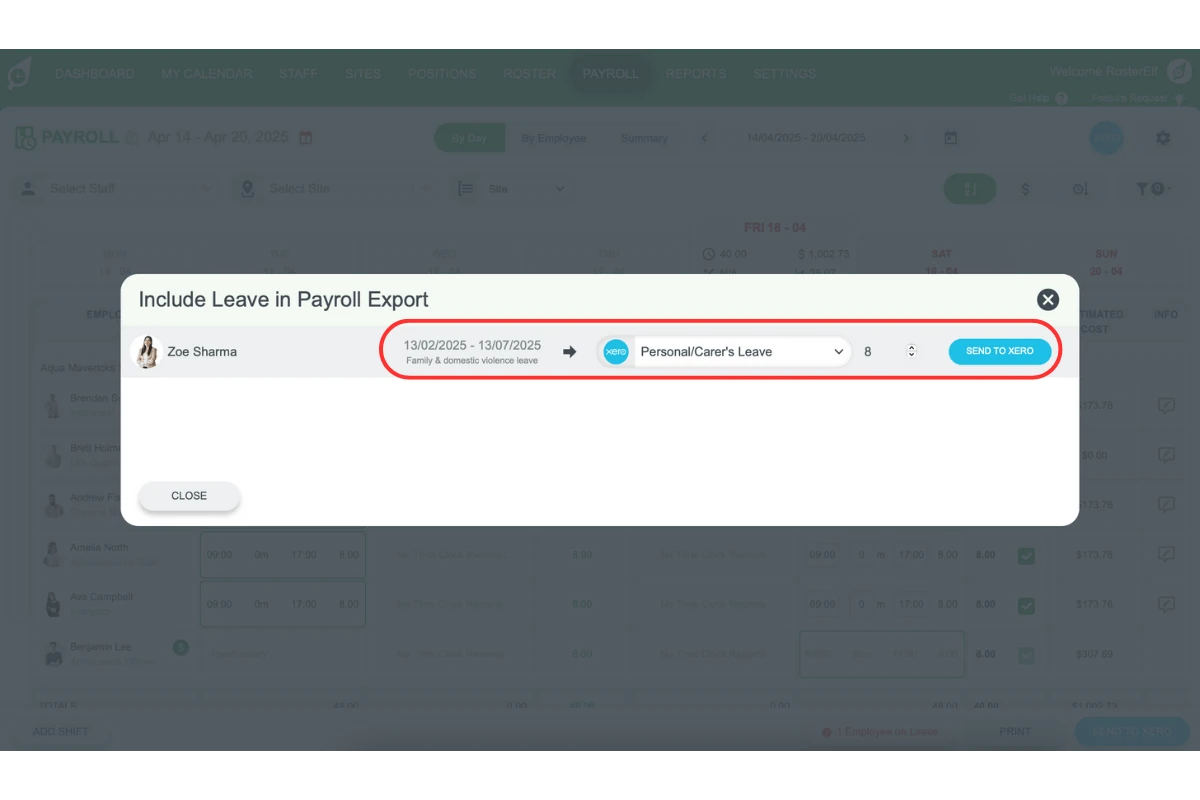
1.1.4 Push the leave request to adjust the total leave units (click here for more information).
Avoid leaving the hours unchanged
Leaving the hours as they are when a leave request overlaps a public holiday will double-count them — payroll pays both the leave and the public holiday for the same time. Adjust the hours manually using the steps above rather than leaving them unchanged.
2. Why accurate leave management matters in Xero payroll
Ensuring accurate leave management in Xero payroll is essential for avoiding payroll discrepancies. When you correctly manage leave requests that include public holidays, you prevent payroll errors, support employee satisfaction, and maintain precise financial records. Following these steps can streamline your payroll process and enhance record accuracy.
FAQs on exporting leave to Xero for public holidays
1. How do I avoid double counting leave hours on public holidays in Xero?
Manually adjust the hours by unticking the overlap with the public holiday in the payroll section, then push the leave request. This ensures accurate leave totals and prevents payroll discrepancies.
2. Can I leave the hours unchanged for public holidays in Xero?
This isn’t recommended. Leaving the hours unchanged when a leave request overlaps a public holiday will double-count the hours, so payroll pays both the leave and the public holiday for the same time. Adjust the hours manually instead.
3. What happens if I don’t adjust leave hours for public holidays in Xero?
If you don’t adjust leave hours for public holidays, it can result in double-counted hours, leading to incorrect payroll amounts and potential discrepancies in financial records.
4. Why is accurate leave management important in Xero payroll?
Accurate leave management prevents payroll errors, maintains employee satisfaction, and ensures precise financial records. Managing public holiday overlaps helps keep payroll data consistent and error-free.
5. How do I adjust the total leave units in Xero when there’s a public holiday?
In Xero, go to the payroll section, locate the leave request overlapping the public holiday, untick the hours for the holiday, and push the leave request to update the total leave units accurately.
Frequently asked questions
1. How do I avoid double counting leave hours on public holidays in Xero?
Manually adjust the hours: in the payroll section, find the leave that overlaps the public holiday, untick the hours for the public holiday, then push the leave request to update the total leave units. This is the recommended way to keep leave totals accurate and avoid payroll discrepancies.
2. Can I leave the hours unchanged for public holidays in Xero?
This isn’t recommended. Leaving the hours unchanged when a leave request overlaps a public holiday will double-count the hours, so payroll pays both the leave and the public holiday for the same time. Adjust the hours manually instead.
3. What happens if I don't adjust leave hours for public holidays in Xero?
The hours can be double-counted, leading to incorrect payroll amounts and discrepancies in your financial records.
4. Why is accurate leave management important in Xero payroll?
Accurate leave management prevents payroll errors, maintains employee satisfaction, and ensures precise financial records. Managing public holiday overlaps helps keep payroll data consistent and error-free.
5. How do I adjust the total leave units in Xero when there's a public holiday?
Go to the payroll section, locate the leave request overlapping the public holiday, untick the hours for the holiday, and push the leave request to update the total leave units accurately.